Doit.im
Doit.im: A low-cost GTD task manager with broad planning tools and slower free synchronization. Ranked #42 of 148 in To-Do List Apps by our editors (4.8/10); pricing: Free plan · 30-day trial; best for GTD users wanting a low-cost structured workflow.
At a glance
- Editor score4.8 / 10
- PricingFree plan · 30-day trial
- Best forGTD users wanting a low-cost structured workflow
- Free planYes
- Paid from$20/yr
- Recurring tasksYes
- Founded2009 · Mong Kok, Kowloon, Hong Kong
- Facts checked21 Sep 2026
Where it wins
- GTD views organize inbox, Today, Scheduled and Someday work
- Recurring tasks support daily, weekly, monthly and yearly schedules
- Pro adds Google Calendar sync, subtasks and desktop clients
Where it doesn't
- Free synchronization runs once every 24 hours
- Several useful features require the Pro subscription
- Some help pages document older app versions
Our verdict on Doit.im
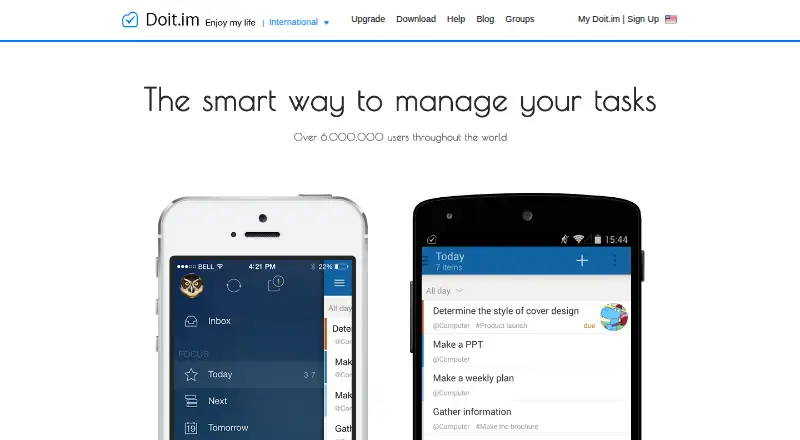
Doit.im is a GTD-oriented task-management app for organizing personal tasks, projects, contexts and scheduled work. It supports web, Windows, macOS, iOS and Android access, with views for Inbox, Today, Tomorrow, Scheduled and Someday. Users can create recurring tasks, add subtasks, set pop-up or email reminders, delegate work, share tasks with contacts, and organize information with search, filters and grouping. Its structure suits people who want a defined GTD workflow rather than a minimal checklist.
The free plan includes web, Android and iOS access, but synchronization runs once every 24 hours and manual synchronization is also available. Pro costs $2 per month when billed monthly or $20 per year when billed annually. It adds cloud synchronization, two-way Google Calendar synchronization, Mac and Windows clients, email task creation and Evernote attachments. The paid tier therefore changes Doit.im from a basic mobile and web task manager into a more connected cross-device system, particularly for people who plan around calendars or capture tasks by email.
Doit.im’s strongest feature set is its combination of GTD views, recurring schedules, reminders and task delegation. Each task can have up to five reminders, while Google Calendar and Evernote provide focused connections to planning and note-taking workflows. The trade-off is that the free plan’s synchronization interval may not suit frequent multi-device work, and the more complete platform experience depends on Pro. Choose Doit.im if you want structured GTD organization at a low monthly cost; choose an alternative if immediate free synchronization or a more current-looking product experience is a priority.
Your product? Our editors can test Doit.im in depth and publish a review, labelled as paid · from $149/mo →
Doit.im pricing
All 2 Doit.im plans and prices →
Doit.im fact sheet
| Free plan | Yes |
|---|---|
| Paid from | $20/yr |
| Recurring tasks | Yes |
| Task reminders | Yes |
| Calendar sync | Yes |
| Subtasks | Yes |
| Offline access | Mobile |
| Active task limit | Not verified |
| Supported platforms | web, windows, macos, ios, android |
| Free trial | 30 days |
| Money-back guarantee | 30 days |
| Deployment | Cloud, Desktop, Mobile |
| Platforms | Web, Windows, macOS, iOS, Android |
| Support | Email, Community, Docs |
| Built for | Solo, Small business (editorial estimate) |
| Integrations | 2 integrations: Google Calendar, Evernote |
| Pricing | Free plan · 30-day trial (source) |
| Website | doit.im |
| Facts checked | 21 Sep 2026 |
Doit.im integrations
Doit.im lists 2 integrations on its own site.
- Google Calendar
- Evernote
Alternatives to Doit.im
- TodoistA complete task manager with broad platform coverage, recurring tasks, and team workspaces.9.2
- TickTickA broad to-do app for users who want tasks, planning, habits, and focus tools together.9.0
- Microsoft To DoA capable free choice for daily planning, shared lists, and Microsoft-connected task management.8.8



See all Doit.im alternatives →
Used Doit.im? Be the first to review it
The editor score above is our own research. What this page doesn't have yet is a reader's view — what you used Doit.im for, what worked and what didn't. No stars are seeded and no review is paid for; an editor reads every one before it appears.
Write a reviewTwo minutes · verified accounts only · read by an editor before it appears
Featured on iTechGuides

Doit.im is listed in our To-Do List Apps directory. Add the badge to your site — it links back to this page.
<a href="https://www.itechguides.com/products/doit-im/"><img src="https://www.itechguides.com/best/badge/doit-im.svg" alt="Featured on iTechGuides" width="230" height="46"></a>
Reviewed by iTechGuides Editors · Editorial team · Updated Oct 2026
Advertiser disclosure: iTechGuides is reader-supported. Vendors can pay for top positions in our rankings and for a place on other products' pages, and we may earn a commission when you click some links. Bought places stand at the number bought; this page and our disclosure say so. Paying vendors may get a fuller, more detailed review from our editors, and that review can change their score. How we rank.
Last updated · How we research and update