
dnGrep
dnGrep: A free Windows search utility for complex files, documents, archives, and code. Ranked #44 of 57 in Desktop Search Software by our editors (4.4/10); pricing: Free plan; best for windows developers searching complex files.
At a glance
- Editor score4.4 / 10
- PricingFree plan
- Best forWindows developers searching complex files
- Free planYes
- Paid fromFree
- Content searchYes
- Facts checked21 Sep 2026
Where it wins
- Searches text, Office, PDF, OpenDocument, and archive contents
- Supports regex, XPath, fuzzy, byte-sequence, and plain-text search
- Offers previews, replacement with undo, bookmarks, and editor integrations
Where it doesn't
- Windows-only desktop application
- Does not provide its own file-content index
- Its scope does not include OCR or email-message search
Our verdict on dnGrep
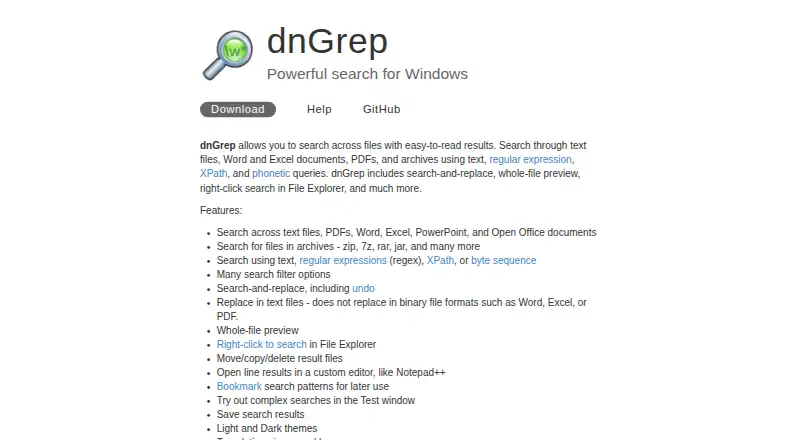
dnGrep is a free, open-source Windows desktop utility for searching local folders, files, network paths, and cloud-backed folders. It is aimed at Windows developers and other users who need to search complex file collections rather than only filenames. Search modes include plain text, regular expressions, XPath, fuzzy matching, and byte sequences. The application can search inside Word, Excel, PowerPoint, PDF, OpenDocument, ZIP, 7z, RAR, JAR, and other archive files. It runs on Windows 10, Windows 11, and Windows Server.
Its main strength is the breadth of content and search controls in one desktop application. Whole-file previews with syntax highlighting help inspect results, while search-and-replace for plain-text files includes undo support. File move, copy, and delete actions add workflow tools beyond finding matches. Windows File Explorer right-click integration keeps searches close to file management, and bookmarks plus saved search results support repeatable work. Optional Everything integration can provide indexed file lookup, while integrations with Notepad++, GVim, Visual Studio Code, WinMerge, and Beyond Compare extend its fit for development and comparison workflows.
dnGrep is a focused choice for Windows users who want deep local file and document search without a paid plan. It is particularly suitable when regex, XPath, archive contents, document formats, previews, and replacement matter more than a broad cross-platform experience. The application does not build its own file-content index, so users seeking indexed lookup can pair it with Everything. Its scope centers on files and documents rather than OCR or email-message search. Choose dnGrep for Windows-based development and document-search workflows; choose an alternative when macOS or another operating system, OCR, or email search is central.
Your product? Our editors can test dnGrep in depth and publish a review, labelled as paid · from $149/mo →
dnGrep pricing
dnGrep fact sheet
| Free plan | Yes |
|---|---|
| Paid from | Free |
| Supported platforms | windows |
| Index locations | local folders and files; network paths; cloud-backed folders |
| Content search | Yes |
| Email search | Not verified |
| Message search | Not verified |
| OCR search | Not verified |
| Indexed-item limit | Not verified |
| Deployment | Desktop |
| Platforms | Windows |
| Support | Docs |
| Built for | Solo, Small business (editorial estimate) |
| Integrations | 7 integrations: Windows File Explorer, Everything, Notepad++, GVim, Visual Studio Code, WinMerge … |
| Pricing | Free plan |
| Website | dngrep.github.io |
| Facts checked | 21 Sep 2026 |
dnGrep integrations
dnGrep lists 7 integrations on its own site.
- Windows File Explorer
- Everything
- Notepad++
- GVim
- Visual Studio Code
- WinMerge
- Beyond Compare
Alternatives to dnGrep
- EverythingA free Windows search utility for instant filename and path discovery.9.3
- Copernic Desktop SearchA Windows search tool for broad local, network, email, and cloud indexing.9.2
- DocFetcherA free, portable full-text search tool for local files, archives, and PST email.9.0



Used dnGrep? Be the first to review it
The editor score above is our own research. What this page doesn't have yet is a reader's view — what you used dnGrep for, what worked and what didn't. No stars are seeded and no review is paid for; an editor reads every one before it appears.
Write a reviewTwo minutes · verified accounts only · read by an editor before it appears
Featured on iTechGuides

dnGrep is listed in our Desktop Search Software directory. Add the badge to your site — it links back to this page.
<a href="https://www.itechguides.com/products/dngrep/"><img src="https://www.itechguides.com/best/badge/dngrep.svg" alt="Featured on iTechGuides" width="230" height="46"></a>
Reviewed by iTechGuides Editors · Editorial team · Updated Oct 2026
Advertiser disclosure: iTechGuides is reader-supported. Vendors can pay for top positions in our rankings and for a place on other products' pages, and we may earn a commission when you click some links. Bought places stand at the number bought; this page and our disclosure say so. Paying vendors may get a fuller, more detailed review from our editors, and that review can change their score. How we rank.
Last updated · How we research and update