ddcci
ddcci: A focused open-source CLI for querying and controlling compatible Linux monitors. Ranked #20 of 24 in Monitor Control Software by our editors (6.4/10); pricing: Open source; best for linux developers needing low-level DDC/CI.
At a glance
- Editor score6.4 / 10
- PricingOpen source
- Best forLinux developers needing low-level DDC/CI
- Paid fromFree
- Supported platformsLinux
- Facts checked20 Sep 2026
Where it wins
- Queries EDID, capabilities, and available monitor controls
- Reads and writes monitor values, including brightness
- Supports input selection and saved settings where supported
Where it doesn't
- Linux-only platform support
- Requires comfort with terminal commands and Linux I2C devices
- Does not provide profiles, scheduling, or desktop-oriented features
Our verdict on ddcci
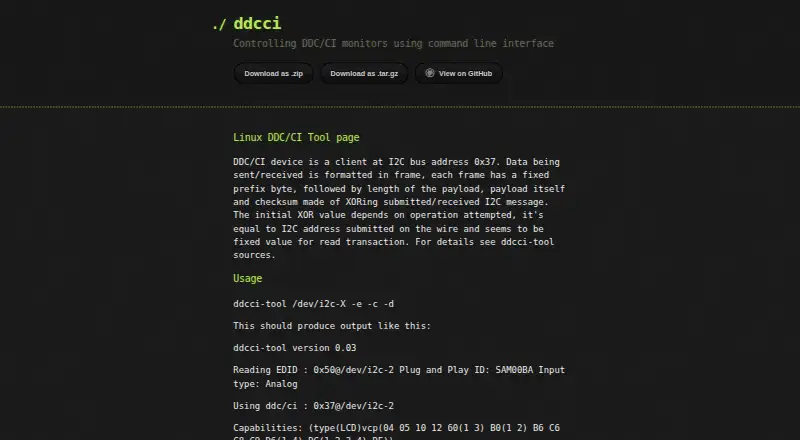
ddcci is an open-source Linux command-line utility for communicating with compatible monitors through DDC/CI. It is designed for developers and technically comfortable Linux users who want direct access to monitor controls rather than a desktop-focused interface. The utility can discover monitors, query EDID and DDC/CI capabilities, inspect individual controls, read values, write new values, adjust brightness, select an input where supported, and save monitor settings. It is distributed as GPL software and available as source code through its project repository.
Its main strength is the breadth of low-level monitor communication in a focused command-line tool. The published feature set covers both discovery and control: users can identify available monitors and controls, inspect capabilities, then apply values through DDC/CI. Input selection is included where supported, and the Samsung DDC/CI enable command addresses a documented monitor-specific requirement. This makes ddcci a practical fit for Linux workflows that need scripting, terminal access, or direct interaction with monitor hardware through Linux I2C devices.
The trade-off is its narrow scope. ddcci concentrates on DDC/CI communication and control instead of profiles, scheduling, automatic brightness, or desktop-oriented features. Its platform coverage is Linux, and its command-line approach assumes familiarity with terminal commands and the underlying device model. Choose ddcci when low-level DDC/CI discovery and control matter most, especially for brightness, input selection, capability queries, and saved settings. Choose another monitor-control tool if you want a graphical desktop experience, automated scheduling, verified profiles, or automatic brightness management.
Your product? Our editors can test ddcci in depth and publish a review, labelled as paid · from $149/mo →
ddcci pricing
ddcci fact sheet
| Free plan | Not verified |
|---|---|
| Paid from | Free |
| Supported platforms | Linux |
| DDC/CI control | Yes |
| Input switching | Yes |
| Monitor profiles | Not verified |
| Settings scheduling | Not verified |
| CLI or API access | Yes |
| Auto brightness | Not verified |
| Deployment | Self-hosted |
| Platforms | Linux |
| Support | Docs |
| Built for | Solo, Small business (editorial estimate) |
| Pricing | Open source |
| Website | bhuvanchandradv.github.io |
| Facts checked | 20 Sep 2026 |
Alternatives to ddcci
- MonitorControl ProA free, open-source Windows tool for advanced monitor control, profiles, and automation.9.4
- Twinkle TrayA capable free Windows utility for multi-monitor control, profiles, scheduling, and scripting.9.2
- LunarA capable Mac monitor controller with automation, sensors, and a low one-time Pro price.8.9


Used ddcci? Be the first to review it
The editor score above is our own research. What this page doesn't have yet is a reader's view — what you used ddcci for, what worked and what didn't. No stars are seeded and no review is paid for; an editor reads every one before it appears.
Write a reviewTwo minutes · verified accounts only · read by an editor before it appears
Featured on iTechGuides

ddcci is listed in our Monitor Control Software directory. Add the badge to your site — it links back to this page.
<a href="https://www.itechguides.com/products/ddcci/"><img src="https://www.itechguides.com/best/badge/ddcci.svg" alt="Featured on iTechGuides" width="230" height="46"></a>
Reviewed by iTechGuides Editors · Editorial team · Updated Oct 2026
Advertiser disclosure: iTechGuides is reader-supported. Vendors can pay for top positions in our rankings and for a place on other products' pages, and we may earn a commission when you click some links. Bought places stand at the number bought; this page and our disclosure say so. Paying vendors may get a fuller, more detailed review from our editors, and that review can change their score. How we rank.
Last updated · How we research and update