
Copy 'Em
Copy 'Em: A focused Apple clipboard manager with useful lists, search, and batch pasting. Ranked #37 of 39 in Clipboard Manager Software by our editors (4.4/10); pricing: Free plan; best for apple users wanting lists and batch paste.
At a glance
- Editor score4.4 / 10
- PricingFree plan
- Best forApple users wanting lists and batch paste
- Free planYes
- Cross-device syncYes
- Facts checked22 Sep 2026
Where it wins
- Searches clipboard history, saved items, and custom lists
- Supports favorites, batch pasting, shortcuts, and text transformations
- Works across Mac, iPhone, and iPad with optional iCloud sync
Where it doesn't
- Mac and iPhone/iPad apps are sold separately
- Platform support is limited to Apple devices
- Email is the listed support channel
Our verdict on Copy 'Em
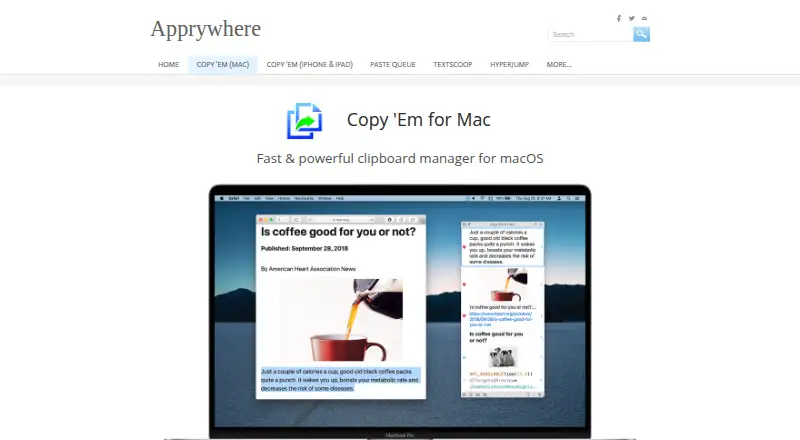
Copy 'Em is a clipboard manager for Mac, iPhone, and iPad aimed at users who want more control over copied content. It captures text, images, links, files, screenshots, and other clipboard items, then supports searching, organization, editing, transformation, and direct pasting. Its strongest fit is for Apple users who regularly reuse groups of copied items or need structured clipboard lists rather than a simple recent-history view.
The feature set is organized around retrieval and repeatable pasting. Users can save clipboard history, search across items and lists, mark favorites, create custom lists, and assign keyboard shortcuts. Batch pasting is a notable capability for inserting multiple items in sequence, while text transformations include plain-text conversion. The Mac app also supports screenshot capture, import and export, and optional iCloud synchronization. On iPhone and iPad, a custom paste keyboard, widgets, sharing, notes, and synchronization extend the workflow beyond the desktop.
Copy 'Em uses a freemium model with a Basic plan covering clipboard saving, organization, and search. Premium adds premium features and iCloud synchronization, while the separate Mac app plan includes a Mac clipboard manager with unlimited lists and clipboard data. The listed starting price is 19.99. Because the Mac and iPhone/iPad apps are sold separately, buyers should consider which devices they need before choosing a plan. Copy 'Em suits solo users and small teams centered on Apple hardware who value lists and batch paste. It is less suitable for mixed-platform environments or buyers seeking one purchase across all devices.
Your product? Our editors can test Copy 'Em in depth and publish a review, labelled as paid · from $149/mo →
Copy 'Em pricing
All 3 Copy 'Em plans and prices →
Copy 'Em fact sheet
| Free plan | Yes |
|---|---|
| Paid from | Not verified |
| History search | Yes |
| Cross-device sync | Yes |
| Snippets | Yes |
| Rich text support | Yes |
| History limit | Not verified |
| Supported platforms | macOS, iOS, iPadOS |
| Deployment | Cloud, Desktop, Mobile |
| Platforms | macOS, iOS |
| Support | |
| Built for | Solo, Small business, Mid-market (editorial estimate) |
| Integrations | 1 integrations: iCloud |
| Pricing | Free plan (source) |
| Website | apprywhere.com |
| Facts checked | 22 Sep 2026 |
Copy 'Em integrations
Copy 'Em lists 1 integrations on its own site.
- iCloud
Alternatives to Copy 'Em
- DittoPowerful free clipboard history, search, organization, and scripting for Windows.9.1
- CopyQA flexible, cross-platform clipboard history tool for users who want control and automation.8.5
- Screenshot CaptorA Windows screenshot tool with scrolling capture, annotation, image editing, and clipboard copying.7.9

See all Copy 'Em alternatives →
Also Ranked In
Copy 'Em is ranked in 2 of our directories.
Used Copy 'Em? Be the first to review it
The editor score above is our own research. What this page doesn't have yet is a reader's view — what you used Copy 'Em for, what worked and what didn't. No stars are seeded and no review is paid for; an editor reads every one before it appears.
Write a reviewTwo minutes · verified accounts only · read by an editor before it appears
Featured on iTechGuides

Copy 'Em is listed in our Clipboard Manager Software directory. Add the badge to your site — it links back to this page.
<a href="https://www.itechguides.com/products/copy-em/"><img src="https://www.itechguides.com/best/badge/copy-em.svg" alt="Featured on iTechGuides" width="230" height="46"></a>
Reviewed by iTechGuides Editors · Editorial team · Updated Oct 2026
Advertiser disclosure: iTechGuides is reader-supported. Vendors can pay for top positions in our rankings and for a place on other products' pages, and we may earn a commission when you click some links. Bought places stand at the number bought; this page and our disclosure say so. Paying vendors may get a fuller, more detailed review from our editors, and that review can change their score. How we rank.
Last updated · How we research and update