Ditto
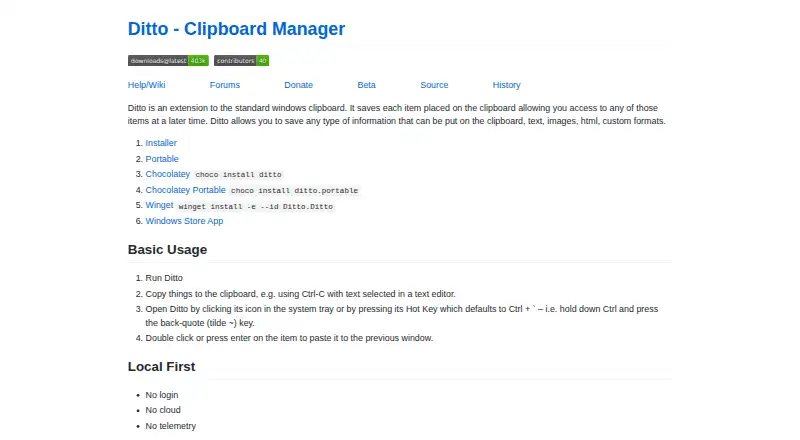
Ditto: Powerful free clipboard history, search, organization, and scripting for Windows. Ranked #1 of 39 in Clipboard Manager Software by our editors (9.1/10); pricing: Free plan; best for windows users wanting powerful free basics.
At a glance
- Editor score9.1 / 10
- PricingFree plan
- Best forWindows users wanting powerful free basics
- Free planYes
- Paid fromFree
- Cross-device syncYes
- Facts checked20 Sep 2026
Where it wins
- Supports text, images, HTML, and custom clipboard formats
- Full-text and regular-expression search across saved clips
- Groups, sticky clips, scripting, and computer-to-computer transfers
Where it doesn't
- Windows-only platform support
- Friends transfers clips between computers rather than using cloud sync
- Advanced features may require more setup than basic clipboard tools
Our verdict on Ditto
Ditto extends the Windows Clipboard with a database-backed history of copied items. It is designed for Windows users who regularly revisit text, images, HTML, or custom clipboard formats and want more control than the standard clipboard provides. Global hotkeys and quick paste support fast retrieval, while groups and sticky clips help organize frequently reused content. Ditto is available as an installer or portable application, does not require an account, and is distributed as open-source software.
Search is one of Ditto’s clearest strengths. Users can search saved clips with full-text and regular-expression support, making the history useful beyond simple recency-based retrieval. The product also includes import and export tools, which support moving or preserving clipboard collections, plus scripting on copy and paste for users who need automation. These capabilities give Ditto a broader scope than a basic clipboard history utility, particularly for workflows involving repeated snippets, structured text, or multiple clipboard formats.
Ditto keeps its core clipboard history local and includes Friends for sending clipboard copies between computers. That combination suits users who want a free Windows tool with local storage and optional computer-to-computer transfer, without relying on an account or cloud service. Users working outside Windows should choose a clipboard manager with broader platform support. It may also be more capability than needed for someone who only wants a simple recent-copy list, but it is a strong fit for Windows users who value search, organization, format support, import/export, and scripting in one open-source application.
Your product? Our editors can test Ditto in depth and publish a review, labelled as paid · from $149/mo →
Ditto pricing
Ditto fact sheet
| Free plan | Yes |
|---|---|
| Paid from | Free |
| History search | Yes |
| Cross-device sync | Yes |
| Snippets | Yes |
| Rich text support | Yes |
| History limit | Not verified |
| Supported platforms | Windows |
| Deployment | Desktop |
| Platforms | Windows |
| Support | Community, Docs |
| Built for | Solo, Small business (editorial estimate) |
| Pricing | Free plan |
| Website | ditto-cp.sourceforge.io |
| Facts checked | 20 Sep 2026 |
Alternatives to Ditto
- CopyQA flexible, cross-platform clipboard history tool for users who want control and automation.8.5
- Screenshot CaptorA Windows screenshot tool with scrolling capture, annotation, image editing, and clipboard copying.7.9
- PasteablePasteable combines encrypted sync, AI actions, search, and clipboard workflows across six platforms.7.8


Ditto vs the competition
- Ditto vs CopyQ
- Ditto vs Screenshot Captor
- Ditto vs Pasteable
- Ditto vs Relic
- Ditto vs Clipman
- Ditto vs Octoclip

Compare Ditto with any tool side by side →
Used Ditto? Be the first to review it
The editor score above is our own research. What this page doesn't have yet is a reader's view — what you used Ditto for, what worked and what didn't. No stars are seeded and no review is paid for; an editor reads every one before it appears.
Write a reviewTwo minutes · verified accounts only · read by an editor before it appears
Featured on iTechGuides

Ditto is listed in our Clipboard Manager Software directory. Add the badge to your site — it links back to this page.
<a href="https://www.itechguides.com/products/ditto/"><img src="https://www.itechguides.com/best/badge/ditto.svg" alt="Featured on iTechGuides" width="230" height="46"></a>
Reviewed by iTechGuides Editors · Editorial team · Updated Oct 2026
Advertiser disclosure: iTechGuides is reader-supported. Vendors can pay for top positions in our rankings and for a place on other products' pages, and we may earn a commission when you click some links. Bought places stand at the number bought; this page and our disclosure say so. Paying vendors may get a fuller, more detailed review from our editors, and that review can change their score. How we rank.
Last updated · How we research and update