ControlMyMonitor
ControlMyMonitor: A free Windows utility for detailed monitor control, profiles and scripting. Ranked #9 of 24 in Monitor Control Software by our editors (7.8/10); pricing: Free plan; best for free Windows configuration and scripting.
At a glance
- Editor score7.8 / 10
- PricingFree plan
- Best forFree Windows configuration and scripting
- Free planYes
- Paid fromFree
- Supported platformsWindows
- Founded2001
- Facts checked20 Sep 2026
Where it wins
- Free portable utility with no installation required
- Supports GUI and command-line monitor control
- Saves profiles and exports settings in five formats
Where it doesn't
- Windows only
- Requires monitor hardware that supports DDC/CI
- Limited scheduling and automation breadth
Our verdict on ControlMyMonitor
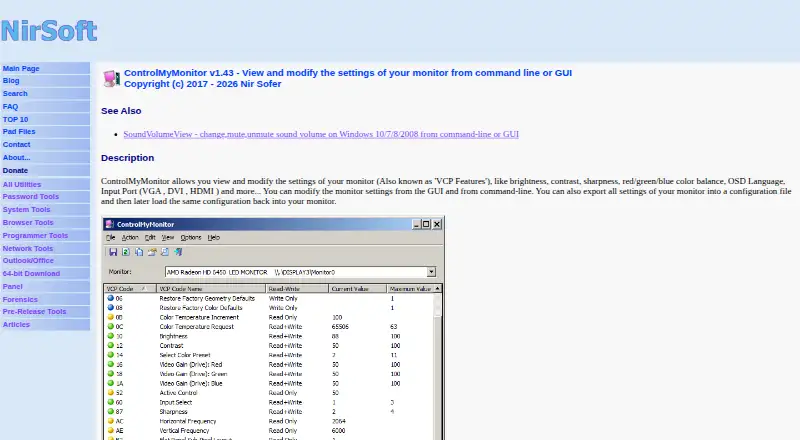
ControlMyMonitor is a free, portable Windows utility for viewing and modifying monitor settings exposed through VCP features. It is aimed at users who need more control than standard display settings provide, including brightness, contrast, sharpness, color balance and input selection. The utility offers both a graphical interface and command-line options, making it suitable for direct configuration as well as scripted monitor control. It can also turn monitors on or off.
Its strongest advantage is the combination of monitor inspection, configuration profiles and export options. Users can view VCP features, save monitor configurations to files and load them later. Settings can be exported as text, CSV, HTML, XML or JSON, which supports record-keeping and workflows that need structured output. Input switching and power control add practical scope beyond basic image adjustments. According to the published product details, these controls depend on monitor hardware that supports DDC/CI.
ControlMyMonitor fits users seeking free Windows configuration and scripting without an installation step. The command-line interface is useful for repeatable control, while the GUI provides a direct way to inspect and change available monitor values. Its focus is monitor control rather than a broader scheduling or automation system, so users needing extensive timed workflows may prefer a more automation-focused option. It is also limited to Windows and compatible DDC/CI hardware. Choose it for portable, profile-based monitor management and command-line control; look elsewhere if cross-platform support or broader automation is the priority.
Your product? Our editors can test ControlMyMonitor in depth and publish a review, labelled as paid · from $149/mo →
ControlMyMonitor pricing
ControlMyMonitor fact sheet
| Free plan | Yes |
|---|---|
| Paid from | Free |
| Supported platforms | Windows |
| DDC/CI control | Yes |
| Input switching | Yes |
| Monitor profiles | Yes |
| Settings scheduling | Not verified |
| CLI or API access | Yes |
| Auto brightness | Not verified |
| Deployment | Desktop |
| Platforms | Windows |
| Support | Email, Docs |
| Built for | Solo, Small business (editorial estimate) |
| Pricing | Free plan |
| Website | nirsoft.net |
| Facts checked | 20 Sep 2026 |
Alternatives to ControlMyMonitor
- MonitorControl ProA free, open-source Windows tool for advanced monitor control, profiles, and automation.9.4
- Twinkle TrayA capable free Windows utility for multi-monitor control, profiles, scheduling, and scripting.9.2
- LunarA capable Mac monitor controller with automation, sensors, and a low one-time Pro price.8.9


See all ControlMyMonitor alternatives →
Used ControlMyMonitor? Be the first to review it
The editor score above is our own research. What this page doesn't have yet is a reader's view — what you used ControlMyMonitor for, what worked and what didn't. No stars are seeded and no review is paid for; an editor reads every one before it appears.
Write a reviewTwo minutes · verified accounts only · read by an editor before it appears
Featured on iTechGuides

ControlMyMonitor is listed in our Monitor Control Software directory. Add the badge to your site — it links back to this page.
<a href="https://www.itechguides.com/products/controlmymonitor/"><img src="https://www.itechguides.com/best/badge/controlmymonitor.svg" alt="Featured on iTechGuides" width="230" height="46"></a>
Reviewed by iTechGuides Editors · Editorial team · Updated Oct 2026
Advertiser disclosure: iTechGuides is reader-supported. Vendors can pay for top positions in our rankings and for a place on other products' pages, and we may earn a commission when you click some links. Bought places stand at the number bought; this page and our disclosure say so. Paying vendors may get a fuller, more detailed review from our editors, and that review can change their score. How we rank.
Last updated · How we research and update