Clipman
Clipman: A broad, free clipboard manager with encrypted sync and optional self-hosting. Ranked #6 of 39 in Clipboard Manager Software by our editors (7.6/10); pricing: Free plan; best for free users needing broad device sync.
At a glance
- Editor score7.6 / 10
- PricingFree plan
- Best forFree users needing broad device sync
- Free planYes
- Paid fromFree
- Cross-device syncYes
- Facts checked20 Sep 2026
Where it wins
- Free, open-source access across desktop and mobile platforms
- Searchable history with pinned, named, grouped, and sortable entries
- Encrypted synchronization with an optional self-hosted server
Where it doesn't
- Synchronization relies on shared folders or a self-hosted server
- Clipboard history is stored locally on the device
- Advanced workflows may require managing many organization options
Our verdict on Clipman
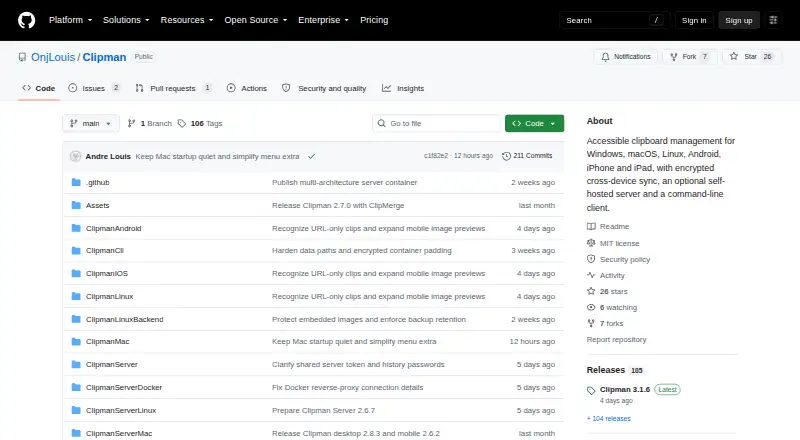
Clipman is an open-source clipboard manager for Windows, macOS, Linux, Android, iPhone, and iPad. It stores clipboard history locally and supports text, links, rich text, images, and files. Users can search, edit, name, group, pin, sort, and paste saved entries. Global hotkeys, quick paste, Quick Clip entry creation, templates, screen-reader support, keyboard-oriented workflows, and a command-line client extend it beyond basic clipboard storage. It suits users who want broad device coverage without moving to a listed paid plan.
The published project description presents Clipman as free and open source under the MIT License. Its synchronization model is focused on user-controlled infrastructure: encrypted synchronization works through shared folders or an optional self-hosted synchronization server. That approach can fit people who want control over where clipboard data is synchronized, while users seeking a vendor-managed synchronization service should compare alternatives. The command-line client also supports desktop and headless use, giving the product a wider platform fit than a desktop-only clipboard utility.
Clipman’s strongest distinction is the combination of searchable history, rich text and image handling, organization tools, privacy controls, and accessibility-oriented workflows. Application exclusion and sensitive-value filtering provide controls for keeping selected content out of clipboard handling. The trade-off is scope: users must choose among local storage, shared-folder synchronization, and optional self-hosted infrastructure rather than relying on one simple synchronization path. Pick Clipman if free open-source access, broad Windows-to-mobile coverage, and configurable workflows matter most. Consider another clipboard manager if you prefer a narrowly focused desktop tool or a vendor-managed sync experience.
Your product? Our editors can test Clipman in depth and publish a review, labelled as paid · from $149/mo →
Clipman pricing
Clipman fact sheet
| Free plan | Yes |
|---|---|
| Paid from | Free |
| History search | Yes |
| Cross-device sync | Yes |
| Snippets | Yes |
| Rich text support | Yes |
| History limit | Not verified |
| Supported platforms | Windows, macOS, Linux, Android, iPhone, iPad |
| Deployment | Self-hosted, Desktop, Mobile |
| Platforms | Windows, macOS, Linux, iOS, Android |
| Support | Docs |
| Built for | Solo, Small business (editorial estimate) |
| Pricing | Free plan |
| Website | github.com |
| Facts checked | 20 Sep 2026 |
Alternatives to Clipman
- DittoPowerful free clipboard history, search, organization, and scripting for Windows.9.1
- CopyQA flexible, cross-platform clipboard history tool for users who want control and automation.8.5
- Screenshot CaptorA Windows screenshot tool with scrolling capture, annotation, image editing, and clipboard copying.7.9

See all Clipman alternatives →
Clipman vs the competition
- Clipman vs Ditto
- Clipman vs CopyQ
- Clipman vs Screenshot Captor
- Clipman vs Pasteable
- Clipman vs Relic
- Clipman vs Octoclip



Compare Clipman with any tool side by side →
Used Clipman? Be the first to review it
The editor score above is our own research. What this page doesn't have yet is a reader's view — what you used Clipman for, what worked and what didn't. No stars are seeded and no review is paid for; an editor reads every one before it appears.
Write a reviewTwo minutes · verified accounts only · read by an editor before it appears
Featured on iTechGuides

Clipman is listed in our Clipboard Manager Software directory. Add the badge to your site — it links back to this page.
<a href="https://www.itechguides.com/products/clipman/"><img src="https://www.itechguides.com/best/badge/clipman.svg" alt="Featured on iTechGuides" width="230" height="46"></a>
Reviewed by iTechGuides Editors · Editorial team · Updated Oct 2026
Advertiser disclosure: iTechGuides is reader-supported. Vendors can pay for top positions in our rankings and for a place on other products' pages, and we may earn a commission when you click some links. Bought places stand at the number bought; this page and our disclosure say so. Paying vendors may get a fuller, more detailed review from our editors, and that review can change their score. How we rank.
Last updated · How we research and update