
Celluloid
Celluloid: A focused, configurable mpv frontend for Linux and Windows desktops. Ranked #29 of 75 in Media Player Software by our editors (6.2/10); pricing: Free plan; best for linux users wanting a lightweight mpv frontend.
At a glance
- Editor score6.2 / 10
- PricingFree plan
- Best forLinux users wanting a lightweight mpv frontend
- Free planYes
- Paid fromFree
- Network playbackYes
- Facts checked21 Sep 2026
Where it wins
- Free, open-source GTK+ frontend for mpv
- Supports playlists, media URIs, subtitles, and hardware acceleration
- Adds scripts, plugins, Wayland, and customizable keyboard bindings
Where it doesn't
- Platform coverage is limited to Linux and Windows
- Playback depends on the mpv library
- No AI features or broader platform coverage
Our verdict on Celluloid
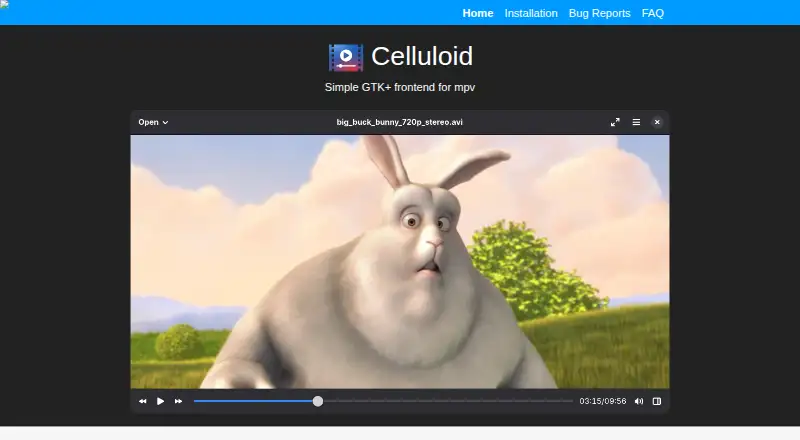
Celluloid is a free, open-source desktop media player that provides a GTK+ graphical frontend for mpv. It is aimed primarily at Linux desktop users who want a lightweight interface around mpv's playback capabilities, while Windows is also supported. The player handles local files and media URIs, with support for audio and video playback, playlists, subtitles, network playback, and hardware acceleration. Its interface keeps the focus on desktop playback rather than broader media-library management.
Celluloid's main strength is how much mpv customization it exposes without requiring a purely command-line workflow. Users can manage playlists with drag and drop, load external mpv configuration files, use mpv user scripts and plugins, and define custom keyboard bindings. Wayland support fits current Linux desktop environments, while MPRIS2 D-Bus controls connect playback with compatible desktop controls. This makes Celluloid a practical choice for users who already value mpv's configurable playback model and want a graphical layer around it.
The trade-off is a narrow product scope. Celluloid is tied to the mpv library and its GTK+ desktop design, and its verified platform coverage is Linux and Windows rather than a wider set of operating systems. It also focuses on playback and configuration instead of AI features or a broader ecosystem of built-in services. Choose Celluloid if you want a free, open-source mpv frontend with desktop integration and customization. Users seeking wider platform coverage or a media player centered on AI capabilities should choose an alternative.
Your product? Our editors can test Celluloid in depth and publish a review, labelled as paid · from $149/mo →
Celluloid pricing
Celluloid fact sheet
| Free plan | Yes |
|---|---|
| Paid from | Free |
| Supported platforms | Linux, Windows |
| Network playback | Yes |
| Subtitle support | Yes |
| Format support | Not verified |
| Hardware acceleration | Yes |
| 4K playback | Not verified |
| License model | Free |
| Deployment | Desktop |
| Platforms | Linux, Windows |
| Support | Docs |
| Built for | Solo, Small business (editorial estimate) |
| Integrations | 2 integrations: MPRIS2, mpv |
| Pricing | Free plan |
| Website | celluloid-player.github.io |
| Facts checked | 21 Sep 2026 |
Celluloid integrations
Celluloid lists 2 integrations on its own site.
- MPRIS2
- mpv
Alternatives to Celluloid
- VLC media playerA broad, capable free player for local, network, and streamed media across major platforms.9.4
- mpvA flexible, scriptable player for users who prefer control over convenience.9.1
- KMPlayerA broad media player with strong format, network, cloud, and casting support.9.0


See all Celluloid alternatives →
Used Celluloid? Be the first to review it
The editor score above is our own research. What this page doesn't have yet is a reader's view — what you used Celluloid for, what worked and what didn't. No stars are seeded and no review is paid for; an editor reads every one before it appears.
Write a reviewTwo minutes · verified accounts only · read by an editor before it appears
Featured on iTechGuides

Celluloid is listed in our Media Player Software directory. Add the badge to your site — it links back to this page.
<a href="https://www.itechguides.com/products/celluloid-media-player/"><img src="https://www.itechguides.com/best/badge/celluloid-media-player.svg" alt="Featured on iTechGuides" width="230" height="46"></a>
Reviewed by iTechGuides Editors · Editorial team · Updated Oct 2026
Advertiser disclosure: iTechGuides is reader-supported. Vendors can pay for top positions in our rankings and for a place on other products' pages, and we may earn a commission when you click some links. Bought places stand at the number bought; this page and our disclosure say so. Paying vendors may get a fuller, more detailed review from our editors, and that review can change their score. How we rank.
Last updated · How we research and update