Brix
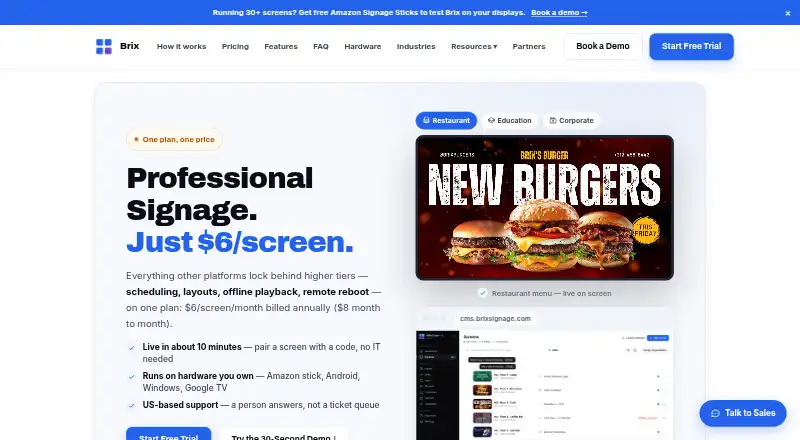
Brix: Brix combines low per-screen pricing with live data, monitoring, and offline playback. Ranked #40 of 207 in Digital Signage Software by our editors (5.3/10); pricing: 7-day trial; best for affordable signage with live data sources.
At a glance
- Editor score5.3 / 10
- Pricing7-day trial
- Best forAffordable signage with live data sources
- Free planNo
- Paid from$6/unit/mo
- Facts checked21 Sep 2026
Where it wins
- Live JSON, CSV, Google Sheets, and connected-account data sources
- Offline playback, remote reboot, monitoring, and proof-of-play reporting
- Custom roles, approvals, and per-location permissions for distributed teams
Where it doesn't
- No free plan beyond the 7-day trial
- Platform support is limited to web, Windows, and Android
- Monthly billing costs more per screen than annual billing
Our verdict on Brix
Brix is a cloud digital signage platform for businesses managing one or more displays. Its web CMS supports media uploads, playlists, content scheduling, multi-zone layouts, screen monitoring, remote reboot, and proof-of-play reporting. It also supports images, video, web pages, Photoshop files, CSV, and JSON, with offline playback for cached content. Brix fits teams that need centrally managed signage with live data sources and operational controls across locations.
Pricing is structured around the screen. The Brix plan costs $6 per screen per month with annual billing or $8 per screen per month with monthly billing. Both versions include scheduling, playlists, multi-zone layouts, remote reboot, proof-of-play analytics, cloud hosting, and technical support. A 7-day free trial is available without a credit card, and the annual option advertises three months free as a promotion. The Partners & White Label plan costs $6 per screen per month with annual billing and adds a custom domain, logo, colours, centrally managed client accounts, a full CMS, and free demo licenses. There is no free plan.
Brix has useful ecosystem coverage for signage teams connecting content and business data. Integrations include Canva, Toast, Square, Clover, Google Sheets, YouTube, Facebook, Google Calendar, Microsoft 365, and RSS. API keys and programmatic integrations extend that connection model, while custom roles, approval workflows, audit logs, screenshots, cache controls, and per-location permissions support more structured operations. The tradeoff is narrower platform coverage: Brix lists web, Windows, and Android, with no mobile app. Choose Brix for cost-conscious teams that value live data, offline playback, and remote control; consider an alternative if broader device coverage is central to the deployment.
Your product? Our editors can test Brix in depth and publish a review, labelled as paid · from $149/mo →
Brix pricing
Brix fact sheet
| Free plan | No |
|---|---|
| Paid from | $6/unit/mo |
| Screen limit | Not verified |
| Offline playback | Yes |
| Content types | images, video, web pages, Photoshop files, CSV, JSON |
| User roles | Custom |
| API access | Yes |
| Mobile app | No |
| Free trial | 7 days · no card needed |
| Deployment | Cloud, Desktop |
| Platforms | Web, Windows, Android |
| Compliance & security | 2FA |
| Support | Email, Docs |
| Built for | Solo, Small business, Mid-market, Enterprise (editorial estimate) |
| Integrations | 10 integrations: Canva, Toast, Square, Clover, Google Sheets, YouTube … See all → |
| Pricing | 7-day trial (source) |
| Website | brixsignage.com |
| Facts checked | 21 Sep 2026 |
Brix integrations
Brix lists 10 integrations on its own site.
- Canva
- Toast
- Square
- Clover
- Google Sheets
- YouTube
- Google Calendar
- Microsoft 365
- RSS
Alternatives to Brix
- OptiSignsA flexible signage platform with mobile administration, offline playback, and a free plan.9.3
- YodeckA flexible signage platform with a generous free tier and broad content support.9.2
- Play Digital SignageFeature-rich signage with a free screen option and wide platform coverage.9.1



Used Brix? Be the first to review it
The editor score above is our own research. What this page doesn't have yet is a reader's view — what you used Brix for, what worked and what didn't. No stars are seeded and no review is paid for; an editor reads every one before it appears.
Write a reviewTwo minutes · verified accounts only · read by an editor before it appears
Featured on iTechGuides

Brix is listed in our Digital Signage Software directory. Add the badge to your site — it links back to this page.
<a href="https://www.itechguides.com/products/brix/"><img src="https://www.itechguides.com/best/badge/brix.svg" alt="Featured on iTechGuides" width="230" height="46"></a>
Reviewed by iTechGuides Editors · Editorial team · Updated Oct 2026
Advertiser disclosure: iTechGuides is reader-supported. Vendors can pay for top positions in our rankings and for a place on other products' pages, and we may earn a commission when you click some links. Bought places stand at the number bought; this page and our disclosure say so. Paying vendors may get a fuller, more detailed review from our editors, and that review can change their score. How we rank.
Last updated · How we research and update