
Atracast
Atracast: A capable, low-cost browser signage tool with strong scheduling and offline playback. Ranked #115 of 207 in Digital Signage Software by our editors (3.0/10); pricing: Free plan; best for small teams needing inexpensive browser signage.
At a glance
- Editor score3.0 / 10
- PricingFree plan
- Best forSmall teams needing inexpensive browser signage
- Free planYes
- Facts checked21 Sep 2026
Where it wins
- Free plan supports up to 3 screens with no credit card required.
- Advanced scheduling, offline cache, approvals, and screen monitoring included.
- Supports Spotify, YouTube, Twitch, Vimeo, feeds, sports scores, and forex rates.
Where it doesn't
- The platform is available on web only.
- The free Starter plan is limited to 3 screens.
- Paid pricing is billed per screen each month.
Our verdict on Atracast
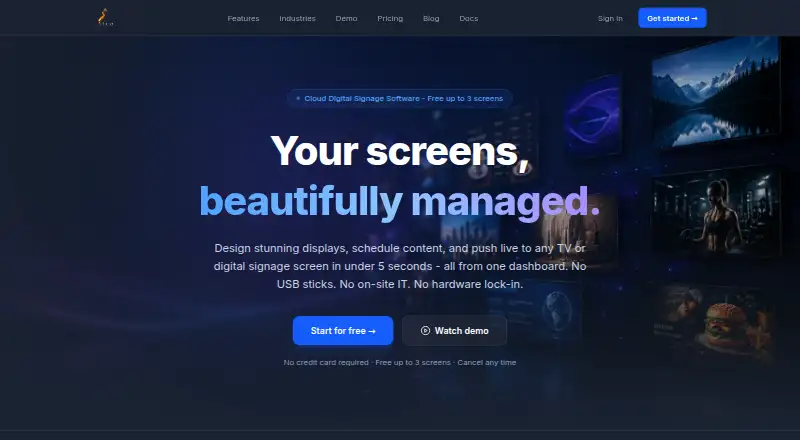
Atracast is cloud-based digital signage software for restaurants, retail stores, gyms, salons, hotels, offices, property managers, and other organizations managing screen content. Its browser-based drag-and-drop designer supports images, video, audio, PDFs, web pages, text, shapes, clocks, tickers, and widgets. Teams can create playlists, publish content in real time, organize screens into multi-location device groups, and use local caching for offline playback. It runs on browser-capable screens, including smart TVs, Fire Sticks, Raspberry Pi devices, and computers.
Pricing is straightforward. The Starter plan is free for up to 3 screens and does not require a credit card. The Per Screen plan costs $9 per screen per month and includes all listed features, including the visual slide designer, playlist builder, advanced scheduling, offline cache, and role-based permissions. For teams managing a small number of displays, this structure keeps the entry cost low. Larger deployments should account for the recurring per-screen billing when planning budgets.
Scheduling and operational control are Atracast’s strongest areas. It supports recurring, time-of-day, and priority scheduling, plus digital service menus with day-part scheduling and sold-out toggles. Content approval workflows add administrator verification, while real-time updates use SSE and heartbeat synchronization. Integrations with Spotify, YouTube, Twitch, Vimeo, RSS/Atom feeds, live sports scores, and live forex rates broaden content options. Atracast suits small teams that want inexpensive browser signage with strong scheduling and offline playback. Organizations needing a non-web platform or a different deployment model should consider alternatives.
Your product? Our editors can test Atracast in depth and publish a review, labelled as paid · from $149/mo →
Atracast pricing
All 2 Atracast plans and prices →
Atracast fact sheet
| Free plan | Yes |
|---|---|
| Paid from | Not verified |
| Screen limit | Not verified |
| Offline playback | Yes |
| Content types | JPG, PNG, GIF, WebP, MP4, MOV, MP3, AAC, PDF, web pages, text, shapes, clocks, tickers, widgets |
| User roles | Advanced |
| API access | Not verified |
| Mobile app | Not verified |
| Deployment | Cloud |
| Platforms | Web |
| Built for | Small business, Mid-market, Enterprise (editorial estimate) |
| Integrations | 7 integrations: Spotify, YouTube, Twitch, Vimeo, RSS/Atom feeds, Live sports scores … See all → |
| Pricing | Free plan (source) |
| Website | atracast.com |
| Facts checked | 21 Sep 2026 |
Atracast integrations
Atracast lists 7 integrations on its own site.
- Spotify
- YouTube
- Twitch
- Vimeo
- RSS/Atom feeds
- Live sports scores
- Live forex rates
See all Atracast integrations →
Alternatives to Atracast
- OptiSignsA flexible signage platform with mobile administration, offline playback, and a free plan.9.3
- YodeckA flexible signage platform with a generous free tier and broad content support.9.2
- Play Digital SignageFeature-rich signage with a free screen option and wide platform coverage.9.1



See all Atracast alternatives →
Used Atracast? Be the first to review it
The editor score above is our own research. What this page doesn't have yet is a reader's view — what you used Atracast for, what worked and what didn't. No stars are seeded and no review is paid for; an editor reads every one before it appears.
Write a reviewTwo minutes · verified accounts only · read by an editor before it appears
Featured on iTechGuides

Atracast is listed in our Digital Signage Software directory. Add the badge to your site — it links back to this page.
<a href="https://www.itechguides.com/products/atracast/"><img src="https://www.itechguides.com/best/badge/atracast.svg" alt="Featured on iTechGuides" width="230" height="46"></a>
Reviewed by iTechGuides Editors · Editorial team · Updated Oct 2026
Advertiser disclosure: iTechGuides is reader-supported. Vendors can pay for top positions in our rankings and for a place on other products' pages, and we may earn a commission when you click some links. Bought places stand at the number bought; this page and our disclosure say so. Paying vendors may get a fuller, more detailed review from our editors, and that review can change their score. How we rank.
Last updated · How we research and update