
Aston
Aston: Aston offers deep Windows shell customization, but its published compatibility is dated. Ranked #37 of 39 in Start Menu Customization Software by our editors (5.2/10); pricing: Paid; best for users needing a full alternative Windows shell.
At a glance
- Editor score5.2 / 10
- PricingPaid
- Best forUsers needing a full alternative Windows shell
- Facts checked20 Sep 2026
Where it wins
- Replaces the standard Explorer desktop shell
- Offers themes, plugins, hotkeys, widgets, and custom search
- Includes extensive taskbar, toolbar, and Start menu controls
Where it doesn't
- Windows-only software
- Published compatibility centers on older Windows releases
- Paid product with no listed free plan
Our verdict on Aston
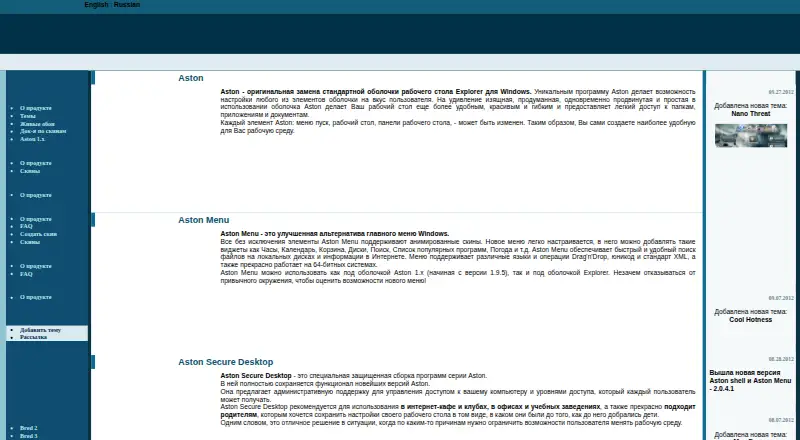
Aston is a Windows shell replacement for users who want more control than the standard Explorer desktop provides. It replaces the Windows desktop shell with a configurable environment that includes an alternative Start menu, customizable desktop elements, toolbars, taskbar controls, launch panels, animated icons, themes, plugins, and hotkeys. It is aimed at people who want a full alternative Windows shell rather than a narrowly focused Start menu modifier.
Its main strength is breadth within desktop customization. Users can configure left and right desktop toolbars, taskbar buttons, a quick-launch panel, resizable desktop icons, and Aston Menu widgets. Aston Menu can also run under Explorer, adding local-file and Internet search without requiring the full shell replacement. Shell Swapper provides a way to switch between Aston and Explorer, which suits users who want to maintain access to both desktop environments. The combination of shell switching, search, widgets, and plugin support gives Aston a wider scope than a basic Start menu replacement.
The main consideration is platform and compatibility context. Aston is designed for Windows, and the vendor’s product page lists compatibility with Windows 98, 2000, XP, and Vista in 32-bit editions. That makes the published support profile most relevant to users maintaining older Windows systems or evaluating a legacy desktop environment. Aston is a sensible choice for users who specifically need extensive shell-level customization, taskbar controls, and alternative desktop elements. Users seeking a current Windows 10 or Windows 11-focused customization tool should consider a product with published support for those operating systems instead.
Your product? Our editors can test Aston in depth and publish a review, labelled as paid · from $149/mo →
Aston pricing
All 1 Aston plans and prices →
Aston fact sheet
| Free plan | Not verified |
|---|---|
| Paid from | Not verified |
| Supported Windows | Not verified |
| Replacement mode | Shell_replacement |
| Start button controls | Yes |
| Custom search | Yes |
| Taskbar controls | Extensive |
| Saved profiles | Not verified |
| Deployment | Desktop |
| Platforms | Windows |
| Support | Docs |
| Built for | Solo, Small business (editorial estimate) |
| Pricing | Paid (source) |
| Website | astonshell.ru |
| Facts checked | 20 Sep 2026 |
Alternatives to Aston
- Start11A paid Windows customization tool for detailed Start menu, taskbar, search, and deployment control.9.3
- Seelen UIA broad, free Windows shell replacement for users who want more than Start menu tweaks.9.1
- Open-Shell MenuA flexible classic Start menu replacement with useful search and shortcut controls.8.9

Used Aston? Be the first to review it
The editor score above is our own research. What this page doesn't have yet is a reader's view — what you used Aston for, what worked and what didn't. No stars are seeded and no review is paid for; an editor reads every one before it appears.
Write a reviewTwo minutes · verified accounts only · read by an editor before it appears
Featured on iTechGuides

Aston is listed in our Start Menu Customization Software directory. Add the badge to your site — it links back to this page.
<a href="https://www.itechguides.com/products/aston/"><img src="https://www.itechguides.com/best/badge/aston.svg" alt="Featured on iTechGuides" width="230" height="46"></a>
Reviewed by iTechGuides Editors · Editorial team · Updated Sep 2026
Advertiser disclosure: iTechGuides is reader-supported. Vendors can pay for top positions in our rankings and for a place on other products' pages, and we may earn a commission when you click some links. Bought places stand at the number bought; this page and our disclosure say so. Paying vendors may get a fuller, more detailed review from our editors, and that review can change their score. How we rank.
Last updated · How we research and update