
Anythings
Anythings: A focused task manager for turning text, voice, images, and files into prioritized tasks. Ranked #67 of 148 in To-Do List Apps by our editors (3.0/10); pricing: Free plan; best for users wanting AI-powered task capture.
At a glance
- Editor score3.0 / 10
- PricingFree plan
- Best forUsers wanting AI-powered task capture
- Free planYes
- Paid from$19.99 one-time
- Recurring tasksYes
- Facts checked22 Sep 2026
Where it wins
- Extracts tasks from text, voice, images, files, and forwarded emails
- Recognizes dates, recurring tasks, and priority automatically
- Available on web, Windows, macOS, iOS, and Android
Where it doesn't
- Free access is limited to the first 50 tasks
- Support is provided through email
- Google Play pricing may differ from the one-time Lifetime plan
Our verdict on Anythings
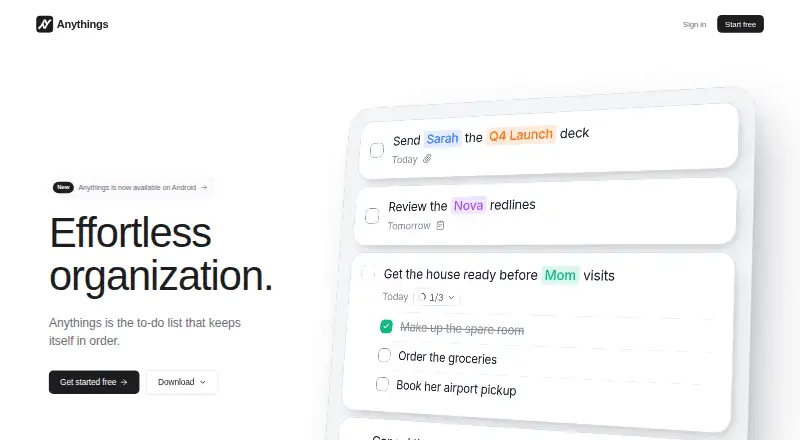
Anythings is an AI-powered to-do list for organizing personal tasks and everyday work. It is aimed at solo users and small teams who want to capture tasks in different formats instead of entering every item manually. Text, voice notes, photos, files, and forwarded emails can become tasks, while the app interprets dates and organizes the resulting list by priority. Notes, attachments, filters, snoozing, daily summaries, Siri input, and widgets extend the core task-list experience.
Its main distinction is the breadth of its AI capture workflow. Anythings can extract tasks from text, voice, images, and files, recognize natural-language dates, detect recurring tasks, and apply automatic prioritization. The Free plan includes capture across those formats, smart dates, prioritized tasks, notes, attachments, filters, and daily summary notifications, with access for the first 50 tasks. The one-time Lifetime plan costs $19.99 and adds unlimited tasks, no AI usage caps, all features, priority support, and one purchase across devices.
The app fits users who want a lightweight, capture-first system across web, desktop, and mobile platforms. Its ecosystem connections include Claude, ChatGPT, and Siri, while email-to-task capture supports another practical intake route. Support is available by email. Anythings should appeal to people who value AI-assisted task entry and a simple priority-oriented workflow; buyers seeking a broader workspace centered on team collaboration or extensive business tooling may prefer a product designed around those needs instead.
Your product? Our editors can test Anythings in depth and publish a review, labelled as paid · from $149/mo →
Anythings pricing
All 2 Anythings plans and prices →
Anythings fact sheet
| Free plan | Yes |
|---|---|
| Paid from | $19.99 one-time |
| Recurring tasks | Yes |
| Task reminders | Not verified |
| Calendar sync | Not verified |
| Subtasks | Not verified |
| Offline access | Not verified |
| Active task limit | Not verified |
| Supported platforms | web, windows, macos, ios, android |
| Deployment | Cloud, Desktop, Mobile |
| Platforms | Web, Windows, macOS, iOS, Android |
| Support | |
| Built for | Solo, Small business (editorial estimate) |
| Integrations | 3 integrations: Claude, ChatGPT, Siri |
| Pricing | Free plan (source) |
| Website | anythings.app |
| Facts checked | 22 Sep 2026 |
Anythings integrations
Anythings lists 3 integrations on its own site.
- Claude
- ChatGPT
- Siri
Alternatives to Anythings
- TodoistA complete task manager with broad platform coverage, recurring tasks, and team workspaces.9.2
- TickTickA broad to-do app for users who want tasks, planning, habits, and focus tools together.9.0
- Microsoft To DoA capable free choice for daily planning, shared lists, and Microsoft-connected task management.8.8



See all Anythings alternatives →
Used Anythings? Be the first to review it
The editor score above is our own research. What this page doesn't have yet is a reader's view — what you used Anythings for, what worked and what didn't. No stars are seeded and no review is paid for; an editor reads every one before it appears.
Write a reviewTwo minutes · verified accounts only · read by an editor before it appears
Featured on iTechGuides

Anythings is listed in our To-Do List Apps directory. Add the badge to your site — it links back to this page.
<a href="https://www.itechguides.com/products/anythings/"><img src="https://www.itechguides.com/best/badge/anythings.svg" alt="Featured on iTechGuides" width="230" height="46"></a>
Reviewed by iTechGuides Editors · Editorial team · Updated Oct 2026
Advertiser disclosure: iTechGuides is reader-supported. Vendors can pay for top positions in our rankings and for a place on other products' pages, and we may earn a commission when you click some links. Bought places stand at the number bought; this page and our disclosure say so. Paying vendors may get a fuller, more detailed review from our editors, and that review can change their score. How we rank.
Last updated · How we research and update