Actiona
Actiona: A capable free desktop automator for Windows and Linux, especially for scripted workflows. Ranked #25 of 35 in Task Automation Software by our editors (6.5/10); pricing: Free plan; best for free open-source desktop automation.
At a glance
- Editor score6.5 / 10
- PricingFree plan
- Best forFree open-source desktop automation
- Free planYes
- Paid fromFree
- Desktop supportCross_platform
- Facts checked21 Sep 2026
Where it wins
- Free and open source under the GNU GPL license
- Visual editor with JavaScript customization
- Desktop control, file operations, detection, loops, and scheduling
Where it doesn't
- Focused on Windows and Linux desktop automation
- No verified integrations or broad app-trigger coverage
- Complex workflows may require scripting and control-flow setup
Our verdict on Actiona
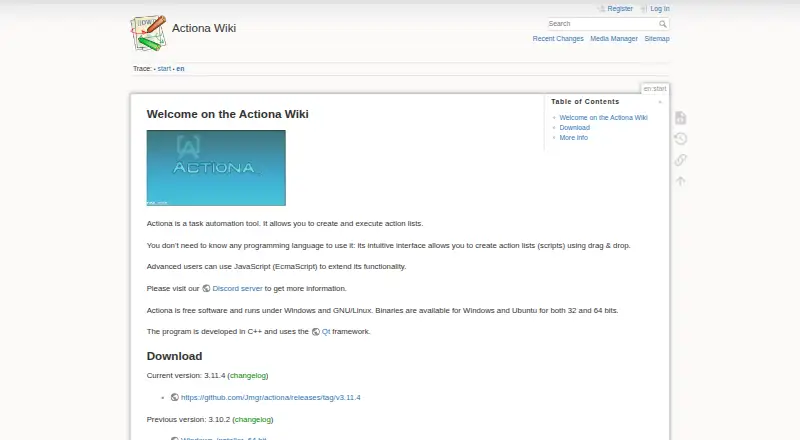
Actiona is a free, open-source desktop automation tool for Windows and Linux. It is designed for users who want to automate computer actions directly, either by arranging steps in a visual task editor or by adding JavaScript within action parameters. Its scope covers desktop workflows rather than broad, app-based automation: mouse and keyboard emulation, window manipulation, file and clipboard operations, command execution, process control, and environment-variable actions are all part of the toolset. The GNU GPL license also makes its open-source distribution central to its positioning.
The strongest fit is for workflows that need direct control of a computer. Actiona includes image and pixel detection, loops, variables, procedures, control flow, timed waits, and date-based waits, allowing tasks to respond to visual conditions and run on schedules. Notifications, downloads, email, and text-to-speech extend workflows beyond simple input playback. These features give the product useful breadth within desktop automation, while the visual editor provides an entry point for users who do not want to write every step as code. JavaScript support adds flexibility when visual actions alone are not enough.
Actiona should appeal to technically comfortable individuals and teams seeking a free desktop automation tool that can operate across Windows and Linux. It is less suitable for buyers prioritizing ready-made integrations, app-specific triggers, or a broad cloud automation ecosystem. The product’s value comes from controlling desktop actions, files, processes, and visual states in a configurable workflow. Choose it when open-source licensing, local desktop control, scripting, and scheduled runs matter most; choose another category of tool when connecting many external applications is the primary requirement.
Your product? Our editors can test Actiona in depth and publish a review, labelled as paid · from $149/mo →
Actiona pricing
Actiona fact sheet
| Free plan | Yes |
|---|---|
| Paid from | Free |
| Desktop support | Cross_platform |
| Scheduled runs | Yes |
| App triggers | Not verified |
| Browser automation | Not verified |
| Desktop recorder | Not verified |
| Monthly run limit | Not verified |
| Workflow step limit | Not verified |
| Deployment | Desktop |
| Platforms | Windows, Linux |
| Support | Community |
| Built for | Solo, Small business (editorial estimate) |
| Pricing | Free plan |
| Website | actiona.tools |
| Facts checked | 21 Sep 2026 |
Alternatives to Actiona
- ZapierA broad workflow automation platform with more than 9,000 app integrations.9.3
- MakeA flexible no-code automation platform with multi-step workflows and a free entry plan.9.2
- Microsoft Power AutomateA broad automation suite for Microsoft environments, with paid plans starting at $15 per user monthly.9.0


See all Actiona alternatives →
Used Actiona? Be the first to review it
The editor score above is our own research. What this page doesn't have yet is a reader's view — what you used Actiona for, what worked and what didn't. No stars are seeded and no review is paid for; an editor reads every one before it appears.
Write a reviewTwo minutes · verified accounts only · read by an editor before it appears
Featured on iTechGuides

Actiona is listed in our Task Automation Software directory. Add the badge to your site — it links back to this page.
<a href="https://www.itechguides.com/products/actiona/"><img src="https://www.itechguides.com/best/badge/actiona.svg" alt="Featured on iTechGuides" width="230" height="46"></a>
Reviewed by iTechGuides Editors · Editorial team · Updated Oct 2026
Advertiser disclosure: iTechGuides is reader-supported. Vendors can pay for top positions in our rankings and for a place on other products' pages, and we may earn a commission when you click some links. Bought places stand at the number bought; this page and our disclosure say so. Paying vendors may get a fuller, more detailed review from our editors, and that review can change their score. How we rank.
Last updated · How we research and update