
Do these 3 things before closing this tab:
1Repair Windows errors before they cause bigger problems2Scan for outdated or missing drivers - takes under a minute3Clear out junk files and repair common Windows errorsiTechGuides is reader-supported. When you buy through links on our site, we may earn an affiliate commission. As an Amazon Associate I earn from qualifying purchases. Learn more
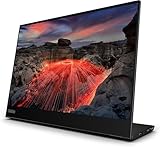
The Lenovo ThinkVision M14t Gen 2 is a 14-inch, 2240 × 1400 portable touchscreen designed for USB-C devices that can output video. It offers useful touch and pen workflows in a light, adjustable package, but the pen distinction matters: Lenovo includes a passive pen, while an active stylus is sold separately. Check your computer or phone’s USB-C video and touch compatibility before buying.
What the ThinkVision M14t Gen 2 offers
Lenovo’s datasheet specifies a 14-inch panel with 2240 × 1400 resolution and a 16:10 aspect ratio. The extra vertical room compared with a typical 16:9 screen can suit documents, web pages and coding windows, while the compact size makes the display practical as a second screen on a desk or while travelling. Lenovo’s PSREF lists 10-point touch.
Key specifications in Lenovo’s product materials are:
What’s actually slowing this PC down?
Pick the symptom - the matching free tool is one click away.
| Specification | Lenovo’s stated detail |
|---|---|
| Panel size and resolution | 14 inches; 2240 × 1400 pixels (Lenovo datasheet) |
| Aspect ratio | 16:10 (Lenovo datasheet) |
| Touch | 10-point touch (Lenovo PSREF, revised November 24, 2025) |
| Approximate monitor weight | 0.7 kg (1.5 lb); Lenovo notes actual weight may vary (PSREF, revised November 24, 2025) |
| USB-C connectivity | Two USB-C ports with DisplayPort 1.2 and USB Power Delivery up to 65 W (Lenovo PSREF, revised November 24, 2025) |
| Mounting and adjustment | Adjustable stand with tilt, pivot and lift; support for 100 mm VESA mounting using two holes (Lenovo PSREF) |
The USB Power Delivery figure is a maximum specification, not a guarantee that the monitor will charge every connected laptop. Actual behavior depends on the host, its port capabilities and the connection setup.
Popular on Amazon
Does it work with your laptop or phone?
The M14t Gen 2 connects over USB-C, but a USB-C socket alone does not ensure that a device can send a picture to the monitor. Lenovo specifies DisplayPort 1.2 over USB-C, so the host needs a compatible USB-C port with video output. Lenovo also cautions that extending a phone screen depends on a compatible USB-C laptop or a phone operating system that supports the feature.
Before choosing it, check the exact host model and port documentation for video output over USB-C. If you need touch input through the connection, confirm that the host and operating system support touch over the chosen setup as well. Lenovo’s specifications do not establish universal compatibility across laptops and phones.
Also popular on Amazon

- W126087394
- 47.0cm (18.5") HD 1366 x 768 W-LED TN
- 5ms, 16:9, 200cd/m², 600:1
- This ultraportable 15.6" FHD mobile display connects to your laptop via USB C to give you extra screen real estate for your own workand a great way to share content with clients and colleagues. Its ergonomic design lets you control the viewing angleand thanks to ports on both sides, it's friendly to right and left handed users. ThinkVision M15: The modern solution for mobile productivity.
- At just 860g and 10mm✝, the ThinkVision M15 mobile display won't weigh you down. And despite its ultraportable design, it delivers great visuals on its FHD. 1920 x 1080 IPS display
Is the included pen active?
No. Lenovo’s datasheet says the box includes a passive pen and that an active stylus is sold separately. A passive pen can act as a touch input, but it should not be confused with an active stylus that provides pressure-sensitive input. The datasheet mentions touch solutions with up to 4,096 pressure levels; that does not mean the bundled passive pen supplies those active pressure levels.
Crashes, No Sound, or Screen Glitches?
Random freezes, missing sound and display glitches usually trace back to one bad driver. Find and replace yours safely.Free scan · under a minuteWindows Errors? Fix Them Before They Spread
Repair common Windows errors and clear accumulated junk for a smoother, more stable PC - no reinstall needed.Free scan · no reinstallLenovo’s UK product listing names active stylus models 4X81H95633 and 4X81H95634. Confirm the exact pen’s compatibility with the M14t Gen 2, your host device and your market before purchasing; the listing does not establish that every pen in Lenovo’s range works with this monitor.
Also popular on Amazon

- ENHANCED VISUAL EXPERIENCE: Immerse yourself in vibrant FHD resolution with the Lenovo L15 Monitor that boasts stunning clarity and detail
- ON-THE-GO CONVENIENCE: Take your setup anywhere — the lightweight, portable monitor clocks in at just under two pounds
- ERGONOMICALLY DESIGNED STAND: Customize your viewing experience with a height-adjustable stand that reduces eye strain during long hours of use
- VERSATILE CONNECTIVITY: Seamlessly connect your devices with two USB-C ports, which provide compatability and convenience
- OPTIMIZED VISIBILITY: A 250-nit screen enables clear visuals in any bright environment
What is it like to use?
In its hands-on review, TechRadar describes the text as crisp and the colors as vibrant, and reports a stable stand, useful stylus workflows and seamless orientation changes between portrait and landscape. Those are the publication’s review impressions, not independent measurements here. TechRadar also notes that fingerprints and smudges are a drawback of using the touchscreen.
The stand’s tilt, pivot and lift adjustments help position the screen for different desk setups, and the monitor can also be mounted using the stated VESA pattern. Lenovo’s PSREF lists a USB-C cable, touch pen, two clips, an L-shaped dongle and a protective bag in the package.
Also popular on Amazon

- Is power-efficient with minimal heat production to ensure a prolonged, convenient usage
- USB Type-C allows powerful and efficient transfer of data with maximum productivity
- 14" viewable screen size provides a lively viewing experience
- Minimize blurring and smearing during motion and gaming sequences with a 6 ms response time to provide a clear picture
- 375 Nit brightness gives an exceptional visible display for clear and consistent on-screen pictures
Where its limits matter
USB-C-only inputs
The monitor’s USB-C connectivity is convenient when the host supports video over USB-C, but it limits use with devices that expect HDMI or another input. RTINGS says the monitor is unsuitable for console gaming because its inputs are USB-C only. It is a better fit for compatible computers and supported phones than for a console setup that needs HDMI.
Touch and pen add value only for the right workflow
If you mainly want a portable screen for ordinary mouse-and-keyboard work, touch and stylus input may not justify paying extra for this model. TechRadar names the Dell Pro 14 Plus (P1425) as an alternative for buyers who do not need touch or the M14t Gen 2’s higher resolution. That is a limited alternative suggestion, not a complete comparison of the market.
Also popular on Amazon

- Screen Size Class: 14"
- Viewable Screen Size: 14"
- Screen Mode: Full HD
- Panel Technology: In-plane Switching (IPS) Technology
- Pixel Pitch: 0.13460 mm x 0.13460 mm
Verdict: who should choose the M14t Gen 2?
Consider the ThinkVision M14t Gen 2 if you want a high-resolution portable touchscreen for a compatible USB-C laptop or supported phone, and you expect to use finger input or a stylus. Its 16:10 panel, adjustable stand and travel accessories make it a capable second-screen concept, while the 0.7 kg approximate weight is attractive for portability. Skip it if your host lacks USB-C video output, you need HDMI for a console, or you assume an active pen is included. Check current regional availability, pricing and exact stylus compatibility before ordering.

