
JP Gleyzes’ PullStruder is a hands-on DIY project that turns PET drink bottles into a strand intended for 3D printing. The bottle is cut by hand into a continuous ribbon first; a heated, motorized mechanism then pulls the ribbon into filament and winds it onto a spool. Gleyzes’ documented build shows how the process works, but the available project accounts do not establish consistent print quality or a verified cost advantage over commercial filament.
How PullStruder turns a bottle into filament
PullStruder is a form of PET “pulltrusion”: instead of melting bottle flakes and extruding them through a conventional filament die, the maker feeds a narrow ribbon cut from a bottle through a heated block and draws it into a thinner strand.
- Cut the bottle: Prepare a PET bottle and use a bottle cutter to make a long, narrow, continuous ribbon. This cutting and feedstock preparation are manual.
- Arrange the ribbon: Wind or position the ribbon so it can feed from a holder into the machine.
- Heat and pull: Feed the ribbon through the heated block. Gleyzes describes pulling it slowly and regularly so the material shrinks into a filament strand.
- Spool and inspect: Wind the strand onto a spool, then check it by hand before trying it in a printer.
The motorized stage helps draw and wind the material, but it does not remove the need to prepare a clean, continuous ribbon by hand. A bottle cutter is therefore part of the practical process, not an optional convenience.
What Gleyzes’ documented build uses
Gleyzes’ project configuration combines reused components with custom and 3D-printed parts. The list below describes his reported build, not a required specification for every PullStruder or a validated set of construction instructions.
What’s actually slowing this PC down?
Pick the symptom - the matching free tool is one click away.
#1 Best Overall

- This is a single-shaft extruder accessory with a single-shaft screw, 2 heating coils and a hopper
- 2 pieces 200W ceramic heating coils, fast heating and easy wiring for diy plastic extruder machine
- 45# steel screw, high temperature resistant, can be used within 572℉. Applicable to extrusion of PE PP PS PVC POM PA PC ABS PET and other materials
- This is the main accessory of the extruder. You need to prepare a K-type temperature controller and a motor with a speed greater than 50rpm, a power greater than 100W and a torque greater than 10 Nm. You can easily assemble your own 3D filament extruder
- The equipment is compact and designed for experimental research, small batch testing, 3D consumables extrusion molding, etc.
| Build element | What Gleyzes reported |
|---|---|
| Heating | Scrap-aluminum heater block with a PID controller targeting 200°C |
| Pulling motor | Reused car wiper motor |
| Drive components | 3D-printed gears |
| Feed and winding | 3D-printed spool holder and a repurposed filament spool |
| Power | PC power supply |
The project also uses a custom bottle cutter with sharp roller bearings. Because cutter geometry affects the ribbon, a generic retail cutter should not be assumed to reproduce the project design or its results. Gleyzes’ project page and build details are available on Hackaday.io; Hackster.io’s earlier account is at Hackster.io.
How consistent is the resulting filament?
Consistency is a key uncertainty, not a demonstrated strength. Gleyzes reports that a badly cut ribbon can form a blob in the resulting filament and advises checking the strand by hand before printing. The project accounts do not provide a quantified defect rate, controlled print tests, or evidence that the homemade strand matches commercial filament or works reliably in every printer.
Rank #2

- 【Innovative & Environmentally Friendly Design】: 3D printer extruders visually showcases the innovative combination of plastic recycling and 3D printing technology for home DIY creation, environmental education, and 3D printing teaching experiments
- 【Turn Trash Into Trend】: Our 3D printer filament maker machine can directly convert discarded bottles into consumables needed for 3D printing. Standard cola bottles can produce about 10m of environmentally friendly filament, greatly reducing the cost of consumables while being environmentally friendly
- 【Integrated Smart Filament Making Machine】: Our 3D recycled PET consumables machine Integrating heating, temperature control, traction, and winding, the real-time LCD screen displays temperature and speed, making it very suitable for beginners and professionals.
- 【Adjustable Temperature / Speed】: The 3D recycled pet filament maker adopts a speed and temperature adjustable design, with a maximum temperature of 240℃. The cutting table can also be adjusted to ensure suitability for plastic bottles of various thicknesses, meeting your different needs for multifunctional filament production.
- 【Desktop Compact Design】: Desktop filament maker adopts a compact design, weighing only 3.75lb, with a size of 13.78(L)*5.9(W) inch, easy to carry, operating at less than 45 dB. It is an ideal choice for small spaces such as homes, classrooms, and dormitories
- Inspect the strand along its length and watch for blobs or obvious irregularities before loading it.
- Treat a poor ribbon cut as a possible cause of a defect in the strand.
- Do not assume that a strand which looks usable has been proven compatible with a particular printer or print profile.
These checks reflect the maker’s reported observation; they are not a guarantee of successful printing. A PullStruder is better suited to an experienced, hands-on maker or an educational demonstration than to someone who needs turnkey, repeatable filament production.
What the maker says about output and cost
Gleyzes reported converting more than 100 bottles into recycled pieces in Hackster.io’s 2022 coverage. His later 2022 Hackaday.io project page gives a figure of more than 200 bottles. These are separate, maker-reported project activity figures, not measurements of filament mass, usable yield, or successful prints.
Rank #3
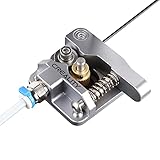
- 【Quality Assurance】100% official all-metal 3D printer extruder. High quality aluminum alloy material and sandblast to surface oxidization, ensuring this gray extruder is last for long term use. Works better than original plastic stock extruder. Original Creality 3D printers accessories for Ender-3/Ender-3 Pro/Ender-3S/Ender-3 V2/Ender-3 Max/CR-10/CR-10S
- 【Work Better】Our 3d printer extruder kits have an adjustable bolt so that you can adjust the pressure of the extruder gear as needed. The extruder drive has better stronger pressure pushing the filament into the printer nozzle and so will improve the printer's performance. 40 Teeth drive gear feeds the 1.75mm filament, compatible with PLA/ABS/Wood/TPU/PTEG
- 【Improved Performance】The optimized extruder with metal extrusion and original hotend kit pushes the filament into the printer nozzle, greatly making the metal extruder retain power in filament feed-in. And the beveled filament intake can prevent scraping the filament as it is pulled into the feeder
- 【Easy To Install】DIY kit and you need to assemble by yourself. The full necessary screws & parts kit for the extruder is included. Referring to instructions or our 5th picture to install, it is very easy and straightforward to switch to this upgraded part on your machine
Gleyzes also said the build cost less than the price of one 1 kg PETG spool. That is his cost claim; the project accounts do not provide an independently verified bill of materials or a current, like-for-like price comparison. It should not be read as proof that building and operating a PullStruder is cheaper than buying filament.
Independent reader supportYour contribution helps us test, update, and keep practical guides available for everyone.Who should consider building one?
PullStruder makes sense for someone interested in experimenting with plastic reuse, machine building, or a classroom-style demonstration—and willing to cut bottles, assemble a mechanism, and inspect the output. It is a less suitable choice if the priority is dependable filament with established dimensions and printer compatibility.
Rank #4

- ✔️ INNOVATIVE RECYCLING DESIGN —— This machine creatively merges plastic recycling with 3D printing, enabling you to produce your own filament while reducing material consumption. Suitable for DIY projects, environmental education, and hands-on learning.
- ✔️ TRANSFORM BOTTLES INTO FILAMENT —— Convert used plastic bottles into ready-to-use 3D printing filament. A single standard soda bottle produces approximately 10m of filament, lowering your material costs and supporting sustainable making.
- ✔️ ALL-IN-ONE SMART DESIGN —— Integrates plastic cutting, heating, temperature control, traction, and winding into one compact unit. The real-time LCD display ensures easy monitoring and setting for both beginners and experienced users.
- ✔️ CUSTOMIZABLE PRODUCTION —— Fully adjustable temperature (up to 572℉) and speed settings allow you to match different plastics and bottle thicknesses. The customizable cutting bed supports versatile filament production for various project requirements.
- ✔️ SPACE-SAVING & LOW NOISE —— With a compact footprint of 13.78"L x 5.9"W and a weight of only 3.75 lbs, the machine operates below 50 dB. Its quiet and small design fits in homes, classrooms, and dorm rooms.
Gleyzes framed the project as a contribution to awareness rather than a definitive solution: “This project is not ‘THE’ answer but may clearly participate to the global awareness on this topic.” That is the maker’s perspective, not a measured finding about environmental benefit. The available accounts include no life-cycle analysis comparing this process with other ways to handle PET bottles.
Quick Recap
Best Value

- ①【SUNLU PLA 3D Printer Filament】PLA material is the perfect choice for 3D printing enthusiasts! SUNLU PLA filament is reliable, versatile, and easy to use. No clogs, bubbles, or tangles, its excellent layer adhesion ensures high-quality prints every time. Ideal for beginners and experienced users.
- ②【Neatly Wound 3D Filament Spool】SUNLU's self-developed neat winding device ensures that the filament is easy to use, with a 100% neat rate that reduces the risk of tangles and jams, and provides a smoother and more efficient 3D printing experience.
- ③【PLA Filament 1.75 mm】SUNLU 3D printer filament dimensional Accuracy +/- 0.02mm. SUNLU filament has wide compatibility due to the small diameter error, making it suitable for almost all 1.75mm FDM 3D printers.
- ④【Filament Spool Diameter】Spool Diameter: 8.00", Spool Width: 2.50", Spool Hub Hole Diameter: 2.20". The size of the SUNLU filament spool is suitable for hanging on a lot of FDM 3D printers.
- ⑤【PLA Recommend Settings】To achieve the best printing results with SUNLU PLA filament, we recommend printing at a nozzle temperature of 200-230°C, a bed temperature of 50-65°C, and a printing speed of 50-100mm/s.
Product prices and availability are accurate as of the date/time indicated and are subject to change. Any price and availability information displayed on Amazon at the time of purchase will apply.
Do these 3 things before closing this tab:
1Fix the driver behind crashes, sound loss and screen glitches2Clear out junk files and repair common Windows errors3Scan for outdated or missing drivers - takes under a minute
