
Quick wins for a faster PC:
Fix the driver behind crashes, sound loss and screen glitchesFind Drivers →Repair Windows errors before they cause bigger problemsFix Now →iTechGuides is reader-supported. When you buy through links on our site, we may earn an affiliate commission. As an Amazon Associate I earn from qualifying purchases. Learn more
To use Apple Music Sing for karaoke, play a supported Apple Music song, open its synchronized lyrics, tap the Mic/Vocal Volume button, and lower the original vocals on iPhone or iPad. On Apple TV, the current experience requires an Apple TV 4K (3rd generation) with tvOS 26 or later, and compatible iPhones can act as microphones.
Apple Music Sing is built into the Apple Music app rather than being a separate karaoke application. The feature combines timed lyrics with adjustable vocal levels, so you can sing along while reducing—but not always completely removing—the original singer.
Key takeaways
- On iPhone and iPad, Apple Music Sing appears after you open synchronized lyrics and tap the Mic/Vocal Volume button.
- Current iPhone support requires iPhone 11 or later or iPhone SE (3rd generation), while current iPad support starts with iPad (9th generation), iPad Air (4th generation), iPad mini (6th generation), and iPad Pro (5th generation) models.
- The current Apple TV Sing experience requires Apple TV 4K (3rd generation), tvOS 26 or later, and an Apple Music subscription for the host.
- Apple TV can connect up to 30 additional participants by QR code, but only one participant can use the microphone at a time.
- Apple TV microphone mode does not support wireless speakers such as HomePod; Apple requires TV speakers or wired receiver speakers during the microphone session.
- Sing reduces the vocal level rather than guaranteeing a clean instrumental track, and the control may be unavailable for individual songs.
What is Apple Music Sing?
Apple Music Sing is Apple’s built-in karaoke mode. The feature shows time-synchronized lyrics and provides a vocal-level control that lowers the original singer while the song continues playing. Apple introduced Apple Music Sing on December 6, 2022, as a combination of adjustable vocals and real-time lyrics in the Apple Music app; the original Apple Music Sing announcement describes the launch feature.
What’s actually slowing this PC down?
Pick the symptom - the matching free tool is one click away.
Apple Music Sing is not a separate app and is not a guarantee of studio-quality vocal isolation. Depending on the song’s mix, backing vocals, harmonies, reverb, and vocal effects may remain audible after the lead vocal is lowered. Sing is best understood as a practical karaoke approximation: the singer’s voice becomes quieter, while the lyrics remain synchronized on screen.
Popular on Amazon

- Wireless Freedom: With a 200 foot operating range (line of sight), it can move freely during performances, suitable for indoor and outdoor activities such as home karaoke, church, wedding, conference, speech, and small stage performances. Reliable signal, no need to worry about sound being cut off during use.
- Stable Signal & Strong Anti-Interference: wireless transmission boasts stronger anti-interference performance and zero audio delay than traditional Bluetooth mics. It delivers stable signal transmission up to 40 meters, supporting free movement during singing, hosting and stage performances. No sudden sound cutoff or signal loss in crowded indoor and outdoor scenarios, solving the common signal instability and stuttering issues of ordinary wireless microphones.
- Plug and play and multi compatibility: Insert the receiver into an audio device with a 6.35mm or 3.5mm microphone jack. Then turn on the receiver and wireless microphone, they will automatically pair. Compatible with devices with 6.35mm (1/4 inch) or 3.5mm (1/8 inch) microphone interfaces, such as party speakers, singing machines, amplifiers, PA systems, audio interfaces, truck speaker systems, dome speaker systems, etc. (AUX interface not applicable)
- Clear and rustic voice amplifier equipped with a high-sensitivity professional heart-shaped dynamic capsule, picking up clear, pure, and complete sound for greater gain, while eliminating annoying background noise and a certain degree of howling. No radiation, anti whistling, anti-interference, constant frequency, distortion<0.2%. High quality and excellent audio performance.
- You will receive: 2 handheld microphones, 1 x receiver with 6.35mm plug(Two versions are randomly shipped), 1 x 3.5mm adapter, 2 anti slip rings, 2 x microphone covers, 1 x manual. (Note: This system is not compatible with mobile phones, computers, or tablets.)
The Mic icon can be misleading. On iPhone and iPad, the Mic/Vocal Volume control primarily changes the vocal level in the song; it does not turn the iPhone into a live microphone for ordinary on-device karaoke. The iPhone microphone-party feature is an Apple TV function.
What do you need to use Apple Music Sing?
You normally need an active Apple Music subscription, a supported Apple device, an up-to-date operating system, and a song from the Apple Music catalog with synchronized lyrics and Sing support. Apple says availability can vary by country or region, and Sing may be unavailable for a particular song even when the device is compatible.
Internet access may be needed for lyrics, translations, and pronunciation features. Apple also says lyric controls can be unavailable when a song is not from the Apple Music catalog, lyrics are unavailable, the device is offline, or the song has not been downloaded in a way that retains the required lyric data. For the most reliable test, use an online song from the Apple Music catalog and update both the Apple Music app environment and the device software.
Do these 3 things before closing this tab:
1Repair Windows errors before they cause bigger problems2Fix the driver behind crashes, sound loss and screen glitches3Clear out junk files and repair common Windows errorsWhich iPhone, iPad and Apple TV models support Apple Music Sing?
As of August 18, 2026, Apple’s current compatibility guidance separates local iPhone/iPad Sing from the newer Apple TV features. The device must also run the latest available version of iOS or iPadOS where Apple specifies that requirement.
| Feature | Supported hardware | Software requirement | Important limitation |
|---|---|---|---|
| Sing on iPhone | iPhone 11 or later; iPhone SE (3rd generation) | Latest available iOS | Sing may still be unavailable for an individual song. |
| Sing on iPad | iPad Pro (5th generation or later); iPad Air (4th generation or later); iPad mini (6th generation or later); iPad (9th generation or later) | Latest available iPadOS | Camera compatibility is broader than local iPad Sing compatibility. |
| Current Sing on Apple TV | Apple TV 4K (3rd generation) | tvOS 26 or later | Required for the current Apple TV vocal controls and microphone-party experience. |
| Apple TV iPhone microphone | Apple TV 4K (3rd generation), plus compatible iPhones | tvOS 26 or later; participant iPhones need iOS 26 or later | Participants must use the same Wi-Fi network; only one microphone is active at a time. |
| Apple TV Continuity Camera | Apple TV 4K (3rd generation), compatible iPhone or iPad | tvOS 17 or later; iPhone/iPad needs iOS 17 or iPadOS 17 or later | Camera mode is separate from microphone mode. |
For the current iPhone and iPad list, see Apple’s Apple Music lyrics and Sing support page. For Apple TV requirements and controls, see Apple’s current Apple TV Sing guide.
Older articles often cite iOS 16.2, iPadOS 16.2, or tvOS 16.2 because those were launch-era requirements from December 2022. Those historical requirements should not be used as the current definitive Apple TV compatibility answer in 2026.
How do you use Apple Music Sing on iPhone?
To use Apple Music Sing on iPhone, start a supported Apple Music song, open the song’s lyrics, and lower the vocal slider.
Crashes, No Sound, or Screen Glitches?
Random freezes, missing sound and display glitches usually trace back to one bad driver. Find and replace yours safely.Free scan · under a minutePC Slower Than It Used to Be?
A free scan shows the junk files, broken settings and background clutter dragging Windows down - then fixes them in one click.Free scan · Windows 10 & 11Also popular on Amazon

- 【4-in-1 Karaoke Microphone】— Besides a wireless microphone, the BONAOK mic can be used as a portable Bluetooth speaker, MP3 player.
- 【Controllable Dynamic LED Light】— Music~ 27 colorful LED lights will flicker with the rhythm of the music. Higher volume, brighter light, perfectly creating a karaoke atmosphere for you. If long pressing "M", the LED light will appear/ disappear.
- 【Excellent Live Show】— Multi-layer denoising head, powerful stereo speaker, professional buttons, and brief layout, all allow you to enjoy an aural carnival. Let this microphone light up your party.
- 【Easy to Use】— Via Bluetooth and memory function, the karaoke player can be easily connected to your phone. Also, support TF card plug and play(not included). Wherever you'd like to sing or listen to music, this moving speaker will meet all of your needs.
- 【Great Gift Ideas】— BONAOK microphone is a party favor for 4 5 6 7 8 9 10 11 12 years old toddlers, girls, boys, and teenagers. A great gift idea for holidays and activities(Valentine's Day, Easter, Christmas, Thanksgiving, New Year, etc).What you get(Q78 microphone,charging cable,giftable box, NO BLACK CASE for this color)
- Open the Apple Music app.
- Play a song from the Apple Music catalog.
- Tap the song currently playing to open the Now Playing screen.
- Tap the Lyrics button.
- Tap the Mic/Vocal Volume button.
- Drag the vocal slider down to reduce the original singer.
- Raise the slider when you want the original vocal to help you find the melody or timing.
The synchronized lyrics continue to highlight the words as the song plays. Tap the control again or leave the lyrics view when you want to stop adjusting the vocals. The exact icon can vary slightly with Apple’s interface design, but the control is found inside the lyrics view rather than as a recording function.
How do you use Apple Music Sing on iPad?
Apple Music Sing on iPad uses the same basic path as iPhone: open a catalog song, open Lyrics, tap Mic/Vocal Volume, and adjust the vocal slider.
- Open Apple Music and start a supported song.
- Tap the currently playing song.
- Tap Lyrics.
- Tap the Mic/Vocal Volume button.
- Drag the slider down to reduce the original vocal or back up to restore it.
Do not assume that an iPad capable of acting as an Apple TV camera can also run local iPad Sing. Apple’s Continuity Camera list is broader than the current iPad list for the full local vocal-control feature. A compatible older iPad may work as a camera on Apple TV while lacking local iPad Sing support.
How do you use Apple Music Sing on Apple TV?
On Apple TV, Apple Music Sing starts from the Music app’s Sing area or from a compatible song with synchronized lyrics. The current Apple TV implementation requires Apple TV 4K (3rd generation) with tvOS 26 or later.
- Open the Music app on Apple TV.
- Select Sing at the top of the screen, or select the Apple Music Sing icon on the Home Screen.
- Choose a curated mix or playlist, or start a compatible song.
- On the Now Playing screen, show the playback controls.
- Swipe down on the Apple TV remote’s clickpad or touch surface.
- Select Lyrics.
- Swipe up on the clickpad or touch surface.
- Select the Apple Music Sing button.
- Swipe up or down to adjust the vocal volume.
Apple TV has separate controls for the singer and the whole song. Swiping up or down while the Apple Music Sing vocal control is active changes the vocal level. The remote’s physical volume buttons change the overall song volume, not just the singer’s voice.
How do you use an iPhone as a microphone with Apple TV?
An iPhone can act as a karaoke microphone for Apple TV when the Apple TV and participant iPhone meet Apple’s current requirements. The host needs an Apple Music subscription, while participants can join the host’s microphone party without having their own Apple Music subscription.
- Open Music on Apple TV 4K.
- Go to Sing, or play a song with synchronized lyrics.
- Select Connect iPhone Mic.
- Scan the QR code shown on the television with the iPhone’s Camera app.
- Follow the onscreen connection instructions.
After connecting, the iPhone controls can turn the microphone on or off, adjust microphone volume with the iPhone volume buttons, cycle through song-vocal levels, cycle through microphone-reverb levels, add songs to the Sing queue, and send animated emoji reactions.
Also popular on Amazon
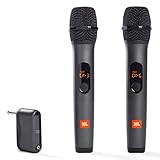
- HIGH Vocal Quality & JBL Original Pro Sound - The crystal clear clarity of JBL wireless microphones means they won't stuck, delay or distort. Your voice will sound on point, with the back of the amazing JBL Original Pro sound.
- RECHARGEABLE DUAL CHANNEL UHF WIRELESS RECEIVER - No need to fly alone, unless you want to take center stage, of course. Connect two wireless microphones together and hear both voices mixed seamlessly through the speaker for up to 6 hours of playback.
- PLUG AND PLAY - When you want to be heard, you want to be heard now. JBL wireless microphones have a super simple setup. Simply turn on the receiver and wireless microphone and you're ready to go instantly.
- MICROPHONES COME WITH REPLACEABLE AA BATTERIES - JBL wireless microphones come with easy-to-replace AA batteries, so put your slot all night long.
| Microphone-party requirement | Current requirement |
|---|---|
| Apple TV | Apple TV 4K (3rd generation) |
| Apple TV software | tvOS 26 or later |
| Host subscription | The host must have an Apple Music subscription. |
| Participant iPhone | iPhone SE (2nd generation) or later, or iPhone 11 or later |
| Participant software | iOS 26 or later |
| Network | All participants must be on the same Wi-Fi network. |
| Party size | Up to 30 additional people can scan the QR code and join. |
| Active microphones | Only one person can use the microphone at a time. |
The microphone feature is a party control system, not a promise that every participant can sing simultaneously through separate live microphone channels.
Recommended Free Tools
Which speakers work with the Apple TV microphone?
Apple TV iPhone microphone mode requires audio output through the television or wired receiver speakers. Apple’s current guide explicitly says wireless speakers such as HomePod are not supported during the microphone session.
If a microphone session will not start or the singer cannot be heard, switch the Apple TV audio output from HomePod or another wireless speaker to the TV speakers or a wired receiver. AirPlay does not make every Apple TV Sing feature compatible with every Apple TV model or speaker arrangement.
Can an iPhone or iPad show the singer on Apple TV?
Apple TV can use an iPhone or iPad as a Continuity Camera, showing the singer onscreen alongside lyrics and visual effects. Camera mode is different from the microphone mode: camera mode sends video to the television, while microphone mode sends the iPhone’s voice input through the supported TV or wired receiver speakers.
- Start a song with synchronized lyrics.
- Show the playback controls.
- Select More Options.
- Choose Sing with Camera.
- Select Connect iPhone or iPad.
- Choose an existing profile or scan the displayed QR code.
- Confirm the connection on the iPhone or iPad.
- Place the device near the TV in landscape orientation.
- Use Center Stage or select visual effects from the Filters list.
Apple lists Apple TV 4K (3rd generation) with tvOS 17 or later for this camera feature. Compatible camera devices include iPhone XR or later, including iPhone SE (2nd generation), iPad (8th generation) or later, iPad mini (5th generation) or later, iPad Air (3rd generation) or later, iPad Pro 11-inch (1st generation) or later, and iPad Pro 12.9-inch (3rd generation) or later. Compatible iPad models require iPadOS 17 or later.
One iPhone cannot be both the microphone and Continuity Camera at the same time. Use a separate compatible device if you want one person’s video onscreen while another person uses an iPhone microphone.
Why is the Apple Music Sing Mic button missing?
The Apple Music Sing control can be missing because of the device, software, song, lyrics, network, download, or regional availability. Apple specifically says Sing may be unavailable for an individual song even on supported hardware.
Also popular on Amazon

- Clear voice, crisp sound: The cardioid pickup pattern of these mics deliver a warm, clear, and crisp vocal sound that's designed to make everyone sound their best over any JBL PartyBox.
- Minimize all unwanted noise: A shock mount system minimizes the sound of the mics passing from one hand to another, while a built-in pop filter eliminates any extraneous breathing sounds that you don't want to be part of your performance.
- Easy to use: Just plug in and start singing. It's really that simple.
- Compatible with all PartyBox speakers: From the PartyBox Encore to the Ultimate, you can use the mics with any JBL PartyBox speakers.
- Sing out all night long: Keep the party going all night with up to 20 hours of play time. (up to 12 hours play time when using the digital wireless dongle.)
- Check the device. Compare the iPhone or iPad with Apple’s current supported list, or verify that the Apple TV is an Apple TV 4K (3rd generation).
- Update the software. Install the latest available iOS, iPadOS, or tvOS version required by the feature.
- Use an Apple Music catalog song. A local file or separately purchased track may not expose the control.
- Open Lyrics first. On iPhone and iPad, the Mic/Vocal Volume button appears inside the lyrics view.
- Check for synchronized lyrics. Lyrics must be available for the song, and lyrics availability does not guarantee Sing support.
- Check the connection. Go online and test again, especially if the song was downloaded or lyric controls disappeared while offline.
- Try another catalog song. A well-known compatible track can distinguish a song limitation from a device problem.
- Check your country or region. Apple says Apple Music lyrics and related availability can vary by region.
If the button appears for one song but not another, the most likely explanation is track-level availability rather than a damaged device.
What should you do when Apple Music lyrics are missing?
Missing lyrics usually mean that Apple does not have lyrics for the track, the track is not from the Apple Music catalog, the device is offline, the downloaded version lacks the required lyric data, or lyrics are unavailable for that language or region.
Free tools Windows power users keep installed
One-click scans. No signup required.
Try an online catalog song with known synchronized lyrics, then open Now Playing and tap Lyrics. If lyrics appear but the Sing control does not, the song may have lyrics without Apple Music Sing support.
What should you do if the Apple TV microphone will not connect?
Confirm the Apple TV, iPhone, software, Wi-Fi, QR-code, and speaker requirements before attempting the connection again.
- Verify that the Apple TV is an Apple TV 4K (3rd generation) running tvOS 26 or later.
- Verify that the participant iPhone is an iPhone SE (2nd generation) or later or an iPhone 11 or later, running iOS 26 or later.
- Put the Apple TV and iPhone on the same Wi-Fi network.
- Use the iPhone Camera app to scan the QR code again and complete the onscreen confirmation.
- Switch audio output to TV speakers or a wired receiver if HomePod or another wireless speaker is selected.
- Disconnect and reconnect the QR-code session if the microphone is connected but not heard.
Noticeable delay can be affected by Wi-Fi conditions, TV audio processing, receiver latency, and the speaker configuration. A stable same-network connection, proximity to the Wi-Fi access point, wired TV or receiver output, and reduced audio-processing modes can improve the experience, but Apple does not promise zero-latency microphone performance.
Does Apple Music Sing work with HomePod, AirPlay, or Dolby Atmos?
Apple Music Sing has different behavior depending on the playback setup. HomePod and AirPlay can remain useful for ordinary Apple Music playback, but the Apple TV iPhone microphone mode has a specific wireless-speaker restriction.
| Setup | What to expect |
|---|---|
| HomePod for ordinary Apple Music playback | HomePod can be used for ordinary Apple Music playback and AirPlay scenarios. |
| HomePod during Apple TV iPhone microphone mode | Unsupported; use TV speakers or wired receiver speakers instead. |
| AirPlay | AirPlay does not guarantee that every Sing feature works on every Apple TV model or speaker setup. |
| Dolby Atmos with Sing active | Apple TV disables Dolby Atmos and plays the song without surround sound. |
| Dolby Atmos after Sing is turned off | Apple TV restores Dolby Atmos playback when the song and system support it. |
Is Apple Music Sing good enough for karaoke?
Apple Music Sing is a strong low-setup option for Apple users who already have a supported device and want synchronized lyrics plus reduced vocals. The feature is especially convenient on iPhone or iPad because no television, microphone, mixer, or karaoke machine is required.
Also popular on Amazon

- PARTICULAR DESIGN: The excellent design of karaoke microphones is very suitable for your hand, which let you feel more comfortable. And the built-in high-quality Bluetooth module can be used as a wireless speaker, mp3 player, and recorder, compatible with various singing applications
- TWO WAYS CONNECTION: Bluetooth Connection & Cable Connection. You just need to connect your phone with cable or Bluetooth, and then open the singing APP on your phone. The built-in clear audio and the vividly sound effect let you listen and sing anytime and anywhere
- HIGH COMPATIBILITY: Supporting micro SD card max 32GB(NOT INCLUDED) and song switch. The Bluetooth has a great distance of connection(10m)
- EASY TO USE: Multi-function buttons, easy to switch to different modes, adjust microphone, echo, and music volume separately, enjoy singing along with the music. With echo mode, a karaoke mic can bring a surrounding immersion
- MICROPHONE FOR KIDS & ADULTS: Come with 1* BONAOK microphone, 1* Audio Cable, 1*Charge Cable, 1*User Manual, and 1*Colorful Box. Cute gifts idea for kids, teens and adults, friends and family, suitable for all kinds of holidays and festivals
Apple Music Sing is less suitable when the goal is a clean instrumental, several simultaneous microphones, advanced vocal mixing, or tightly controlled low-latency performance. The vocal reduction varies by song, and Apple TV microphone mode allows only one active microphone at a time. A dedicated karaoke machine or karaoke application may offer more audio controls, while YouTube karaoke videos may provide a wider selection of purpose-made instrumental tracks but can have inconsistent lyric quality, advertising, and licensing limitations.
| Option | Best fit | Trade-off |
|---|---|---|
| Apple Music Sing on iPhone or iPad | Casual karaoke with minimal setup and Apple Music catalog integration | Requires supported hardware and does not guarantee complete vocal removal. |
| Apple Music Sing on Apple TV | Living-room lyrics, vocal reduction, camera effects, and an iPhone microphone party | Current experience requires Apple TV 4K (3rd generation); HomePod microphone output is unsupported. |
| YouTube karaoke videos | Finding dedicated instrumental versions of particular songs | Video quality, ads, lyrics, and licensing vary. |
| Dedicated karaoke app or machine | Multiple singers, microphone mixing, and traditional karaoke controls | May require additional hardware, software, or subscription costs. |
How much does Apple Music Sing cost?
Apple Music Sing itself is included in Apple Music rather than sold as a separate add-on. Apple’s U.S. pricing page currently lists the following regular monthly plans; prices are U.S.-specific, can change, and may differ in other countries.
| Plan | U.S. price listed by Apple | Who it suits |
|---|---|---|
| Student | $6.99/month | Verified students who qualify for the student plan. |
| Individual | $11.99/month | One person who wants Apple Music and Sing. |
| Family | $19.99/month | A household sharing with up to five other people. |
| Apple One Individual | $19.95/month | Someone who also wants the other services included in the Individual bundle. |
| Apple One Family | $27.95/month | A family that wants multiple services in the Family bundle. |
| Apple One Premier | $39.95/month | A household that wants the broader Premier bundle, not karaoke alone. |
See Apple’s current Apple Music plans and offers for the price shown in your market. See Apple One’s current plan details if you already pay for services such as Apple TV, iCloud+, Apple Arcade, Fitness+, or News+. Apple One is generally a poor choice solely to obtain karaoke; the bundle becomes relevant when you already want several included services.
Most readers do not need to buy new hardware. A supported iPhone or iPad can run local Sing by itself. Apple TV becomes worthwhile when you specifically want a large-screen lyrics experience, camera effects, or the iPhone microphone-party feature. If you use Apple TV microphone mode, plan around TV speakers or a wired receiver rather than a wireless HomePod setup.
Frequently Asked Questions
Does Apple Music Sing require an Apple Music subscription?
Yes. Normal Apple Music Sing playback requires Apple Music access, and the host must have an Apple Music subscription for an Apple TV microphone party. Participants joining the host’s Apple TV party do not each need their own subscription, but they do need supported iPhones, iOS 26 or later, and the same Wi-Fi network.
Can an iPhone be used as a microphone for Apple Music Sing?
Yes, but the iPhone microphone feature is available through Apple TV, not ordinary on-device Sing on iPhone. The current microphone-party setup requires Apple TV 4K (3rd generation) with tvOS 26 or later, a compatible iPhone running iOS 26 or later, the same Wi-Fi network, and TV or wired receiver speakers.
Why does Apple Music Sing lower vocals instead of removing them completely?
Apple Music Sing adjusts the song’s vocal level rather than guaranteeing a perfectly isolated instrumental track. Lead vocals, backing vocals, reverb, harmonies, and other effects can remain audible depending on the individual song’s mix.
Can multiple people use Apple Music Sing microphones at once?
Up to 30 additional people can join an Apple TV microphone party by scanning the QR code, but Apple allows only one person to use the microphone at a time.
Does Apple Music Sing work with HomePod?
HomePod can be used for ordinary Apple Music playback, but Apple does not support wireless speakers such as HomePod during the Apple TV iPhone microphone session. Switch to the television speakers or a wired receiver for microphone mode.
The Bottom Line
For quick karaoke, use a supported iPhone or iPad: play an Apple Music catalog song, open Lyrics, tap Mic/Vocal Volume, and lower the singer. Choose Apple TV only when you want the living-room interface, camera effects, or iPhone microphone party—and verify that you have Apple TV 4K (3rd generation), tvOS 26 or later, and TV or wired receiver speakers.

