

What’s actually slowing this PC down?
Pick the symptom - the matching free tool is one click away.
iTechGuides is reader-supported. When you buy through links on our site, we may earn an affiliate commission. As an Amazon Associate I earn from qualifying purchases. Learn more
On Facebook you can “Like” a post or a photo. You can also “Like” a comment or a page. This guide demos how to “Unlike” something on Facebook.
Below are steps to “Unlike” a post, comment or page.
Option 1: “Unlike” a Post, Comment, or Page from a PC
If you want to “Unlike” a Post on Facebook, here are the steps:
Free tools Windows power users keep installed
One-click scans. No signup required.
- Locate the post you want to “Unlike”.

- Then scroll below the post. To confirm that you already “Liked” the post, the color of the “Like” icon will be blue.
- To “Unlike” the post, click on the “Like” icon (thumbs-up icon).

- The “Like” icon will immediately go from blue to gray! It is that easy to “Unlike” something on Facebook!

As I mentioned earlier you also can also “Unlike” a comment on Facebook.
Popular on Amazon

- Compact Mouse: With a comfortable and contoured shape, this Logitech ambidextrous wireless mouse feels great in either right or left hand and is far superior to a touchpad
- Durable and Reliable: This USB wireless mouse features a line-by-line scroll wheel, up to 1 year of battery life (2) thanks to a smart sleep mode function, and comes with the included AA battery
- Universal Compatibility: Your Logitech mouse works with your Windows PC, Mac, or laptop, so no matter what type of computer you own today or buy tomorrow your mouse will be compatible
- Plug and Play Simplicity: Just plug in the tiny nano USB receiver and start working in seconds with a strong, reliable connection to your wireless computer mouse up to 33 feet / 10 m (5)
- Better than touchpad: Get more done by adding M185 to your laptop; according to a recent study, laptop users who chose this mouse over a touchpad were 50% more productive (3) and worked 30% faster (4)
Here are the steps to “Unlike” a comment on Facebook from a PC…
- Locate the post with the comment you want to “Unlike”.

- Then scroll to the bottom of the post and click the x comments. See the highlighted portion of the image below.

- When the comments are displayed, the comment you previously “Liked” will be blue. To “Unlike” a comment, click on the thumbs-up “Like” icon. The comment “Like” icon will turn gray, confirming that you have now “Unliked” the comment.


Finally, for this section here are the steps to “Unlike” a Facebook page…
Also popular on Amazon

- Ultra-fast LIGHTSPEED wireless technology in this wireless mouse gives you a lag-free gaming experience, delivering incredible responsiveness and reliability with 1 ms report rate for competition-level performance
- G305 wireless computer mouse boasts an incredible 250 hours of continuous gameplay on just 1 AA battery; switch to Endurance mode via Logitech G HUB software and extend battery life up to 9 months
- The durable, compact design with built-in nano receiver storage makes G305 not just a great portable desktop mouse, but also a great laptop travel companion and gaming wireless mouse. Use with a gaming laptop and play anywhere
- The next-generation optical HERO sensor in this gaming mouse delivers incredible performance and up to 10x the power efficiency over previous generations, with 400 IPS precision and up to 12,000 DPI sensitivity
- Wireless does not have to mean heavy. This gaming mouse provides high maneuverability, coming in at only 3.4 oz, thanks to an efficient, lightweight mechanical design and ultra-efficient battery usage
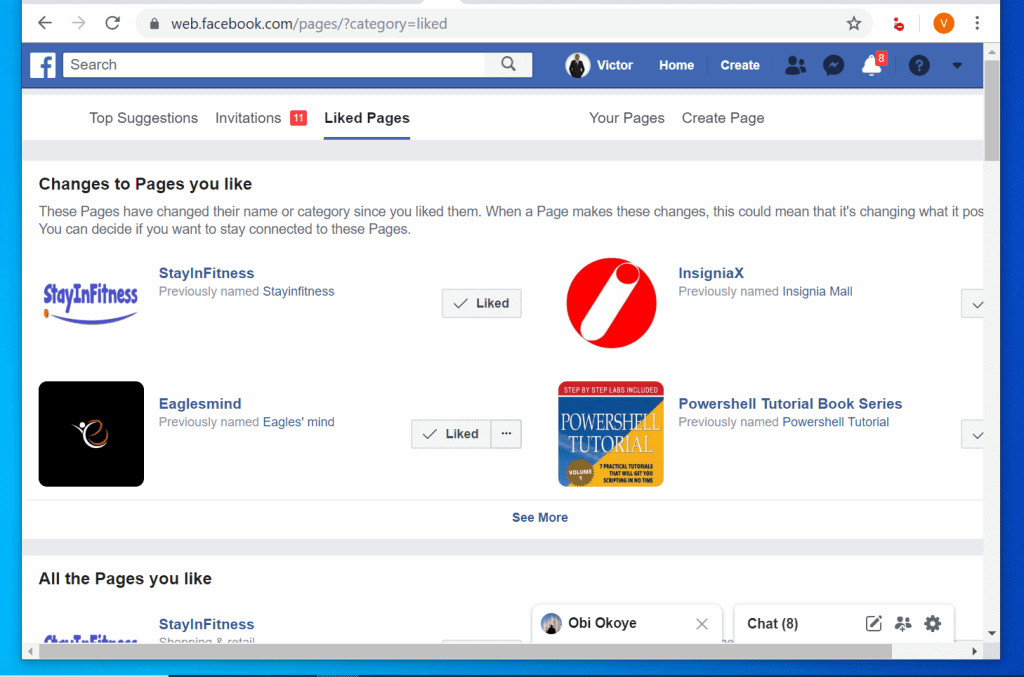
- On the left pane of your Facebook News Feed, click Pages.

- All the Facebook Pages you “Like” will be displayed. To “Unlike” a page, click “Liked” thumbs-up icon beside the page. The “Liked” icon will change from a tick to a normal thumbs-up. In this example, I “Unliked” Eaglesmind. See the difference between the “Like” buttons in the first and second image below.

Option 2: “Unlike” a Post, Comment, or Page via the Facebook App
If you access Facebook from the App on your smartphone, you can still “Unlike” something on Facebook – Post, Comment or Page. Here are the steps:
Recommended Free Tools
To “Unlike” a post:
- Locate the post you want to “Unlike” and scroll to the bottom. If you previously “Liked” the post, the thumbs-up “Like” icon will be blue.
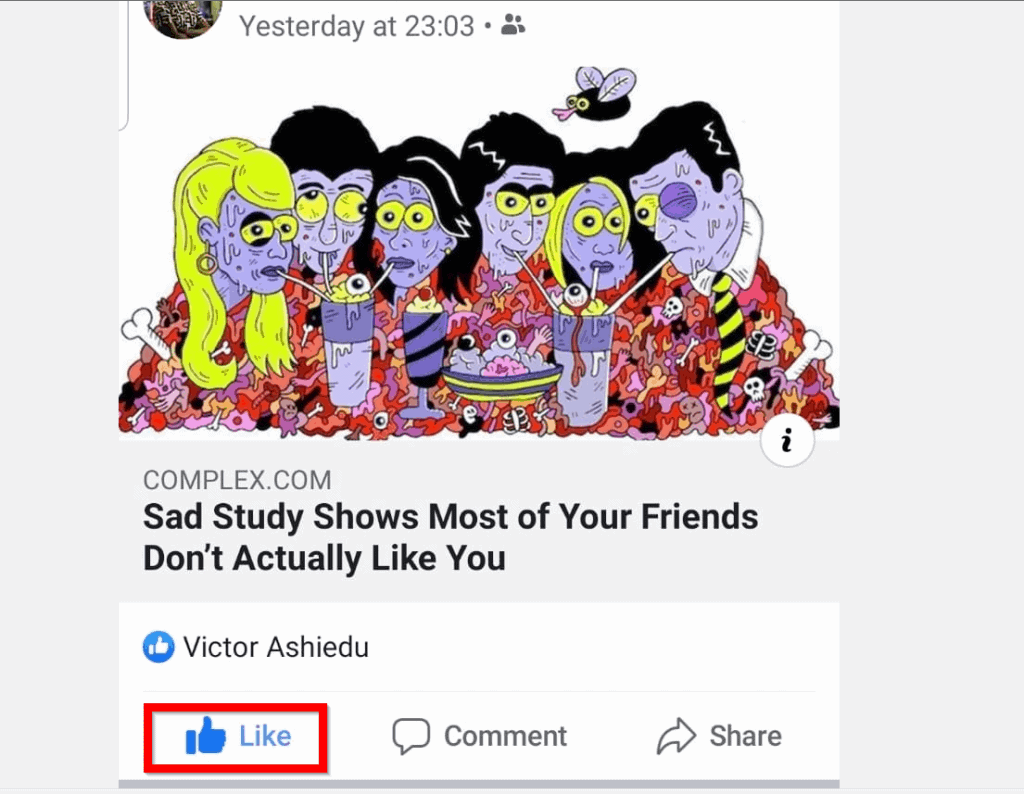
- To “Unlike” the post, click on the “Like” icon. Once you “Unlike” the post the “Like” icon will turn gray.

If you are looking to “Unlike” a comment, here is how…
Also popular on Amazon

- Compact Mouse: With a comfortable and contoured shape, this Logitech ambidextrous wireless mouse feels great in either right or left hand and is far superior to a touchpad
- Durable and Reliable: This USB wireless mouse features a line-by-line scroll wheel, up to 1 year of battery life (2) thanks to a smart sleep mode function, and comes with the included AA battery
- Universal Compatibility: Your Logitech mouse works with your Windows PC, Mac, or laptop, so no matter what type of computer you own today or buy tomorrow your mouse will be compatible
- Plug and Play Simplicity: Just plug in the tiny nano USB receiver and start working in seconds with a strong, reliable connection to your wireless computer mouse up to 33 feet / 10 m (5)
- Better than touchpad: Get more done by adding M185 to your laptop; according to a recent study, laptop users who chose this mouse over a touchpad were 50% more productive (3) and worked 30% faster (4)
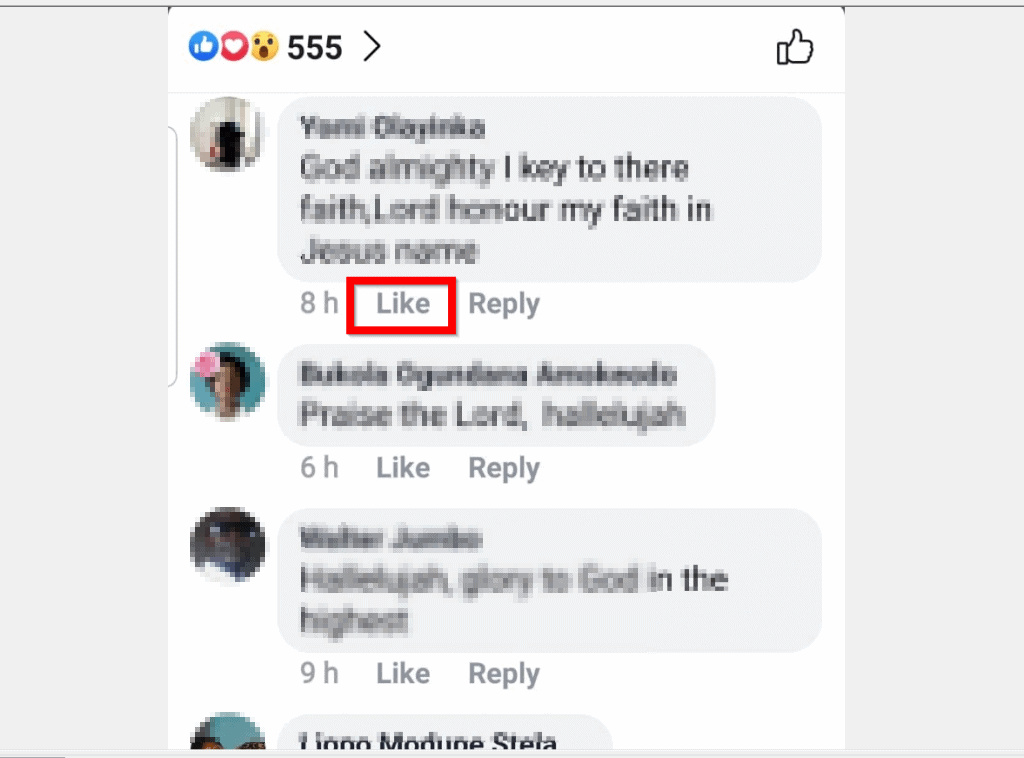
- Open the post with the comment you previously “Liked” and want to “Unlike”. Beneath the post click x comments.

- Any comment you previously “Liked” will be displayed in blue. To “Unlike” a comment, click on the blue “Like” icon. It will turn gray. Compare the two images below.

Finally, here are the steps to “Unlike” a Facebook page from the App..
- From the Facebook App on your phone, click the 3 lines on top right of the page. Then click Pages Manager.

- Then, on the top right of Pages, click Liked Pages.

- A list of all the pages you “Like” will be will be displayed – each with a ticked “Liked” icon. To “Unlike” a page, click the “Liked” icon beside it. In this example, I will “Unlike” Argus.

- To confirm that you have “Unliked” the page, the blue tick icon will change to gray thumbs-up icon.

Whatever your reason for wanting to “Unlike” something on Facebook, I hope you found this guide helpful!
Also popular on Amazon

- IN THE BOX: Amazon Basics 3-button USB wired mouse (MSU0939) in Black with 4.9-foot cable; plug-and-go ready for instant use with no drivers needed
- WIRED CONNECTION: USB-A wired connection with 4.9-foot cable for reliable, lag-free use; if device only supports USB-C, an additional adapter will be required
- OPTICAL TRACKING: High-definition 1000 DPI optical sensor ensures responsive cursor control for precise tracking & easy text selection on your personal computer
- AMBIDEXTROUS DESIGN: Lightweight ambidextrous shape suits both left & right-handed users; portable design measuring 4.3 x 2.4 x 1.4 inches
- BUTTONS & CONTROLS: 3 buttons provide effortless fingertip control including click & scroll for smooth navigation of your computer interface
Have a question, comment, or feedback? Use the “Leave a Comment” form found at the end of this page.
For more guides like this one visit our Social Media how-to page.
Quick Recap
Also popular on Amazon

- 【Plug and Play for Home/Office/School】The wireless computer mouse features 2.4GHz connectivity, delivering a stable, interference-free connection up to 32ft. Designed for 𝐦𝐞𝐝𝐢𝐮𝐦 𝐭𝐨 𝐥𝐚𝐫𝐠𝐞 𝐬𝐢𝐳𝐞𝐝 𝐡𝐚𝐧𝐝𝐬, it ensures comfortable use all day. Simply plug in the USB-A receiver for instant pairing—no drivers needed. 📌📌 If the mouse isn’t suitable, place the USB receiver in the battery compartment and return both.
- 【3 Levels Adjustable DPI】This travel USB mouse offers 3 adjustable DPI settings (800, 1200, 1600), allowing you to customize sensitivity for precise design work. Effortlessly switch to match your task and elevate your productivity. 📌 Please remove the film at the bottom of the mouse before use.
- 【Effortless Browsing】Equipped with forward and backward buttons, this computer mice streamlines your workflow, making it easy to navigate through web pages and files with a simple click. 📌Side button does not work on Mac.
- 【Visible Indicator Light】 The pc mouse features a visual indicator for DPI levels and low battery alerts. The red light flashes once for 800 DPI, twice for 1200 DPI, and three times for 1600 DPI. When the battery level is below 10%, the light flashes red until the mouse is completely out of power.
- 【Click to Wake】With smart sleep mode, it saves power by standby after 10 inactive minutes, just 2-3 clicks to wake. This efficient design delivers 3x longer battery life than motion-wake mice. Engineered for durability, its buttons and scroll wheel are tested for 10 million clicks, ensuring long-term reliability and consistent performance.



Online search: [url=https://google.com/]https://google.com/[/url].
Любой сервис для планирования поездок легко оценить поверхностно — по красивому оформлению и громким обещаниям. [url=https://trip83at.com]сайт трипскан[/url] [url=https://trip-86.at]tripscan личный кабинет[/url] Но когда дело доходит до реального использования, значение имеют совсем другие вещи.
Первый критерий — достоверность данных. Цены, расписания и условия меняются [url=https://trip-81.co]tripscan трипскан[/url] быстро, поэтому важна не широта охвата, [url=https://trip-88.at]tripscan официальный[/url] а актуальность: устаревшая информация обходится дороже, чем её отсутствие. Второй критерий — понятность логики. Хороший инструмент объясняет, откуда взялась цифра и что в неё включено. Если tripscan [url=https://tripscan89.at]trip 75 co[/url] показывает итоговую сумму, а состав расходов остаётся туманом, доверять такому результату сложно.
Третий момент — скорость получения ответа. [url=https://trip86.net]трипскан личный кабинет[/url] Планирование редко бывает спокойным процессом: решения принимаются в спешке, и задержка в пару минут может стоить удобного варианта. Четвёртый — [url=https://trip-89.co]tripscan официальный сайт[/url] предсказуемость условий: комиссии, [url=https://trip81-at.com]trip80 co[/url] ограничения, правила изменения и отмены должны быть видны заранее, а не всплывать на последнем шаге.
трипскан вход личный — https://tripscan91.com
Поиск поездок давно перестал быть делом случая: сервисы вроде tripscan собирают перелёты, жильё и маршруты в одном окне, но пользоваться ими стоит с холодной головой. Первое правило — не доверять первой цене. Итоговая сумма почти всегда складывается из багажа, сборов и условий отмены, поэтому сравнивайте не цифру на карточке, а полную смету поездки.
Второй момент — даты. Сдвиг на день-два часто экономит больше, чем любые промокоды. Полезно проверять и соседние аэропорты: [url=https://trip-91.at]трипскан вход личный[/url] [url=https://trip-82.co]trip80.at[/url] лишние полчаса [url=https://trip91.net]трипскан сайт вход[/url] дороги иногда окупаются [url=https://trip85.net]сайт трипскан[/url] многократно.
Спорный вопрос: бронировать через агрегатор или напрямую? [url=https://trip-84.at]trip80 at[/url] Агрегатор удобнее для сравнения, прямая покупка надёжнее при изменениях — [url=https://trips83.at]трипскан сайт вход[/url] [url=https://trip91.net]сайт трипскан[/url] при отмене рейса поддержка перевозчика отвечает быстрее.
tripscan официальный сайт — https://trip81co.com
1xBet промокод Введя на https://yogapodolsk.ru/wp-content/inc/1xbet_promokod_pri_registracii_bonus.html и заберите бонус 100% на депозит до 32 500?, чтобы начать игру с преимуществом.
Любая поездка начинается задолго до выхода из дома — с проверки деталей, которые кажутся мелочами, пока не превратятся в проблему. Опытные путешественники взяли за правило прогонять маршрут через tripscan: это помогает увидеть слабые места плана заранее, а не разбираться с ними в аэропорту или на незнакомой улице. [url=https://tripscan90.at]trip80.co[/url] Начните с документов. Проверьте срок действия паспорта — многие страны требуют, [url=https://tripscan89.at]трипскан[/url] чтобы до его окончания оставалось не меньше полугода. Уточните визовые правила и сохраните копии броней в телефоне: связь [url=https://trip84-co.com]trip79.co[/url] за границей может подвести в [url=https://trip80-co.com]trip80 at[/url] самый неподходящий момент. [url=https://trip81co.com]trip81.at[/url] Дальше деньги и связь. Сообщите [url=https://trip-89.at]tripscan официальный сайт[/url] банку о поездке, иначе карту заблокируют после первой же покупки. Возьмите немного наличных, а [url=https://trip79-co.com]trip80.at[/url] роуминг [url=https://tripscan89.at]трипскан сайт вход[/url] или местную SIM-карту продумайте [url=https://trip80-co.com]tripscan[/url] до вылета.
Отдельно — [url=https://tripscan87.at]трипскан вход[/url] жильё и трансфер. Перепроверьте адрес, время заселения и способ добраться от вокзала. Поздний приезд — плохой момент для поисков.
Не забудьте про здоровье: аптечка, страховка, прививки по требованиям страны и запас обычных лекарств на пару дней.
И оставьте в плане свободное место. Жёсткое расписание ломается от одной задержки, а спокойный путешественник всегда найдёт выход. Вечер проверок экономит дни нервов.
trip83 co — https://trip-82.co