
To sync your Casio watch and set up phone alerts, install CASIO WATCHES, register or sign in when prompted, add your watch in the app, and complete the model-specific pairing steps. Time synchronization and notifications are available only on compatible watches; notifications also depend on your phone’s permissions. Check your watch’s module number and manual before you begin because the supported features and button sequences vary by model.
Before you start: check your watch’s compatibility
Find the module number on the watch or in its documentation, then check its manual to confirm that it supports CASIO WATCHES and which mobile-link features it offers. A Bluetooth connection does not mean every Casio watch supports phone notifications or the same time-correction behavior. CASIO’s App Connection Start Guide cautions that supported features vary by model.
Use the manual for your exact module for button-by-button instructions. The steps below describe the general app flow; the examples for modules 5737, 5744, and 3515 illustrate model-specific behavior rather than rules for every watch.
Pair your watch with CASIO WATCHES
- Install and open CASIO WATCHES. Register for or sign in to a CASIO ID if the app asks, and accept the required terms. The app’s onboarding flow then guides you toward registering a watch.
- Turn on Bluetooth on your phone. Keep the phone near the watch. For module 5737, CASIO specifies keeping them within one meter during linking; another module may specify a different procedure or distance.
- Start the add-watch flow. In the app, choose its option to add or register a watch, then follow the prompts shown by the app and the watch. Press the buttons indicated in your module’s manual rather than assuming another model’s sequence will work.
- Wait for pairing to complete. On documented compatible watches, establishing the connection also synchronizes the watch and phone time. CASIO describes this behavior for modules 5737 and 5744.
Keep the watch time synchronized
Pairing may set the watch to the phone’s time, but automatic correction after pairing depends on the watch and its connection conditions. For module 5737, CASIO says to leave the watch in Timekeeping Mode for automatic correction during daily use. For module 5744, CASIO says the current time is corrected while a Bluetooth Mobile Link connection exists and the app is running. Consult your own module’s manual for its timing and connection requirements.
#1 Best Overall
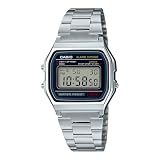
- CLASSIC RETRO CASIO DESIGN A timeless digital watch that has remained an icon for decades. The vintage square face and polished stainless steel bracelet deliver a clean, minimalist style that complements casual, business, and everyday wear for both men and women.
- RELIABLE EVERYDAY DIGITAL FUNCTIONS Stay organized with practical features including a 1/100-second stopwatch, daily alarm, hourly time signal, auto calendar, and selectable 12/24-hour time format—everything you need in a dependable everyday
- LONG-LASTING 7-YEAR BATTERY Powered by a dependable CR2016 battery designed to last approximately seven years under normal use, giving you years of worry-free performance with minimal maintenance.
- LIGHTWEIGHT & COMFORTABLE Weighing only 46 grams, the slim profile and adjustable stainless steel bracelet provide exceptional comfort for all-day wear. The self-adjustable clasp allows for a customized fit on a wide range of wrist sizes.
- TRUSTED CASIO QUALITY Built with Casio's legendary reliability, this water-resistant digital watch features a durable chrome-plated resin case, stainless steel bracelet, LED backlight for nighttime visibility, and quartz accuracy of approximately ±30 seconds per month.
CASIO Europe’s pairing and connection FAQ recommends maintaining a Bluetooth connection between the app and watch, which is also used to adjust the current time. Do not assume the correction schedule or required app state is identical across models.
Enable phone notifications on a supported watch
First confirm that your module can receive notifications. Pairing alone may not enable alerts: the watch feature, the app’s notification settings, and phone-side permissions may all need attention. Menu names and available controls vary by watch, phone OS, and app version.
Rank #2
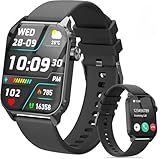
- 1.83" HD Display and Custom Watch Faces: Enjoy a bright 1.83 inch screen with 240x284 resolution. Change watch faces freely to match your style, whether casual, sporty, or professional. Clear visuals and elegant design for any occasion.
- 120 Workout Modes and Health Tracking: Track over 120 activities including walking, running, and cycling. Monitor your heart rate and sleep quality continuously. Step counting starts after 20 steps to avoid false records. A complete wellness companion for daily fitness.
- IP67 Waterproof and Long Battery Life: Rated IP67 to resist sweat, rain, and splashes. The 350mAh battery lasts 5 to 7 days of normal use and up to 30 days on standby. Reliable for workouts, travel, and daily wear.
- Bluetooth Calling and Wide Compatibility: Make and answer calls from your watch. Control music and your phone's camera remotely. Works with iPhone iOS 9.0 and above and Android 5.0 and above. A smart, all in one watch for easier living.
- Alexa Built-in and Smart Notifications: Talk to Alexa directly from your wrist. Get real time alerts for calls, messages, and apps like Facebook and WhatsApp. Supports 15 languages. Stay connected without picking up your phone.
- In CASIO WATCHES, enable the watch’s notification feature if the app provides one for your model.
- Allow CASIO WATCHES to access or send notifications when your phone requests permission. Also check the phone’s notification-access settings if alerts still do not arrive.
- Check your watch manual for any additional Bluetooth notification-sharing setting. For example, on the documented iPhone procedure for module 3515, CASIO requires notifications for CASIO WATCHES to be enabled and Share System Notifications to be on for the paired watch in the iPhone’s Bluetooth settings. The manual lists incoming calls, mail, SNS, schedules, and other alerts for that module; this is not a promise that every model displays every app’s notifications.
For the 3515 procedure and its supported notification types, see CASIO’s Receiving Phone Notifications manual. On Android or a different watch, follow that phone’s current permission prompts and the watch’s own manual rather than looking for an identical setting name.
Independent reader supportYour contribution helps us test, update, and keep practical guides available for everyone.Troubleshoot time sync or missing notifications
- The watch will not pair: Confirm the module supports CASIO WATCHES, turn on phone Bluetooth, keep the devices close, and check whether the app shows the watch as connected. If registration did not finish, reopen the app and retry using the exact button sequence in the module manual.
- The time does not update: Check that the watch is a compatible connected model and that its required mode, app state, and Bluetooth connection are in place. Pairing and automatic-correction behavior differ by module.
- Notifications do not appear: Verify that the model supports them, then check the app’s notification feature, phone notification permission or access, Bluetooth connection, and any system notification-sharing setting specified by the manual. CASIO’s connection FAQ also recommends checking Bluetooth, the app connection, and notification settings.
- The app asks for location permission: Follow the explanation shown for your model and the operation you are setting up. In its module 5737 instructions, CASIO says to allow background location use for the app’s location-related operation; that is not a universal requirement for every watch feature.
For additional connection guidance, CASIO Singapore provides an app connection support page.
Free tools Windows power users keep installed
One-click scans. No signup required.
Quick Recap
Rank #4

- ICONIC VINTAGE DESIGN A true Casio classic, the A168WA-1 combines timeless retro styling with dependable digital functionality. Its polished stainless steel bracelet and signature square case create an iconic look that's perfect for everyday wear, business casual, or vintage-inspired fashion.
- BRIGHT ELECTRO-LUMINESCENT BACKLIGHT Unlike standard LED illumination, the A168 features Casio's Electro-Luminescent (EL) backlight, providing a bright, even blue-green glow across the entire display for outstanding nighttime visibility.
- PRACTICAL EVERYDAY FEATURES Stay on schedule with a 1/100-second stopwatch, daily alarm, hourly time signal, auto calendar, and selectable 12/24-hour time format. Designed for reliable everyday performance whether you're at work, school, or on the go.
- LIGHTWEIGHT COMFORT & LONG BATTERY LIFE Weighing just 50 grams with an adjustable stainless steel bracelet, the A168WA-1 is comfortable enough for all-day wear. Its dependable CR2016 battery provides approximately seven years of operation under normal use.
- DEPENDABLE CASIO QUALITY Built with Casio's legendary reliability, this watch features quartz accuracy of approximately ±30 seconds per month, water resistance for daily use, a durable chrome-plated resin case, and a stainless steel bracelet designed to withstand years of everyday wear.
Rank #3

- Get the toughness and functionality your surfing lifestyle demands and the summery materials and colors you love in a G-SHOCK from the G-LIDE line
- Inspired by the summer surf scene, the bezel is made with two different materials to evoke the look of shimmering waves gleaming in the sunlight
- Key resin components used in the band are made with bio-based resin, a material expected to help reduce environmental impact
Product prices and availability are accurate as of the date/time indicated and are subject to change. Any price and availability information displayed on Amazon at the time of purchase will apply.

