
PC Slower Than It Used to Be?
A free scan shows the junk files, broken settings and background clutter dragging Windows down - then fixes them in one click.Free scan · Windows 10 & 11Crashes, No Sound, or Screen Glitches?
Random freezes, missing sound and display glitches usually trace back to one bad driver. Find and replace yours safely.Free scan · under a minuteTo keep an AI API bill under control, set a notification threshold and, where available, an enforced spending cap in each provider’s console. An alert alone usually warns you but does not stop requests. A hard cap can interrupt your application, and provider-side limits may not take effect instantly or prevent every overage. Configure the controls at the right organization, project, or billing-account scope, then make your software handle billing-limit errors.
Choose the right scope before setting a limit
Start by identifying every organization, project, workspace, and billing account that can generate API charges. A limit on one project may not cover other projects, while a billing-account cap may aggregate usage across several linked projects. Check current usage and the account’s tier in the provider console before choosing a threshold.
Keep spending caps separate from rate limits, included usage, and prepaid-credit balances: those controls address different things and are not interchangeable. Recheck limits after changing project-to-billing-account links, tiers, or billing arrangements.
OpenAI API: configure organization and project limits
OpenAI supports monthly spending limits at both organization and project scope. You need permission to change the relevant settings. Follow the matching path in the API Platform:
Recommended Free Tools
#1 Best Overall

- Improved Measurement Accuracy: Our USB C Tester can accurately measure accuracy: ± (1%+5). The data is more accurate for detecting charging devices such as chargers, mobile phones, tablets, and power banks. Make this Type-C meter suitable for more 3C digital peripheral products, making it the first choice for digital gamers and electronics enthusiasts.
- Wide Applicability: This USB power meter is equipped with a 12A high current terminal, which is more stable. Measuring current: 0-12A; measuring voltage: 4V-30V. The wide test range makes this USB meter suitable for more 3C digital peripheral products, and it’s a cost-effective solution for anyone looking to optimize their electronic devices’ charging performance.
- Detect Various Fast Charging Protocols: The USB power meter supports PD2.0/3.0, QC2.0/3.0, FCP. SCP, AFC, PE, DASH VOOC and Super VOOC protocol charging. Whether you’re testing chargers, power banks, or any USB-C device, this tester is up to the task.
- Upgraded Curve Function: This USB C tester has upgraded curve function to better record real-time voltage and current. You can set the time of curve page (5mins/15mins/60mins/2hrs) by long press button to monitor the real-time voltage and current. In addition, the voltage and current of each cell will be automatically adjusted according to the actual voltage and current.
- ISP Color Display Interface: This USB C Power Meter features a 1.06-inch ISP color high-definition display with high resolution and clarity. It can display voltage, current, power, capacity, energy, time, maximum voltage, maximum current, maximum power, current direction, and CPU temperature. You can easily switch between interfaces by pressing a key. Double-click the button to rotate the displayed content.
- Organization: open Organization limits, choose Edit spend limit under Spend, enter the monthly amount, and save. Enable Enforce a hard limit if requests should fail when the limit is reached.
- Project: open Project settings > Limits, then use the Spend editor to set the project’s limit and, if appropriate, enforce it.
An OpenAI spend alert is a notification; API traffic continues after it fires. With a hard limit enabled, affected calls fail with HTTP 429 and either organization_spend_limit_exceeded or project_spend_limit_exceeded. Alerts can remain active alongside the hard limit, so set an alert threshold early enough to investigate or respond before traffic is blocked. The organization or project spend limit is separate from the usage limit assigned to the organization’s usage tier.
OpenAI cautions that enforcement is not instantaneous: the platform can process some additional usage while the limit state propagates, so recorded spend may slightly exceed the configured amount. See the OpenAI spend-limits guide.
Rank #2

- Upgraded Function: This USB tester can record the Max Watt, Current and Voltage during charging and detect voltage, current, capacity, electric quantity, power, temperature, charging time, which is convenient for testing power supply and quality.
- Wide Applicability: This USB power meter is equipped with a 12A high current terminal, which is more stable. Measuring current: 0-12A; measuring voltage: 4V-30V. The wide test range makes this USB meter suitable for more 3C digital peripheral products, and it’s a cost-effective solution for anyone looking to optimize their electronic devices’ charging performance.
- Upgraded Curve Function: This USB C tester has upgraded curve function to better record real-time voltage and current. You can set the time of curve page (5mins/15mins/60mins/2hrs) by long press button to monitor the real-time voltage and current. In addition, the voltage and current of each cell will be automatically adjusted according to the actual voltage and current.
- Detect Various Fast Charging Protocols: The USB power meter supports PD2.0/3.0, QC2.0/3.0, FCP. SCP, AFC, PE, DASH VOOC and Super VOOC protocol charging. Whether you’re testing chargers, power banks, or any USB-C device, this tester is up to the task.
- Measuring Data is Guaranteed: Power-off storage function that stores capacity and energy data when the mobile power is turned off, which is convenient for subsequent viewing and convenient for capacity energy measurement of mobile power.
Gemini API: set project and billing-account protections
Project spend cap in AI Studio
A project editor, owner, or admin can set a monthly project cap in Google AI Studio. Open Spend > Monthly spend cap > Edit spend cap. Google marks this project-cap feature experimental and limited in scope. Invoiced or offline billing accounts cannot use these spend caps.
Google says billing data can take around 10 minutes to process, creating a window for overage. Long-running batch completions and agent sessions may also exceed the project cap. Treat this as a safeguard, not an exact real-time cutoff.
What’s actually slowing this PC down?
Pick the symptom - the matching free tool is one click away.
Rank #3

- VERSATILE USB TESTING: Test voltage from 3 to 20V DC and current from 0.05 to 3A (USB-A) and current from 0.05 to 5A (USB-C), covering most common standard USB ports, including Qualcomm Quick Charge ports
- EXTENSIVE MONITORING: Continuously monitor voltage, current, capacity/charge delivered, energy, and resistance (calculated) for up to 1000 hours, providing comprehensive data insights
- CONVENIENT DATA STORAGE: Store and recall up to 10 readings, allowing easy access to previous measurements for comparison and analysis
- OVERLOAD DETECTION: Detect voltage and current overload, ensuring the safety and protection of your devices and power sources during testing
- HIGH-RESOLUTION LCD: The hi-resolution LCD provides clear visibility of measurements, even in environments with low ambient lighting, ensuring easy reading of data
Billing-account tier cap
Google also applies monthly Gemini API spend caps at billing-account tier. Its documentation lists Tier 1 at $250, Tier 2 at $2,000, and Tier 3 at $20,000–$100,000. These are current documented tier limits, not universal fixed allowances; verify the live billing page because limits and eligibility can change. The account cap aggregates Gemini API spend across linked projects with the API enabled. When the cap is reached, Gemini API service pauses for all linked projects until the next monthly cycle.
Google Cloud Billing budgets
A spend-capped Cloud Billing budget extends AI Studio spend protection to additional services and sends alerts at 50%, 80%, and 100% of the target budget. If an AI Studio cap and Cloud Billing budget overlap for Gemini API, whichever processes the usage cost first can trigger first. When the cap triggers, Gemini API use is blocked for that project across platforms. See Gemini API billing and Google Cloud Billing budgets.
Rank #4

- UPGRADED MULTIFUNCTIONAL USB C POWER METER: Detects the charging status and process of your USB-enabled or type c-enabled devices. Supports QC3.0, QC2.0 and BC1.2. A Must Gadget checks the charging performance (charging speed and quality) of the output wall/car/solar panel chargers and USB charging cables. It can be also used to find the highest current of the Wireless Charger, and test capacity and electric energy of power bank
- PROFESSIONAL SAFETY GUARD: Featured with over-voltage protection, over-current protection, under-voltage protection, low energy protection and alarm system. This upgraded USB Type C tester can detect safety and maximally protect the appliances from damaging. It will cut off output automatically and alarm by sound, while it will save data when power off suddenly
- MULTIPLE COLOR SCREEN DISPLAY MODES: New upgraded version offers 8 LCD main color screen display interfaces, allowing switching the display interface by pressing the key. With the new interface settings, this instrument can monitor voltage, current, capacity, electric quantity, power, load impedance, D+/D- voltage and other data of USB
- WIDE RANGE OF APPLICATION: Thanks to the PD protocol quick charging mode measurement technology, this new multimeter supports the updated iPhone X mobile phone. (Support iphone 8 / 8P / iPhone Xs quick charging, 29W power, 5V3A / 9V3A / 12V2.5A / 15V2A). It also can be applied to test other type C devices, Compatible With Galaxy S10/S9/Note 10 +, ChromeBookPixel, OnePlus and More
- QUALITY COMMITMENT: We always believe in the stability and continuous improvement of product quality. Package includes 1 x USB Tester. (Note: If the USB tester does not show any parameters, please insert the small adapter sent with the package into the side hole of the USB tester to trigger the PD charging function)
Claude API: set a Console spend limit
In Claude Console, open Settings > Billing, find Spend limits, and select Adjust limit or Set limit. Enter an amount no higher than the current tier cap. When a user-set limit is reached, requests fail with HTTP 400 and an invalid_request_error message indicating a specified usage limit.
Do not confuse that response with Anthropic’s tier-cap behavior: reaching the tier cap pauses usage and produces HTTP 429 with the code enforced_spend_limit_reached. The current documented monthly caps are Start $500 USD, Build $1,000 USD, and Scale $200,000 USD; Custom has no monthly cap and is arranged with Anthropic’s account team. These tier figures can change, so check your account and the Anthropic rate-limits documentation.
Best Value
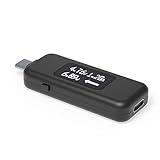
- USB C Tester: Monitors USB-C power and charging up to 240W; measures voltage and amperage; visualizes the directional flow of electrical current; features an updated OLED display for improved readability; includes a new orientation button for screen rotation
- Bidirectional: Connects in either orientation for USB Extended Power Range (EPR) voltage from 5 to 48V (4.5V-50V, 50mA-6.5A operating range)
- Broad USB Support: Functions as a data and power quality meter with USB data pass-through, USB-C Alt Mode video, and USB-C charging; compatible with USB-C docking stations, chargers, accessories, etc.; not compatible with Thunderbolt 3 devices
- Compact and Durable: Portable design fits most phones and tablets without removing protective cases; reinforced USB-C connections ensure durability for reliable use
- Enhance Your USB-C Experience: Unlock the full potential of your USB-C devices with this versatile and rugged USB C power tester
Claude Enterprise member limits
Claude Enterprise organizations can use Anthropic’s Spend Limits API to read effective member limits and period-to-date spend, set or clear per-user overrides, and review limit-increase requests. It requires a scoped Admin API key and is not available to Claude Platform (Claude Console) organizations. Limits can inherit from user, group, seat tier, or organization settings; a group limit is a default for each member, not a shared pooled budget. Details are in the Anthropic Spend Limits API documentation.
Make a cap useful without creating avoidable outages
- Set an alert below the enforced cap. Leave enough room for a person or automated process to investigate and adjust before requests are blocked.
- Choose a cap with latency and scope in mind. Account for reporting or enforcement delays, possible overage, and whether a limit covers one project or all linked projects.
- Decide whether blocking is safe. A cap can fail production requests or pause API service across multiple projects. If uninterrupted service matters more, use alerts and monitoring while managing the operational risk of continued spend.
- Handle provider errors explicitly. Detect the documented billing-limit responses, alert operators, and return or queue a controlled application-level error rather than repeatedly retrying a request that cannot succeed until the limit changes or resets.
- Review after account changes. Recheck settings when projects move between billing accounts, a provider changes your tier, or the billing model changes; Google notes that project movement can affect caps and accumulated spend.
Provider controls differ in scope, eligibility, reset cycle, enforcement timing, and failure response. There is no single cross-provider budget switch: set and verify protections separately for every provider account that can incur charges.
Quick Recap
Product prices and availability are accurate as of the date/time indicated and are subject to change. Any price and availability information displayed on Amazon at the time of purchase will apply.

