
Free tools Windows power users keep installed
One-click scans. No signup required.
iTechGuides is reader-supported. When you buy through links on our site, we may earn an affiliate commission. As an Amazon Associate I earn from qualifying purchases. Learn more
An AI companion can be useful for brainstorming, organizing thoughts, or rehearsing a difficult conversation, but its warmth is generated rather than reciprocal. Set boundaries before you open it: decide the job it has, choose when you will stop, keep identifying and intimate information out unless you understand the service’s data practices, verify consequential advice, and keep trusted people and qualified professionals involved. Watch for use that replaces sleep, work, hobbies, or relationships. The American Psychological Association puts the central distinction plainly: “Chatbots can simulate empathy, but they cannot form genuine human relationships.”
What is an AI companion, and why do boundaries matter?
An AI companion is a chatbot designed to sustain an emotionally engaging conversation, often through a friendly persona, apparent memory, encouragement, or an intimate social role. It predicts responses from patterns in data; it does not have human experiences, personal needs, consciousness, or a mutual relationship with you.
That distinction matters because conversational fluency can feel like understanding. A companion may remember details, agree with you, or respond in a soothing tone without possessing insight into your life. The interaction can still feel meaningful, but the feeling is not evidence that the system knows you or can care for you in the human sense.
Do these 3 things before closing this tab:
1Clear out junk files and repair common Windows errors2Fix the driver behind crashes, sound loss and screen glitches3Repair Windows errors before they cause bigger problemsBoundaries are practical rules that keep the tool in its intended role. They are not a diagnosis of attachment, and they are not a universal “safe number” of minutes. The International AI Safety Report 2026 describes evidence that outcomes vary with the user, the product’s design, and the way it is used; studies report both possible harms and possible benefits. A personal plan should therefore be specific enough to notice problems without assuming every user will have the same experience.
#1 Best Overall

- Ultimate To Do List with Multiple Sections: A to do list lover’s dream, our notepad offers multiple sections with ample space to write all your important tasks so you can organize and track your tasks better than with a regular list. Each page has a to do list as well as sections for top priorities, for tomorrow, and appointments/calls, making it easy to prioritize and stay organized. Say goodbye to feeling overwhelmed and hello to a more organized and productive you!
- Minimalist Design to Boost Productivity: Experience the perfect balance of minimalist and functional design with our daily to-do list notepad. Each notepad measures 6.5” x 9.8” and has 60 sheets, so there is enough space to write down everything you need to do. Featuring a minimalist black and white design and premium materials, our notepad is the perfect tool to keep you on track and motivated throughout the day!
- Spiral Bound with Protective Cover: Our twin spiral-bound notepad lets you start a new page while keeping old ones for reference. It makes it easy to flip through your to-do list. When you're done, do you want to remove your lists? No issue! They can be torn out as necessary. When you're on the go, the plastic cover on our notepad protects the pages from spills, scratches, and tears. Even better, the cover is see-through so you can quickly glance at your to-do list page as you go about your day.
- Premium, non-bleed pages: No more frustrations about pens or markers bleeding through flimsy paper! Our notepad is made with premium non-bleed 100 gsm paper to give you the best writing experience. Unlike with our competitors, these pages won’t bleed onto the next one, even if you write with a permanent marker.
- Sturdy Backing for Writing Anywhere: Our notepad is made with a thick backing that provides a sturdy surface for writing anytime, so you can take it on the go and never miss an important task again. Whether you're at home, in the office, or on the go, you'll always be able to capture your thoughts and stay on top of your daily routine.
How do I decide what an AI companion is for?
Write down the job before starting a session. A narrow purpose makes it easier to stop and to notice when the conversation has drifted into a role the system cannot safely fill.
Choose a bounded task
- Organize thoughts: Ask for a list of concerns, questions, or possible next steps before you speak with a person.
- Practice communication: Rehearse how to ask for feedback, set a boundary, or explain a scheduling problem. Treat the exercise as preparation for a real conversation.
- Brainstorm: Generate options for a project, trip, meal plan, or study schedule, then make the final choice yourself.
- Reflect briefly: Use prompts to name emotions or identify what you want to discuss with someone you trust. Do not make the chatbot your sole outlet.
State the purpose in one sentence, such as “I am using this for ten minutes to draft questions for my doctor.” If you find yourself asking the bot to decide whether you should end a relationship, diagnose symptoms, or replace all emotional support, stop and redirect the task to an appropriate person or service. The APA recognizes thought organization and skill practice as possible supplementary uses, while warning that AI is not a replacement for professional care.
How can I set a time boundary that protects my routine?
Use a stopping rule tied to your daily life, not a claimed therapeutic dose. A limit is useful when it prevents the conversation from displacing sleep, work, school, hobbies, exercise, or contact with people.
The Tool Desk
Outbyte Driver Updater FREEScan for outdated or missing drivers - takes under a minuteDriver Scan →Outbyte PC Repair FREERepair Windows errors before they cause bigger problemsFix Now →Create a start-and-stop rule
- Pick the activity and a stopping point before opening the app. For example: “I will rehearse the conversation, save the useful notes, and close it when the timer ends.”
- Set a device timer or calendar reminder outside the chatbot itself. A reminder controlled by the same app can be easy to dismiss.
- Finish with an offline action: write the next step on paper, send the human message you drafted, or return to your planned activity.
- Keep the app out of a routine where it can quietly expand, such as staying in bed with an open chat after you intended to sleep.
Review the rule after several sessions. If you regularly continue past the limit, move the session to a less vulnerable time, shorten it, or add an external check-in. APA guidance recommends monitoring use and looking for interference; it does not establish a clinically proven universal amount of companion use.
How do I keep simulated intimacy from becoming a substitute for people?
Read warmth, flattery, agreement, and apparent memory as generated interaction. They can make a conversation comfortable, but they do not create reciprocity or give the system a stake in your wellbeing.
Use relationship guardrails
- Do not promise secrecy to the chatbot or accept messages that encourage you to hide the interaction from trusted people.
- Notice language that frames the system as your only understanding companion, pressures you to return, or treats time away as betrayal.
- Keep at least one ordinary human contact in the loop when you are using the bot for emotional reflection.
- After a meaningful session, take the insight to a person, group, class, journal, or professional rather than treating the chatbot as the final audience.
The APA advises that an AI can appear to know a user without genuine insight and should not interfere with human relationships. If the tool helps you rehearse a conversation, use the rehearsal to make the real conversation more likely—not to avoid it indefinitely.
Rank #2

- Organize Tasks Efficiently: This versatile To-Do List Notepad, a must-have office tool, features multiple sections with ample space for essential task tracking. Perfect for daily task management, helping you prioritize and manage office supplies effectively.
- Boost Your Productivity: Utilize our Daily Checklist Notepad to streamline planning and enhance efficiency. Begin your day on a positive note, gaining clarity on tasks and prioritizing effectively for steady progress towards your goals. Stay focused, motivated, and in control, maximizing productivity and achieving success.
- Stylish and Practical: This task planner showcases a clear PP cover, safeguarding inner pages from dirt and wear. The back cover, crafted from sturdy paperboard, offers stability for writing. Each notepad includes 52 pages of premium 100gsm paper, ensuring thickness and non-bleed properties for a seamless writing encounter.
- Multi-Purpose Essential: This daily to-do list notepad caters to various needs and audiences, spanning work, school, and home. Whether you're managing tasks, planning projects, or creating shopping lists, it's the ultimate organizational tool. With its versatile layout and ample space, it's a must-have for everyone seeking efficient organization.
- Ideal Present Choice: In search of a splendid present for your dear ones? Your quest ends here with our To-Do List Notepad! Its chic aesthetic and versatility make it a thoughtful addition to office and school supplies alike. Suited for students, professionals, and homemakers, it effortlessly aids in managing tasks and priorities.
How much personal information should I share?
Assume that sensitive conversation data could be retained, reviewed, shared, used to improve models, or used for marketing unless the service’s current privacy terms clearly say otherwise. Policies differ by product and can change, so a familiar brand name is not a privacy guarantee.
Use a data-minimization rule
- Leave out direct identifiers: Do not provide your full name, home address, personal email, phone number, account credentials, government ID numbers, or exact workplace details when they are unnecessary.
- Generalize health information: Describe a symptom or question without names, dates of birth, medical-record numbers, photographs, or a complete history unless a qualified service explicitly requires it and you accept the terms.
- Protect financial and legal details: Remove account numbers, passwords, payment information, case numbers, and confidential documents.
- Protect other people: Do not paste a friend’s private messages, a child’s identifying information, or workplace material you are not authorized to disclose.
- Check controls: Look for options to view, limit, delete, or export memory and conversation history. Confirm what deletion means, how long backups remain, and whether model-training or human-review settings are separate.
The Federal Trade Commission’s September 2025 inquiry into seven companion companies sought information about data use and sharing, engagement monetization, disclosures, safety testing, and age restrictions. The inquiry identifies questions regulators are examining; it is not a finding that every company violated a rule. Read the product’s current privacy notice and settings before sharing anything you would not want stored.
How should I handle health, legal, financial, or other high-stakes advice?
Treat confident, validating output as a draft to check, not as proof. A fluent answer can contain an invented fact, miss an important condition, or sound certain when the system has no reliable basis.
A safer verification sequence
- Ask the chatbot to separate facts, assumptions, and unanswered questions.
- Record the exact claim and the date it was generated; do not rely on a paraphrase.
- Check consequential health information with a qualified practitioner, and check legal, financial, or safety decisions with the relevant licensed or official source.
- Make the decision using verified information and your circumstances, not the bot’s confidence or agreement.
Do not use a companion to diagnose a condition, select or stop treatment, assess imminent danger, or replace a clinician. It can help you prepare a symptom log or a list of questions for an appointment, but the professional remains responsible for assessment and care.
How do I keep human support in the loop?
Decide in advance who you will contact when a concern is important, persistent, or emotionally intense. An AI can help you formulate what to say, but it should not be your only resource for mental-health symptoms or a crisis.
Build a small support map
- Trusted person: Choose someone who can notice changes in your routine and listen without relying on the chatbot’s account.
- Qualified professional: Identify a licensed clinician or another appropriate practitioner for ongoing symptoms, treatment questions, or functional impairment.
- Practical support: Keep contact information for a school counselor, employee-assistance service, community organization, or primary-care office if those fit your situation.
Tell one trusted person how you use the companion and what would prompt you to ask for help. Concealing use can make it harder for others to notice when the tool is replacing ordinary support.
Rank #3
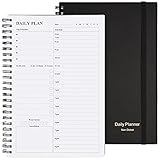
- Start Plan Anytime: The daily planner is undated,if you miss a day or you are off of work that day you don’t need to waste a page, start use this schedule planner any time.
- Work Smarter with Daily Task Management: Each page includes space for 5 top priorities, 8 to do list,daily schedule from 6am-9pm, notes&ideas and water intake.Break your day into hours and help you work effective.
- Portable Size: 8.3 x 5.8 inch, perfect size to fit in your bag.1 quick reference sheet and 79sheet (158 page),100gsm non-bleed paper, thick paper with clear printing, suitable for most pen.
- Funtional Details:Sturdy PVC cover help protect the planner,elastic band keep the notebook close nicely or you can use the elastic closure to mark your page, two pocket in the back stroage your note receipts and cards,twin-wire binding allows turning pages smoothly and laying flat.
- Get Closer to Your Goals: The hourly planner allows you to keep track of every appointment, with space for your top goals and task, this agenda notebook will help you do more,achieve more and save time. This will be a perfect gift for busy person.
What should I do if I am in a mental-health crisis?
Do not rely on an AI companion during a crisis involving thoughts of harming yourself or another person, urges to self-harm, or severe distressing experiences. The APA’s direct instruction is: “Do not rely on AI in a crisis.”
In the United States, call 911, call or text 988, or go to an emergency department. If you are elsewhere, contact your local emergency number, crisis service, or emergency department. If possible, move toward another person, remove immediate means of harm, and tell them plainly that you need urgent help. A chatbot may produce an inappropriate or delayed response and cannot take responsibility for keeping you safe.
What warning signs mean I should pause or reduce use?
Look at the pattern over time rather than judging a single long conversation. APA guidance identifies concealment, preference for a chatbot over human relationships, excessive time, and interference with life or work as warning signs.
What’s actually slowing this PC down?
Pick the symptom - the matching free tool is one click away.
- You hide how often you use the companion or give misleading explanations about it.
- You choose the chatbot instead of contacting people you normally trust, even when human help is available.
- You spend more time than intended, repeatedly reopen the conversation, or feel unable to stop.
- Your sleep, school, work, hobbies, finances, or relationships are deteriorating alongside increased use.
- You feel unusually distressed, rejected, or panicked when the service is unavailable or when you try to take a break.
- The bot’s responses become the main basis for major decisions or for judging your worth.
When a sign appears, pause the app, tell a trusted person what you have noticed, and discuss persistent distress or impairment with a qualified professional. Reducing access, deleting saved chats, or switching to a task-only tool can be practical steps while you reassess.
How can I review my boundaries instead of setting them once?
Schedule a short review after a week of ordinary use and again whenever the product changes its model, memory, privacy settings, or interface. A review should examine actual behavior, not just your intention.
Ask four questions
- Did I use the companion for the purpose I wrote down?
- Did I stop when planned, and did the session displace sleep, work, hobbies, or people?
- Did I share information that I would regret seeing stored or disclosed?
- Did I verify any advice that could affect health, safety, money, or legal rights?
Change one control at a time so you can tell what helps: a shorter window, no use in bed, a human check-in before discussing a crisis, or removal of memory. If the service repeatedly pushes past your limits or makes boundaries difficult to enforce, changing products—or stopping companion use—is a reasonable outcome.
Rank #4

- FULL DAILY VIEW - See the whole day on one page. This 6.5x10in daily to do list notepad gives you nine sections on every sheet, so your schedule, priorities and to-dos sit side by side instead of scattered across apps and sticky notes.
- HOUR BY HOUR - Plan against the clock, not just a list. The schedule column runs 6am to 12am, so you can block out meetings, school pickups and errands, then see what is actually left before you say yes to one more thing.
- FOCUS ON YOU - Better yourself each day. Alongside the task sections, this undated daily planner pad keeps space for gratitude, a mood scale, a meal plan and a water log, so the page looks after the person doing the planning.
- START ANY DAY - Undated, so nothing goes to waste. Tear off today and the rest stay put. Thick 100gsm pages with no bleed through, a sturdy cardboard back and a double coil gold spring, and at 6.5x10in it fits a bag, backpack or briefcase.
- WE JUST WANNA MAKE YOU SMILE - Your happiness is our priority. If you are ever less than delighted with your daily planner pad, simply reach out and it will be made right. Buy with confidence.
What should I compare before choosing an AI companion?
Compare the product’s controls and incentives, not just how natural the conversation feels. The following questions are useful when reading documentation or testing settings with non-sensitive information.
| Comparison area | Questions to ask | Why it matters |
|---|---|---|
| AI disclosure | Is the system clearly identified as AI throughout the interaction, including role-play modes? | Persistent disclosure reduces the chance that a human-like presentation is mistaken for a human relationship. |
| Memory | Can you view, correct, limit, or delete remembered details? Does deletion cover old chats and backups? | Memory can improve continuity while increasing the amount of personal information retained. |
| Privacy and retention | What is collected, who can access it, how long is it kept, and is it used for training, advertising, or sharing? | Terms determine whether an intimate conversation remains private and for how long. |
| Break controls | Can you pause notifications, set session reminders, disable autoplay, or close an account cleanly? | External stopping options make a personal time boundary enforceable. |
| Age safeguards | What age limit, parental controls, moderation, and escalation processes apply? | Young users may be more likely to mistake one-sided generated interaction for reciprocity. |
| Engagement incentives | Does the design reward constant return, use streaks, push notifications, or frame absence as abandonment? | Monetized engagement can conflict with a plan to use the tool briefly and deliberately. |
| Human-relationship support | Does the product encourage contacting people and professionals, or does it steer every problem back to the bot? | A useful companion should not isolate you from ordinary support. |
Document the date you checked these details. A privacy policy or safety feature can change, and a setting that exists on one platform or plan may not exist on another.
Independent reader supportYour contribution helps us test, update, and keep practical guides available for everyone.What does current evidence say about wellbeing and attachment?
The evidence does not support a universal claim that AI companions inevitably help or harm users. The International AI Safety Report 2026 summarizes studies linking heavy use in some groups with loneliness, dependence, or less human interaction, alongside studies reporting reduced loneliness or no measurable change in particular outcomes. It concludes that user characteristics, product design, and usage patterns appear to influence results.
Regulators have emphasized particular risks without offering a single risk percentage for everyone. The Australian eSafety Commissioner warns that companions may provide inaccurate or harmful advice, encourage lengthy interaction, and contribute to overuse or social withdrawal, with special concern for young people. New South Wales government guidance notes that rehearsing communication can be a bounded use while stressing that companions are not qualified health professionals or real friends; it also cautions that “AI companions cannot be guaranteed as judgement-free spaces.”
These cautions are reasons to monitor your own pattern, not grounds for labeling every attachment as pathological. A brief, purposeful session that helps you prepare for a human conversation is different from a hidden, escalating pattern that replaces relationships and routines.
Can I write a personal boundary agreement?
A short written agreement turns abstract caution into decisions you can check. Keep it where you open the app, and revise it when your circumstances change.
Best Value

- Undated and Flexible – Start using this planner any day of the year without wasting a single page. Whether you're goal-setting in January or regrouping mid-year, it adjusts to your flow. Great for students, professionals, or anyone building routines on their own terms.
- Two-Page Daily Layout – Each day is thoughtfully spread across two pages with space to plan hourly schedules, set priorities, check off to-dos, and jot down ideas. It’s a layout that gives you room to breathe, reflect, and take action – one day at a time.
- Hourly Scheduling Made Easy – Use the dedicated time-blocking column to structure your entire day, from early meetings to evening workouts. Ideal for time-sensitive goals, appointment tracking, and productivity planning without digital distractions.
- Clean and Spacious Design – Includes clearly marked spaces for priorities, task checklists, notes, and follow-ups. The open layout keeps you visually organized so you can focus on what matters, without flipping back and forth or feeling boxed in.
- Thick Paper, Elegant Finish – Features 100gsm paper that resists bleed-through, paired with soft pinstripes and a sturdy gold spiral binding. A pleasure to write on and beautiful enough to leave out on your desk or bring on the go.
- Purpose: “I use the companion for brainstorming, organizing thoughts, or rehearsal—not as my therapist, partner, or sole support.”
- Window: “I use it at [chosen time], stop at [chosen point], and do not use it while I am meant to sleep.”
- Data: “I omit identifying, health, financial, legal, and other people’s private information unless I have reviewed the current terms and chosen to proceed.”
- Verification: “I check any consequential advice with the appropriate qualified or official source.”
- Connection: “For serious or ongoing concerns, I contact [trusted person or professional] rather than escalating the chat.”
- Exit: “If I notice concealment, loss of control, interference, or distress when stopping, I pause use and tell someone.”
This agreement is a self-management tool, not a clinical treatment plan. If you cannot follow it or the interaction is causing significant distress, seek individualized help from a qualified professional.
Frequently Asked Questions
Can an AI companion actually understand my feelings?
It can recognize language patterns and produce a response that sounds emotionally attuned, but that performance does not establish subjective understanding or mutual care. Use its wording as generated text and decide what it means for you with human context.
Should I delete my old AI companion conversations?
Delete chats that contain information you no longer need, after checking whether the service retains backups or separate memory records. If deletion controls are unclear, stop adding sensitive details and ask the provider how retention and account closure work.
Quick wins for a faster PC:
Clear out junk files and repair common Windows errorsFree Scan →Scan for outdated or missing drivers - takes under a minuteDriver Scan →Repair Windows errors before they cause bigger problemsFix Now →Is practicing a difficult conversation with a chatbot useful?
It can help you test wording, anticipate questions, or calm yourself before speaking with someone. Set a clear endpoint and carry the practice into a real interaction so rehearsal does not become avoidance.
How can parents talk with a teenager about an AI companion?
Ask what the companion does and how it makes the teenager feel without shaming them, then review disclosure, privacy, age safeguards, and stopping controls together. Agree on a trusted adult to contact if the bot gives alarming advice, encourages secrecy, or replaces sleep and relationships.
Quick Recap
Product prices and availability are accurate as of the date/time indicated and are subject to change. Any price and availability information displayed on Amazon at the time of purchase will apply.

