
Free tools Windows power users keep installed
One-click scans. No signup required.
iTechGuides is reader-supported. When you buy through links on our site, we may earn an affiliate commission. As an Amazon Associate I earn from qualifying purchases. Learn more
To connect a retro computer to a modern TV or monitor, first identify the video signal the computer outputs—RF, composite, S-Video, RGB/SCART, VGA, or another format—then choose a cable and converter that accept that signal and produce an input your display supports. There is no universal adapter: a connector’s shape alone does not tell you which signal it carries.
Identify the computer’s video output first
Check the computer’s manual and inspect its video port before buying anything. Similar-looking sockets can carry different signals or use different pin assignments, and some computers need a model-specific cable to expose the video signal. The relevant path is the signal from the computer, through any required cable or converter, to an input and timing the display accepts.
- RF (aerial or coax): Some older computers output RF. Connecting one to a modern digital display can require RF demodulation before video conversion. Of the routes discussed here, RF is the lowest-quality option in the overview from Retro Compute.
- Composite: Often carried by a yellow RCA connector or a computer-specific cable. A composite-to-HDMI converter is suitable only if the computer actually outputs composite video.
- S-Video: Carries brightness and color separately, unlike composite. Confirm that both the computer-side cable and converter support S-Video.
- RGB/SCART: RGB can provide a cleaner signal than composite, but the computer may need an RGB cable. The converter must accept RGB; a SCART socket alone does not prove that it does.
- VGA or another monitor output: Check the computer’s output timing and the converter’s supported modes. RetroTINK lists VGA among input categories across its processor range, but support varies by model and timing. See its product information.
If the TV or monitor has a matching input and supports the computer’s signal timing, you may be able to connect directly. If the display only accepts HDMI, choose an analog-to-HDMI converter or scaler that accepts the computer’s actual signal.
Choose the conversion route that matches the signal
RF output
Do not treat an RF-to-HDMI lead as an ordinary video cable. RF must first be tuned or demodulated into a video signal, and the resulting signal must then be converted to an input the display accepts. Confirm that every device in the chain supports the computer’s region-specific output.
Popular on Amazon
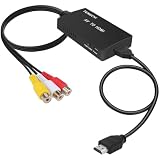
- RCA Female to HDMI Video Converters Adapter : The cable is used to convert analog composite input to HDMI 1080p output, displayed on a 1080p HD TV/TV/monitor.
- Input ports: 1xRCA Female (Yellow, White, Red), Output ports: 1xHDMI 1.3 1080p. NOT support 3D and 4K, NOT support HDMI Converts to AV
- AV to HDMI Converter: Plug and Play, Easy to Install and Operate, Powered by External USB Cable. Note: Please hook up the USB power cable (included) to 5V 1Apower source during use (not included power supply ).
- Support PAL, NTSC3.58, NTSC4.43, SECAM, PAL/M, PAL/N standard TV formats input. For PS2,PS3,Xbox,N64,STB, VHS, VCR, DVD Players and other devices with standard composite AV input.
- You Will Get : 1x RCA Female TO HDMI Converter, 1xHDMI cable, 1xUSB cable, 1xUser Manual. ONE YEAR WARRANTY - if you are not satisfied for any reason whatsoever, do not hesitate to contact us .
Composite or S-Video output
A basic composite-to-HDMI converter can be a straightforward option for a compatible composite source. It will not thereby accept S-Video, RGB, VGA, or RF. Converter quality varies, and the available evidence does not establish a universal model recommendation or independently measured performance. Check the converter’s exact inputs before purchase.
RGB/SCART output
For RGB, verify both halves of the connection: the computer needs the correct RGB cable if its port does not provide a ready-to-use lead, and the converter must accept RGB. A product described as “SCART to HDMI” may not accept RGB simply because it has a SCART connector. Retro Compute’s overview discusses RGB/SCART and machine-specific cable needs, but it is not a complete compatibility database: How to Connect a Retro Computer to a Modern TV.
Also popular on Amazon

- COMPACT DESIGN - The compact-designed portable Benfei HDMI to VGA adapter connects a computer, desktop, laptop, or other devices with HDMI port to a monitor, projector, HDTV, or other devices with VGA port; Tuck this lightweight gadget into your bag to do a business presentation with your laptop and projector, or extend your desktop screen to a monitor or TV;
- INCREDIBLE PERFORMANCE - The HDMI male to VGA Male cable supports resolutions up to 1920x1080@60Hz (1080p Full HD) including 720p, 1600x1200, 1280x1024 for high definition monitors or projectors; Gold plated HDMI connector resists corrosion and abrasion and improve the signal transmission performance; Molded strain relief increases cable durability
- 18 MONTH WARRANTY - Exclusive Benfei Unconditional 18-month Warranty ensures long-time satisfaction of your purchase; Friendly and easy-to-reach customer service to solve your problems timely
An RGB-focused scaler such as the OSSC is one possible route for compatible RGB sources, not a default choice for every retro computer. Confirm the source and scaler requirements before selecting one.
Do these 3 things before closing this tab:
1Scan for outdated or missing drivers - takes under a minute2Clear out junk files and repair common Windows errors3Fix the driver behind crashes, sound loss and screen glitchesVGA or other monitor output
Match the computer’s output mode to the scaler’s supported resolution, refresh rate, and scan mode. A product range listing VGA as an input category does not mean every model accepts every VGA timing.
Also popular on Amazon

- COMPACT DESIGN - The compact-designed portable Benfei HDMI to VGA adapter connects a computer, desktop, laptop, or other devices with HDMI port to a monitor, projector, HDTV, or other devices with VGA port; Tuck this lightweight gadget into your bag or pocket to do a business presentation with your laptop and projector, or extend your desktop screen to a monitor or TV; A VGA cable is required.
- SUPERIOR STABILITY - Built-in advanced IC chip converts HDMI digital signal to VGA analog signal; It is NOT a bi-directional converter and cannot transmit signals from VGA to HDMI
- INCREDIBLE PERFORMANCE - The HDMI male to VGA female converter supports resolutions up to 1920x1080@60Hz (1080p Full HD) including 720p, 1600x1200, 1280x1024 for high definition monitors or projectors; Gold plated HDMI connector resists corrosion and abrasion and improve the signal transmission performance; Molded strain relief increases cable durability
- BROAD COMPATIBILITY - The HDMI-VGA adapter is compatible with computer, pc, desktop, laptop, ultrabook, notebook, Chromebook, Raspberry Pi, Intel Nuc, Roku, PS3, Xbox One, Xbox 360, Wii U, Set Top Box, TV BOX, or other devices with HDMI port; NOT compatible with Blu-ray player and devices with low-power HDMI ports such as SONY PS4, Apple MacBook Pro with Retina Display, Mac mini, and Apple TV
- 18 MONTH WARRANTY - Exclusive Benfei Unconditional 18-month Warranty ensures long-time satisfaction of your purchase; Friendly and easy-to-reach customer service to solve your problems timely
Dedicated processors and scalers
Dedicated devices can offer several input types and more processing options than a basic converter. RetroTINK’s product information lists categories including SCART, VGA, composite, S-Video, component, and digital sources across its processor range. Inputs and features differ by model, so check the manual for the exact unit and its supported timings: RetroTINK product information.
Check the whole connection chain before buying
| Check | What to confirm |
|---|---|
| Source signal | Does the computer output composite, S-Video, RGB/SCART, VGA, RF, or another format? |
| Computer-side cable | Does the computer need a model-specific video cable, breakout, or RF connection? |
| Converter input | Does the exact converter accept the computer’s signal—not merely a connector with a familiar shape? |
| Display input | Does the converter output HDMI or another format the TV or monitor accepts? |
| Timing and scan mode | Does the full chain support the computer’s resolution, refresh rate, scan mode, and region-specific format? |
| Picture priorities | Is basic usability sufficient, or do you need a scaler with more image-processing controls? |
| Unusual or interlaced modes | Does the manual explicitly cover the mode and any sync-handling requirements? |
As an example of why the timing check matters, a RetroTINK 5X firmware record warns that certain downscaling options are experimental and that third-party HDMI-to-analog adapters are not guaranteed to work; it also notes sync handling considerations for 480i. This is a device-specific caveat, not a claim about every converter. Consult the RetroTINK 5X firmware update log and the current manual for the unit you are considering.
Also popular on Amazon

- 【Enhance Your Gaming Experience】This product includes a N64 HDMI adapter converter, HDMI cable, and USB cable to bring your old-school games into the modern gaming world. Note: Depending on the TV device, this HDMI cable cannot increase the screen resolution.
- 【Enjoy High-Quality Graphics】RuntoGOL HDMI converter compatible with Gamecube/N64/SNES/SFC, which supports 1080P/720P aspect ratio output switch, allowing you to fully experience the stunning graphics of your classic games.
- 【Easy to Use】Simply plug and play with our HDMI adapter to instantly upgrade your gaming setup, no driver is needed. Note: Only for N64, NGC, SNES, SFC.
- 【Versatile Compatibility】The N64/NGC/SNES/SFC compatible design allows you to connect your favorite classic game consoles using this N64 to HDMI adapter.
- 【Multiple Uses】With the GameCube HDMI converter, this set is complete for gaming or streaming your favorite vintage games on any HDMI-equipped device. Don't miss out on this must-have Gamecube adapter/N64 HDMI converter set!
Troubleshoot a missing or poor picture
- No picture: Check that the source signal matches the converter input, the computer-side cable is correct, the converter is powered, and the display is set to the input receiving its output.
- Monochrome or distorted color: Recheck cable wiring, signal type, region, and format compatibility. A matching physical connector is not proof of a matching video signal.
- Unstable image or unsupported-mode message: Look up the computer’s exact output timing and scan mode in the manuals for the converter and display. Interlaced or unusual signals may need specific sync support.
- SCART connection does not work as expected: Confirm that the computer outputs RGB and that the converter accepts RGB. SCART may carry different signal types.
Change one part of the chain at a time—such as the selected input, cable, or converter—so you can identify the mismatch. For model-specific wiring or signal details, use documentation for the exact computer revision rather than assuming that another machine with a similar connector works the same way.
Confirm your exact computer and display before ordering
Write down the computer’s model and revision, its video output, any required cable, and the TV or monitor’s available inputs. Then check the converter manual for the source signal and timing it accepts. If those details are uncertain, identify them before choosing an adapter; the right recommendation depends on the complete setup.
Quick Recap
Also popular on Amazon
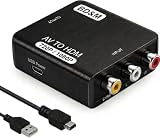
- Convert RCA to HDMI Instantly – BD&M RCA to HDMI Converter easily converts analog RCA/composite AV signals to HDMI output, allowing you to connect older devices to modern HDTVs, monitors, and projectors with clear video and audio quality.
- Wide Device Compatibility – Supports VHS players, VCRs, DVD players, camcorders, retro gaming consoles, and more including PS1, PS2, PS3, Xbox, N64, Wii, and older AV devices with standard RCA output.
- 1080P HDMI Output – Advanced signal processing delivers stable and sharp video output with support for 720P/1080P HDMI resolution, improving compatibility with modern TVs and displays.
- Plug & Play Setup – No drivers or software required. Simply connect the RCA cables, HDMI cable, and included USB power cable for quick and easy installation in minutes.
- Compact & Reliable Design – Lightweight mini converter design makes it perfect for home entertainment setups, retro gaming, travel, or converting old media collections while maintaining stable performance.

