
What’s actually slowing this PC down?
Pick the symptom - the matching free tool is one click away.
iTechGuides is reader-supported. When you buy through links on our site, we may earn an affiliate commission. As an Amazon Associate I earn from qualifying purchases. Learn more
The safest all-purpose choice is a 3.1-channel soundbar with a dedicated center channel and subwoofer. The center channel anchors speech, while the subwoofer supplies film impact without requiring separate front speakers. Choose 5.1 if you specifically want physical rear-channel effects. Choose an Atmos model with upward-firing drivers and, ideally, rear speakers when immersive movie sound is the priority and your room and TV can support it. For music, judge balanced left/right sound and the streaming connections you will use rather than buying on an Atmos badge alone.
Your decision also depends on HDMI ARC or eARC support, the bar’s height and width, whether the TV stand or wall can accommodate it, and whether you can return it if your room makes dialogue or bass sound different from expectations.
What should you decide before comparing soundbars?
Start with one primary use. A bar designed around a center channel and controlled vocal output solves a different problem from a movie system designed to create sound behind and above you. Listing every feature first makes it easy to pay for capabilities your room cannot use.
- Dialogue first: shortlist 3.1 models with a real center channel, a speech-enhancement control and placement that keeps the bar close to the screen’s centerline.
- Music first: prioritize even left/right presentation, useful Bluetooth or Wi-Fi streaming and sound-quality performance at normal listening levels. Treat surround and height processing as optional effects.
- Movies first: look for a capable subwoofer, physical rear speakers and upward-firing height drivers if the room has a suitable ceiling and open reflection path.
- Mixed use: begin with 3.1 and add rear speakers later only if the model supports them. This avoids buying a large surround package before you know what your room needs.
There is no published wattage or room-size formula that reliably predicts dialogue or music quality. Consumer Reports describes configurations and recommends checking placement, connections, sound-quality ratings and return policies rather than treating a single specification as a guarantee.
#1 Best Overall

- FULL, BALANCED SOUND WITH A SUBWOOFER INCLUDED: Immerse yourself in your favorite content with perfectly balanced sound and rich bass from the built-in woofer.
- ONE REMOTE. TOTAL CONTROL: Use your Samsung TV remote to control key soundbar functions, including power, volume and sound effects.
- EXPANDS YOUR LISTENING ZONE SO YOU CAN FEEL THE SOUND ALL AROUND YOU: Experience immersive sound that fills the room. Clear audio is projected in all directions so you can feel the action from every angle.
- SEAMLESSLY CONNECTS TO YOUR TV: Connects to your TV without cable clutter. Just pair and play your favorite content.
- PICK UP EVERY PIECE OF DIALOGUE: Hear voices more clearly with dialogue automatically amplified so you don't miss a word.
How do 2.0, 2.1, 3.1, 5.1 and Atmos layouts differ?
The first number identifies main speaker channels, the number after the dot identifies a subwoofer channel, and an additional height designation indicates overhead effects. Sony’s channel table uses the following meanings:
| Layout | What is included | What you hear best | Who should choose it |
|---|---|---|---|
| 2.0 | Left and right speakers in the bar | Basic stereo TV and music | Small setups where simplicity matters more than bass or centered speech |
| 2.1 | Left and right speakers plus a subwoofer | Wider stereo and deeper low frequencies | Viewers who want more film impact but do not need a dedicated dialogue channel |
| 3.1 | Left, center and right speakers plus a subwoofer | Centered dialogue, front movie effects and bass | The strongest general starting point for dialogue-heavy television and mixed use |
| 5.1 | Left, center and right speakers, a subwoofer and two rear channels | Directional effects that move around the room | Movie viewers who can place physical rear speakers |
| Atmos system | Usually a multichannel bar with upward-firing drivers and/or rear speakers | Height and three-dimensional effects in supported content | Movie enthusiasts with compatible equipment, content and a room that supports reflected sound |
Why the center channel matters
Dolby states that “Center speakers are primarily used to deliver dialog.” A center driver lets the soundbar place voices in the middle of the picture instead of sharing them between the left and right channels. Consumer Reports likewise says that models with three speakers in the main enclosure typically include a center channel, which can enhance dialogue intelligibility in television shows and movies.
What the other channels do
Left and right speakers carry most music and front movie effects. Surround channels create directional sounds such as movement behind or beside you. Height speakers add elevation cues, while the subwoofer handles low-frequency information; its position can be more flexible than the bar’s position, although the room still changes how bass sounds.
Recommended Free Tools
Which soundbar is best for clear dialogue?
For consistently intelligible speech, choose a 3.1 model with a dedicated center channel, then verify that the bar offers a speech or voice-enhancement adjustment. A center channel is a useful design advantage, not a guarantee: placement, room reflections, the television mix and the bar’s tuning still determine whether voices sound natural.
Check these dialogue features
- Real center channel: confirm that “3.1” describes separate left, center and right speaker paths rather than a virtual mode applied to a 2.1 bar.
- Speech control: a dialogue or voice mode can raise vocal frequencies or level. It should be adjustable, because maximum enhancement may make voices thin or harsh.
- Night or dynamic-range mode: useful when late-night listening must keep loud effects from jumping far above speech. Use it as a listening option, not as proof of better daytime fidelity.
- Screen alignment: keep the bar centered under or immediately below the television. If it is far to one side, voices can appear detached from the speaker’s face.
Use placement to preserve intelligibility
Measure the bar’s height before buying. A tall enclosure can block the bottom edge of the picture or the television’s remote sensor when it sits on a stand. Wall-mounted bars need enough clearance for the TV’s lower edge and a cable route that does not pull the bar out of alignment.
Do not infer dialogue performance from channel count alone. The cited sources provide no universal score, wattage threshold or room-size number that predicts speech quality. A retailer with a practical return policy is valuable because a reflective room, open floor plan or low-quality television output can make two similarly rated bars sound different.
How should you choose a soundbar for music?
Music exposes tonal imbalance more readily than ordinary television. Select a bar with a balanced left/right presentation, a subwoofer that can be blended rather than simply turned up, and the streaming inputs you already use. Dolby identifies the left and right speakers as the main sources for music, so do not let an Atmos logo substitute for a good stereo presentation.
Evaluate music connections
- Bluetooth: convenient for a phone or tablet and normally the simplest connection to test immediately.
- Wi-Fi or network streaming: useful when you want the bar to remain on your home network or use a supported streaming platform without keeping a phone connected.
- TV-app playback: check whether music played through the television reaches the bar in the format you expect.
Use familiar recordings with vocals, acoustic instruments and dense bass. Listen at both quiet and moderate levels. Vocals should remain centered without a piercing treble boost; bass should add foundation without masking the kick drum or lower voices. Compare the manufacturer’s music or standard mode with any surround mode. Surround processing can be enjoyable for live recordings, but restrained processing usually gives a more predictable stereo image.
Rank #2

- Fire TV Soundbar Plus – Elevate your audio with an all-in-one 3.1 soundbar that’s easy to set up. Featuring built-in bass, crisp dialogue, Dolby Atmos, and DTS:X.
- Powerful sound with style – Take your entertainment to the next level with incredible sound, clarity, and depth packed into an all-in-one design.
- Crystal clear dialogue – A dedicated center dialogue channel sharpens conversations so you can catch every moment of your favorite shows.
- Sound in another dimension – Dolby Atmos features 3D sound that moves around you and clear dialogue. DTS:X delivers multi-dimensional audio for lifelike sound.
- Easy setup – Connect the included HDMI cable to your TV's HDMI eARC/ARC port and instantly enjoy audio that’s always in sync.
Decide whether you need the subwoofer
A 2.0 bar can be adequate for background music and a small room. A 2.1 or 3.1 system adds low-frequency extension that makes bass instruments and movie effects more physical. If the subwoofer is wireless, plan its power outlet and leave enough freedom to move it during setup; bass response changes substantially with distance from walls and corners.
Is Dolby Atmos worth it for movies?
Atmos is worth considering when immersive film sound is a priority, you have compatible content and the room allows height effects to reach you. It is not automatically worth paying more for a bar that only applies virtual processing or lacks the physical drivers and speakers needed for convincing elevation.
What creates an Atmos effect?
Upward-firing drivers bounce sound from the ceiling, while dedicated height speakers or rear modules can place effects above and behind the seating area. Physical rear speakers also improve ordinary 5.1 surround because they deliver directional information from behind rather than synthesizing it in the front bar.
Check the room before buying
- A reasonably unobstructed ceiling path helps upward-firing drivers reflect sound toward the listening position.
- Very high, angled, heavily absorbent or open ceilings can weaken reflected height cues.
- Furniture, wall recesses and seating position affect whether rear speakers can be placed symmetrically.
- The bar must receive an Atmos-capable signal from the TV or a connected source; the badge on the enclosure does not create missing audio data.
Manufacturers often list recommended minimum TV sizes for particular bars. Samsung’s current guide is an example of that practice, but those pairings are compatibility examples, not a universal rule. Your actual stand width, viewing distance and room geometry matter more than a generic screen-size pairing.
Do you need a subwoofer or rear speakers?
Buy the components that solve your main limitation. A subwoofer is the most direct upgrade for thin bass; rear speakers are the most direct upgrade for sounds that should come from behind.
| If you want… | Prioritize… | Accept the trade-off |
|---|---|---|
| Clearer speech | 3.1 center channel and dialogue control | Less enveloping surround than a full rear-speaker package |
| More cinematic impact | Subwoofer with adjustable level and crossover behavior | Extra floor space, a power outlet and possible bass peaks |
| Sounds behind you | Physical rear speakers, preferably included rather than optional | Speaker stands or wall mounting, cable or power planning and more setup |
| Height effects | Upward-firing drivers and/or dedicated height channels | Performance depends strongly on ceiling, seating and source format |
Check the package contents carefully. Some product names describe a bar that can add a subwoofer or rear speakers later, while others include those components in the box. If the hardware is optional, include its cost, placement and power requirements in your decision rather than assuming the bar alone provides the advertised layout.
Should you use HDMI ARC or eARC?
Use HDMI ARC when your TV and soundbar support the formats you need and you want a single cable for TV audio and remote-control functions. Choose eARC when you need the higher bandwidth required by uncompressed multichannel formats such as Dolby Atmos and DTS:X, provided that both devices expose compatible eARC ports.
The Tool Desk
Outbyte Driver Updater FREEFix the driver behind crashes, sound loss and screen glitchesFind Drivers →Outbyte PC Repair FREERepair Windows errors before they cause bigger problemsFix Now →| Connection | What it carries | When it is enough | What to verify |
|---|---|---|---|
| HDMI ARC | Standard audio formats over one HDMI connection | Most television apps and systems that do not require higher-bandwidth, uncompressed multichannel audio | ARC labels on both TV and bar, plus supported pass-through for connected sources |
| HDMI eARC | Higher-bandwidth audio, including uncompressed multichannel formats such as Dolby Atmos and DTS:X | Atmos or other high-bandwidth formats from a compatible TV or source | eARC on both devices, appropriate cable and pass-through support |
| Optical | Digital TV audio when HDMI return audio is unavailable | Older TVs or simple stereo and standard surround setups | Format limits and whether the bar loses advanced Atmos or control features |
| HDMI input on the bar | Audio and video from a connected player or console, depending on pass-through | When the TV lacks the required return-audio capability or you need the bar to handle a source | 4K HDR pass-through and console refresh-rate requirements |
Crutchfield explains that ARC carries standard formats while eARC provides more bandwidth for uncompressed multichannel audio. Confirm the exact port labels on the television and bar; an HDMI socket is not automatically ARC or eARC. Also check whether a connected game console, disc player or streaming box passes 4K HDR and the refresh rate you use. Routing every source through the bar can simplify audio but may create a video pass-through limitation if the bar does not support that signal.
Rank #3
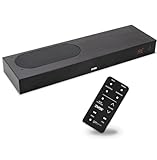
- CLEAR DIALOGUE TECHNOLOGY: Hear every word effortlessly with our sound bar for TV, featuring patented technology that separates and enhances voices, eliminating background noise. Enjoy seamless understanding, even in busy audio environments, for a frustration-free experience.
- CUSTOMIZABLE VOICE CLARITY: Tailor your listening experience with twenty AccuVoice settings, allowing you to fine-tune voice clarity for your needs. Enjoy clear dialogue from your sound bar, making every conversation crisp and easy to understand on your TV.
- RICH BASS: A powerful amplifier and dual built-in woofers deliver wide range sound, including rich bass – from a cabinet less than 2” high. Enhance your viewing experience with balanced audio that brings every beat and explosion to life.
- CONSISTENT VOLUME CONTROL: Say goodbye to jarring volume spikes with our Output Leveling feature, which instantly reduces the impact of loud commercials. Enjoy smooth, balanced audio levels for a more comfortable and uninterrupted listening experience.
- IMMERSIVE 3D SOUND EXPERIENCE: With PhaseCue virtual surround technology, enjoy room-filling 3D audio from a compact sound bar. Transform your space with rich, expansive sound that brings movies and music to life, all from one small, powerful cabinet.
How do you check physical fit and TV compatibility?
Measure before reading feature lists. A soundbar that cannot sit securely in front of the television, fit between the stand legs or clear the remote sensor is the wrong model regardless of its channel count.
- Measure the stand or wall: record usable width, depth and the maximum height below the picture.
- Check the TV legs: some stands leave little room for a wide bar, while others place the screen low enough that a tall bar blocks it.
- Locate the remote sensor: make sure the bar does not obscure the sensor or the television’s lower edge.
- Plan cable paths: include power, HDMI, optical and any rear-speaker cables. Wall mounting may require a longer route and a suitable bracket.
- Confirm expansion: read the model’s specification for compatible subwoofers or rear speakers; wireless does not mean universally interchangeable.
- Check TV audio settings: identify whether the television offers ARC, eARC, optical output and pass-through controls before you buy.
Do not use a manufacturer’s minimum-TV-size table as a substitute for measurements. Such tables illustrate intended pairings, but stand geometry and remote-sensor position vary between televisions of the same diagonal size.
How do you connect and set up a soundbar?
Set up the system in this order so that you can isolate a connection problem from a placement or tuning problem.
- Place the bar: center it with the screen, keep the front unobstructed and avoid pushing it deep into a cabinet. If it is wall-mounted, leave the clearance specified by the manufacturer and keep it level.
- Connect the TV: plug the soundbar’s HDMI ARC or eARC port into the television’s matching port. Use optical only when HDMI return audio is unavailable or its format limits are acceptable.
- Connect sources: attach a player or console to the TV or to an HDMI input on the bar according to your pass-through needs. Check 4K HDR and refresh-rate support before routing a console through the bar.
- Enable TV audio return: select the television’s external-speaker or HDMI audio-output setting and enable ARC or eARC where required. Set digital audio output to a compatible pass-through or bitstream option when the bar is intended to decode the format.
- Pair included components: connect the subwoofer and rear speakers to power, follow the model’s pairing process and place rears to the sides or slightly behind the seating position.
- Run calibration: use the bar’s room-calibration routine if supplied. It can account for distance and level, but it cannot fix a blocked bar, an unsuitable ceiling or a badly placed subwoofer.
- Set dialogue and bass: begin with neutral sound, then raise speech enhancement only until words are clear. Set subwoofer level so bass supports, rather than covers, voices and music.
- Test several sources: play a dialogue-heavy show, a film with surround effects and familiar music. Confirm that the TV remote changes volume and that switching inputs does not drop audio.
What to do if audio is missing
- Recheck that the cable is in the TV’s ARC/eARC-labeled socket, not an ordinary HDMI input.
- Confirm the bar is set to the correct HDMI or optical input and that the television is outputting to external speakers.
- Temporarily select a basic PCM or standard Dolby output to determine whether a format mismatch is the cause.
- Power-cycle the TV and bar after changing ARC or eARC settings; some devices only renegotiate the connection during startup.
What to do if voices and pictures do not match
Use the soundbar or television’s lip-sync adjustment in small increments. If the delay changes with only one source, inspect that source’s audio-processing or pass-through setting instead of applying a large global correction.
What specifications deserve the most attention?
Read specifications in the order they affect your use, not in the order manufacturers print them.
| Specification | Why it matters | Questions to ask |
|---|---|---|
| Channel layout | Determines whether speech is anchored, bass is extended and surround is physical | Is the center channel real? Are rear speakers and the subwoofer included? |
| Audio modes | Changes speech prominence, dynamic range and music processing | Can dialogue enhancement and night mode be adjusted or disabled? |
| HDMI ARC/eARC | Controls TV integration and advanced audio formats | Which port is labeled ARC or eARC, and what pass-through formats are supported? |
| Streaming connectivity | Determines how conveniently you can play music | Does it support the Bluetooth or Wi-Fi method you actually use? |
| Physical dimensions | Affects screen clearance, stand fit and wall placement | What are the bar height, width, depth and cable-clearance requirements? |
| Expansion | Determines whether you can add immersion later | Are compatible rear speakers or a subwoofer sold separately? |
Be skeptical of a large wattage number or a higher channel count presented without listening context. The cited guidance establishes no universal wattage rule, and more channels do not automatically produce clearer dialogue or better music.
Independent reader supportYour contribution helps us test, update, and keep practical guides available for everyone.What are the most common buying mistakes?
Buying on the Atmos label alone
An Atmos badge does not prove that a bar includes upward-firing drivers, rear speakers or the HDMI bandwidth needed by your source. Verify the physical hardware and the TV’s ARC/eARC path.
Do these 3 things before closing this tab:
1Fix the driver behind crashes, sound loss and screen glitches2Repair Windows errors before they cause bigger problems3Scan for outdated or missing drivers - takes under a minuteChoosing 2.1 when speech is the problem
A subwoofer adds bass but does not replace a dedicated center channel. If voices disappear into effects, move your shortlist to 3.1 before adding more low-frequency output.
Rank #4

- HEAR YOUR TV BETTER: Designed with simplicity in mind, the Bose TV Speaker is an all-in-one soundbar that clarifies speech and is a simple fix for better TV sound
- WIDE, NATURAL SOUND: 2 angled full-range drivers deliver a more realistic, spatial audio experience for overall better TV sound from a small soundbar
- ENHANCED DIALOGUE: This sound bar for smart tv is designed to specifically focus on clarifying and elevating vocals and pronunciation
- BLUETOOTH TV SPEAKER: Pair your device to this Bluetooth soundbar to wirelessly stream your favorite music and podcasts. Connect up to 3 devices through the inputs (HDMI, Optical in, and AUX in); the first powered on device will automatically connect
- SIMPLE SETUP: A single connection from this compact soundbar to the TV via an optical audio cable (included) or an HDMI cable (sold separately) has you up and running in minutes
Assuming virtual surround equals rear speakers
Virtual processing can widen the front image, but physical rear channels are the direct way to place effects behind you. Treat a simulated mode as a convenience, not an equivalent hardware layout.
Ignoring the television stand
Width, height, leg spacing and remote-sensor location can make an otherwise excellent bar unusable. Measure the installation area before comparing sound quality.
Routing a console through an incompatible bar
If the bar’s HDMI input cannot pass the console’s 4K HDR or refresh-rate signal, connect the console to the TV and return audio through ARC or eARC instead, if that path supports the required format.
PC Slower Than It Used to Be?
A free scan shows the junk files, broken settings and background clutter dragging Windows down - then fixes them in one click.Free scan · Windows 10 & 11Outdated Drivers Are Slowing You Down
One free scan finds every outdated or missing driver and matches the right update for your exact hardware.Free scan · exact hardware matchSkipping the return window
Room acoustics, ceiling shape and seating distance influence perceived bass, dialogue and height effects. A return policy lets you evaluate the actual installation rather than relying only on a specification sheet.
Which configuration fits each type of buyer?
| Your priority | Recommended starting point | Upgrade only when… |
|---|---|---|
| News, drama and spoken television | 3.1-channel bar with center channel and adjustable speech mode | You need more bass or want effects behind the seating position |
| Mixed television and films | 3.1 with a subwoofer and HDMI ARC/eARC | Your room can place rear speakers and you watch content mixed for surround |
| Blockbuster movies | 5.1 or Atmos package with included subwoofer and rear speakers | The ceiling and seating arrangement support reflected or dedicated height effects |
| Music and occasional TV | 2.0 or 2.1 bar with balanced stereo and your preferred streaming connection | You want centered speech or cinematic surround as a secondary use |
| Small or difficult room | Compact 3.1 or 2.1 selected by measurements, with modest processing | You can rearrange furniture or add speakers without blocking paths and sensors |
What is the final buying checklist?
- Have you ranked dialogue, music and movies instead of treating every feature as equally important?
- Does the channel layout match that ranking, and are optional speakers actually included?
- Have you measured the stand or wall, bar height, leg spacing, remote sensor and cable route?
- Does the TV have the required ARC or eARC port, and does pass-through support your players and console?
- Will the bar provide the Bluetooth or Wi-Fi streaming connection you use?
- For Atmos, do the hardware, source format, ceiling and seating position all support height effects?
- Can you return the system if the room produces boomy bass, weak dialogue or disappointing reflections?
For most households, a properly placed 3.1 soundbar with a center channel and subwoofer is the least-compromised starting point. Move to 5.1 for physical rear effects, or to a genuine Atmos package when immersive movies justify the extra speakers and your room can use them. For music, let balanced stereo performance and practical streaming connectivity decide the model rather than channel count alone.
Frequently Asked Questions
Can a soundbar replace a full AV receiver and speaker set?
It can simplify a living-room system by combining several speakers in one enclosure and adding optional components, but it does not offer the same placement freedom as separate speakers. Choose a bar when installation simplicity and a compact footprint matter more than individually positioned front, center, surround and height speakers.
Why does dialogue become worse after I enable a surround mode?
Some surround modes redistribute or process the front channels, which can move voices away from the center image or change their tonal balance. Switch back to the standard or movie mode, then add only as much speech enhancement as needed.
Can I place the subwoofer anywhere in the room?
Its placement is more flexible than the bar’s, but walls and corners can create uneven bass. Try a few locations near the front or side of the room and choose the position that gives even bass at the main seat without masking speech.
Do I need eARC for every Dolby Atmos soundbar?
No. The requirement depends on the TV, source and audio format being passed. ARC may be sufficient for some compressed formats, while eARC is needed for higher-bandwidth, uncompressed multichannel formats; verify support on both devices before buying.
Quick Recap
Product prices and availability are accurate as of the date/time indicated and are subject to change. Any price and availability information displayed on Amazon at the time of purchase will apply.

