
iTechGuides is reader-supported. When you buy through links on our site, we may earn an affiliate commission. As an Amazon Associate I earn from qualifying purchases. Learn more
The most complete built-in check is Windows 11’s battery report. Run powercfg /batteryreport from an elevated Command Prompt, open the generated HTML file, and compare Full Charge Capacity with Design Capacity. The report also shows recent usage, battery drain, capacity history, and life estimates. If the capacity ratio is low, runtime is poor, or the battery is swollen, use your laptop maker’s diagnostics and arrange a model-specific replacement.
| Option | What you need | Best for |
|---|---|---|
| Windows battery report | Windows 11 laptop, administrator Command Prompt, web browser | Cross-brand capacity, usage history, and runtime evidence |
| OEM diagnostics | Dell SupportAssist/BIOS/ePSA, HP Battery Check, or MSI Battery Master on supported models | Model-specific fault checks and service decisions |
How do I generate a battery report in Windows 11?
You need an administrator account and a few minutes of normal laptop use if you want meaningful recent-usage data. Microsoft’s battery guidance covers the built-in report and battery-care precautions.
- Open Start, type Command Prompt, right-click it, and select Run as administrator.
- Approve the User Account Control prompt.
- Enter
powercfg /batteryreportand press Enter. - Read the confirmation line. Windows reports the exact path where it saved the HTML file (commonly inside your user folder).
- Open File Explorer, browse to that path, and double-click the HTML file. It opens in your default browser.
Start with the report’s Installed batteries, Recent usage, and Battery usage sections. If you need a fresh snapshot, run the command again; the confirmation message gives the new file location.
Free tools Windows power users keep installed
One-click scans. No signup required.
Does the process differ between Windows 11 24H1 and earlier, and 24H2 and later?
No separate battery-health command is required. The same powercfg /batteryreport procedure applies to Windows 11 version 24H1 and earlier and to version 24H2 and later. Section names or the visual layout can vary slightly with Windows builds, but the capacity fields and usage-history concepts are the same.
Popular on Amazon

- Use for check LiPo LiFe Li-ion NiMH Nicd battery,the item is without the battery ,pls note it before you buying it .
- Cell Number: NiCd / NiMH (4 - 7 Cells), Lithium Type (2 - 7 Cells)
- Display Mode: Battery cell voltages, Total voltages, Lowest cell voltage, Highest cell voltage, Voltage gap between highest cell voltage and lowest cell voltage, Remaining battery capacity(%)
- Applies to check the batteries, simple and convenient to read your cell voltage
- Package included: 1pc x Lipo Battery Checker. Product Size: 8.4x5x1.6cm/3.35x1.97x0.63inch. Product Weight: 45g/0.09lb
Use the report generated by the laptop itself rather than assuming a desktop battery reading applies. Windows can create the report on a wide range of Windows 11 notebooks, while additional OEM screens depend on the manufacturer and model.
What do Design Capacity and Full Charge Capacity mean?
Design Capacity is the battery’s nominal energy capacity when new. Full Charge Capacity (also called Last Full Charge Capacity in ACPI terminology) is the system’s current estimate of how much energy the battery can hold when fully charged. ACPI defines these values, which may be displayed in mWh or mAh; the specification is documented by Intel’s ACPI power-interface specification.
Calculate an easy-to-read health ratio:
health percentage = (Full Charge Capacity / Design Capacity) × 100
Quick wins for a faster PC:
Clear out junk files and repair common Windows errorsFree Scan →Scan for outdated or missing drivers - takes under a minuteDriver Scan →Wear is the complementary calculation:
wear percentage = (Design Capacity − Full Charge Capacity) / Design Capacity × 100%
For example, MSI’s published example uses 51,368 mWh design capacity and 49,304 mWh full-charge capacity. That is about 96% remaining capacity, or 4% wear; the example appears in MSI’s battery-health guidance.
Also popular on Amazon
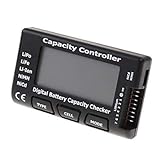
- High quality, safe and durable. Lightweight and compact with excellent performance
- Cell Number: NiCd / NiMH (4 - 7 Cells), Lithium Type (2 - 7 Cells)
- Display Mode: Battery cell voltages, Total voltages, Lowest cell voltage, Highest cell voltage, Voltage gap between highest cell voltage and lowest cell voltage, Remaining battery capacity(%)
- Applies to check the batteries, simple and convenient to read your cell voltage
- Use for LiPo LiFe Li-ion NiMH Nicd battery
A lower Full Charge Capacity means less stored energy than the battery’s nominal new condition. Do not treat one reading as a laboratory-grade score: compare it with the capacity history and your actual unplugged runtime.
How do I read each section of the report?
Installed batteries
This table identifies the battery and normally lists Design Capacity and Full Charge Capacity. It may also include a cycle count when the laptop’s hardware exposes one. Record the date, both capacities, and the units before comparing reports.
Recent usage
Recent usage is a timeline of recent battery and AC activity. It helps answer whether a short session was caused by heavy use, a rapid drop, sleep or connected-standby time, or a change in the power source. Look for unusually fast capacity loss between adjacent entries rather than focusing on a single percentage.
Battery usage
Battery usage breaks down discharge periods so you can connect a percentage drop with a time window. A large drain during video, gaming, compiling, or other sustained work can be normal; a similar drain while the laptop is idle points toward background activity, sleep behavior, or a failing pack.
Battery capacity history
Battery capacity history records Design Capacity and Full Charge Capacity over time. A gradual downward trend supports normal chemical aging. A sudden step change can follow calibration, firmware changes, temperature exposure, or a reporting correction, so check what happened on that date before ordering a battery.
Also popular on Amazon

- 【Multi Function USB Meter】 DROK USB Tester is equipped with adjustable backlight color LCD display screen, which can be switched between 3 display modes for monitoring 7 parameters. This multimeter can be used as voltage meter, amp meter, power meter, battery capacity tester, timer, internal resistance and battery level indicator at a time. Only 1 button to switch the display mode, simple and handy.
- 【Dual USB Output】 This battery monitor is equipped with USB A USB C input and USB A USB C output. Both output ports support USB 2.0 data communication, PD/QC and other fast charging protocols, which can be used for charging and data transfer. For devices without PD protocol support, if the tester does not display after connecting, please press and hold the "Ⅰ" key for over 5 seconds to trigger 5V voltage for use.
- 【Customizable BackLight】 Know your device's charging status at a glance with our intelligent multi-color backlight— blue by default, glowing orange during high-speed charging, switching to green when fully charged, plus 3 additional adjustable colors (purple, light blue, and yellow green) to personalize your preference.
- 【Easy to Use】 The multimeter has only 1 set button. Once you plug in the meter, you can test the parameter you want. The button can switch 3 modes display——VAΩT(Voltage/Current/Resistance/Time), VAWmAh(Voltage/Current/Power/Capacity), VAWmWh(Voltage/Current/Power/Energy).
- 【Application】 DROK USB Meter can be used for the devices between 3.2-30V and 0-5A. You can use this for 5V 9V 12V 24V power bank, laptop, tablet, phone.
Battery life estimates
Battery life estimates compares expected runtime using the current Full Charge Capacity with the theoretical runtime at Design Capacity. Dell recommends reviewing this section, along with capacity history, when investigating short runtime. Estimates are projections from recorded activity, not a promise that every workload will last the displayed duration.
The Tool Desk
Outbyte PC Repair FREERepair Windows errors before they cause bigger problemsFix Now →Outbyte Driver Updater FREEScan for outdated or missing drivers - takes under a minuteDriver Scan →“In use” and “Overall usage”
Reports can summarize life estimates with labels such as In use and Overall usage. Read In use as the active-use estimate and Overall usage as the report’s broader aggregate estimate; compare the same label across reports. A low estimate under heavy active workloads does not by itself prove a defective battery.
When does a battery need replacing?
Dell gives a concrete service rule: “If Full Charge Capacity is below 40% of Design Capacity, the battery is significantly degraded and should be replaced.” Treat that as Dell-specific guidance, not a universal Windows health grade. Confirm the ratio with poor real-world runtime, a declining capacity-history trend, and your manufacturer’s diagnostic result. Dell’s report instructions also point to SupportAssist and ePSA/SupportAssist Pre-Boot diagnostics for additional checks; see Dell’s battery-report documentation.
There is no single cross-brand cycle-life number or Windows threshold that applies to every laptop. A battery at 55% may be tolerable for light travel use but frustrating for mobile work; make the replacement decision from capacity, runtime, history, warranty status, and safety condition together.
Which manufacturer tools can supplement the Windows report?
- Dell: SupportAssist, BIOS battery information, and ePSA/SupportAssist Pre-Boot diagnostics can add hardware-specific checks.
- MSI: Battery Master may show a health state on supported notebooks. MSI says calibration may be appropriate when calculated wear reaches 50%; contact service if high wear remains afterward.
- HP: HP Battery Check examines the battery and its cells, but availability and menu names vary by model and software generation. HP’s safety documentation advises using the supplied battery, an HP replacement, or a compatible battery purchased from HP; see the HP battery-safety manual.
OEM tools are most useful when you need a warranty or service decision. They may expose cell faults or model-specific error codes that the generic Windows report cannot.
Also popular on Amazon

- Supports LiPo, LiHV, LiFe, and Li-Ion batteries from 1S to 8S. Accurately displays total voltage and individual cell voltage for fast battery status checking.
- Built-in PWM measurement, manual servo test, automatic servo test, and PPM output. Ideal for RC airplanes, helicopters, cars, boats, and FPV systems.
- Balance current: 100mA per cell. Balance discharge power up to 2W (max), helping equalize cell voltage and improve battery performance.
- When connected to an external battery, USB-C output up to 30W and USB-A output up to 22.5W. Convenient for powering small devices in the field. (Note: USB-C and USB-A are output only, not input.)
- Clear display, simple button operation, lightweight and portable—perfect tool for RC hobbyists and professionals.
Why can the capacity number change from one report to the next?
Full-Charge Capacity is an estimate, not a fixed label. Dell notes that external and ambient temperature, heat soak, discharges to 0%, and the number of full-charge cycles can all change the reported value. Take measurements under broadly similar conditions and use the trend over several reports.
If the laptop has just been hot, has been repeatedly run flat, or has changed charging behavior, allow it to cool and complete ordinary charge-and-use cycles before interpreting a small change as permanent wear. Calibration can improve the accuracy of an estimate; it cannot restore chemically lost capacity.
What should I do if the battery is swollen?
Software readings are secondary to physical safety. Microsoft states: “If a battery expands beyond the device’s mechanical enclosure, stop using the device immediately.” Do not press, puncture, bend, or continue normal charging of a swollen pack. Shut the laptop down if it is safe to do so, disconnect external power, keep it away from heat and combustible materials, and contact the manufacturer or an authorized repair service for handling and disposal.
Independent reader supportYour contribution helps us test, update, and keep practical guides available for everyone.How should I store and replace a battery?
For long-term storage, Microsoft recommends approximately 40–60% charge, a cool, dry location, and periodic level checks; storing at a higher charge tends to reduce capacity faster. Keep the laptop protected from hot cars and direct sunlight.
Before buying a replacement, identify the exact laptop model and the battery’s part number. Verify voltage, connector, dimensions, and seller compatibility, and choose an OEM or explicitly compatible battery intended for that model. Do not infer compatibility from a similar-looking pack or from capacity alone.
Also popular on Amazon

- 【7 Modes Display Monitor】 DROK USB Tester is equipped with digital color LED display screen, which can be switched between 7 display modes. This multimeter can be used to measure voltage, current, power, capacity. Through the 7 modes, you can clearly see the voltage, current, capacity and power during charging. Only 1 button to switch the display mode, simple and handy.
- 【Dual USB Output】 This item is equipped with USB-A USB-C input and dual USB 2.0 output. The output ports support PD QC 3.0 fast charge protocol. This meter can auto identify the fast charge protocol, which can charge your device among 3.6V to 12V 3A. Output Ⅰ can be used for device charging and data transfer, and output Ⅱ can only be used for charging.
- 【Multifunction】 DROK USB detector can be used for capacity checking, capacity clear, over voltage, under voltage, over current and short circuit alarm, which is easy to test the power, quality and know the health condition of your device chargers or USB cables.
- 【Easy to Use】 The multimeter only has Two button. Once you plug in the meter, you can test the parameter you want. The button Ⅱ can switch 7 modes display——VA(Voltage & Current), C(Capacity), P(Power), VA+C, VA+P, C+P, VA+C+P. 1. Please note that The latter 4 models is cyclic display. If you dislike the cyclic display modes, Just press the button Ⅱ to former 3 modes which are all fixed display. When voltage ≥ 5V, power on and long press button Ⅰ for 5 seconds to activate output.
- 【Application】 DROK USB Meter can be used for the devices between 3.2-30V and 0-5A. You can use this for 5V 9V 12V 24V 30V solar panel, power bank, battery charger, USB able.【Note】If you use USB-C IN and USB-A OUT, long press button I to Start Output.
How we picked the checking methods
The Windows report is the baseline because it is broadly available and combines capacity, usage history, and estimates. OEM utilities are included when they add model-specific diagnostics or service evidence. The comparison also prioritizes safety: a physically swollen battery overrides any reassuring software percentage.
Frequently Asked Questions
How often should I run a Windows battery report?
There is no required daily or monthly schedule. Generate one when unplugged runtime changes, after a major battery or firmware event, or before contacting support, then compare it with an older report rather than reacting to tiny fluctuations.
Why is cycle count missing from my report?
Cycle count appears only when the laptop’s battery hardware and firmware expose it to Windows. Its absence does not prove the battery is healthy or unhealthy; rely on capacity, history, runtime, and OEM diagnostics instead.
Do these 3 things before closing this tab:
1Scan for outdated or missing drivers - takes under a minute2Clear out junk files and repair common Windows errors3Fix the driver behind crashes, sound loss and screen glitchesCan battery calibration restore lost capacity?
Calibration can make the reported Full Charge Capacity more accurate after the gauge has drifted. It does not reverse chemical aging, so a persistently low capacity ratio still indicates wear.
Should I replace a battery solely because the report shows 40% health?
Use the 40% figure as Dell’s service guidance, not a universal Windows rule. Confirm the result with your laptop’s actual runtime, capacity-history trend, warranty terms, and the manufacturer’s diagnostic tool.

