
Free tools Windows power users keep installed
One-click scans. No signup required.
iTechGuides is reader-supported. When you buy through links on our site, we may earn an affiliate commission. As an Amazon Associate I earn from qualifying purchases. Learn more
The cheapest PC is not the one with the lowest sticker price; it is the one that meets your actual games or workloads without paying for unused performance. Set a resolution, frame-rate goal, game list and firm all-in ceiling first. Then select a balanced CPU platform, put the largest share of the gaming budget into the graphics card, verify every physical and electrical compatibility detail, and compare the finished cart with current prebuilts.
Prices, stock, taxes, delivery charges and regional availability can change daily. The 2026 figures below are dated publisher estimates, not promises of the cheapest configuration today. A careful comparison must include the operating system, monitor, keyboard, mouse, warranty and the value of your assembly time.
Start with a performance target and a hard ceiling
Write the target before opening a parts picker. “A gaming PC under $700” is incomplete unless it also says which games, at what resolution and with what frame-rate expectation. A system for esports at 1080p has a different balance from one intended for visually demanding single-player games, video editing or software development.
Define the workload
- Games: list the titles you actually play, whether you use 1080p or 1440p, the quality preset you expect, and whether a steady 60 frames per second or a high-refresh display matters.
- Productivity: identify applications that benefit from more CPU cores, memory capacity, GPU acceleration or fast storage. Do not buy gaming-oriented GPU performance if your work never uses it.
- Longevity: decide whether the goal is the best experience today or an upgradeable base. A newer socket can cost more initially but may permit a later CPU upgrade.
Set an all-in ceiling
Separate the money you can spend from the amount allocated to the tower. Count the following before choosing parts:
Popular on Amazon

- System: AMD Ryzen 5 5500 3.6GHz 6 Cores | AMD B550 Chipset | 8GB DDR4 | 500GB PCIe 4.0 NVMe SSD | Windows 11 Home
- Graphics: AMD Radeon RX 6500 XT 4GB Graphics | 1x HDMI | 1x DisplayPort
- Connectivity: 4 x USB-A 3.2 | 4 x USB-A 2.0 | 1 x LAN | WiFi 5 | Bluetooth 5.0 | 7.1 Channel Audio
- Tempered Side Case Panel | Custom RGB Lighting | Keyboard and Mouse
- 1 Year Parts & Labor Warranty, Free Lifetime Tech Support
- CPU, motherboard, memory, graphics card, storage, power supply, case and any CPU cooler.
- Operating-system license or installation plan.
- Monitor, keyboard, mouse, headset, Wi-Fi or Bluetooth adapter and speakers if you do not already own them.
- Shipping, sales tax, assembly service, replacement cables and a small contingency for a missing fan or incompatible accessory.
Keep a written ceiling and a second “stretch” ceiling. If a cart exceeds the first number, remove features or change the target rather than silently increasing the budget one component at a time.
What dated 2026 guides actually show
There is no authoritative, representative statistic for the cost of a budget PC or for how much do-it-yourself assembly always saves. Published examples illustrate different targets and dates:
| Publisher and date | Published range or total | What it represents |
|---|---|---|
| GamersNexus, January 2026 | Under $700 | A low-cost example aimed at playable 1080p with medium settings, using a Ryzen 5 5500 and Intel Arc B570. Component prices and availability may change daily. |
| MaxMyBuild, 2026 | $650–$750 | An estimate for a capable new-parts 1080p gaming build; the publisher describes a lower range when using a used GPU. |
| Newegg Insider, 2026 | $900–$1,000 target; approximately $1,095 sample total | A parts estimate whose listed components add up to more than the headline target, demonstrating why you must total the live cart yourself. |
| Tom’s Guide, July 28, 2026 | $1,000–$1,200 | A dated observation that solid 1080p prebuilts with an RTX 5060-class GPU and 32GB of RAM were available in that range. |
Use these numbers as context, not as a price list. A sale, tariff, regional tax or a change in GPU supply can reverse the ranking within days.
Do these 3 things before closing this tab:
1Clear out junk files and repair common Windows errors2Scan for outdated or missing drivers - takes under a minute3Repair Windows errors before they cause bigger problemsPut money where it changes the experience
For gaming, prioritize the GPU after confirming the target
The graphics card usually has the greatest effect on game settings and resolution. MaxMyBuild’s 2026 guidance assigns roughly 35–40% of a gaming budget to the GPU, but that is an editorial rule of thumb, not a universal formula. A cheaper card can be sensible for 1080p medium settings; a 1440p or high-refresh target may justify a larger share.
Compare cards by the performance your games need, available video memory, outputs, physical length and power connectors. Do not choose a GPU solely because its model number is newer, and do not buy extra performance that your monitor cannot display or your games will not use.
Choose a CPU that fits the workload
A mainstream processor is often enough for a budget gaming system. Spending heavily on a premium CPU before improving the GPU, display or storage can produce little visible benefit. More cores and a newer platform matter when you compile code, render, stream, run virtual machines or plan a later graphics-card upgrade; they are less valuable when the chosen GPU is the limiting part at 1080p.
The Ryzen 5 5500 in GamersNexus’ January 2026 example demonstrates a low-cost platform choice, not a standing recommendation. Check its current price, included cooler, motherboard support and memory requirements against today’s alternatives.
Outdated Drivers Are Slowing You Down
One free scan finds every outdated or missing driver and matches the right update for your exact hardware.Free scan · exact hardware matchWindows Errors? Fix Them Before They Spread
Repair common Windows errors and clear accumulated junk for a smoother, more stable PC - no reinstall needed.Free scan · no reinstallAlso popular on Amazon

- Equipped with i5 Power for Gaming & Work - Runs on a high-performance i5 processor, delivering strong frame rates for 1080p gaming, and smooth performance in multitasking, streaming, or content creation.
- Speed and Stability in One - Boot up fast and load games instantly with a 256 GB M.2. Multitask with confidence using 8 GB RAM, known for its reliability in high-load scenarios.
- RGB Lighting and Advanced Cooling - Stay cool under pressure with four black RGB fans with a vertical design CPU cooler.
- Balanced Build with Efficient Power Delivery - Pre-installed in a matte black case with wide-voltage 400W power supply, this system offers future upgrade space and steady operation under full load.
- Graphics Notice – This unit is equipped with integrated graphics only; no dedicated GPU is included, and graphics performance is limited by shared system memory.
Do not economize on power-supply quality
Size the power supply for the graphics card’s recommended capacity, the CPU’s peak draw and reasonable upgrade headroom. Use a reputable unit with the connectors your GPU requires. An 80 Plus efficiency badge describes energy efficiency under specified tests; it does not, by itself, establish component quality, protections or long-term reliability.
Spend less on features you will not use
A premium motherboard may add stronger overclocking power stages, extra expansion slots, high-end audio or networking. Those features are worthwhile only when they match your workload. A basic board with the correct socket, memory support, storage slots, rear ports and firmware support is usually the better budget choice.
Treat compatibility as one system
A parts list is not automatically safe to substitute. CPU socket, motherboard firmware, memory generation, cooler mounting, case dimensions, GPU clearance and PSU cabling must all agree.
Build around the CPU platform
- Choose the processor family and socket.
- Select a motherboard that explicitly supports that CPU, including the required BIOS version.
- Confirm the board’s form factor fits the case and that it has the expansion and storage connections you need.
If a board may require a BIOS update before it can boot the chosen CPU, verify whether it has a flashback feature or arrange an update through the seller. Do not assume a physically matching socket guarantees support.
Match memory generation and profile
DDR4 and DDR5 are different electrical standards. A DDR4 module cannot be installed in a DDR5 slot, and DDR4 cannot be reused on a new AM5 build. Confirm the board’s supported generation, capacity and slot layout before buying memory.
Memory often runs at a conservative default until its rated profile is enabled. After the first successful boot, enter firmware setup and enable the board’s XMP or EXPO profile, then check stability. Read the motherboard and memory documentation rather than assuming the profile is automatically active.
Check physical clearances
- Compare the graphics card’s length, height and slot thickness with the case’s maximum GPU clearance, including front radiators or drive cages.
- Confirm the CPU cooler’s height and mounting bracket match the socket and do not obstruct memory slots.
- Make sure the motherboard form factor is supported and that standoff locations align.
- Plan airflow: at least one intake and one exhaust fan are preferable, but verify which fans and brackets are included.
Verify storage, power and connectors
Check whether an M.2 drive shares bandwidth with SATA ports, whether the board includes the required heatsink, and whether the case has the mounts for any 2.5-inch or 3.5-inch drives you are reusing. Match the GPU’s power plug to the PSU’s native cable; avoid improvised adapters unless the manufacturer explicitly supports them.
Also popular on Amazon
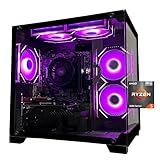
- Processor specifications: Adopting AMD Ryzen 5 5600 processor, with a basic clock speed of 3.5GHz and a turbo frequency of 4.4GHz, it can achieve fast response computing performance
- Graphics Card: Features GeForce RTX 3050 graphics card with 6GB dedicated video memory for gaming and multimedia applications
- Memory configuration: Equipped with 32GB DDR4 RAM (16GB * 2), providing sufficient memory capacity for multitasking and demanding applications
- Gaming Performance: Designed to handle modern gaming titles and graphics-intensive tasks with smooth frame rates and visual quality
- Desktop System: Complete gaming desktop computer system ready for setup and use out of the box
Reuse what you already own—only when it remains suitable
Reusing a monitor, keyboard, mouse, case, SATA SSD or hard drive can free money for the GPU. Inspect each item rather than treating it as free:
The Tool Desk
Outbyte Driver Updater FREEScan for outdated or missing drivers - takes under a minuteDriver Scan →Outbyte PC Repair FREEClear out junk files and repair common Windows errorsFree Scan →- Confirm the display has the resolution, refresh rate and input your target requires.
- Check a reused drive’s health and capacity, back up its data, and make sure the new board supports its interface.
- Measure an old case and verify airflow, front-panel connectors and GPU clearance.
- Do not carry over an unknown-age power supply simply to avoid buying a new one.
Newegg’s 2026 guide specifically notes that drives and peripherals are often reusable while warning that DDR4 cannot be used on a new AM5 system. Keep the operating-system activation and any license-transfer rules in your budget calculation.
When used parts make sense
Used CPUs can be a relatively lower-risk way to reduce cost because they have no moving parts, but savings depend on the local market and the seller. Used GPUs can save more and carry greater uncertainty: hidden mining wear, noisy fans, altered firmware, missing accessories or a short return period.
Use a used-part checklist
- Buy from a seller with a verifiable history and a written return window.
- Ask for the exact model, serial information where appropriate, operating temperature and clear photos of connectors and fans.
- Test immediately after delivery. Run your normal games or a trusted stress test, check for display errors, crashes, abnormal fan noise and temperatures, and save evidence during the return period.
- Budget for a replacement fan, thermal paste or shipping if the condition is not as described.
MaxMyBuild recommends reputable sellers, return windows and prompt testing for used GPUs, while also recommending that the power supply be purchased new. A low price is not a bargain if a failed part removes your return option or damages other components.
Build a verifiable shopping list
Before placing an order, use a compatibility checker or the manufacturers’ documentation and then perform a manual review. A checker can catch obvious socket or memory conflicts; it cannot judge power-supply quality, seller reliability, noise, thermals or whether a case will be pleasant to assemble.
- Write the target: games, resolution, settings and frame-rate expectation.
- Reserve the non-tower items: subtract the cost of a monitor, input devices, operating system, taxes and delivery from the ceiling if you need them.
- Select the CPU platform: socket, motherboard and memory generation as a group.
- Allocate for the GPU: compare real game requirements, memory, dimensions and connectors.
- Complete the support parts: storage, case, cooler and a new, reputable PSU.
- Record exact models: include board revision, memory kit capacity and speed, GPU length and PSU model rather than writing only a brand family.
- Price two complete carts: one with new parts and one with any proposed used item. Include shipping and tax.
- Recheck the total on purchase day: do not substitute a cheaper-looking part without repeating the compatibility review.
Assembly sequence that reduces expensive mistakes
Most builds require a Phillips #2 screwdriver, a clean non-carpeted work area and the manuals for the motherboard, case and power supply. Keep screws separated and never force a connector.
- Bench-test the core: outside the case, install the CPU, cooler mounting hardware, memory and M.2 SSD on the motherboard. Newegg’s guide recommends this check so a dead component can be identified before cable management.
- Prepare the case: install the correct standoffs, confirm the I/O shield arrangement, and route front-panel and fan cables where they will remain accessible.
- Mount the board and power supply: tighten screws evenly and connect the 24-pin motherboard and CPU power leads.
- Install storage and the GPU: secure the card in the top full-length slot, connect its required power cable, and avoid putting pressure on the slot.
- Connect controls and cooling: attach the case power switch, USB and audio headers, CPU-fan header and case fans according to the board diagram.
- First boot: enter firmware setup, confirm the CPU, memory amount, storage drive and fan readings, and update the BIOS only according to the board maker’s instructions.
- Configure memory: enable XMP or EXPO, save, then verify stability. If the system fails to boot, reset firmware and run conservative defaults before trying a lower profile.
- Install the operating system and drivers: use the motherboard and GPU support pages for current drivers, then test networking, audio, USB ports, sleep and every display output.
DIY versus a prebuilt: compare the complete value
Do not claim that assembling a PC always saves money. Newegg Insider’s 2026 guide claims $150–$300 in savings versus an equivalent prebuilt, but Tom’s Guide reported in July 2026 that bulk purchasing and component price pressure sometimes made prebuilts match or beat comparable DIY systems. In that article, analyst Avi Greengart of Techsponential said by email, “buying pre-built is usually less expensive than building your own.” “Usually” is his qualified market observation, not a rule.
Also popular on Amazon

- Gaming PC / Prebuilt Gaming PC / Ryzen Gaming Desktop – Smooth 1080P Gaming: Powered by the AMD Ryzen 5 5500 processor with 6 cores, 12 threads and speeds up to 4.2GHz, this prebuilt gaming computer delivers smooth, responsive 1080P performance for popular games including Fortnite, GTA V and Call of Duty, while handling streaming, multitasking and everyday computing.
- RX 580 Gaming PC / Gaming Desktop Computer – Radeon RX 580 8GB Graphics: Equipped with dedicated AMD Radeon RX 580 8GB GDDR5 graphics, this gaming PC desktop delivers smooth visuals and reliable performance for 1080P gaming, esports, online multiplayer games and casual gaming, making it a practical choice for entry-level and budget PC gamers.
- Gaming Computer / Desktop Gaming Computer – 16GB RAM + 1TB NVMe SSD: Built with 16GB high-speed RAM for smooth gaming, streaming and multitasking, plus a spacious 1TB NVMe SSD for fast Windows startup, quick game loading, responsive file access and plenty of storage for games, schoolwork, media and everyday applications.
- RGB Gaming PC / ARGB Gaming Desktop – 8 RGB Fans for Cooling & Style: This prebuilt gaming PC features 8 RGB fans designed to improve internal airflow and heat dissipation while creating a vibrant gaming setup. The RGB lighting and modern gaming case give this desktop gaming computer a bold look for bedrooms, gaming rooms, home offices and gaming stations.
- Prebuilt Gaming Computer / Gaming PC Desktop – Ready to Play: Fully assembled and ready to use, this Ryzen gaming PC combines a Ryzen 5 5500 processor, RX 580 8GB graphics, 16GB RAM, 1TB NVMe SSD and 650W power supply in one complete gaming desktop. Backed by a 1-year warranty and lifetime technical support for added peace of mind.
| Comparison point | DIY questions | Prebuilt questions |
|---|---|---|
| All-in price | Does the cart include tax, delivery, OS, cooler, Wi-Fi, monitor and input devices? | Are the listed components complete, or are OS, shipping and peripherals extra? |
| Component quality | Can you identify the exact PSU, motherboard, memory kit, SSD and GPU model? | Are the same details disclosed, or only a CPU/GPU headline? |
| Warranty and support | Each part may have a separate warranty; you diagnose failures yourself. | One support channel may simplify a fault, but read exclusions and return shipping terms. |
| Thermals and noise | You choose the case, fans and cooler, but installation determines the result. | Look for independent thermal or noise evidence and inspect the airflow design. |
| Upgrade access | You select a socket, board and PSU with future upgrades in mind. | Check proprietary connectors, blocked slots, spare power capacity and case clearance. |
| Time and risk | Allow time for assembly, BIOS setup and troubleshooting. | Pay for convenience, testing and support, while accepting less control. |
Compare the live totals on the same day. A prebuilt that includes a usable monitor and operating system may beat a tower-only DIY quote even when its advertised tower price is higher. Conversely, a DIY system can win when you already own peripherals, find a safe used component or value precise part selection.
Common ways a tight budget goes wrong
Chasing a low headline price
A “$700 build” that omits the operating system, delivery, tax, monitor and input devices is not comparable with a complete prebuilt. Label every omitted item and decide whether you already own it.
Downgrading the power supply first
An unreliable or underpowered PSU can cause crashes and make a future GPU upgrade impossible. Remove decorative motherboard features, excess storage or a premium case before compromising power quality.
Buying a substitute without checking the platform
A different CPU may require another BIOS version; a cheaper memory kit may be the wrong generation; a longer GPU may not fit once front fans are installed. Re-run the socket, BIOS, memory, clearance and connector checks for every substitution.
Ignoring firmware and memory settings
A system can appear defective when the board simply needs a supported BIOS or the memory profile is unstable. Boot at default settings, confirm each component, then enable XMP or EXPO and test before adding other changes.
Spending on capacity you will not use
Extra RGB, an oversized motherboard, very fast storage that your workload cannot distinguish, or a CPU cooler designed for a much higher power class can consume money better spent on the GPU or a reliable PSU.
What’s actually slowing this PC down?
Pick the symptom - the matching free tool is one click away.
Dated examples, used correctly
GamersNexus’ January 2026 “under $700” example pairs a Ryzen 5 5500 with the Sparkle Intel Arc B570 Guardian OC 10GB and DDR4 for a 1080p, medium-settings goal. Treat those model names as examples to search and verify, not as a promise that they remain the best-priced choices or are still in stock. MaxMyBuild’s $650–$750 estimate and its suggestion that a used GPU can lower the range describe that publisher’s assumptions. Newegg’s approximately $1,095 component total shows why a nominal $900–$1,000 target can drift once every item is listed. Tom’s Guide’s $1,000–$1,200 prebuilt observation applies to its July 2026 market snapshot.
These examples answer different questions. None establishes a universal cheapest build, a guaranteed frame rate or a permanent DIY saving. Your target, region, existing equipment and live prices determine the sensible combination.
Quick Recap
A final purchase checklist
- Target resolution, games and frame-rate expectation are written down.
- The maximum all-in spend includes taxes, delivery, OS and peripherals.
- CPU, motherboard, BIOS version and memory generation are confirmed.
- GPU performance, memory, length, thickness and power connector are suitable.
- Case, cooler, motherboard and storage physically fit together.
- PSU capacity, connectors, protections and model quality are verified; the unit is new unless you knowingly accept the risk.
- Used parts have a reputable seller, return window and immediate testing plan.
- A complete DIY cart has been compared with at least one current prebuilt on price, warranty, component disclosure, noise, thermals, upgrade access and assembly time.
- The final cart has been rechecked on the day of purchase.

