
What’s actually slowing this PC down?
Pick the symptom - the matching free tool is one click away.
You can build an Arduino RFID lock demonstrator with a compatible MFRC522/RC522 reader, an Arduino-compatible board, a matching card or tag, and a small servo that moves a model latch. The reader supplies a card’s identifier to the sketch; the sketch checks whether it matches an authorized value and, if so, operates the servo. That is a useful learning project—not a security-tested lock for an exterior door.
How the demonstrator works
- A compatible card or tag is presented to the MFRC522/RC522 reader.
- The controller reads its identifier, commonly called a UID.
- The sketch compares the scanned UID with an authorized value defined in the program.
- If the values match, the sketch moves a servo for a timed interval to operate a small latch.
An Arduino Project Hub example describes this UID-comparison and servo sequence. It illustrates project logic, not proof that UID matching provides adequate access security. Arduino Project Hub: RFID-Based Smart Servo Lock System using Arduino UNO R4 Wi-Fi.
Parts for a small-scale build
| Part | Role and selection notes |
|---|---|
| Arduino-compatible controller | Runs the sketch. An Arduino Uno Rev3 is used in one example; choose a board whose pinout and software match the sketch. |
| MFRC522/RC522 reader module | Reads compatible contactless cards or tags. Check the specific breakout board’s supply and signal requirements rather than assuming every module has the same electrical characteristics. |
| Compatible card or tag | Acts as the credential. Confirm protocol compatibility with the reader; a product described only as RFID or NFC is not necessarily compatible. |
| Small servo | Moves a model or small-scale latch. The project example lists an SG90 micro-servo; this is not a recommendation for operating a full-sized door. |
| Breadboard and jumper wires | Support temporary prototype connections. |
| Optional 16×2 I2C LCD | Can provide simple status feedback; it appears in an Arduino Project Hub build’s parts list. |
The component combination above is a demonstrator bill of materials, not a universal kit or a finished door-lock design. The example list is available from Arduino Project Hub’s Secure RFID Door Access System using Arduino and LCD with Servo motor.
Check reader and card compatibility
NXP describes the MFRC522 as a reader/writer IC for contactless communication at 13.56 MHz. Its documented support includes ISO/IEC 14443 A, MIFARE, and NTAG. Those specifications do not mean the module reads every RFID or NFC card: the card or tag must use a supported technology, and the breakout and controller must also be electrically compatible. See the NXP MFRC522 data sheet, Rev. 3.9, dated 27 April 2016.
#1 Best Overall
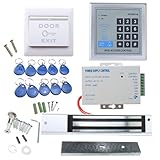
- [Modern Technology for Home Security] This RFID Proximity door access control system kit is one of the modern electronic access control systems
- [Safely and Reliable] The state-of-the-art CPU and integrated circuit techniques are applied to keep all the data from loss due to power failure.
- [Easy To Access] AGPtEK door security system is powerful and can open the door using proximity cards, passwords, or the hybrid.
- [More Convenient] The rfid lock kit access controller can provide users with more convenience by connecting to terminals, including the button for opening the door, doorbell, and electric lock that is normally open or closed.
- [Wide Application] The door lock installation kit offers a method for controlling access safely and automatically, qualifying it as ideal equipment for businesses, offices, factories, and communities. Get the full set of door security system to update your home security!
There is also a product-status consideration for new projects. In a support discussion dated 12 September 2023, NXP Technical Support said the MFRC522 “is no longer supported” and recommended the CLRC663 plus family for new designs. This is dated support-thread guidance, not a guarantee of current availability or status; check NXP’s support discussion and current product information before choosing a reader for a new design.
Plan the actuator before wiring
A servo latch and an electromagnetic lock are different architectures. Choose based on the physical mechanism, electrical load, and intended use; do not treat them as interchangeable devices on an unspecified Arduino output.
Rank #2

- COMPLETE KIT: Includes Arduino UNO R3 board, RFID module with cards, LCD display, breadboard, jumper wires, LEDs, resistors, and various electronic components in a retail storage box. This product does not contain batteries
- DIMENSIONS: Compact storage case measuring 8.86 inches long, 6.11 inches wide, and 2.36 inches high for organized component storage
- LEARNING FEATURES: Perfect for beginners with comprehensive components for RFID projects, including remote control, digital display, and sensor modules
- CONNECTIVITY: Comes with USB cable for programming, breadboard for prototyping, and various connection cables for easy circuit building
- COMPONENTS: Features LCD screen, digital display module, multiple LEDs in different colors, push buttons, resistors, and professional-grade circuit board
| Approach | What it does | Design considerations |
|---|---|---|
| Servo-driven small latch | A servo turns or shifts a small latch in a model, enclosure, or other suitable demonstrator. | Check that the servo’s movement and force suit the latch, and verify the servo’s supply and current needs. The cited example does not establish suitability for a full-sized door. |
| Relay-switched electromagnetic lock | A relay switches power to an electromagnetic lock; this is a separate project pattern shown in an Arduino tutorial. | Choose components and wiring for the lock’s electrical load and consider what happens when power is lost. The tutorial does not establish a complete safety or door-installation design. |
The relay-and-electromagnetic-lock pattern is described in ArduinoGetStarted.com’s Arduino RFID electromagnetic lock tutorial. Its wiring should not be combined casually with the servo example: each design needs components and connections appropriate to its actuator.
Assemble and verify a prototype cautiously
- Choose a compatible combination. Match the controller and sketch to the reader breakout, and select cards or tags supported by the MFRC522 protocol.
- Check electrical requirements. Confirm the specific module’s supply and signal limits, the controller pin mapping, and the actuator’s voltage and current requirements. Do not assume the Arduino output can directly power an actuator.
- Build the reader-and-controller prototype. Use the exact pin assignments and connection instructions for the board and module you selected. The cited sources do not establish a single wiring diagram that is safe for every board, breakout, and actuator combination.
- Implement the authorization behavior. In a learning sketch, read the identifier and compare it with the authorized value before commanding the actuator. Treat this as a demonstration of program flow, not as a security design.
- Test with the latch unloaded or on a model. Confirm that the intended card is recognized and that the servo moves the prototype latch as expected before attaching any mechanism that could trap or obstruct someone.
- Consider loss of power and egress. Work out what the chosen mechanism does when power is removed. The cited examples do not resolve safety or egress requirements for a particular door.
Why this is not a proven primary door lock
The cited project examples show how a reader, UID comparison, and actuator can be combined. They do not provide independent penetration testing, reliability testing, lock certification, or an assessment of installation and egress on a real door. The MFRC522 data sheet describes reader capabilities; it is not a security evaluation of a DIY system. A UID comparison in a sketch alone should not be taken as evidence that an entry door is secure.
Rank #3
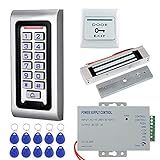
- 1. Working with DC12V power supply system. Very easy to install. Don't need to connect to computer.
- 2. Made of high quality, the access control keypad is IP65 waterproof, can be used outside. Has a WG26 interface and door bell button.
- 3. Support 2000 user capacity. Can open the door with RFID key cards, password, RFID key card+password.
- 4. Suitable for wooden door, metal door, glass door. Locked when power on, unlocked when power off.
- 5. Package including access control keypad + power supply + 180KG electric magnetic lock + door exit button +10pcs Keyfobs.
For a residential or commercial entry door, use a properly evaluated access-control product and qualified installation rather than relying on this hobby demonstrator as the only security control.
Quick Recap
Best Value

- Magnetic Lock: Includes a robust 180 kg magnetic lock system for secure door control and management. For outdoor installation, a rain cover is required (not included in the package). Rain cover ASIC: B0FQCBRG9X
- This is a complete access control system kit, including a keypad, power supply, 180kg magnetic lock, and stainless steel exit button + 10 ID key fobs. It includes a doorbell button for installing a wired doorbell. Note: The doorbell is not included in the package.
- Made with high-quality materials, safe and durable. Supports 1000 user cards and 3- to 6-digit PINs. Offers 3 different unlocking methods:(Unlock using RFID card, PIN, or RFID card + PIN)
- Applications: Suitable for single doors made of wood, glass, metal, fireproof, etc., and widely used in apartments, offices, villas, engineering projects, and other places.
- We offer comprehensive pre-sales and after-sales support. For any questions, please find us on Amazon, and we will resolve any issues related to installation, wiring, etc., within 24 hours.
Rank #4

- Security: The electromagnetic lock provides reliable access control security, preventing unauthorized entry.
- Convenience: The remote access control system allows authorized personnel to conveniently unlock the door remotely, for example, using a remote control.
- Flexibility: The electromagnetic lock can release immediately upon receiving the unlock signalled, allowing for quick access.
- Automation: The electromagnetic lock can be integrated into an automatic access control system, streamlining the entry and exit process.Multiple authorization methods: Access control systems typically support various authorization methods, such as passwords, card access, and fingerprint recognition, offering a range of access management options.
- Practicality: The electromagnetic lock is easy to install, requires minimal space, and is suitable for various access control scenarios.
Product prices and availability are accurate as of the date/time indicated and are subject to change. Any price and availability information displayed on Amazon at the time of purchase will apply.

