
The quickest way to add a sliding side cart is to use WooCommerce’s native Mini-Cart block on a block theme. For automatic opening after an item is added, checkout inside the drawer, page exclusions, or more extensive controls, install a current side-cart extension and configure it in WooCommerce settings.
Choose the right side-cart method
Your theme and the behavior you need determine the best implementation. A native Mini-Cart block is the simplest option for a block theme. An extension is more suitable when the drawer must open automatically, contain checkout controls, or behave differently on selected pages or devices.
| Approach | Best fit | Automatic open after add-to-cart | Checkout in drawer | Mobile and page controls | Update status |
|---|---|---|---|---|---|
| Native Mini-Cart block | Block themes using WooCommerce’s modern cart experience | Not documented as a native setting | Not documented as a drawer feature | Template-part and block settings | Current WooCommerce feature |
| WooCommerce Mini Cart extension | Stores needing a configurable side cart and optional auto-open | Yes, with Enable to Open Side Cart on Add to Cart | Not stated in the documented controls | Mobile and page exclusions, positions, styling and sticky-cart options | Check the product page’s current compatibility information |
| Side Cart & Checkout extension | Stores wanting cart and checkout actions in a slide-in panel | Yes, with Automatically Open Cart | Yes, with Allow Checkout | Hide on Mobile and slide-in animation | Check the product page’s current compatibility information |
| Floating Sticky Cart | Existing installations only | Documented historically | Not stated | Historical AJAX and CSS controls | WooCommerce says it is no longer available and the documentation is no longer updated |
Option 1: Add the native Mini-Cart block
This route requires a block theme. WooCommerce’s Mini-Cart block places a cart button in the header or another block area. When a shopper clicks it, a drawer slides out with the current cart and a route to checkout. The drawer is rendered through a Mini-Cart template part rather than by replacing the cart page.
Check that your store uses a block theme
- In WordPress administration, open Appearance > Editor.
- If the Site Editor opens with templates and template parts, your theme supports the block-based editing workflow.
- Confirm that the header contains a Mini-Cart block. If the header has only a classic cart widget, use the widget’s own settings or choose an extension instead.
For stores started after WooCommerce 8.3 in November 2023, Cart and Checkout blocks are the default experience on block themes. An extension can still require particular WooCommerce or theme compatibility, so review its Compatibility section before installation.
Quick wins for a faster PC:
Repair Windows errors before they cause bigger problemsFix Now →Scan for outdated or missing drivers - takes under a minuteDriver Scan →Clear out junk files and repair common Windows errorsFree Scan →#1 Best Overall

- END GROCERY TRIP CHAOS: Tired of juggling messy grocery totes and digging through plastic bags or bulky boxes? These 3 XL reusable bags with handles keep everything upright and organized by category; they feature an insulated bag and wine and egg pockets to protect fragile items and speed up checkout
- FITS XL CARTS & CLUB STORES, NOT YOUR FRUSTRATION: No more guessing or wasting money on reusable shopping bags foldable that don’t align; each grocery tote bag of the Club Cart set fits Costco, Sam’s Club, ALDI, Food4Less, and H-E-B carts; perfect for XL carts and bulk shopping trips
- BUILT FOR BUSY DAYS: From warehouse runs to big hauls, these shopping bags for groceries adapt fast; use them together or detach with Velcro; remove the rods to turn them into foldable grocery bags for errands, markets, or large-cart shopping
- NO MORE MELTED ICE CREAM: The XL turquoise insulated food bag is thermal-lined to protect frozen and chilled foods; no more stressing over softening frozen goods or lukewarm dairy by the time you’re home; these kitchen reusable grocery bags heavy duty help maintain freshness until you're ready to unload
- HEAVY-DUTY, MACHINE-WASHABLE: Each reusable shopping bag HOLDS OVER 60 LBS with reinforced seams and durable fabric; the wide openings of our reusable grocery totes make bulk shopping easy, and they’re machine washable for hassle-free cleaning
Place or edit the Mini-Cart
- Go to Appearance > Editor.
- Open the site’s header or the template part that contains the cart controls.
- Select the Mini-Cart block, or insert one if the header does not already contain it.
- Open the Mini-Cart template part and edit its filled and empty states. Depending on the theme, some existing blocks may be locked; you can still change available settings and add permitted blocks.
- Save the template-part and header changes, then test the cart on the storefront.
This approach lets you change the drawer’s content without replacing the standard Cart page. It is also the preferred built-in performance path in WooCommerce’s developer guidance because the Mini-Cart block does not use the cart-fragments API.
Option 2: Install WooCommerce Mini Cart
Use this extension when you want a dedicated side-cart interface, automatic opening after an add-to-cart action, or controls that are not exposed by the native block.
Rank #2

- Universal Cart Clip Attachment: Engineered for compatibility with most supermarket carts, this secure clip system locks onto metal or plastic frames for a stable, elevated setup. Keep your groceries organized, visible, and within easy reach from aisle to checkout.
- Easy, Organized Shopping: Designed to attach directly to your grocery cart, these reusable bags keep items upright, visible, and neatly separated throughout your trip. Load as you shop, streamline checkout, and lift each bag straight into your trunk for a faster, more efficient grocery run.
- Interior Zipper Pouch for Secure Storage: Keep small essentials neatly contained with the built-in inner zipper pocket. Perfect for keys, coupons, receipts, phone, or loose items, this secure compartment prevents shifting and keeps valuables protected while you shop.
- Eco-Friendly & Reusable: A sustainable alternative to single-use plastic bags, designed to reduce waste and support environmentally conscious shopping. Built for long-term use, this reusable system helps you minimize your environmental footprint with every grocery trip.
- Heavy-Duty & Extra Spacious: Made from premium 210D polyester with reinforced double-stitched seams and handles for superior strength and long-lasting durability. Each bag is built to support up to 40 lbs, making it ideal for heavy grocery hauls, bulk shopping trips, and warehouse store runs.
Install and activate it
- Download the extension ZIP from its current WooCommerce Marketplace listing.
- In WordPress administration, go to Plugins > Add New.
- Choose Upload Plugin, select the ZIP, install it, and activate it.
- Open WooCommerce > Mini Cart > General Settings.
- Enable Side Cart.
Configure the drawer
The documented settings include Enable to Open Side Cart on Add to Cart, side-cart and widget positions, header text and icon, rounded corners, colors, mobile visibility, page exclusions, sticky-cart buttons, and a shortcode for placing the cart in another location. Change only the controls your design needs, then test the drawer at the storefront’s actual breakpoints.
Option 3: Install Side Cart & Checkout
This extension is the more suitable choice when the drawer should handle checkout actions rather than simply preview the cart.
Recommended Free Tools
Install and open its settings
- Upload and activate the extension ZIP through the WordPress plugin screen.
- Go to WooCommerce > Settings > Direct Checkout > General Settings.
- Select Side Cart.
- Enable Automatically Open Cart if every successful add-to-cart action should open the panel.
Decide which checkout controls to expose
- Allow Checkout: lets shoppers proceed from the side panel.
- Skip the Cart: bypasses the traditional cart page when that matches your purchasing flow.
- Hide on Mobile: suppresses the drawer on small screens if it conflicts with the mobile layout.
- Slide-in animation: controls the panel’s entrance effect.
The Cart Contents panel can expose quantity pickers, prices, subtotals, product images, and delete buttons. The extension can also replace the traditional cart or checkout page, so verify those choices before enabling them on a live store.
Rank #3

- Universal Cart Clip Attachment: Engineered for compatibility with most supermarket carts, this secure clip system locks onto metal or plastic frames for a stable, elevated setup. Keep your groceries organized, visible, and within easy reach from aisle to checkout.
- Easy, Organized Shopping: Designed to attach directly to your grocery cart, these reusable bags keep items upright, visible, and neatly separated throughout your trip. Load as you shop, streamline checkout, and lift each bag straight into your trunk for a faster, more efficient grocery run.
- Interior Zipper Pouch for Secure Storage: Keep small essentials neatly contained with the built-in inner zipper pocket. Perfect for keys, coupons, receipts, phone, or loose items, this secure compartment prevents shifting and keeps valuables protected while you shop.
- Eco-Friendly & Reusable: A sustainable alternative to single-use plastic bags, designed to reduce waste and support environmentally conscious shopping. Built for long-term use, this reusable system helps you minimize your environmental footprint with every grocery trip.
- Heavy-Duty & Extra Spacious: Made from premium 210D polyester with reinforced double-stitched seams and handles for superior strength and long-lasting durability. Each bag is built to support up to 40 lbs, making it ideal for heavy grocery hauls, bulk shopping trips, and warehouse store runs.
Make the cart open after Add to Cart
Automatic opening is an extension setting, not a universal WooCommerce switch. In WooCommerce Mini Cart, enable Enable to Open Side Cart on Add to Cart under WooCommerce > Mini Cart > General Settings. In Side Cart & Checkout, enable Automatically Open Cart under WooCommerce > Settings > Direct Checkout > General Settings.
Test both product-page and shop/archive buttons. Themes and product plugins can use different add-to-cart flows, especially for variable, grouped, or AJAX products.
Rank #4
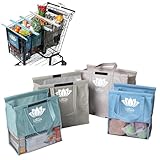
- END GROCERY TRIP CHAOS: Tired of juggling messy grocery totes and digging through plastic bags? These 4 reusable bags with handles keep everything upright and organized by category; they feature an insulated bag and wine and egg pockets to protect fragile items and speed up checkout
- FITS YOUR CART, NOT YOUR FRUSTRATION: No more guessing or wasting money on reusable shopping bags foldable that don’t align; each grocery tote bag of the Original set fits Target, Kroger, and standard U.S. carts (NOT SUITABLE FOR WAREHOUSE CLUB STORES); check out our Club Cart version for warehouse stores
- BUILT FOR BUSY DAYS: From Target runs to big hauls, these shopping bags for groceries adapt fast; use them together or detach with Velcro; remove the rods to turn them into foldable grocery bags for errands, markets, or weekly Instacart orders
- NO MORE MELTED ICE CREAM: The insulated food bag is thermal-lined to protect frozen and chilled foods; no more stressing over softening frozen goods or lukewarm dairy by the time you’re home; these kitchen reusable grocery bags heavy duty help maintain freshness until you're ready to unload
- TOUGH, CLEAN, AND MOLD-FREE: Each reusable shopping bag holds over 60 lbs with 120 GSM fabric and reinforced seams; machine wash the mesh-bottom bags to eliminate spills and smells; no more soggy reusable grocery totes or hidden messes
Test the drawer before publishing it
- Add a simple product, a variable product, and any product type that uses a custom purchase form.
- Confirm that the drawer opens only once and shows the newly added item.
- Increase, decrease, and remove quantities; check that totals change immediately.
- Apply and remove a coupon if the chosen implementation supports coupons.
- Check shipping-method display and recalculation when the extension provides those controls.
- Follow the checkout link or embedded checkout and verify that order totals persist.
- Open the empty-cart state and verify its message and button.
- Close the drawer with its close button, by clicking outside if supported, and with the keyboard.
- Repeat the test on narrow mobile widths, tablets, and desktop screens.
- Test excluded pages and mobile visibility rules if you configured them.
Troubleshoot a side cart that does not update
Cart contents remain stale
WooCommerce’s older cart-fragments mechanism refreshes mini-cart markup with AJAX. Caching, optimization plugins, or custom pages can prevent those requests or serve an old response. Clear page and object caches, temporarily test with optimization features disabled, and inspect whether the add-to-cart request and cart refresh complete in the browser’s network tools.
The Tool Desk
Outbyte PC Repair FREERepair Windows errors before they cause bigger problemsFix Now →Outbyte Driver Updater FREEFix the driver behind crashes, sound loss and screen glitchesFind Drivers →The drawer works on one page but not another
Custom product templates, nonstandard add-to-cart buttons, and page-specific JavaScript can bypass the event that an extension expects. Test the default WooCommerce product template, then re-enable custom components one at a time to identify the conflict.
Best Value

- Universal Cart Clip Attachment: Engineered for compatibility with most supermarket carts, this secure clip system locks onto metal or plastic frames for a stable, elevated setup. Keep your groceries organized, visible, and within easy reach from aisle to checkout.
- Easy, Organized Shopping: Designed to attach directly to your grocery cart, these reusable bags keep items upright, visible, and neatly separated throughout your trip. Load as you shop, streamline checkout, and lift each bag straight into your trunk for a faster, more efficient grocery run.
- Interior Zipper Pouch for Secure Storage: Keep small essentials neatly contained with the built-in inner zipper pocket. Perfect for keys, coupons, receipts, phone, or loose items, this secure compartment prevents shifting and keeps valuables protected while you shop.
- Eco-Friendly & Reusable: A sustainable alternative to single-use plastic bags, designed to reduce waste and support environmentally conscious shopping. Built for long-term use, this reusable system helps you minimize your environmental footprint with every grocery trip.
- Heavy-Duty & Extra Spacious: Made from premium 210D polyester with reinforced double-stitched seams and handles for superior strength and long-lasting durability. Each bag is built to support up to 40 lbs, making it ideal for heavy grocery hauls, bulk shopping trips, and warehouse store runs.
The native Mini-Cart is missing
Check whether the theme is classic rather than block-based. A classic theme may expose a cart widget instead of the Mini-Cart block; in that case, use the widget’s configuration or install a compatible extension.
Checkout or mobile layout breaks
Disable one drawer implementation if more than one is active. Multiple mini-cart scripts can compete over the same cart fragments, triggers, and overlays. Then retest with the extension’s mobile and page-exclusion settings configured explicitly.
What not to use for a new installation
WooCommerce’s Floating Sticky Cart documentation describes an AJAX off-canvas cart with automatic opening, add/remove actions, coupons, shipping methods, related products, and custom CSS. However, WooCommerce labels the product “no longer available” and says the document will no longer be updated. Treat it as legacy documentation for existing users, not as a current purchase recommendation.
Do these 3 things before closing this tab:
1Fix the driver behind crashes, sound loss and screen glitches2Clear out junk files and repair common Windows errors3Scan for outdated or missing drivers - takes under a minuteRecommended decision
Choose the native Mini-Cart block when your block theme only needs a slide-out cart preview and a link to checkout. Choose WooCommerce Mini Cart when you need automatic opening, styling, placement, or page and mobile controls. Choose Side Cart & Checkout when shoppers should change quantities and proceed through checkout from the drawer. Whichever route you select, use one implementation, verify compatibility, and test caching and AJAX behavior before launch.
Quick Recap
Product prices and availability are accurate as of the date/time indicated and are subject to change. Any price and availability information displayed on Amazon at the time of purchase will apply.

