

Recommended Free Tools
iTechGuides is reader-supported. When you buy through links on our site, we may earn an affiliate commission. As an Amazon Associate I earn from qualifying purchases. Learn more
Do you wish to add a caption to a photo on your WordPress site but have no idea how? You should read through this article, as it contains multiple methods to do that.
Option 1: Write a Caption to an Image Through the WordPress Block Editor
One of the fastest ways to insert a caption to a photo in WordPress is through the default WordPress block editor. To achieve that, follow the procedures below.
- Using an admin account, log in to the backend dashboard of your WordPress website. Then, select Pages or Posts on the left pane, depending on where you want to write a caption to a photo.

- Following that, click the title of the post or page where you want to add a caption to a photo. I will click the “Hello” post on my WordPress website for this demonstration.
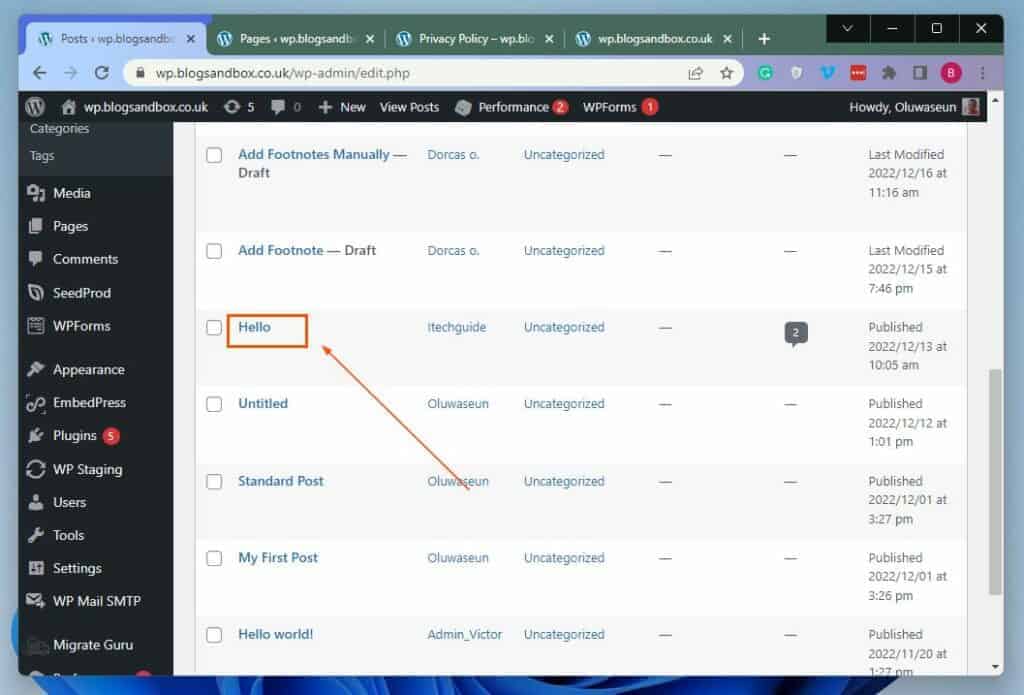
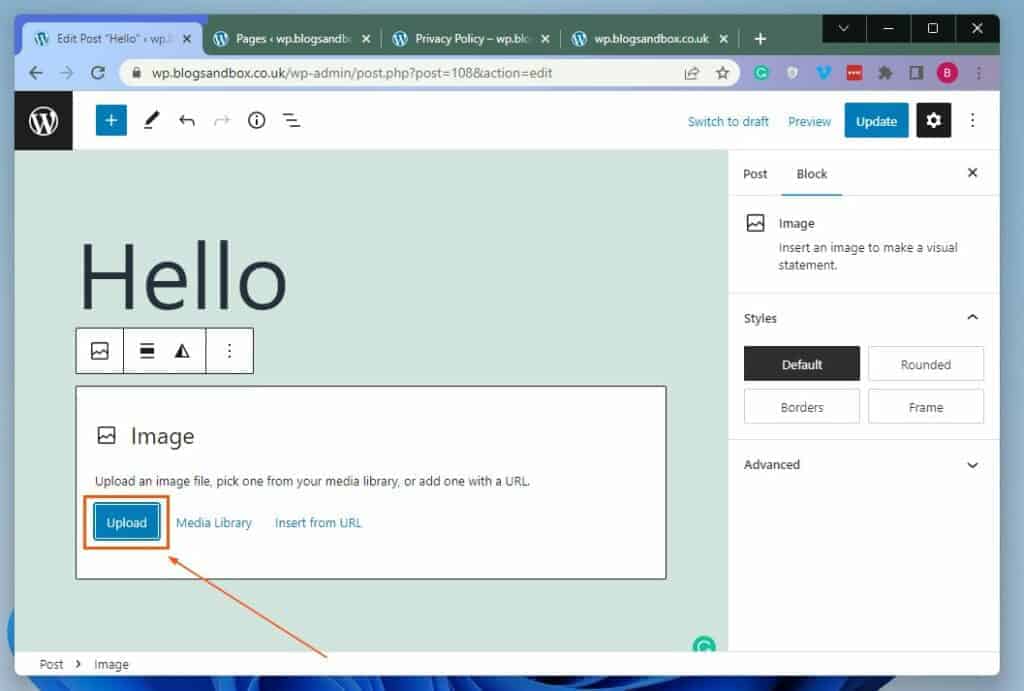
- After doing that, click the Add block button in the area you want to upload the photo you want to add a caption to. Next, input “image” in the search field and select the Image block from the search results.

- Subsequently, click the blue Upload button in the Image block.
- In the Open window, navigate to the location where you stored the photo you want to add a caption to. Then, select the photo and click the Open button at the bottom of the window.

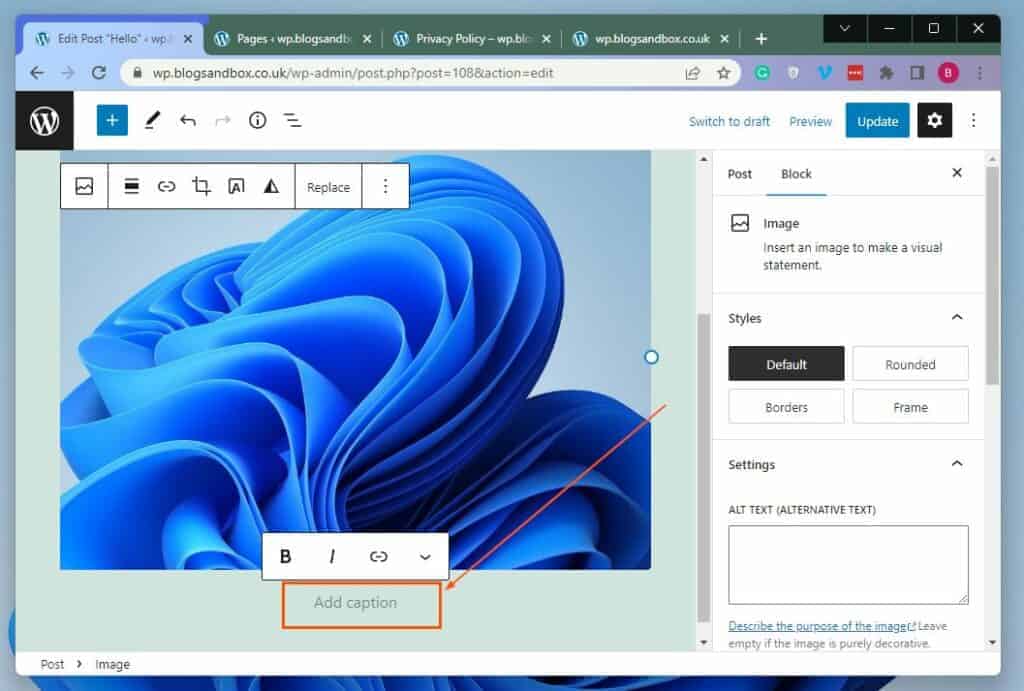
- When the photo has been uploaded, ensure it is selected. Hence, you will see an “Add caption” label at the bottom of the photo – click the label, and you can add your caption.
Option 2: Write a Caption to a Photo via WordPress Media Library
Interestingly, before uploading a photo in WordPress, you can add a caption to the photo through the WordPress media library. Follow the steps below to learn how to add a caption to a photo in WordPress via the WordPress media library.
- Go to the backend dashboard of your WordPress site using an admin account. Next, hover your mouse on Media among the menus on the left pane, then select Library.

- On the Media Library page, click the image you want to add a caption to.

- Then, in the Attachment details page of the selected image, you will find the Caption input box on the right side. Hence, you can add a caption to the photo using the Caption input box.

- When you’ve added a caption to the selected photo, click the “x” button at the top right of the page.

Frequently Asked Questions
Yes, you can add text over a picture on your WordPress website. To learn how to do that, read How To Put A Text Box Over A Picture In WordPress.
#1 Best Overall

- 【12 rolls of printing paper】12 Rolls of Refill Print Paper included. Each roll is about 2.2in × 29.5ft and can print over 80 photos. Kids can enjoy taking pictures without having to stop frequently to refill the paper because of insufficient paper
- 【Safe & Premium Print Paper】Our thermal printing Paper for children's cameras is made of high-quality paper, safe and skin-friendly, It can not only be HD Printing but also be easily colored While enjoying the fun of taking photos, children can also have full play to their creativity and imagination to depict the world in their eyes-BPA free
- 【Wide Compatibility】This Kids Instant Camera Printing Paper is suitable for Most printing 2.2 inch/56mm wide photo paper children cameras.and very easy to install so that children can replace it by themselves just need to follow the correct direction
- 【A Cost-Effective Option】Our kids camera paper roll refill has more paper and is more affordable. Children can experience the world to their heart's content. Keep every beautiful moment and share it with others
- 【Wonderful gift choice】This instant camera refill thermal paper can be used as DIY drawing paper. Kids can draw graffiti on interesting photos taken by themselves,and little photographers can also give full play to their painting talents
A caption is a brief text description that provides additional details about an image.
The caption is usually located at the bottom of a picture in WordPress.
Rank #2

- Premium Thermal Paper: Crafted from high-quality paper, our instant camera thermal paper provides excellent coloring and painting capabilities. The white refill print paper boasts a glossy finish. It is also designed with an optimal thickness that resists breakage, making it long-lasting use
- Package Include: You will receive a set of 6 rolls of instant camera white refill print thermal paper. Each roll measures approximately 2.2*0.98 inches
- Doodle and Entertainment: MIARALA instant camera refill thermal paper offers a creative outlet for children. It doubles as a drawing paper, allowing kids to unleash their imagination and creativity. They can enjoy the fun of taking pictures and display their artistic skills by drawing or coloring on the printed black and white photos
- HD Printing: The kids instant camera refill print paper utilizes a high-quality thermal coating, resulting in high-definition and true-to-life printing effects. This enables children to accurately replicate and fill colors, enhancing their interest in graffiti and promoting artistic development
- Easy to Use: Our camera thermal paper is compatible with various styles of kids' instant cameras. It is incredibly easy to install, requiring children to simply follow the correct direction when inserting the thermal paper and ensuring it remains within the camera cover
Yes, captions are included among the word count in WordPress.
On the 27th of May 2003, WordPress was released.
Conclusion
Adding a caption to a photo in WordPress lets you offer additional information about the photo. However, not everyone knows how to add a caption to a picture in WordPress.
Rank #3

- Snap, Print & Smile – Capture Happy Moment with High-Quality Thermal Printer Paper! Still searching for the perfect paper for your kids instant print camera or mini printer? Look no further! This premium printer paper is just what you need. It's safe and durable, ideal for little ones who love taking photos and creating memories. Thick enough to prevent tearing or bending, yet flexible enough for easy printing, it lets your child enjoy hours of creative fun without worrying about flimsy paper!
- Great for Kids - Clear and Bright Prints Every Time! Parents, we know you want high-quality prints without the hassle. Our thermal paper is made for just that! Every print is bright, clear, not blurry or faded. From the first to the last print, photos look as good as if they were just taken. Perfect for creating photo albums, decorating or sticking on the fridge to preserve those special moments!
- Quick and Easy – The Perfect Choice for Little Hands! We understand that kids aren't always the most patient, nor do they want complicated technology. That's why this thermal print paper is designed to be simple and user-friendly. Just pop it into your thermal mini printer or camera for kids instant print, and in seconds, they can print. No ink, no mess, just fun! Compatible with most popular models like T02 and M02, simply load and go!
- 10 Rolls of Sheer Joy – Value That Lasts! Your child will never run out of thermal paper with this handy set! Each set comes with 10 rolls, each with 94 prints. That’s hours of creative fun at an unbeatable price. Whether it's for school projects, a family field trip, or a rainy day activity, you will have enough printing paper to continue the fun without worrying about running out!
- The Perfect Gift for Young Creators and Family Fun! Are you looking for a gift that encourages creativity while preserving precious memories? This thermal printer paper is the ideal choice! It's perfect for kids, and parents will love it too – whether for birthdays, holidays, or just because. Print, decorate, and share their world, one photo at a time, and let your child’s imagination soar!
Gladly, this article taught us two techniques to accomplish that. More specifically, we discussed how to perform this task through the default WordPress block editor.
This guide also provided steps to add a caption to a photo in WordPress through the WordPress media library.
Rank #4

- High-Quality Thermal Paper: The instant camera printing paper refill pack includes 6 non-sticky thermal paper rolls. With moderate thickness, it resists tearing, has a glossy surface, and delivers clear, smooth images that won't fade easily. It rarely jams, offering you a better experience. Each roll is 2.2 inches wide and 20ft long, printing 75-90 photos—highly durable.
- Material Safety Guaranteed: This camera photo paper is made of eco-friendly materials, featuring non-toxic, BPA-free, and ink-free properties to prevent stains on little hands. Rigorously tested for safety, it's gentle on sensitive skin, so parents can relax while you create freely.
- Creative DIY Fun: Turn photo paper into a medium for artistic creation. This special camera paper roll not only captures precious moments in sharp, flawless black-and-white but also doubles as drawing paper. Everyone can unleash creativity and imagination—drawing or coloring with markers to enjoyably boost their artistic skills. Perfect for personalized albums and indoor decoration.
- Easy to Install: The thermal paper roll for camera is simple to set up. Just place it horizontally in the camera in the correct direction, close the cover securely, and it's done. Everyone can replace the roll independently in seconds.
- Portable Design: Lightweight and compact, this photo printer paper is easy to carry/store. Its scroll design saves space, protects the paper, and fits on-the-go creativity—no supply concerns during trips. Great for outdoor sketching, travel journals, enabling "HD printing anytime, anywhere."
I sincerely hope you found this guide helpful. If you did, click on “Yes” beside the “Was this page helpful” question below.
You may also express your thoughts and opinions by using the “Leave a Comment” form at the bottom of this page.
Best Value

- STUNNINGLY VIBRANT DETAIL - Premium quality photo paper recreates every color and memorable moment with outstanding and brilliant detail.
- FRIENDLY PHOTOS - Zink paper eliminates the need for costly film and wasteful cartridges, Ink and toners.
- LIFEPROOF PRINTS - Zink paper is treated with a glossy, protective polymer overcoat that is water resistant, tear resistant and dry to the touch.
- MEMORIES THAT LAST A LIFETIME - Specially made to be long lasting. Zink prints are fade resistant, even when exposed to light, heat, and humidity.
- PRINT AND POST - Share or frame your Mini 2ʺx3ʺ photo prints, or peel off the sticky back and post them in a book.To get the best possible photo quality, make sure you properly calibrate your camera’s printer by inserting the Blue Color Calibration sheet with the barcode facing down. The glossy side of the paper should be facing up.
Finally, for more WordPress guides, visit our WordPress & Websites How-To page.
Quick Recap
Product prices and availability are accurate as of the date/time indicated and are subject to change. Any price and availability information displayed on Amazon at the time of purchase will apply.


