
iTechGuides is reader-supported. When you buy through links on our site, we may earn an affiliate commission. As an Amazon Associate I earn from qualifying purchases. Learn more
To put links in your Instagram bio, open your profile, tap Edit profile → Links → Add external link, paste the complete URL beginning with https://, add an optional title, and tap Done. Instagram lets personal accounts add normal external profile links; current 2026 coverage reports up to five links on many accounts.
Key takeaways
- Instagram’s current mobile path is Profile → Edit profile → Links → Add external link, although labels can vary by app version, device, language, and rollout.
- A normal personal Instagram account can add an external profile link without switching to a Creator or Business account.
- Current 2026 coverage reports that many Instagram accounts can add up to five native external links, but the retrieved Instagram Help Center information does not state that numerical limit.
- Paste the complete address, including
https://, and test the saved link from your public profile, another account, or an incognito browser window. - A link-in-bio service is optional: use one when you need a branded hub, more destinations, analytics, forms, bookings, or commerce.
How do you put links in your Instagram bio?
To put links in your Instagram bio, add the URL through Instagram’s Links section rather than typing the address into the bio text. The native profile link is clickable and appears beneath the bio area for profile visitors.
How do you add one link in the Instagram app?
- Open Instagram and sign in.
- Tap your profile picture in the bottom-right corner.
- Tap Edit profile.
- Tap Links.
- Tap Add external link.
- Paste or type the complete address, such as
https://www.example.com. - Add an optional short title, such as Shop, Book a consultation, Read my newsletter, or Watch the latest video.
- Tap Done, or the equivalent save control shown by your app.
- Return to your profile and tap the new link to confirm that it opens the intended page.
Current walkthroughs document the Edit profile → Links → Add external link path and an optional title field; Instagram’s exact save label can differ between app versions and devices. See the documented mobile walkthrough and a 2026 step-by-step guide for the same current flow.
Windows Errors? Fix Them Before They Spread
Repair common Windows errors and clear accumulated junk for a smoother, more stable PC - no reinstall needed.Free scan · no reinstallCrashes, No Sound, or Screen Glitches?
Random freezes, missing sound and display glitches usually trace back to one bad driver. Find and replace yours safely.Free scan · under a minuteWhat URL should you paste?
Paste the full URL, including https://, for example https://www.example.com. A complete URL is easier for Instagram to recognize and reduces formatting problems. Linktree’s instructions likewise tell users to include the full https:// address when adding a Linktree URL to Instagram; the same practice is sensible for a website, shop, booking page, portfolio, or newsletter.
#1 Best Overall

- Transparent Phone Ring Design: The cell phone ring holder is made of transparent Acrylic, the phone grip kickstand perfect fit for any cell phone with or without case cover. Phone ring keeps your phone original feature design without affecting the exterior.
- Free Rotation Phone Ring Holder: Black, sliver, rose gold round transparent phone ring for you to choose. Size: round diameter 1.4 inch. 360°Rotation and 180°Flip fold to help you adjust your phone, different viewing angles to reading, watch videos.
- Strong Adhesive: Environment-friendly material and strong adhesive sticky to make the phone ring holder finger kickstand can be glued to the back of your tablets/phones or their cases firmly, which reduces the risk of theft.
- Wide Compatibility of Phone Case Holder: Our cell phone ring holder stand is compatible with almost all phones and phone cases. Phone ring holders conveniently take photos, text or talk. Nice package perfect for your family, friends, co-workers, Thanksgiving day, Christmas gift choice.
- High Viscosity: Strong sticky adhesive makes sure the phone ring be attached tightly to the back of your phone/tablet. Nice package perfect for your family and friends gift choice.
Before saving, remove accidental spaces and check the spelling of the domain. Open the URL in a normal browser first so you know whether the destination works independently of Instagram.
How do you add multiple links to an Instagram bio?
Instagram’s native multi-link feature uses the same Links screen. Open Profile → Edit profile → Links, tap Add external link, enter the next URL and title, and repeat the process for each destination.
- Open Profile → Edit profile → Links.
- Tap Add external link.
- Paste the next complete URL and add a descriptive title.
- Save the link.
- Repeat until you reach the limit shown on your account.
Current 2026 coverage reports support for up to five external profile links on many accounts. The retrieved Instagram Help Center information confirms that profile links are public but does not state the five-link number, so treat five as a reported current limit rather than a permanently guaranteed Instagram specification. If your Links screen shows a different limit, follow the limit displayed on your account.
Put the most important destination first. A first link titled Shop, Book now, or Latest article is usually more useful than making visitors scan several equally vague options. Use titles that describe the result instead of labels such as Click here.
| Need | Recommended setup | Reason |
|---|---|---|
| One website or campaign | One native Instagram profile link | It gives visitors the shortest route to the destination. |
| A few important destinations | Instagram’s native Links list | You can show several URLs without maintaining another landing page. |
| More destinations than Instagram shows | A link-in-bio landing page | One Instagram URL can lead to many buttons or sections. |
| Bookings, forms, products, or email capture | A suitable third-party landing page or your own links page | These tools can provide experiences that the native profile-link control does not provide by itself. |
Can a personal Instagram account add a link?
Yes. A normal personal Instagram account can add a basic external profile link; switching to a Creator or Business account is not required. Adweek’s walkthrough documents the feature for personal accounts.
Rank #2

- [High quality phone ring holder] Features ultra-slim design (0.014inch thickness). made of high-quality zinc alloy and metal plate, Syncwire phone ring holder boasts unrivalled durability to stay intact even in dropping accidents. Vacuum Ion plating technology makes the phone holder surface 5 times more resistant to color fading than traditional water electroplating ones. The edges of the ring grip are carefully polished for your fingers.
- [Strong adhesiveness finger ring grip] With an ultra-strong 3M VHB adhesive pad, This phone finger ring grip can attach to your smartphone tightly (withstands 5kg gravity test) for accidental drops and slips. The 3M pad can be applied to most smooth surfaces including plastic, metal and TPU. Note: The 3M pad does not work with silicone case, leather, fabric case.
- [360°Rotatable & 180°adjustable] Syncwire phone holder is 360° rotatable and 180° foldable so that you can position your phone at your best viewing angle anytime. This ring grip is tested to withstand 6000 times of folding without getting loose. The metal plate is a perfect match for a magnetic car mount.
- [Multi-functional phone ring] This versatile phone holder can set your hands free while you are riding in crowded buses or subways. You can also place It on your office desk, kitchen counter or table to watch movies, listen to music, put on makeup, make video calls and play games.
Do not confuse Instagram’s native URL field with a third-party integration. For example, Linktree’s Instagram Link App, which can display Instagram content inside Linktree, requires a Creator or Business account according to Linktree’s integration documentation. That requirement applies to the integration, not to adding an ordinary external URL to your Instagram profile.
How do you edit or remove an Instagram bio link?
To edit or remove an Instagram bio link, open Profile → Edit profile → Links and select the existing link.
The Tool Desk
Outbyte PC Repair FREEClear out junk files and repair common Windows errorsFree Scan →Outbyte Driver Updater FREEFix the driver behind crashes, sound loss and screen glitchesFind Drivers →- Go to your Instagram profile.
- Tap Edit profile.
- Tap Links.
- Tap the link you want to change.
- Replace the URL, change the title, and save the update.
- To remove the link, use the Delete or Remove control on the link’s edit screen, then save if Instagram asks you to.
If no obvious edit or delete button appears, check for a three-dot menu or an icon beside the link. Instagram labels and controls can vary by platform version and account rollout. Test the profile again after changing or removing the link.
How do you add a link to your Instagram bio from a computer?
Instagram’s desktop editor can provide the same function, but desktop labels may differ from the mobile app. Use the browser as a fallback when the app is inconvenient.
- Visit Instagram in a desktop browser and sign in.
- Open your profile.
- Choose Edit profile.
- Look for Links or an older Website field.
- Paste the complete URL, including
https://. - Save the profile.
- Open the public profile in a separate tab and test the link.
Newer interfaces commonly use Links, while older versions may show one Website field. The variation can depend on the browser, app rollout, account, or interface version; a current desktop walkthrough documents both labels.
Rank #3
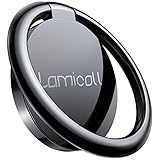
- 【Wide Compatibility】Whole Ring Size Φ14.17", Using Circle Size Φ10.24". The phone ring holder is compatible with all smartphones in 4-8 inches, like iPhone 17 16 15 14 13 12 11 Mini Pro Xs Max XR X 8 8 plus 7 7 plus 6 6 plus SE 5, Galaxy S23 S22 S21 Ultra, S20, S10, S9, S9 Plus, S8, S7, Edge, Note 20 ultra, A72, A71, A51, LG, Sony, Nexus, Oneplus and other Android cell phones
- 【360° Rotation & 180° Adjustable】The phone ring stand features excellent tightness, so you can adjust it and turn it around. It can be easily locked in one position. A perfect finger ring stand in landscape or portrait mode to read/watch videos
- 【Strong 3M Adhesive】The adhesive is stable, which can tightly hold your phone and prevent the possibility of dropping the phone on many occasions. Max hanging weight is 5kg. Warm Tips: This ring holder's adhesive is not fit for Soft Silicone/TPU/PP/TPE case.
- 【High Quality Material】The finger ring kickstand is made of high-quality zinc alloy and stainless steel. Zinc alloy has good ductility and features ruggedness, which contributes to a long lifespan. Polished ring holder, smooth edge, no worries of scratches to your fingers
- 【Multi-functions】It can be used as a phone grip, a table kickstand. Moreover, it also works well with your magnetic car mount while driving. With one finger occupied, hold your phone with a single hand greatly reduce the risk of accidentally dropping down
Why is your Instagram bio link not clickable?
An Instagram bio link may not be clickable because the URL was typed into the bio text instead of added through Links, the URL is incomplete, the profile change did not save, or the destination itself is unavailable.
Do these 3 things before closing this tab:
1Repair Windows errors before they cause bigger problems2Fix the driver behind crashes, sound loss and screen glitches3Clear out junk files and repair common Windows errorsWork through this checklist in order:
- Check the field: Confirm the address is under Edit profile → Links, not merely written in the bio description.
- Use the full address: Add
https://and remove spaces before or after the URL. - Check the destination: Open the address in a browser and look for a typo, expired domain, broken redirect, login requirement, or error page.
- Save and reopen: Leave the editor, close and reopen the profile, and check whether the link appears.
- Test as another viewer: Open the profile from a second account or an incognito browser window. An owner’s view is not enough to confirm that other visitors see the link.
- Update Instagram: Install the latest available app update from your device’s app store.
- Restart the app: Force-close Instagram, reopen it, and try again.
- Use another route: Try adding the link from another device or from Instagram in a desktop browser.
- Re-add the link: Remove the link, save the profile, and add it again if the editor appears stuck.
- Check account restrictions: Look under Instagram’s Account Status for restrictions affecting profile editing or other features.
- Pause repeated changes: If Instagram displays a warning or temporary restriction, avoid changing the link repeatedly in rapid succession.
Community reports describe accounts that could not edit links or could see a link that other viewers could not see, but those reports are anecdotal and do not establish a universal Instagram policy. Examples include a reported link-editing problem and a reported visibility problem. Do not assume a “shadowban”; the cause may be an account restriction, a technical issue, an interface rollout, or a problem with the destination.
What if the Links option is missing?
If Links is missing, first look for an older Website field and then try the feature from an updated app and a browser.
- Update Instagram.
- Open your actual profile and select Edit profile; do not rely on a different Edit public profile or account-management screen.
- Look for Website as well as Links.
- Log out and back in.
- Try Instagram in a desktop browser.
- Check Account Status for restrictions.
- Try another device.
- Contact Instagram support if the control is absent in both the app and browser.
Instagram frequently tests and changes interface placement. Screenshots and button names in older guides are not permanent guarantees, so use the labels currently shown on your account.
Can people see your Instagram bio link if your account is private?
Yes. Instagram’s Help Center says profile links are public profile information visible to anyone, whether the account is public or private. Making an Instagram account private limits access to posts and stories, but it does not necessarily hide every item of profile information, including the profile link.
Rank #4
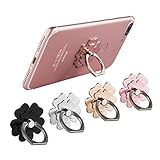
- Mobile Phone Ring Holder - 360°rotation and 180°angle adjustable, with lovely flower design, it's absolutely the best decision to your love cell phone
- Hands Free - Cell phone stand holder can used as a kckstand, set your hands free when watching movies, listening to music or facetime chatting
- Sturdy Adhesive - Metal finger ring grip with advanced and sticky sensitive adhesive which tightly hold your phone and prevent possibility of dropping phone on many occasion
- Compatibility - Phone ring holder is compatible with most smartphones which has flat back cover
- Packing - There are 4 pieces of phone ring holders in different colors
The linked website or service can have separate privacy and access rules. A destination may require a login, restrict visitors by country, or limit content independently of Instagram. Read Instagram’s official information about public profile information when privacy is important.
Independent reader supportYour contribution helps us test, update, and keep practical guides available for everyone.Should you use Instagram’s native links or a link-in-bio service?
Instagram’s native links are the better choice for most people with one to five important destinations because they are fast, direct, and require no additional service. A link-in-bio service becomes useful when you need a branded landing page, more destinations, analytics, forms, bookings, products, or a way to change several destinations behind one stable Instagram URL.
| Criterion | Native Instagram links | Link-in-bio service |
|---|---|---|
| Setup | Fast; no external account is required. | Requires creating and maintaining another page. |
| Destinations | Current 2026 coverage reports up to five on many accounts. | Designed to organize more destinations; exact limits depend on the service and plan. |
| Visitor path | Direct from Instagram to the selected destination. | Adds an intermediate landing page and another page load. |
| Branding | Uses Instagram’s profile presentation. | Usually provides more layout, button, category, and branding controls. |
| Analytics | The native profile-link interface does not offer the same link-level analytics and landing-page controls as dedicated services in the supplied research. | Some services offer analytics, but features and plan requirements must be checked with the provider. |
| Commerce and conversion tools | No landing-page forms, bookings, or product hub inside the native link control. | Some services offer forms, bookings, products, donations, or embedded media. |
| Maintenance | Each destination is edited in Instagram. | One Instagram URL can remain stable while destinations are changed on the landing page. |
| Best fit | Personal accounts and simple creator or business profiles. | Creators, businesses, and marketers with multiple campaigns or conversion goals. |
Linktree describes ordinary links as buttons leading to external destinations and also documents embedded Link Apps for experiences such as video, podcasts, forms, and bookings. Read Linktree’s explanation of its link types and Link Apps before deciding whether those extra features justify another service.
When is Linktree a sensible option?
Linktree can be sensible when Instagram’s native list is too limited for your destinations or when you want one branded page for a shop, newsletter, booking system, social profiles, and other resources. To add a Linktree page, copy the full Linktree address beginning with https:// and add it as a normal Instagram external link; Linktree documents that setup in its Instagram URL instructions.
Do not choose a third-party page merely because you need one website link. A third-party page adds another load, redirect, account, and dependency. Linktree pricing and plan-specific features were not verified for this article, so check the provider’s current terms before paying or relying on analytics, commerce, or integrations.
Best Value

- [Upgraded] MagSafe Phone Ring Holder: Built with ultra-strong N52 magnets, this MagSafe-compatible finger stand delivers a powerful, secure magnetic grip to keep your iPhone 18/17/16/15/14/13/12 series firmly in place - resisting slips, shakes, or drops. For non-MagSafe phones or cases, attach a metal ring(included) to enhance the magnetic force by up to 5× for even greater stability
- Hands-Free Phone Holder Loop: Our foldable kickstand grip features a fully 360° rotatable and 180° flip, offering versatile adjustments at multiple angles. This cell phone stand ring is tested to withstand 40,000 folds without loosening. Enjoy stable, hands-free viewing in both horizontal and vertical modes - perfect for watching YouTube, TikTok, FaceTime, video calls, or multitasking with one hand
- Dual-Sided Magnetic Phone Grip: Designed with a unique two-sided magnetic structure and powerful built-in magnets on both sides. One side of the gym finger ring holder attaches securely to MagSafe-compatible iPhones or cases, while the other sticks firmly to magnetic surfaces like gym equipment, refrigerators, kitchen appliances, or MagSafe car mounts
- Universal Compatibility: Our iphone magnetic ring stand can snap on directly to iPhone duo/18 Pro/18 Pro Max/17e/17/16/16 Pro/16 Pro Max/16 Plus/15/15 Pro/15 Pro Max/15 Plus/14/14 Pro/14 Pro Max/14 Plus/13/13 mini/13 Pro/13 Pro Max/12/12 Pro/12 Pro Max/12 mini without MagSafe-enabled cases. It also supports iPhone SE/11/XS/Max/XR/X 8/8 Plus/7/7 Plus/6/6 Plus/5, Samsung Galaxy Z Fold8/Flip8/Flip7 FE/S26/S25/S24/S23/S10/S9/S8, Note20, Google Pixel, and other devices. Please use the metal ring(included) to enhance the magnet
- Important Note: 1. This is a double-sided magsafe phone grip holder, it works with the mag car mount, BUT not support for wireless charging. 2. The position on the phone or phone case to attach the metal ring must be a hard material with a flat surface, NOT FIT FOR the soft rubber phone case (TPU/PP/TPE/Silicone). 3. Please align it with the magnetic circle in the middle of the iPhone, or use a magnetic ring to increase the suction force. 4. The Package comes with 1x magsafe holder in black; 1x megnet ring
How should you choose and test the best Instagram bio link?
Choose the destination that best matches the action you ask followers to take, then make the destination easy to use on a phone.
- Match the title to the action: Use “Book a consultation” for a booking page and “Shop the collection” for a store rather than a vague label.
- Put the highest-value action first: The first native link should normally be the destination most visitors need.
- Use a mobile-friendly page: Check that text, buttons, forms, and checkout work in a phone browser.
- Keep the address trustworthy: Prefer a clean canonical URL or reputable redirect over a long, confusing tracking address.
- Check redirects: Multiple redirects can slow loading or trigger security warnings.
- Check access: A page that requires a login may be technically functional but unusable for visitors without that account.
- Test from outside your owner view: Use an incognito window or another account after every important change.
- Update campaign links: A native Instagram link must be edited in Instagram when the campaign changes; a landing page can keep one stable Instagram URL while its buttons change.
“Link in bio” is shorthand for a link displayed on the profile. Tell followers where to find it with wording such as “Shop through the first link on my profile” or “Book using the link in my bio.” A URL typed into an Instagram post caption is not the same as a native profile link and should not be presented as an equivalent setup.
Frequently Asked Questions
How many links can I add to my Instagram bio?
Current 2026 coverage reports that many Instagram accounts can add up to five native external profile links. Instagram’s retrieved Help Center information confirms that profile links are public but does not state the numerical cap, so check the limit displayed in your own Links screen.
What’s actually slowing this PC down?
Pick the symptom - the matching free tool is one click away.
Can I add a link to an Instagram post caption?
A URL typed into an Instagram post caption is not the same as a clickable native profile link. Add a destination through Profile → Edit profile → Links, then direct viewers to the link on your profile.
Why does my Instagram bio link work for me but not other people?
Test the profile from another account or an incognito browser window because the owner’s view may not match another viewer’s view. Then check account restrictions, the URL and its redirects, Instagram updates, and whether the destination requires a login.
Do I need Linktree to add a link to Instagram?
No. Instagram’s native Links control is sufficient for one or several important destinations. Use Linktree or another link-in-bio service only when you need a branded hub, additional destinations, analytics, forms, bookings, commerce, or similar tools.
Can I hide my Instagram profile link by making my account private?
No. Instagram’s Help Center identifies profile links as public profile information visible to anyone, including when the Instagram account is private. The linked destination can still apply its own privacy or login requirements.
Quick wins for a faster PC:
Repair Windows errors before they cause bigger problemsFix Now →Fix the driver behind crashes, sound loss and screen glitchesFind Drivers →The Bottom Line
Bottom line: Use Instagram’s built-in Profile → Edit profile → Links → Add external link path unless you genuinely need a landing page with more destinations or conversion tools. Personal accounts can use the native feature, and the most reliable setup is a complete https:// URL, a clear title, the highest-priority destination first, and a test from another viewer’s perspective.
Quick Recap
Product prices and availability are accurate as of the date/time indicated and are subject to change. Any price and availability information displayed on Amazon at the time of purchase will apply.

