
Free tools Windows power users keep installed
One-click scans. No signup required.
The Free-Dog SDK is a community-made, unofficial project that aims to let owners program Unitree Go1 quadrupeds without the model restrictions associated with Unitree’s SDK. Its maintainers describe high-level behavior commands and low-level control for Go1 Air, Pro, Max, and EDU models—but they also warn that the software lacks the original SDK’s safety features and can damage a robot.
What is the Free-Dog SDK?
Free-Dog is a community-created software project, not a Unitree product or manufacturer announcement. Its maintainers describe it as a free, non-paywalled alternative to the Unitree Legged SDK, intended for the Go1 robot family. The repository says the work is unfinished, and its capability statements are project claims rather than independently verified compatibility results. Free-Dog SDK repository
Hackaday covered the project on June 24, 2023, describing it as a work in progress that could send both high-level and low-level commands to Go1 robots. That report is useful context, but it does not establish support for every hardware or firmware revision currently in circulation. Hackaday’s June 24, 2023 report
Which Go1 models does it claim to support?
The repository lists Go1 Air, Pro, Max, and EDU. It describes low-level control on non-EDU models as “faux-level” support: a project-provided approach intended to offer EDU-style control on those models. Treat that as a maintainer claim, not a guarantee that a particular robot, software version, or firmware combination will work.
Do these 3 things before closing this tab:
1Repair Windows errors before they cause bigger problems2Scan for outdated or missing drivers - takes under a minute3Clear out junk files and repair common Windows errors#1 Best Overall

- 【Next-Generation Robotic Companion: Meet the Unitree Go2 Robotic Dog】 The Unitree Go2 Pro is a powerful and intelligent quadruped robot designed for tech enthusiasts and advanced users alike. It measures 27.6"x12.2"x15.7" and weighs just 33 lbs, yet carries up to 17.8 lbs and reaches speeds of 3.5 m/s. Its advanced joint mobility allows it to climb 40° slopes and overcome 6.3" obstacles. An 8000 mAh battery provides 1–2 hours of operation.
- 【Intelligent Navigation with 3D LiDAR & Obstacle Avoidance】 Featuring ultra-wide 3D LiDAR with 360°x96° perception, the Go2 Pro detects obstacles as close as 2 inches for reliable all-terrain navigation and real-time avoidance. Note: Obstacle avoidance must be manually enabled.
- 【High-Definition Vision & Seamless App Integration】 A front HD camera streams 1280x720 video to the app. Control the robot, view real-time data, use graphical programming, and update firmware via OTA. Connectivity includes WiFi6 and Bluetooth 5.2. *Note: Voice/GPT features are Pro/X-exclusive; 4G modules are unavailable in North America.*
- 【Advanced Joint & Cooling Design for Enhanced Durability】 Joints provide 45 N·m peak torque for dynamic, precise movement. Internal wiring reduces wear, and an integrated knee heat pipe improves thermal management for stable extended use. Warning: Not waterproof. Avoid rain or water.
- 【Complete Package & Important Guidelines】 Each Go2 Pro comes with a handheld remote control and a 33.6V/3.5A standard charger. Please note that this product is non-returnable and non-exchangeable once activated, except for quality-related issues. We strongly recommend reviewing all specifications before purchase. Warranty: Go2 Air – 6 months; Go2 Pro/Go2 X – 12 months. The warranty does not cover damage caused by modifications, disassembly, or misuse. Users are advised to operate the robot responsibly and in compliance with local regulations.
An Open Robotics Discourse post announced low-level support for Go1 Air, Pro, and Max on June 9, 2023. The thread was automatically closed on July 25, 2023; it records a dated community announcement, not an up-to-date support commitment. Open Robotics Discourse announcement
What can you control?
High-level commands
High-level commands ask the robot to perform a behavior rather than having the programmer specify each limb’s movement. Examples described by Hackaday include pushups, turning 90 degrees, and walking. The repository also provides high-level command examples.
Rank #2

- 【Next-Generation Robotic Companion: Meet the Unitree Go2 Robotic Dog】 The Unitree Go2 X is a powerful and intelligent quadruped robot designed for tech enthusiasts, researchers, and developers seeking ultimate performance and expandability. It measures 27.6""x12.2""x15.7"" and weighs just 33 lbs, yet carries up to 17.8 lbs and reaches speeds of 3.7 m/s. Its advanced joint mobility allows it to climb 40° slopes and overcome 6.3"" obstacles. An 8000 mAh battery provides 1–2 hours of operation.
- 【Intelligent Navigation with 3D LiDAR & Obstacle Avoidance】 Featuring ultra-wide 3D LiDAR with 360°x96° perception, the Go2 X detects obstacles as close as 2 inches for reliable all-terrain navigation and real-time avoidance. Note: Obstacle avoidance must be manually enabled.
- 【High-Definition Vision & Seamless App Integration】 A front HD camera streams 1280x720 video to the app. Control the robot, view real-time data, use graphical programming, and update firmware via OTA. Connectivity includes WiFi6 and Bluetooth 5.2. *Note: Voice/GPT features are Pro/X-exclusive; 4G modules are unavailable in North America.*
- 【Advanced Joint & Cooling Design for Enhanced Durability】 Joints provide 45 N·m peak torque for dynamic, precise movement. Internal wiring reduces wear, and an integrated knee heat pipe improves thermal management for stable extended use. Warning: Not waterproof. Avoid rain or water.
- 【Complete Package & Important Guidelines】 Each Go2 X comes with a handheld remote control and a 33.6V/3.5A standard charger. Please note that this product is non-returnable and non-exchangeable once activated, except for quality-related issues. We strongly recommend reviewing all specifications before purchase. Warranty: Go2 Air – 6 months; Go2 Pro/Go2 X – 12 months. The warranty does not cover damage caused by modifications, disassembly, or misuse. Users are advised to operate the robot responsibly and in compliance with local regulations.
Low-level commands
Low-level control works closer to the robot’s actuators: examples include specifying limb positions or torque. The repository also lists position, torque, and velocity examples. This can expose more direct control than behavior commands, but it also puts more responsibility on the programmer.
Safety warning: The project maintainers explicitly say Free-Dog does not include the safety features of the original SDK and warn that low-level commands may damage the robot. Do not treat its examples as safety-reviewed procedures or assume manufacturer protections remain active. Use a controlled environment and understand the robot’s stop and recovery procedures before experimenting.
Rank #3
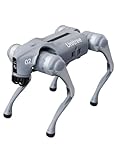
- 【Next-Generation Robotic Companion: Meet the Unitree Go2 Robotic Dog】 The Unitree Go2 Air is an intelligent quadruped robot, perfect for beginners and tech lovers. It measures 27.6"x12.2"x15.7" and weighs just 33 lbs, yet carries up to 15.4 lbs and reaches speeds of 2.5 m/s. Its advanced joint mobility allows it to climb 30° slopes and overcome 5.9" obstacles. An 8000 mAh battery provides 1–2 hours of operation.
- 【Intelligent Navigation with 3D LiDAR & Obstacle Avoidance】 Featuring ultra-wide 3D LiDAR with 360°x96° perception, the Go2 Air detects obstacles as close as 2 inches for reliable all-terrain navigation and real-time avoidance. Note: Obstacle avoidance must be manually enabled.
- 【High-Definition Vision & Seamless App Integration】 A front HD camera streams 1280x720 video to the app. Control the robot, view real-time data, use graphical programming, and update firmware via OTA. Connectivity includes WiFi6 and Bluetooth 5.2. *Note: Voice/GPT features are Pro/X-exclusive; 4G modules are unavailable in North America.*
- 【Advanced Joint & Cooling Design for Enhanced Durability】 Joints provide 45 N·m peak torque for dynamic, precise movement. Internal wiring reduces wear, and an integrated knee heat pipe improves thermal management for stable extended use. Warning: Not waterproof. Avoid rain or water.
- 【Complete Package & Important Guidelines】 Each Go2 Air comes with a handheld remote control and a 33.6V/3.5A standard charger. Please note that this product is non-returnable and non-exchangeable once activated, except for quality-related issues. We strongly recommend reviewing all specifications before purchase. Warranty: Go2 Air – 6 months; Go2 Pro/Go2 X – 12 months. The warranty does not cover damage caused by modifications, disassembly, or misuse. Users are advised to operate the robot responsibly and in compliance with local regulations.
How does its scope compare with the manufacturer SDK?
| Area | Unitree SDK context in the cited material | Free-Dog project claim |
|---|---|---|
| Models and control tiers | Hackaday describes restrictions associated with the manufacturer SDK; the specific current model-by-model policy is not established in the cited material. | Maintainers list Go1 Air, Pro, Max, and EDU, including “faux-level” low-level control for non-EDU models. |
| Command level | High- and low-level command examples are not detailed for every model in the cited material. | High-level behavior commands and low-level position, torque, and velocity examples are described. |
| Setup | Not stated in the cited material. | README describes Python prerequisites, network configuration, connection settings, and switching the robot into low-level mode with its controller. |
| Safety features | Hackaday and the project README refer to safety features in the original SDK but do not specify them individually. | Maintainers say Free-Dog does not include those safety features and warn that commands can damage the robot. |
| Evidence and currency | Coverage cited here is Hackaday’s report published June 24, 2023. | Compatibility and setup details are maintainer statements in a repository that may change; the cited 2023 announcement is not a current guarantee. |
This comparison is about described scope, not a verified replacement test. The available information does not establish that Free-Dog is a supported substitute for Unitree’s software, nor that every Go1 variant or revision is compatible.
What does setup involve?
Free-Dog setup is more than installing a Python library. The README describes Python prerequisites, configuring the network and connection settings, and using the robot’s controller to switch into low-level mode. Follow the repository’s current instructions for the exact configuration rather than relying on an older walkthrough; incorrect network or control-mode settings can prevent communication or create unsafe behavior.
Rank #4
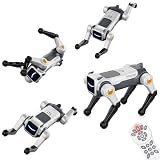
- Stunt Master Action & Dog-Like Gestures – Watch your smart robot dog perform amazing acrobatic moves including forward/backward flips, left/right rolls, frog jump, and adorable real-dog poses like one-leg pee gesture and greeting paw raise. Bring endless laughter and excitement to playtime!
- Lifelike dog postures, nurturing responsibility & fun interaction – Moves like one-leg pee and raised-paw greeting are not just funny gimmicks; they let kids experience the “command → response” interaction just like with a real pet. The robot dog’s motions are gently tuned – vivid but not too rough – suitable for indoor floors, carpets, or flat outdoor ground.
- Auto Demo with Dancing & Music – Press the auto-demo button and let your robotic puppy show off its talent! It will automatically perform a full dance routine with synchronized music and lively dance moves – a perfect entertainer for parties, family gatherings, or simply when kids want to watch their pet doggy shine.
- Dual Control: Remote + Voice Command – Take full control with the traditional 2.4GHz remote controller (great for precise operation), or simply speak commands to make the robot dog execute any action. Hands-free voice control works for all 6 major action types – flips, rolls, frog jump, pee gesture, greeting paw, and auto-demo dancing!
- Program & Learn Through Play - The product comes with several pre-stored programs combining actions and movement paths. For example, with one command you can make it “walk a square route while mixing in backflips”, or execute a fixed routine like “go around obstacles + pee gesture”. This upgrades gameplay from random commands to scripted performances.
Because low-level operation can damage the robot and the project disclaims the original SDK’s safety features, a Go1 owner should first verify the exact model and software configuration against the project’s current documentation. The available sources do not establish compatibility across all firmware and hardware revisions.
Independent reader supportYour contribution helps us test, update, and keep practical guides available for everyone.Who should consider it?
Free-Dog may interest Go1 developers who want to explore commands beyond high-level behaviors, especially those investigating low-level control on non-EDU models. It is a poor fit for anyone who needs manufacturer-backed support, documented safety protections, or guaranteed compatibility. The robot hardware is separate from the SDK; no claim here suggests that Free-Dog is bundled with a Go1.
PC Slower Than It Used to Be?
A free scan shows the junk files, broken settings and background clutter dragging Windows down - then fixes them in one click.Free scan · Windows 10 & 11Crashes, No Sound, or Screen Glitches?
Random freezes, missing sound and display glitches usually trace back to one bad driver. Find and replace yours safely.Free scan · under a minuteQuick Recap
Best Value

- Three models, one lightweight platform R1 Air (20 DOF, monocular camera), R1 (26 DOF, binocular camera, head+waist joints), and R1 Edu (26 DOF + SDK/API for programming). All weigh ~29kg / 123cm – one person can lift, move, and fit into a car trunk.
- Easy setup – no coding required for basic use Unbox, power on, and start. Manual teaching feature: physically pose the robot, and it replays the motion. Graphical drag-and-drop programming also available.
- More DOF = more expressive movement 26‑DOF models (R1 / R1 Edu) add head and waist articulation for smoother dance and running. For safety reasons, only basic actions are currently available; advanced movements are not yet released.
- Voice interaction + two color options Responds to English voice commands (music, conversation, photo). Choose Gold or Blue‑White with automotive‑grade gloss paint.
- R1 Edu adds open development SDK/API access for custom programming, simulation platforms, and future Unistore content downloads. Adult use only – under 18 requires adult supervision.
Product prices and availability are accurate as of the date/time indicated and are subject to change. Any price and availability information displayed on Amazon at the time of purchase will apply.

