
Free tools Windows power users keep installed
One-click scans. No signup required.
iTechGuides is reader-supported. When you buy through links on our site, we may earn an affiliate commission. As an Amazon Associate I earn from qualifying purchases. Learn more
Yes, 3D-printed parts can stay outdoors when the filament, design and print process match the exposure. ASA is a practical starting point for functional parts that receive regular sunlight, heat and weather because manufacturers describe it as UV- and temperature-resistant. That does not guarantee a particular service life: outdoor durability also depends on the exact filament formulation, print quality, geometry, mechanical load, moisture and whether exposure is continuous.
Sunlight is only one part of the problem. A print must tolerate heat cycles, rain, humidity, wind and the stresses placed on it. The sections below explain how to choose a material, print it reliably and judge whether an outdoor application needs a more specialized solution.
Which filament is best for outdoor use?
For a general-purpose functional part exposed to sustained sun and weather, start by evaluating ASA. Prusa describes ASA as suitable for outdoor and technical parts because of its UV and temperature resistance, while Polymaker positions its ASA as an ABS alternative with improved weather resistance. Those are manufacturer descriptions, not a promise that every ASA part will last for a set number of years.
The Tool Desk
Outbyte PC Repair FREEClear out junk files and repair common Windows errorsFree Scan →Outbyte Driver Updater FREEFix the driver behind crashes, sound loss and screen glitchesFind Drivers →ASA: the practical starting point
ASA is designed to retain useful properties under ultraviolet light and elevated temperatures better than many ordinary consumer filaments. Prusa lists temperature resistance up to 93 °C. That figure is material guidance from Prusa, not a universal operating limit for every brand, color or printed geometry. Polymaker also identifies its ASA as UV- and weather-resistant.
#1 Best Overall
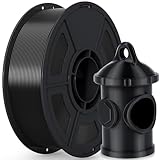
- 🌞【Excellent UV & Weather Resistance】- iSANMATE ASA filament is a highly durable material that offers exceptional UV, weather, mechanical, and thermal resistance, ensuring stability and durability in different temperature environments
- 🌞【Wide Compatibility and Outdoor Use for Long】- iSANMATE ASA filaments compatible with most consumer and industrial 3D printers. providing effective protection against breakage and color degradation when used outdoors for long-term purposes
- 🌞【Recommended Printing Conditions】- The Printing Temp is 240°C - 270°C (depending on the printer model)which is wider than typical PLA, Printing speed: 30-100mm/s. Hot bed temperature: 80°C - 100°C; ❗❗Printing Tips: 1. When you use ASA filament to print models, it is better to print in a closed environment. 2. It is recommended to apply glue to the bed before printing
- 🌞【Vacuum-sealed packaging】-iSANMATE 3D priting filament is carefully vacuum packed with desiccant to maintain the performance of PLA filament and prevent dust and foreign matter from entering
- 🌞【Technical Solutions】- Provide fast and efficient technical solutions when you have any printing problems with 24 hours guaranteed reply
ASA still has important limitations. It can warp significantly while printing, especially in large flat shapes, and needs controlled ambient temperature. A durable finished material is not automatically an easy material to print.
ABS: related, but not an interchangeable outdoor answer
ASA and ABS share processing characteristics, but Polymaker specifically presents ASA as the weather-improved alternative. The available product information does not provide a controlled, head-to-head outdoor-aging result for a named ABS grade versus a named ASA grade. Treat the comparison as a material-selection direction rather than a quantified lifetime ranking.
PETG and PLA: avoid blanket lifetime claims
Prusa’s material guide provides useful print-setting and broad feature comparisons for PETG, PLA and ASA. However, the available sources do not establish matched outdoor-aging tests showing that one of these materials always outlasts the others in every climate and application. Intermittent shade, continuous desert sun, freeze-thaw cycles and a lightly loaded cover are different service conditions.
Specialty options such as PVDF
UltiMaker identifies PVDF as having good UV-resistant properties. PVDF is a specialty material rather than a simple default for a typical consumer printer, so it belongs in a requirements-driven selection process where chemical resistance, temperature and processing capability justify the additional complexity.
Is ASA filament weatherproof and truly UV-resistant?
ASA is described by its manufacturers as UV- and weather-resistant, but “weatherproof” should not be read as indestructible, permanently waterproof or guaranteed to last a particular number of years. UV resistance means the polymer can better resist ultraviolet light, including sunlight; it does not eliminate all forms of aging.
Rank #2

- 🌞【Excellent UV & Weather Resistance】- iSANMATE ASA filament is a highly durable material that offers exceptional UV, weather, mechanical, and thermal resistance, ensuring stability and durability in different temperature environments
- 🌞【Wide Compatibility and Outdoor Use for Long】- iSANMATE ASA filaments compatible with most consumer and industrial 3D printers. providing effective protection against breakage and color degradation when used outdoors for long-term purposes
- 🌞【Recommended Printing Conditions】- The Printing Temp is 240°C - 270°C (depending on the printer model)which is wider than typical PLA, Printing speed: 30-100mm/s. Hot bed temperature: 80°C - 100°C; ❗❗Printing Tips: 1. When you use ASA filament to print models, it is better to print in a closed environment. 2. It is recommended to apply glue to the bed before printing
- 🌞【Vacuum-sealed packaging】-iSANMATE 3D priting filament is carefully vacuum packed with desiccant to maintain the performance of PLA filament and prevent dust and foreign matter from entering
- 🌞【Technical Solutions】- Provide fast and efficient technical solutions when you have any printing problems with 24 hours guaranteed reply
Why exposure pattern matters
UltiMaker’s educational guidance notes that continuous UV exposure is more serious than intermittent exposure. A part mounted in full sun every day experiences a different dose from a component used outdoors only occasionally or kept under an overhang. Heat, moisture and mechanical stress can accelerate the consequences of that exposure.
What the available specifications do—and do not—prove
An UltiMaker Method-series ASA listing reports a tensile modulus of 2,300 MPa, tensile strength of 49 MPa and thermal resistance of 96 °C. These are listed properties for that Method-series material, not generic values for every ASA filament and not an outdoor-aging result. Prusa’s separate guidance gives up to 93 °C for ASA; the two figures come from different sources and should not be treated as interchangeable test results.
No universal outdoor lifetime is established for an arbitrary printed part. Without a defined filament grade, geometry, load, climate and exposure test, a claim such as “five years outside” would be unjustified.
How should I choose a filament for my outdoor part?
Decide from four axes: ultraviolet and weather exposure, the hottest temperature the part will see, how reliably your printer can process the material and the mechanical demands if the part carries a load.
| Material or option | What the available guidance supports | What remains uncertain |
|---|---|---|
| ASA | Prusa and Polymaker describe it as suitable for outdoor use with UV and temperature resistance; a sensible starting point for sustained sun and weather. | No universal service-life number; exact performance depends on formulation, print and environment. |
| ABS | Related processing family; Polymaker positions ASA as an ABS alternative with better weather resistance. | No matched aging result for a specific ABS and ASA grade in the available sources. |
| PETG | Prusa’s guide supplies material and print-setting comparisons. | No evidence here that PETG always lasts longer or shorter than ASA or PLA outdoors. |
| PLA | Prusa’s guide supplies material and print-setting comparisons. | No evidence here for a blanket outdoor-lifetime ranking. |
| PVDF | UltiMaker identifies good UV-resistant properties. | Specialty processing and printer requirements make it unsuitable as a default consumer choice. |
Ask how hot the part will become
Measure or estimate the temperature at the part, not merely the outdoor air temperature. Dark surfaces in direct sun can become much hotter than ambient air. Compare that condition with the exact filament maker’s thermal guidance, and remember that a quoted resistance value is not a guarantee that a loaded, thin-walled print will retain its shape at that temperature.
Rank #3

- 【Weather resistance & Heat resistance】OVERTURE ASA filament is specially formulated to provide excellent protection against UV rays. It also exhibits excellent temperature resistance, ensuring stability and durability in different temperature environments
- 【Clog-Free & Bubble-Free】 Designed and manufactured with our patented clog-free formula to guarantee a smooth and seamless printing experience. All spools undergo thorough drying for 24 hours before packaging and are vacuum-sealed in resealable foil packaging
- 【Dimensional Accuracy & Consistency】Advanced CCD diameter measuring and self-adaptive control system in the manufacturing guarantee these ASA filaments to be strict tolerances. Diameter 1.75mm, dimensional accuracy (98%) + / - 0.02 mm without any exaggeration
- 【Wide Compatibility and Color Selection】 Overture filaments seamlessly integrates with most consumer and industrial 3D printers. Explore your creative side with our extensive selection of vibrant colors, ensuring a spectrum of possibilities for your unique creations
- 【Supported & Smooth Printing】 Print with confidence. Overture filament comes with dedicated support and a 1-year shelf life for unopened spools (proper storage required). We're committed to timely solutions for a seamless printing experience. Your reliable 3D printing partner
Ask what happens if the part fails
A decorative sign and a bracket supporting equipment should not use the same safety margin. The available sources do not validate a universal recipe for wall thickness, infill, orientation or fasteners. Design those features for the actual load, impact and failure consequences rather than inferring them from a UV-resistance claim.
Crashes, No Sound, or Screen Glitches?
Random freezes, missing sound and display glitches usually trace back to one bad driver. Find and replace yours safely.Free scan · under a minutePC Slower Than It Used to Be?
A free scan shows the junk files, broken settings and background clutter dragging Windows down - then fixes them in one click.Free scan · Windows 10 & 11What printer setup does ASA require?
ASA generally needs a stable, warm printing environment. Prusa reports significant warping as a main drawback, recommends a warm ambient environment and says an enclosure is necessary for large parts. Polymaker likewise recommends an enclosed printer to control temperature and reduce warping.
Use the exact filament profile
Prusa’s material guide lists ASA with a recommended enclosure, a nozzle range of 220–275 °C and a bed range of 90–110 °C. Polymaker’s product guidance gives 240–260 °C for the nozzle and 75–95 °C for the bed. These ranges are not meant to be averaged: they apply to different guidance documents and formulations. Select the profile supplied for your exact spool and printer, then validate first-layer adhesion and dimensional accuracy.
Control drafts and ambient temperature
Keep the print area free from cold drafts and sudden temperature changes. For large parts, use the enclosure recommended by the manufacturer. Prusa cautions that printing a lot of ASA in an unventilated enclosure can deform plastic printer components over time; check your printer’s enclosure limits and ventilation requirements before committing to long jobs.
Dry only when the filament has absorbed moisture
Prusa notes that ASA is partially hygroscopic. Polymaker’s product guidance recommends drying its ASA at 70 °C for six hours when the filament has absorbed moisture. This is conditional, product-specific advice, not a universal requirement for every spool. Follow the drying temperature and time printed by the filament maker, and store the cooled, dry spool in a sealed container afterward.
Rank #4

- 【UV & Weather Resistant】: Polymaker ASA 3D printer filament combines the properties of ABS with added weather resistance. UV-resistant and less prone to environmental stress cracking, it’s suitable for outdoor applications like RC planes and car accessories.
- 【High Heat Resistance & Mechanical Properties】: Polymaker ASA filament can withstand temperatures up to 100˚C (212°F) and offers high toughness and impact resistance, making it suitable for functional applications. It shares the same properties as ABS 3D printer filament.
- 【Strong & Durable】: Polymaker ASA 3D printer filament combines strength, rigidity and reliable layer adhesion for real-world applications. Suitable for functional prototypes, mechanical parts, brackets, housings, replacement parts, tools and other projects that require durable performance.
- 【Printing Settings】: Nozzle Temperature: 250˚C; Bed Temperature: 90˚C; Speed: 50mm/s. (Adjust as needed per your 3D printer; refer to standard ABS filament settings). For large parts, use an enclosed printer to prevent warping.
- 【Risk-Free & Lifetime Technical Support】: We're here to assist you in achieving flawless, beautiful prints. Feel free to reach out to us on Amazon anytime you need help!
How do I print an ASA part for outdoor service?
Use this workflow as a verification sequence, while treating the filament maker’s profile as the controlling source for temperatures.
- Define exposure and load. Record whether the part will be in continuous sun, intermittent outdoor use or shade; note expected heat, rain, humidity, impacts and the consequence of a failure.
- Confirm printer compatibility. Check that the printer can reach the exact nozzle and bed ranges for the chosen ASA and that an enclosure is supported, especially for a large part.
- Inspect and condition the spool. If the material shows moisture-related symptoms or the manufacturer says it has absorbed moisture, apply the product’s drying instruction. For Polymaker’s stated condition, that is 70 °C for six hours.
- Prepare the build environment. Eliminate drafts, preheat the bed as directed and make sure the enclosure is stable. Keep heat away from printer components that are not rated for enclosed operation.
- Print a small validation piece. Check first-layer adhesion, corner lift, layer bonding and dimensions before starting the final outdoor part.
- Manage warping on the final geometry. Large flat areas and sharp corners are especially demanding. Use the adhesion and geometry features supported by your slicer and printer profile rather than copying settings from an unrelated ASA spool.
- Inspect before installation. Reject parts with lifted corners, visible layer separation, cracks or distorted mounting faces. A UV-resistant polymer cannot compensate for a print that is already structurally compromised.
- Install with the real load in mind. Use fasteners, clearances and support surfaces designed for the application. Do not assume a generic infill percentage or wall count is safe without considering force direction and failure consequences.
What outdoor problems should I watch for?
Warped or lifted corners during printing
Warping usually indicates an unstable thermal environment, inadequate bed adhesion or geometry that concentrates shrinkage. Recheck the exact profile, improve enclosure temperature control and validate the first layer before changing multiple variables at once.
Stringing, bubbling or inconsistent extrusion
Moisture can contribute to poor extrusion behavior. Dry the filament only according to its manufacturer’s conditional instructions, then keep it sealed. If symptoms persist with a dry spool, check nozzle condition, extrusion calibration and the profile’s temperature range.
Softening or deformation in service
Compare the part’s actual hot condition with the exact material specification. Prusa’s up-to-93 °C figure and UltiMaker Method-series ASA’s listed 96 °C thermal resistance are source- and product-specific values, not a guarantee for a loaded assembly. Reduce heat exposure, redesign the load path or select a material and process validated for the temperature.
Quick wins for a faster PC:
Repair Windows errors before they cause bigger problemsFix Now →Scan for outdated or missing drivers - takes under a minuteDriver Scan →Clear out junk files and repair common Windows errorsFree Scan →Brittleness, cracking or fading after sun exposure
UV damage can accumulate, particularly under continuous exposure. Inspect high-stress areas, screw holes and thin sections for cracks or loss of flexibility. Replace a part when damage affects its load path; a UV-resistant designation does not make it immune to aging.
Best Value

- High UV Resistance - FLASHFORGE ASA UV filament combines the properties of traditional ABS filament with enhanced high-temperature resistance. It is UV stable, meaning it doesn’t suffer from significant shrinking.
- Excellent Temperature Resistance - FLASHFORGE ASA maintains its shape and integrity up to temperatures near 93°C. This makes it particularly suitable for printing objects intended for long-term outdoor use, such as RC planes or car accessories.
- Chemical Resistance - ASA exhibits good resistance to many chemicals, including oils and solvents, making it an excellent choice for applications that require chemical stability.
- Clog-Free, Bubble-Free: The filament is designed to be clog-free and bubble-free, ensuring a smooth and stable printing experience. It is dried for 24 hours, vacuum-sealed, and undergoes quality checks before leaving the factory.
- Precision and Consistency: Advanced CCD diameter measurement and adaptive control systems ensure that 99% of the filament has a diameter of 1.75 mm with a tolerance of +/- 0.02 mm. Each spool contains 1 kg (2.2 lbs) of filament.
Water entering the assembly
Material weather resistance does not automatically make a printed assembly watertight. Layer interfaces, screw holes, seams and moving joints can admit water even when the polymer itself resists weather. Treat sealing, drainage and electrical protection as separate design tasks.
How long will an ASA print last outside?
There is no defensible single number of years for an arbitrary ASA print. Longevity depends on the filament formulation and color, layer bonding, geometry, applied load, temperature cycles, moisture, cleaning chemicals and whether sunlight is continuous or intermittent.
Manufacturers’ suitability statements establish intended use, not a guaranteed field lifetime. To make a lifetime claim for a specific application, you would need a defined material and print process plus exposure conditions and a failure criterion. In the absence of that test, plan inspections and replacement based on the consequence of failure rather than a calendar promise.
Recommended Free Tools
What is the safest decision for a specific outdoor application?
Use ASA as the initial candidate when a consumer-printable part must tolerate regular sun and weather, then verify the printer setup and the exact spool’s instructions. Escalate to a specialty material or a different manufacturing process when the part faces unusually high heat, chemicals, critical structural loads or safety-sensitive failure consequences.
- Low consequence, intermittent exposure: Prototype the chosen material, inspect it periodically and protect it from unnecessary direct sun where practical.
- Continuous sun and weather: Favor a material explicitly described as UV- and weather-resistant, control the print environment and design for thermal movement and water paths.
- High load or safety-critical function: Require application-specific engineering validation; do not rely on a generic filament label or an untested infill recipe.
Frequently Asked Questions
Can I leave an ASA print in direct sun all year?
Direct sun is the most demanding common exposure because ultraviolet dose is continuous and the part can heat well above air temperature. ASA is a reasonable candidate when its manufacturer describes it as UV- and weather-resistant, but inspect the installed part and do not assign a fixed lifetime without an exposure test for your exact material and design.
Does an enclosure make every ASA printer safe to use?
No. An enclosure helps control temperature and reduce warping, but the printer’s motors, electronics and plastic components must also be rated for the resulting heat. Check the printer maker’s enclosure guidance; prolonged ASA printing in an unventilated enclosure can deform unsuitable plastic components.
Should I dry every ASA spool before printing?
Not automatically. ASA is partially hygroscopic, and drying is most useful when the filament has absorbed moisture or the specific manufacturer instructs it. One product guide specifies 70 °C for six hours under that condition, so use your spool’s instructions rather than applying that cycle universally.
What’s actually slowing this PC down?
Pick the symptom - the matching free tool is one click away.
Can a UV-resistant print be used as a watertight outdoor seal?
UV resistance addresses ultraviolet exposure, not the sealing behavior of layer lines, holes and joints. A watertight assembly needs its own seal design, drainage strategy and validation under the expected pressure and weather.
Quick Recap
Product prices and availability are accurate as of the date/time indicated and are subject to change. Any price and availability information displayed on Amazon at the time of purchase will apply.

