
You usually don’t need an Eye-Fi card to send camera photos wirelessly: first check whether your camera has built-in Wi-Fi or Bluetooth, then use the manufacturer’s compatible phone app. If it doesn’t, wireless options are model-specific; for unsupported cameras or large full-resolution transfers, a card reader or USB connection may be the practical fallback.
Choose a transfer method that fits your camera and destination
The right route depends on the exact camera model, whether you’re sending photos to a phone or computer, and whether you need selected images or full-resolution files. The maker’s specifications and app support matter: wireless features, supported file types, and menus vary by camera, phone operating system, and firmware.
| Method | Best suited to | What to check |
|---|---|---|
| Built-in Wi-Fi or Bluetooth with the maker’s app | Sending a few selected photos to a compatible phone or tablet | Camera and app compatibility; available file sizes and formats |
| Camera-to-phone FTP | Supported Sony cameras and a configured receiving app or server | Camera support and setup; Sony documents Wi-Fi and personal-hotspot methods |
| Wireless adapter or transmitter | Particular older camera bodies or supported computer workflows | Exact body, accessory, software, phone OS, and app compatibility |
| Wireless tethering to a computer | Supported studio or remote-shooting workflows | Compatible camera and software; some setups require an optional transmitter |
| Card reader or camera USB | Full-resolution images, larger batches, or cameras without a suitable wireless option | Compatible card format, reader or cable, and computer or phone port; this is wired |
There is no dependable universal speed comparison: transfer time depends on the camera, destination device, file size, and connection conditions. Canon notes that video transfers can take time because of file size and transfer speed. Canon Camera Connect support
Use built-in Wi-Fi or Bluetooth and the camera maker’s app
For most people transferring a few photos to a phone, this is the first option to check. Confirm that the exact camera supports the app and the transfer you want; a camera may offer wireless sharing without supporting every file type, size, or destination.
Free tools Windows power users keep installed
One-click scans. No signup required.
#1 Best Overall
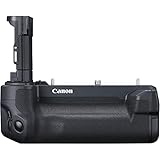
- High-performance Pro Workflow Support via Wired/Wireless LAN with Integrated Vertical Battery Grip.
- Supports FTP, FTPS, and SFTP for Various Options of Encryption and Secure File Transfer
- EOS Utility and Network Setting Tool support.
- Easy to use Interface to help Create Wireless Configurations of all Levels of Complexity
- Enhanced Linked Multi-Camera Shooting and Wireless Time Syncing.
- Look up your camera model in its official manual or support page and confirm which phone app and wireless features it supports.
- Install the compatible app, then follow the camera’s instructions to pair or connect. Depending on the camera, the devices may connect directly rather than through a Wi-Fi hotspot.
- In the app, select the images the camera makes available and import them. Check the app’s settings or manual if you need to know whether it sends originals, resized copies, JPEGs, or RAW files.
Canon
Canon says Wi-Fi-equipped compact cameras can send images wirelessly to compatible devices through Camera Connect, but available destinations vary by camera. Its support page, updated March 31, 2026, also cautions that video transfers can take time. Canon Camera Connect support
Nikon
Compatible Nikon cameras can transfer images to compatible smart devices through the appropriate Nikon app. Nikon says a camera and smart device can create their own connection without a Wi-Fi hotspot. Its guidance distinguishes quick, smaller downloads from maximum-resolution workflows; the app and features depend on the camera, so do not assume Wireless Mobile Utility or SnapBridge works with every body. Nikon USA: Using Your Nikon Camera’s Built-in Wi-Fi
Rank #2

- 1300FT Transmission Range:Dual antenna design,2.4/ 5G high-speed transmission and strong signal. Through the point-to-point connection between transmitter and receiver equipment, extends 1080P full HD HDMI signal wirelessly up to 1300ft in an open field without interference. Note: Walls, metal,bricks or glass can shorten signal coverage or cause severe signal loss
- Plug and Play,1080P Resolution:Quick and easy setup, no software to install, eliminating cable clutter and truly plug and play!Wireless HDMI transmitter and receiver using HDCP version 1.4 with input/output resolutions up to Full HD 1080p @60Hz,0.05s latency, suitable for real-time games and sports programs
- Loop Out&Dual HDMI Out,IR Remote Control:Vrriis Wireless Video Transmission System allows the source device to recognize remote commands; you can use the included IR cable to control the HDMI source device from an auxiliary location (typically where the HDTV is located) for added convenience. The additional HDMI loop out on the transmitter side allows you to add a local monitor for monitoring,dual HDMI output on the receiver side, you can connect two screens at the same time to make monitoring more convenient
- Multiple Power Options:This Wireless HDMI Extender Kit offers a variety of power supply options and can be powered by NP-F Series:F970,F750,F550 series batteries,5V2A type-C & adapters,and 5V2A portable rechargeables,meet the power supply needs encountered when using various scenarios. Note: Our products are not sold together including batteries
- Up to 1TX to 5RX:Wireless Video Transmission System can switch between up to 5 different devices. As the RX increases, the wireless transmission distance will decrease
Fujifilm
The GFX100 II manual documents app-based image transfer, automatic transfer settings, and optional compression for smartphone uploads. Compression for the upload does not alter the originals on the camera card. Those menu details are specific to the GFX100 II and should not be assumed for other Fujifilm models. Fujifilm GFX100 II manual
For supported Sony cameras, consider FTP transfer to a phone
Sony’s Transfer & Tagging instructions describe sending images to a smartphone through FTP over Wi-Fi or a personal hotspot on supported camera models. This is a more specialized setup than selecting photos in a camera app: the camera must support the workflow, and the receiving app or server must be configured. Sony’s instructions include model-specific paths and distinguish newer from older supported cameras, so identify the exact camera before following them. Sony Transfer & Tagging instructions
Rank #3

- Wireless RCA video transmitter & receiver kit for car rear view camera
- Wireless RCA video receiver/transmitter; avoid complicated wiring, to be used with in-car monitor, head unit, DVD player and camera, etc.
- Receiver/transmitter frequency: 2370MHz
- Av in/out: PAL/NTSC Composite video signal, RCA Jack
- Receiver/transmitter distance: 100m (in jam-free open areas)
Check compatibility before buying an adapter or setting up computer tethering
Nikon WU-1a
The WU-1a wireless mobile adapter works only with compatible Nikon DSLR and COOLPIX cameras. Before buying a used or legacy accessory, confirm that your camera body, phone operating system, and the relevant app still support the intended transfer. Nikon WU-1a product information
Wireless tethering with Nikon NX Tether
Nikon NX Tether supports wireless operation with listed compatible cameras that have a built-in transmitter or use a specified optional transmitter. Nikon also identifies models with limited functionality, so check the compatibility information for both the camera and transmitter before relying on a particular workflow. Nikon NX Tether information
Rank #4

- Supports Wireless LAN: IEEE 802.11a/b/g/n/ac for ultra high-speed image transfer using both 2.4 GHz or 5 GHz
- Transfer images at your convenience using FTP transfer, EOS Utility, WFT Server or Canon Camera Connect app
- Specially designed for use with the new EOS-1D X Mark II camera, with an improved UI, organized settings and a more simple display configuration
- Wireless time syncing can sort images captured by multiple cameras and determine the accurate shooting sequence
Use a card reader or USB when wireless is unsuitable
A wired transfer is not wireless, but it can be the more suitable choice for full-resolution files or a large batch. Nikon says wireless transfer is not ideal for transferring maximum-resolution camera files and recommends a card reader or camera-to-computer USB connection for that workflow. Fujifilm’s GFX100 II manual also documents connecting a USB card reader to a computer or smartphone; check that the reader, card format, device port, and camera settings are compatible.
Quick Recap
Best Value

- Product Type: Camera Other Accessories
- Package Quantity: 1
- Country Of Origin: Japan
- Package Dimensions: 17.272 cms (L) x 12.953 cms (W) x 6.35 cms (H)
Troubleshoot a camera that will not connect
- Confirm the exact camera model. App support, adapter compatibility, and menu paths can differ across models from the same brand.
- Check the app and phone requirements. Confirm the camera maker’s current support information for your phone OS, app, and camera firmware.
- Check what the app is set to transfer. Selected JPEGs or resized copies may be available where a full-resolution RAW or JPEG workflow is not.
- Try the connection method the camera specifies. Some cameras connect directly to a phone; Sony’s documented FTP workflow can use Wi-Fi or a personal hotspot. A normal home Wi-Fi network is not necessarily required for every camera workflow.
- Switch to a wired method if needed. If the camera lacks a supported wireless route, the connection is unreliable, or you need full-resolution files in bulk, use a compatible card reader or USB connection instead.
Product prices and availability are accurate as of the date/time indicated and are subject to change. Any price and availability information displayed on Amazon at the time of purchase will apply.

