
iTechGuides is reader-supported. When you buy through links on our site, we may earn an affiliate commission. As an Amazon Associate I earn from qualifying purchases. Learn more
A VPN can change the IP address and country that xHamster sees, but it cannot guarantee access from every network or jurisdiction. The site may block VPN address ranges, apply its own regional controls, or require age verification regardless of your VPN location.
For 2026, NordVPN is the strongest overall choice for xHamster based on current xHamster-specific testing. Proton VPN is the better privacy-focused alternative, Surfshark is the most practical option for many devices, and ExpressVPN offers the simplest setup.
Best VPNs for xHamster in 2026
| VPN | Best for | Important feature | Main limitation |
|---|---|---|---|
| NordVPN | Best overall | Large server choice, NordWhisper, and Obfuscated Servers | Some features have separate protocol and platform requirements |
| Proton VPN | Privacy-conscious users | Stealth, Smart Protocol, alternative routing, and a free plan | Free-plan locations may not provide a working xHamster IP |
| Surfshark | Households and many devices | Unlimited simultaneous connections and NoBorders | NoBorders can restrict the available server list |
| ExpressVPN | Simple setup | Automatic protocol selection and Lightway Turbo | Lightway Turbo has platform and feature limitations |
1. NordVPN: best overall for xHamster
NordVPN is the best all-round recommendation because current xHamster-specific testing from 01net ranked it first and reported successful access through servers in countries including Canada and the United States. Other tested locations included Austria and Bulgaria.
Do these 3 things before closing this tab:
1Repair Windows errors before they cause bigger problems2Fix the driver behind crashes, sound loss and screen glitches3Clear out junk files and repair common Windows errorsThat is a test snapshot, not a permanent guarantee. VPN addresses are routinely classified and blocked, so one NordVPN server may work while another does not.
Popular on Amazon
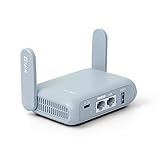
- 【DUAL BAND AX TRAVEL ROUTER】Products with US, UK, EU Plug; Dual band network with wireless speed 574Mbps (2.4G)+2402Mbps (5G); 2.5G Multi-gigabit WAN port and a 1G gigabit LAN port; USB 3.0 port; Wi-Fi 6 offers more than double the total Wi-Fi speed with the MT3000 VPN Router.
- 【VPN CLIENT & SERVER】OpenVPN and WireGuard are pre-installed, compatible with 30+ VPN service providers (active subscription required). Simply log in to your existing VPN account with our portable wifi device, and Beryl AX automatically encrypts all network traffic within the connected network. Max. VPN speed of 150 Mbps (OpenVPN); 300 Mbps (WireGuard). *Speed tests are conducted on a local network. Real-world speeds may differ depending on your network configuration.*
- 【OpenWrt 21.02 FIRMWARE】The Beryl AX is a portable wifi box and mini router that runs on OpenWrt 21.02 firmware. It supports more than 5,000 ready-made plug-ins for customization. Simply browse, install, and manage packages with our no-code interface within Beryl AX's Admin Panel.
- 【PROTECT YOUR NETWORK SECURITY】Our pocket wifi, unlike other vulnerable portable wifi hotspot for travel purposes supports WPA3 protocol–Preventive measures against password brute-force attacks; DNS over HTTPS & DNS over TLS–Protecting domain name system traffic and preventing data eavesdropping from malicious parties; IPv6–Built-in authentication for privacy protection, eliminating the need for network address translation.
- 【VPN CASCADING AT EASE】Surpassing the mediocre performance of most VPN routers for home usage, the Beryl AX is capable of hosting a VPN server and VPN client at the same time within the same device, enabling users to remote access local network resources like Wi-Fi printers or local web servers, and accessing the public internet as a VPN client simultaneously.
NordVPN also has two relevant connection features that are easy to confuse:
- NordWhisper is a current protocol intended for restrictive networks such as hotel, airport, campus, workplace, and conference Wi-Fi.
- Obfuscated Servers is a separate specialty-server feature with different compatibility requirements.
NordWhisper is supported on Windows, macOS, Android, iOS, Linux, and Android TV. It is not compatible with Dedicated IP, Meshnet, or Onion Over VPN.
Enable NordWhisper
- Windows: Open NordVPN → click the gear icon → Connection and security → click the selected protocol → NordWhisper.
- macOS: Open NordVPN → gear icon → General → click the current protocol → NordWhisper.
- Android or iPhone: Open NordVPN → tap the profile icon → Settings → VPN protocol → NordWhisper.
- Android TV: Open NordVPN → cogwheel → Settings → Protocol → NordWhisper.
Use NordVPN Obfuscated Servers
On Windows or macOS, open NordVPN and select Obfuscated Servers under Specialty servers. Click the three-dot menu beside it to choose a country. On Android or iOS, tap Specialty Servers → Obfuscated, then use the three-dot menu to select a location.
On Linux, NordVPN documents the following commands:
nordvpn set technology openvpn
nordvpn set obfuscate on
nordvpn connect
To turn it off:
nordvpn set obfuscate off
nordvpn disconnect
The separate Obfuscated Servers feature uses OpenVPN TCP or UDP on Linux. This does not mean that all NordVPN obfuscation requires OpenVPN: NordWhisper is a separate, newer option.
2. Proton VPN: best privacy-focused option
Proton VPN is the strongest alternative if privacy and anti-censorship features matter more than having the largest possible choice of locations. Its relevant features include DNS and IPv6 leak protection, a kill switch, alternative routing, Smart Protocol, and Stealth.
Also popular on Amazon
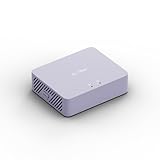
- 【Up to 1100 Mbps VPN Speed 】 Hardware-accelerated WireGuard and OpenVPN-DCO deliver up to 1100 Mbps VPN throughput, over 3× faster than Brume 2 for smooth remote access and file transfers.
- 【Three 2.5G Ports & Multi-WAN】Tri-port 2.5GbE design with flexible WAN LAN configuration supports multi-gigabit wired setups, dual-ISP Multi-WAN and failover to keep home and SOHO networks online.
- 【Stealth VPN Obfuscation】VPN obfuscation disguises VPN traffic as regular HTTPS, helping you evade blocking, bypass restrictive networks and maintain stable, private connections.
- 【DPI protection】Deep Packet Inspection with visual dashboards blocks adult/gambling/malicious sites, while SQM and QoS prioritize gaming, calls, and video when bandwidth is tight
- 【OpenWrt & USB 3.0 Expansion】OpenWrt with 1GB DDR4 and 8GB eMMC lets you install plugins and build VPN, ad-blocking or NAS, while USB 3.0 Type‑C connects high-speed storage or 4G/5G dongles
- Stealth disguises the VPN connection and is available on all Proton VPN plans, including Free.
- Smart Protocol tries available protocols when a connection is blocked. On Windows, Proton documents a sequence that can include OpenVPN UDP, OpenVPN TCP, WireGuard UDP, WireGuard TCP, and Stealth.
- Alternative routing attempts to reach Proton infrastructure through third-party networks when direct connections are unavailable.
- Paid plans support up to 10 simultaneous devices.
Proton’s free plan includes unlimited bandwidth, but it should not be treated as a guaranteed xHamster-unblocking service. Free users may have fewer location choices, and the available exit IP may already be blocked by xHamster or may not be in a suitable country.
Recommended Free Tools
TCP mode can help with ordinary network blocking, but Proton notes that TCP alone may not defeat advanced deep-packet inspection. Stealth is the more relevant option when a network is actively identifying VPN traffic.
3. Surfshark: best for many devices
Surfshark is the practical choice for a household or user with numerous devices. One subscription supports unlimited simultaneous VPN connections, including computers, phones, smart TVs, routers, and browser extensions.
Its NoBorders mode is designed for censorship, geoblocking, and restrictive networks. Surfshark says the feature normally activates when the app detects restrictions and then displays a suitable selection of servers.
Turn on NoBorders
- Windows: Surfshark → Settings → VPN Settings → Advanced Settings → enable NoBorders.
- Android: Surfshark → Settings → VPN settings → Advanced settings → enable NoBorders.
- iOS: Surfshark → Settings → VPN Settings → Advanced Settings → enable NoBorders.
If Advanced settings is not visible on Android, open the VPN settings and tap and hold the Protocol tab for three seconds.
NoBorders may expose only a limited, automatically selected list of locations. If those locations do not work, disable NoBorders after establishing a normal VPN connection and try another server. The feature improves connectivity through restrictions; it does not guarantee a particular xHamster country or IP address.
Also popular on Amazon

- 【Five Gigabit Ports】1 Gigabit WAN Port plus 2 Gigabit WAN/LAN Ports plus 2 Gigabit LAN Port. Up to 3 WAN ports optimize bandwidth usage through one device.
- 【One USB WAN Port】Mobile broadband via 4G/3G modem is supported for WAN backup by connecting to the USB port. For complete list of compatible 4G/3G modems, please visit TP-Link website.
- 【Abundant Security Features】Advanced firewall policies, DoS defense, IP/MAC/URL filtering, speed test and more security functions protect your network and data.
- 【Highly Secure VPN】Supports up to 20× LAN-to-LAN IPsec, 16× OpenVPN, 16× L2TP, and 16× PPTP VPN connections.
- Security - SPI Firewall, VPN Pass through, FTP/H.323/PPTP/SIP/IPsec ALG, DoS Defence, Ping of Death and Local Management. Standards and Protocols IEEE 802.3, 802.3u, 802.3ab, IEEE 802.3x, IEEE 802.1q
4. ExpressVPN: simplest setup
ExpressVPN is suitable for users who would rather let the application choose the connection method. On Windows, Automatic is the default and recommended setting for most users. Available alternatives can include Lightway UDP, Lightway TCP, WireGuard, and OpenVPN.
To change the protocol, disconnect first, then open ExpressVPN → Profile → VPN Protocol. If you select anything other than Automatic or Lightway – UDP, confirm by choosing Change Anyway.
Lightway Turbo is currently available in the Windows app under Automatic or Lightway – UDP. It cannot be used with split tunneling or Lightway TCP. Advanced Protection features can also limit protocol selection to Automatic or Lightway.
ExpressVPN’s current Windows CLI commands include:
expressvpnctl set protocol auto
expressvpnctl set protocol lightwayudp
expressvpnctl set protocol lightwaytcp
expressvpnctl set protocol wireguard
expressvpnctl set protocol openvpntcp
expressvpnctl set protocol openvpnudp
expressvpnctl status
How to connect to xHamster through a VPN
- Install the official app from the VPN provider and sign in.
- Connect to a nearby server in a jurisdiction where adult content is lawful and xHamster is available. Canada, the United States, Austria, and Bulgaria have appeared in current testing, but server availability and site responses change.
- Open xHamster in a private browser window.
- If xHamster remains blocked, try another server in the same country before changing countries. The issue may be the individual VPN IP rather than the country.
- If the VPN application itself cannot connect, use its restrictive-network feature: NordWhisper or Obfuscated Servers for NordVPN, Stealth or Smart Protocol for Proton VPN, NoBorders for Surfshark, or Automatic followed by Lightway TCP for ExpressVPN.
What to do when the VPN does not work
“Connected” but xHamster is still blocked
The selected IP may be recognized as a data-center or VPN address. The chosen country may also apply its own restriction. Disconnect, choose another server in the same country, and test again. If that fails, try a different country where access is lawful. A VPN connection alone does not guarantee website access.
The VPN application will not connect
Your ISP, network administrator, or local authority may be blocking VPN protocols or ports. Repeatedly reconnecting with the default protocol is unlikely to help. Use the provider’s anti-censorship mode, such as Proton Stealth, NordWhisper, Surfshark NoBorders, or an alternative ExpressVPN protocol.
Also popular on Amazon

- 𝐒𝐞𝐜𝐮𝐫𝐞 𝐖𝐢-𝐅𝐢 𝐎𝐧-𝐓𝐡𝐞-𝐆𝐨 - Roam 6 connects to public Wi-Fi and creates a private network for multiple devices at once, ideal for hotels, cafes, airports, and homes. VPN enables secure work. Not eSIM/SIM card compatible. Requires external internet source.
- 𝐑𝐨𝐚𝐦 𝟔 𝐀𝐗𝟏𝟓𝟎𝟎 𝐝𝐮𝐚𝐥-𝐛𝐚𝐧𝐝 𝐬𝐩𝐞𝐞𝐝𝐬 - Wi-Fi 6 Speeds up to 1,201 Mbps (5 GHz) and 300 Mbps (2.4 GHz) for up to 60 devices simultaneously. Actual Wi-Fi speeds vary based on source bandwidth, environment, distance to devices, and obstacles. ◇§
- 𝐏𝐨𝐫𝐭𝐚𝐛𝐥𝐞 𝐚𝐧𝐝 𝐝𝐮𝐫𝐚𝐛𝐥𝐞 𝐝𝐞𝐬𝐢𝐠𝐧 - A portable travel router compactly designed for trips and adventures, featuring a 1 Gbps WAN/LAN port and a 1 Gbps LAN port for reliable wired connectivity.
- 𝐌𝐮𝐥𝐭𝐢𝐩𝐥𝐞 𝐰𝐚𝐲𝐬 𝐭𝐨 𝐜𝐨𝐧𝐧𝐞𝐜𝐭 - (1) Router Mode: Connects to public Wi-Fi, ISP, or phone (USB tethering). (2) AP/RE/Client Mode: Adds WiFi to wired setups, extends WiFi, or connects wired devices wirelessly.
- 𝐎𝐮𝐫 𝐜𝐲𝐛𝐞𝐫𝐬𝐞𝐜𝐮𝐫𝐢𝐭𝐲 𝐜𝐨𝐦𝐦𝐢𝐭𝐦𝐞𝐧𝐭 - TP-Link is a signatory of the U.S. Cybersecurity and Infrastructure Security Agency’s (CISA) Secure-by-Design pledge. Advanced security is integrated into the device’s design, development, and ongoing maintenance.
NordVPN’s obfuscation option is missing
NordVPN’s separate Obfuscated Servers feature may be unavailable because the selected protocol is incompatible. Check the protocol settings or use NordWhisper instead. These are two separate features, not two names for the same setting.
The Tool Desk
Outbyte PC Repair FREERepair Windows errors before they cause bigger problemsFix Now →Outbyte Driver Updater FREEScan for outdated or missing drivers - takes under a minuteDriver Scan →Surfshark NoBorders is not visible
On Android, open Settings → VPN settings, then tap and hold Protocol for three seconds to reveal Advanced settings.
ExpressVPN protocol choices are unavailable
Check whether Advanced Protection is enabled. It can limit the available choices to Automatic and Lightway. Also remember that Lightway Turbo cannot run with split tunneling or Lightway TCP.
An age-verification prompt still appears
A VPN can change the detected network region, but it cannot guarantee removal of an age check. In the UK, services that allow pornography have been required to use highly effective age assurance since July 25, 2025, under the Online Safety Act regime. Changing VPN locations does not remove those legal obligations or make an age check invalid.
Independent reader supportYour contribution helps us test, update, and keep practical guides available for everyone.What a VPN does—and does not—hide
A VPN hides your real IP address from xHamster and routes traffic through the VPN server. It does not make you anonymous. Cookies, logged-in accounts, browser fingerprints, device identifiers, and website-side tracking can still recognize or associate activity with a visitor.
Outdated Drivers Are Slowing You Down
One free scan finds every outdated or missing driver and matches the right update for your exact hardware.Free scan · exact hardware matchPC Slower Than It Used to Be?
A free scan shows the junk files, broken settings and background clutter dragging Windows down - then fixes them in one click.Free scan · Windows 10 & 11A VPN also does not legalize otherwise prohibited conduct. Check the laws where you live regarding pornography, VPN use, and age verification. Access rules can vary by jurisdiction, and bypassing a regional control may conflict with local law or the website’s terms.
Also popular on Amazon

- 【DUAL BAND WIFI 7 TRAVEL ROUTER】Products with US, UK, EU, AU Plug; Dual band network with wireless speed 688Mbps (2.4G)+2882Mbps (5G); Dual 2.5G Ethernet Ports (1x WAN and 1x LAN Port); USB 3.0 port.
- 【NETWORK CONTROL WITH TOUCHSCREEN SIMPLICITY】Slate 7’s touchscreen interface lets you scan QR codes for quick Wi-Fi, monitor speed in real time, toggle VPN on/off, and switch providers directly on the display. Color-coded indicators provide instant network status updates for Ethernet, Tethering, Repeater, and Cellular modes, offering a seamless, user-friendly experience.
- 【OpenWrt 23.05 FIRMWARE】The Slate 7 (GL-BE3600) is a high-performance Wi-Fi 7 travel router, built with OpenWrt 23.05 (Kernel 5.4.213) for maximum customization and advanced networking capabilities. With 512MB storage, total customization with open-source freedom and flexible installation of OpenWrt plugins.
- 【VPN CLIENT & SERVER】OpenVPN and WireGuard are pre-installed, compatible with 30+ VPN service providers (active subscription required). Simply log in to your existing VPN account with our portable wifi device, and Slate 7 automatically encrypts all network traffic within the connected network. Max. VPN speed of 100 Mbps (OpenVPN); 540 Mbps (WireGuard). *Speed tests are conducted on a local network. Real-world speeds may differ depending on your network configuration.*
- 【PERFECT PORTABLE WIFI ROUTER FOR TRAVEL】The Slate 7 is an ideal portable internet device perfect for international travel. With its mini size and travel-friendly features, the pocket Wi-Fi router is the perfect companion for travelers in need of a secure internet connectivity on the go in which includes hotels or cruise ships.
How to choose
| Your priority | Choose | Reason |
|---|---|---|
| Reliable server choice and restrictive-network support | NordVPN | Strong current xHamster-specific test result plus NordWhisper and obfuscated servers |
| Privacy and censorship resistance | Proton VPN | Stealth, Smart Protocol, alternative routing, and leak protection |
| Connecting a large number of devices | Surfshark | Unlimited simultaneous connections |
| Minimal configuration | ExpressVPN | Automatic protocol selection and a straightforward Windows app |
FAQ
What is the best VPN for xHamster in 2026?
NordVPN is the best overall choice based on current xHamster-specific testing, server selection, speed, and restrictive-network features. It is not a guarantee that every NordVPN server will work.
Can a VPN unblock xHamster from anywhere?
No. xHamster can block known VPN IP addresses, apply regional restrictions, or require age verification. A VPN may help in some locations, but it cannot guarantee access everywhere.
Is Proton VPN Free suitable for xHamster?
It offers unlimited bandwidth and Stealth, but its free servers and locations may not provide a suitable or unblocked IP. Treat it as a privacy-focused free option, not a guaranteed unblocking service.
Quick wins for a faster PC:
Fix the driver behind crashes, sound loss and screen glitchesFind Drivers →Clear out junk files and repair common Windows errorsFree Scan →Scan for outdated or missing drivers - takes under a minuteDriver Scan →Does using a VPN remove xHamster age verification?
No. A VPN changes the apparent network location but does not reliably remove age checks or override legal requirements. Check local rules before accessing adult content or using a VPN.
The Bottom Line
NordVPN is the best overall pick for xHamster in 2026, while Proton VPN is the better privacy-led choice. Choose Surfshark if unlimited device connections matter most, or ExpressVPN if you want the app to select the protocol automatically.
Whichever provider you use, expect occasional blocked servers and changing regional rules. Try another server or the provider’s anti-censorship protocol rather than assuming the VPN has failed permanently, and follow the laws and age-verification requirements that apply where you are.

