
Do these 3 things before closing this tab:
1Clear out junk files and repair common Windows errors2Fix the driver behind crashes, sound loss and screen glitches3Repair Windows errors before they cause bigger problemsiTechGuides is reader-supported. When you buy through links on our site, we may earn an affiliate commission. As an Amazon Associate I earn from qualifying purchases. Learn more
For a first night, start with Stellarium Mobile. It works on Android and iPhone, offers a free tier, camera identification, offline use and a red-light mode. If you mainly want an attractive augmented-reality tour, Star Walk 2 is easier to enjoy. Apple users who want a polished, Apple-only option can choose Sky Guide.
Experienced observers should compare Stellarium with SkySafari. Both support chart-based planning and time simulation, while SkySafari is the stronger choice when a large catalog, event searches, alignment tools or telescope control matter. The right app is the one that matches how you observe: point-and-identify, plan from charts, check what is visible tonight, or run a connected telescope.
What a stargazing app actually does
A planetarium app combines your phone’s GPS, compass and motion sensors with an astronomical database. Point the phone at the sky and it estimates the direction the camera is facing, then draws stars, planets and constellation lines over the live view. You can also switch to a conventional chart, search for an object, change the date and time, or move to another location.
This is more than a novelty. A good stargazing app turns a phone into a pocket star chart and helps you use every clear night efficiently. It can tell a beginner which bright point is a planet, show where a constellation rises, and warn an experienced observer that an event or target will be hidden by daylight or the horizon.
Popular on Amazon
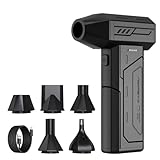
- Powerful Turbo Fan:CAGIWIRU Electric Air Duster have reached speed up to 130000RPM,Can efficient remove dust and debris.With LED light and Three Adjustable Speed to meet with different cleaning tasks.
- With Attached USB C Fasting Charging cable.Charing 3 hours,Enjoy up to 240 minutes of use on the lowest setting, For third speed can use for 25mins.with four charging options to meet with your needs.
- Wide Application: attached 5 different nozzles,making it suitable for a variety of scenes, such as car,pet, pc, keyboards, and other electronic devices. It also serves for office and home clean duster.
- Handy Design & Portable:Cordless air duster electric nozzle is Light weight and small size, design and comfortable to hold and space saving, convenient to carry around. You can put it in your room or inside the car without taking up space.
- Economical &Reusable: Built durable materials with a long-lasting battery,our CAGIWIRU air duster it's a sustainable alternative to disposable air cans.
Quick recommendations by type of observer
| Reader need | Best fit from the researched options | Why |
|---|---|---|
| First app for identifying stars | Stellarium Mobile | Android and iPhone support, search, camera mode, offline use and red-light support; a free tier is available according to SternGucker’s 2026 comparison. |
| Most visual, beginner-friendly AR presentation | Star Walk 2 | 3D constellations, camera overlays, Android and iPhone support, offline use and a free ad-supported tier. |
| Apple-only alternative | Sky Guide | Available for iPhone and iPad, with offline use and ISS alerts; there is no Android version in the comparison. |
| Chart planning and a deeper observing workflow | Stellarium Mobile or SkySafari | Both support planning and time simulation. SkySafari adds larger paid catalogs and telescope-oriented features. |
| Telescope alignment and control | SkySafari | The official SkySafari 8 Pro page documents StarSense Explorer integration, event finding, multi-location observing and shared sky sessions. |
| Desktop planning without an install | Stellarium Web | Runs in a browser and is useful for preparing a session on a larger screen. |
| “What is visible tonight?” | Sky Tonight | Its comparison and beginner material emphasize tonight lists, event calendars and a stargazing index. |
What beginners should check before choosing
Point-and-identify accuracy and clarity
Search for a bright target before going outside, then test the camera view on a known object such as the Moon. The app should place the label close enough to the object that you can understand what you are seeing. Constellation lines and names should remain readable when you hold the phone overhead.
A real night mode
White phone screens damage dark adaptation. Look for a red-light or night mode that changes the whole interface, not merely a red icon. Reduce screen brightness as far as practical and avoid switching back to a bright map between observations.
Search that works in the field
Search should accept common names as well as catalogue designations. After selecting a target, the app should provide an arrow or chart route rather than only opening an information page. Test this before leaving home because a poor compass calibration or an incomplete offline database can make a target appear to be in the wrong place.
Recommended Free Tools
Offline behavior
Mobile coverage is often weak at dark-sky sites. Download or cache what the app permits, then put the phone in airplane mode and test the map. Offline support does not necessarily mean every image, article or event feed is stored locally; verify that the functions you need still work.
Simple controls outdoors
Cold fingers, gloves and dew make small buttons frustrating. A beginner app should let you zoom, lock the orientation and return to the current sky with one obvious control. Camera mode is useful for orientation, but a chart view is usually easier for learning relationships between objects.
App-by-app guide
Stellarium Mobile: the broad cross-platform default
Stellarium Mobile is the safest general recommendation when a group includes both Android and iPhone users. SternGucker’s 2026 comparison lists Android and iPhone support, a free tier, camera mode, offline use and red-light support. The Plus upgrade adds more capability, although the comparison does not establish a single current price.
Also popular on Amazon

- Screen Cleaner is Your Screen’s New Bestfriend! - EVEO is proud to present a screen cleaner that’s perfectly suited for your TV. Meet your new screen cleaner, computer screen cleaner, laptop cleaner, iPad cleaner, Macbook,tv cleaner or any other electronic device. Our screen cleaner spray and wipe along with the included plush microfiber cloth, easily removes dust, fingerprints & other smudges on the screen’s surface. Clean effectively for a streak-free screen
- Gentle on your Screens - Our screen cleaner spray and wipes is compatible to be used even for the most sensitive LCD, LED, CRT, and OLED screens in proper use. Be at ease knowing that this product is compatible with all the major brands: LG, SONY, Samsung, Sharp, iPad, iPhone, Android screens, Kindle, PC monitors - we’ve got you covered! Can be used as LCD screen cleaner, tv cleaner, smart tv screen cleaner, and more
- Premium Super Soft Plush Microfiber Cloth - Included in this efficient screen cleaning kit. This screen cleaner spray and wipe has our signature plush microfiber cloth specially designed to comply with screens and monitors and leave them streak-free. Has been shown to effectively absorbs stubborn stains, zero streaks, and no fiber shedding. Always use this together with our screen cleaner for the best results
- Easy-to-Use Screen Cleaner Kit + microfiber cleaning cloth - The EVEO Screen Cleaning Kit will easily be your new favorite tool when it comes to taking care of the things you love most, quick and easy solution for a streak-free screen. Simply screw on the sprayer gun on the screen cleaner bottle. Spray the cleaning liquid onto the microfiber cloth, then wipe the screen until desired cleanliness & shine is achieved.
- Quality Screen Care Kit Worth Purchasing - Enjoy a convenient Screen Cleaner anytime, anywhere you need it. Your satisfaction is our top priority. We stand behind the quality of our products and that’s why, you shouldn’t be worrying at all. We manufacture the Best Screen Cleaner. and can be used for laptop cleaning kit, laptop screen cleaner, tv screen cleaner for smart tv. MacBook screen cleaner, monitor cleaner or screen cleaner spray for electronic devices with microfiber cleaning cloth
Its value is not limited to identifying a star. Outer Space Trip describes Stellarium as a learning and planning tool with time simulation. Move the clock forward to see when a planet rises, or run it backward to understand how a constellation moves across your sky. Use the chart view to plan a sequence of targets, then use the camera view for final orientation.
Windows Errors? Fix Them Before They Spread
Repair common Windows errors and clear accumulated junk for a smoother, more stable PC - no reinstall needed.Free scan · no reinstallOutdated Drivers Are Slowing You Down
One free scan finds every outdated or missing driver and matches the right update for your exact hardware.Free scan · exact hardware matchChoose Stellarium when you want one app that can serve a beginner now and remain useful as you learn. Its limitations are practical rather than fundamental: advanced catalogue depth, telescope functions and premium features depend on the edition and current store terms.
SkySafari: the experienced observer’s planning candidate
SkySafari has a free Basic tier for iOS and Android. Outer Space Trip reports that this tier contains “120,000+ stars,” all 88 constellations, planets, major satellites, time travel and chart planning. Treat the star count as a 2026 report from Outer Space Trip, not a universal specification for every edition. Paid tiers add larger databases and telescope control.
The official SkySafari 8 Pro product page documents “StarSense Explorer™ integration for fast alignment and object finding” and an event finder for appulse and ISS-transit searches. It also lists Moon surface mapping, multi-location observing and shared sky sessions. Those functions matter when you are preparing a target list, switching between home and an observing site, or coordinating a session with another person.
SkySafari is usually excessive for someone who only wants to identify Orion. It becomes more compelling when you need catalogue depth, a field-of-view simulation, an event search or a path from chart planning to a controlled telescope.
Star Walk 2: visual learning and 3D constellations
The 2026 comparison lists Star Walk 2 for Android and iPhone, with a free ad-supported tier, 3D constellations and offline use. Its strength is demonstration: the three-dimensional constellation artwork and camera presentation help a new observer connect a flat diagram with a real pattern in the sky.
Also popular on Amazon

- 【Large size】:Measuring 800 x 300 mm/ 31. 5×12 inches, which is wider and taller than others. Large mouse pad can perfectly fit your keyboard and mouse of any size, and there is also ample space for peripherals such as phones, tablets, etc.
- 【LED backlight mouse pad】:Blade Hawks RGB mouse pad provides 7 static modes and 7 dynamic modes will give you the options you are looking for. Power-off memory function remembers the last lighting mode you selected. The super glow fiber Chroma will give you a colorful gaming setup that you want.
- 【Anti-slip rubber base】:Made from Natural rubber, this gaming mousepad will firmly grip your desktop, allowing you to enjoy the ultimate precision in the games you are most passionate about. It also comes with a texture that enhances this ability even further.
- 【Smooth and waterproof surface】: Micro-textured cloth surface, for extremely precise mouse control and a smooth movement. When liquid splashes on the gaming mouse pad, it forms water droplets and slides down. Will not delay your work or gameplay.
- 【Plug and play】: This mouse and keyboard pad is powered by USB, plug and play, no driver required. One button control light modes. Press one time to change the lighting mode, press twice to change the brightness, press and hold about 3 seconds turn ON/OFF.
Pick it when the app is part of the experience you are sharing with children, visitors or a casual group. If your priority later shifts to detailed chart planning, catalogue depth or telescope control, compare its tools with Stellarium or SkySafari before making it your only observing app.
Sky Guide: a polished Apple-only option
Sky Guide is listed for iPhone and iPad, with offline use and ISS alerts. Its platform restriction is decisive: Android users need another app. For an Apple household that wants a straightforward sky map and alerts, it is a sensible option; confirm current features and any paid terms in the App Store because app subscriptions and naming can change.
Night Sky: Apple support with camera mode
The comparison lists Night Sky for Apple devices with a camera mode. It is worth considering if you already use Apple hardware and prefer its interface, but verify the current subscription name and price in the Apple App Store. The available comparison does not establish a stable cross-platform edition or a permanent price.
Quick wins for a faster PC:
Fix the driver behind crashes, sound loss and screen glitchesFind Drivers →Repair Windows errors before they cause bigger problemsFix Now →Sky Tonight: a “visible tonight” workflow
Sky Tonight is positioned around what can be seen tonight, event calendars and a stargazing index. That makes it useful when your question is not “what is this?” but “which targets are worth going outside for at 10 p.m.?” Check the current premium terms in the store before subscribing; the comparison does not guarantee that names, limits or prices remain unchanged.
Stellarium Web: browser planning
Stellarium Web requires no installation and runs in a browser. A desktop screen is easier for checking a wide field, comparing dates and building a target list than a phone held at arm’s length. Use it before an outing, then use a mobile app at the observing site if you need sensors, red mode or offline operation.
Stellarium versus SkySafari
| Decision point | Stellarium Mobile | SkySafari |
|---|---|---|
| Platforms | Android and iPhone; Stellarium Web also runs in a browser. | iOS and Android Basic tier; paid-edition capabilities vary. |
| Beginner identification | Camera mode, search, constellation labels and red-light support are listed in the 2026 comparison. | Supports chart planning and time travel; choose it when you expect to progress beyond simple identification. |
| Catalog figure | Specific catalog size is not stated in the supplied comparison. | 120,000+ stars in the Basic-tier description reported by Outer Space Trip in 2026; larger paid databases are available. |
| Planning | Time simulation and chart-based learning and planning. | Time travel, chart planning and event-oriented tools. |
| Telescope workflow | Advanced integration depends on edition; no specific integration is established in the supplied material. | SkySafari 8 Pro documents StarSense Explorer integration, alignment/object finding and telescope control in paid tiers. |
| Best reason to choose it | One broad, approachable app for mixed-platform beginners and developing observers. | Deeper observing workflow, event searches, larger catalogs and telescope integration. |
| Price | Free tier; Plus upgrade price is not stated and can change. | Basic free tier; paid-tier prices are not stated and can change. |
How to use an app on your first night
- Install and update at home. Choose an app that supports your phone. Open it once while online so any required sky data, maps or language files are available.
- Set location permission accurately. Allow location access while using the app, or enter the observing site manually if you prefer not to use GPS. A wrong location shifts the horizon and visibility predictions.
- Calibrate the compass. Follow the app’s figure-eight or movement prompt away from magnetic objects. If labels drift, close the camera view, rotate slowly and recalibrate.
- Set the date and time. Confirm the phone’s clock and time zone. For a future session, use the app’s time controls to preview the sky at the planned start and end.
- Enable red mode and lower brightness. Turn this on before leaving a lit room. Keep a normal white-light flashlight away from the observing area.
- Test a known object. Search for the Moon or a bright planet, follow the direction indicator, then compare the label with the actual sky. This reveals orientation problems before you search for faint targets.
- Switch between camera and chart views. Use camera mode to identify a pattern; use the chart to see nearby targets and plan a route through the sky.
- Use the app briefly, then look up. The screen is a guide, not a replacement for observing. Let your eyes adapt between checks.
Planning an observing session as you gain experience
Build a target list by time and direction
Start with objects that are above the horizon during your actual session. A chart with time simulation lets you remove targets that set early and arrange the rest from west to east, reducing unnecessary movement. Include a few bright targets as waypoints before attempting faint objects.
Also popular on Amazon

- 【Softer and More Comfortable】Vaydeer wrist rest has unique diamond pattern, which is the combination of softness and aesthetics. The materials of wrist rest are improved into higher quality memory foam and covered with silky smooth lycra. The computer wrist rest makes you as comfortable and cushiony as like rest your wrists on clouds.
- 【Ergonomic Wrist Saver】The wrist rests for keyboard and mouse comes with a 17.32×3.15×0.83 inch keyboard wrist pad and a 5.94×3.15×0.83 inch mouse wrist support. Based on ergonomic design, the unique concave shape is the perfect fit for your wrist joints. The wrist rest pad fits most computer keyboards and laptops, improve hand and wrist posture, release your wrist and arm stress.
- 【Non-Slip Rubber Bottom】Featuring an anti-skid silicone base on the bottom, this wrist keyboard support stays firmly in place on your desk, preventing the padding from sliding around, ensuring stable and consistent wrist support during extended computer sessions.
- 【Better Experience & Pain Relief】Our keyboard arm rest is beneficial to alleviate the soreness caused by direct contact and friction between your arm and a hard desk surface, reducing the risk of wrist fatigue or carpal tunnel. The soft texture of memory foam can evenly distribute the pressure around your wrists and provide good support with just enough give.
- 【Helpful in Multiple Scenarios】Whether you're working, studying, writing, typing, gaming, this keyboard and mouse rest combo is an essential accessory to add comfort and support to your hands and wrists. It’s also a great gift for men, women, family, friend, coworker, gamer, teacher, etc.
Use event calendars and visibility lists
Apps that emphasize “tonight” views or event calendars can surface conjunctions, meteor opportunities, satellite passes and lunar events. Treat an alert as a planning prompt, not a guarantee of visibility: clouds, buildings, haze and light pollution still decide what you can see.
Understand an ISS alert
The Night Sky Guide describes a visible ISS pass as “a steady, fast-moving point of light crossing the whole sky in three to five minutes.” An app can provide timing and direction, but you still need an unobstructed horizon and clear weather. Do not mistake a blinking aircraft for a satellite.
Simulate your telescope’s field of view
Advanced apps can show how much sky a particular telescope and eyepiece cover, but the supplied comparisons do not establish identical field-of-view tools for every edition. If this feature is important, verify that the exact app version supports your telescope, eyepieces and sensor before relying on it in the field.
Keep an observing log
Record the date, location, target, equipment and conditions. The supplied material specifically documents observing logs only as an advanced comparison criterion, not as a guaranteed feature of every listed app. If your chosen app lacks a suitable log, use a separate note-taking system rather than assuming your observations are saved automatically.
Independent reader supportYour contribution helps us test, update, and keep practical guides available for everyone.Telescope control and alignment
A phone can be a remote control, a finder or both. Compatibility depends on the telescope mount, connection method, app edition and operating system. SkySafari 8 Pro’s documented StarSense Explorer integration is the clearest researched example: it is designed for fast alignment and object finding. Paid SkySafari tiers also add telescope control according to the product information and comparison material.
The Tool Desk
Outbyte Driver Updater FREEFix the driver behind crashes, sound loss and screen glitchesFind Drivers →Outbyte PC Repair FREERepair Windows errors before they cause bigger problemsFix Now →Before buying an upgrade, check four things:
- The exact mount model appears in the app’s supported-equipment list.
- Your phone and mount can communicate through the required Wi-Fi, Bluetooth or cable method.
- The desired function is included in your edition rather than a higher tier.
- You can still find a target manually if the connection fails.
Do not confuse camera identification with mount control. A camera overlay may tell you where an object is, while a telescope-control connection sends commands to the mount. They solve different problems and may require separate setup and calibration.
Also popular on Amazon

- 【No Drill Mounted】Cable management tray can be assembled in as little as 3 minutes or less-simply. Side clips easily clampe the edge of desk, pass through the holes on the sides, and secure excess cables with baskets. Desk cable management supports inward or outward installation to meet your needs in different scenarios, and provides you with great convenience when collecting and organizing wires.
- 【Rubber Pad Protects Desk】Wire organizer under desk built-in soft rubber pads on the clamp protect your desk from scratches, so you will not damage your furniture or office.
- 【Sturdy and Beautiful】Cord management under desk is made of high-quality carbon steel and holds about 15 lbs. The wire basket has 2 holes on each side of the tray to enable your cables to pass freely. Cable baskets are suitable for desk thickness use from 0.4" to 2.4".
- 【Space Saving & Keep Organized】Desk cable management tray holds all your power cords, outlet strips, USB hubs and computer transformers hidden from your feet, and the data cables will not enter the vacuum cleaner to keep your desk clean and tidy. Desk wire organizer is also suitable for use in the kitchen and outdoors.
- 【Reduce Safety Risks】Cable tray under desk keeps all plugs away from your kids, no more worry about tripping. Using 2 holes wire tray saves extra space, helps you easily cabling and wire protection. The mesh design is not easy to accumulate dust, but avoids safety accidents caused by messy wires.
Free tiers, ads, upgrades and subscriptions
App pricing changes by country, operating system and promotion. The comparisons establish the following models, but not stable prices:
| App | Free or entry model | Paid or additional model | What to verify |
|---|---|---|---|
| Stellarium Mobile | Free tier | Plus upgrade | Current Plus price and which catalog, offline or planning features it unlocks. |
| SkySafari | Basic tier for iOS and Android | Paid tiers with larger databases and telescope control | Edition name, catalog size, mount support and one-time versus recurring billing. |
| Star Walk 2 | Free, ad-supported tier | Additional capabilities may be sold separately | Which features work offline and whether ads are removed by an upgrade. |
| Sky Guide | Entry availability is listed; exact current terms are not stated | Verify in the Apple App Store | iPhone/iPad compatibility and ISS-alert limits. |
| Night Sky | Exact current free limits are not stated | Subscription naming and price must be checked in the Apple App Store | Renewal interval and included camera features. |
| Sky Tonight | Entry availability is listed in comparison material | Premium terms require store verification | Event-calendar and visibility-index limits. |
Install the free tier first when available. Test search, night mode, offline behavior and the targets you actually observe before paying. Store pages show the terms that apply to your country and date; an older review may describe a plan that has since changed.
Common problems and fixes
The labels point in the wrong direction
- Recalibrate the compass away from cars, tripods, speakers and magnetic phone cases.
- Check that location permission and time zone are correct.
- Hold the phone flat, then slowly tilt it; some sensors struggle when the device is held at an extreme angle.
- Switch to a chart view to determine whether the issue is the camera overlay or the underlying location data.
The app cannot find a target offline
Return to a connection, open the target and any required map or catalogue section, then test in airplane mode. If the target still fails, the app may support offline maps but not the full catalogue or event feed.
The screen is too bright
Enable red mode, reduce brightness, disable notifications and avoid opening another app with a white screen. A physical red filter over the phone can help, but it does not fix an app that leaves menus or pop-ups white.
A satellite alert does not match what you see
Check the observing location and local time, then account for the app’s horizon setting. A pass can be hidden by trees or buildings, and clouds can erase a perfectly accurate prediction. Aircraft usually blink; the ISS appears as a steady point moving quickly across the sky.
The telescope will not align
- Confirm that the mount is in the correct alignment mode and has a stable power source.
- Reconnect to the correct Wi-Fi or Bluetooth device; phones often switch back to cellular data.
- Verify that the app edition includes the integration.
- Repeat the alignment with level tripod placement and accurate time and location.
- Keep a manual finder or printed fallback chart available.
Which app should you install?
Choose Stellarium Mobile if you want the best all-purpose starting point, especially across Android and iPhone. Choose Star Walk 2 when visual 3D explanations and an engaging AR presentation are the priority. Choose Sky Guide or Night Sky if you use Apple devices and their interface or alerts fit your habits. Choose Sky Tonight when a tonight list and event calendar drive your decisions, and use Stellarium Web for browser-based planning.
Choose SkySafari when you are moving from casual identification to serious planning, a larger catalogue or telescope integration. The most capable setup may be two apps: a simple camera guide for quick identification and a chart-focused planner for detailed observing.
What’s actually slowing this PC down?
Pick the symptom - the matching free tool is one click away.

