
Quick wins for a faster PC:
Clear out junk files and repair common Windows errorsFree Scan →Fix the driver behind crashes, sound loss and screen glitchesFind Drivers →Repair Windows errors before they cause bigger problemsFix Now →iTechGuides is reader-supported. When you buy through links on our site, we may earn an affiliate commission. As an Amazon Associate I earn from qualifying purchases. Learn more
For most office users, the Keychron K0 Max is the best starting point when you want a wireless mechanical numpad, a dedicated macro column, a rotary encoder and QMK customization in one compact board. Choose the Keychron Q0 Max if you prefer a heavier full-metal build. Choose the Elgato Stream Deck 15-Key when labeled LCD buttons, app profiles, plugins and multi-action workflows are more valuable than mechanical key feel.
These devices reduce repetitive work in different ways. QMK/VIA mechanical macropads store remaps, macros and layers in firmware, while a Stream Deck uses desktop software to show icons, labels and live status. The right choice depends on your applications, whether software installation is permitted, how much feedback you need at a glance, and whether you want a numpad-sized board or a dedicated shortcut panel.
What a programmable macropad does
A macropad is a small input device whose keys can send commands beyond ordinary single-key presses. One key might insert a frequently used phrase, run a keyboard shortcut, open a folder, or trigger a sequence of actions. It does not replace your main keyboard; it places high-frequency commands where they are easier to reach and remember.
PC Slower Than It Used to Be?
A free scan shows the junk files, broken settings and background clutter dragging Windows down - then fixes them in one click.Free scan · Windows 10 & 11Outdated Drivers Are Slowing You Down
One free scan finds every outdated or missing driver and matches the right update for your exact hardware.Free scan · exact hardware matchMechanical macropads generally send keyboard codes and macros through firmware. You configure layers, remaps and sequences with QMK or a compatible configuration tool such as VIA, then the board retains those settings. A Stream Deck-style device uses a desktop application instead: each LCD key can display an icon or label, switch profiles, open folders, run a multi-action, or use a plugin for a supported application.
Popular on Amazon

- 18 Programmable Keys Macro Keypad: This stream controller deck comes with 18 customizable macro keys (15 LCD visual keys + 3 physical buttons). Users may program single actions or multi-step sequences for daily operation. The keys support in-game combos, app launch and media playback control for multiple usage scenarios. Each LCD key accepts JPG, PNG and GIF images and animations to mark separate functions
- Single Tap Control: This USB macro keyboard pad supports single tap commands for quick operation. Users can trigger pre-set macros, input text, open files and web pages, adjust media playback, or switch OBS scenes with one tap. The straightforward layout fits gaming, live streaming and professional office task setup
- One Tap Multi-Shortcut: This macro controller pad streaming deck supports multi-shortcut macro programming for gamers and content creators. Custom shortcuts simplify game combo inputs, video editing, music production and photography workflows. The Operation Follow function runs multiple macro steps in custom order or simultaneous execution for adjustable task control
- Adjustable RGB Surround Light Ring - VSD M18 gaming streaming deck features an outer RGB light ring with auto color cycle mode. Custom RGB tones are available via device firmware upgrade. The light ring offers adjustable visual lighting for dim gaming, streaming and night work setups.
- Wide System Compatibility: This VSDinside macro control board works with Windows 11 and newer, macOS 11.0 and newer systems. Connect via USB-C cable for immediate use. It is compatible with mainstream software including OBS, Streamlabs, YouTube, Twitter, Discord, Excel, Word and Photoshop for daily production work. Native Linux system plug-and-play support is not available, while SDK development documents are provided for custom secondary development
That difference matters in an office. Firmware-based boards can remain useful when a particular computer does not have the vendor application installed, but their blank keycaps do not tell a new user what each key does. LCD keys are immediately understandable and can change when you switch applications, but they depend on the Stream Deck software running on the computer.
Quick comparison
| Device | Programming model | Controls and layout | Connectivity and documented specifications | Best fit |
|---|---|---|---|---|
| Keychron K0 Max | QMK firmware; remaps, macros and layers | Low-profile mechanical numpad with a macro column and left-side rotary encoder; hot-swappable low-profile switches | 2.4 GHz wireless, Bluetooth 5.3, wired operation; 1000 Hz polling; connection to three Bluetooth devices | Spreadsheet work, development and general office shortcuts beside a normal keyboard |
| Keychron Q0 Max | QMK firmware; remaps, macros and layers | Full-metal numpad with a macro column and left-side rotary encoder; PBT keycaps | 2.4 GHz wireless, Bluetooth 5.1, wired operation; 1000 Hz polling; assembled weight 684 ± 10 g | Users who want a substantial, premium mechanical board and do not mind extra weight |
| Elgato Stream Deck 15-Key | Desktop control application with profiles, pages, folders, plugins, multi-actions and Key Logic | 15 customizable LCD keys with icons, labels and live status | Price listed on the US page capture: $149.99; current price and availability can change | Visible app-specific controls, meeting actions and chained workflows |
The number of buttons is not the only measure of usefulness. A mechanical board may offer more layers than its physical key count suggests, while a Stream Deck key can represent a folder containing additional pages. Consider the programming model, feedback, connectivity and workflow before comparing button totals.
Keychron K0 Max: the best all-round mechanical choice
Keychron describes the K0 Max as a low-profile custom number pad with a macro column and a rotary encoder knob on the left. Its layout preserves familiar numpad functions while adding a vertical bank of programmable keys. That makes it practical beside a standard keyboard: the right hand can enter numbers while the macro column handles commands such as inserting text, switching windows or invoking an application shortcut.
Why the K0 Max stands out
- Wireless flexibility: It supports 2.4 GHz wireless and Bluetooth 5.3, as well as wired use. The documented Bluetooth implementation can connect to three devices, useful when one macropad moves between a work computer, a personal computer and another compatible device.
- QMK customization: QMK allows key remapping, macros and multiple layers. You can assign different commands to the same physical keys and switch layers when your work changes from spreadsheets to code or document editing.
- Rotary control: The left-side encoder can be assigned to functions such as volume, scrolling or an application parameter, with its press action available as another command when configured.
- Low-profile mechanical switches: The hot-swappable design lets you replace compatible switches without replacing the whole board. Low-profile switches keep the board closer to a conventional laptop-style height than a full-height mechanical numpad.
Who should buy it
Choose the K0 Max when you want a dedicated numeric keypad but also need a few physical macro keys. It is especially suitable for spreadsheet operators, finance staff, developers and anyone who repeatedly uses the same shortcuts while keeping a normal keyboard as the primary typing device. The wireless modes also help when desk cables are restricted or when the board is shared between machines.
What to consider
QMK rewards deliberate setup, but it does not automatically explain your layout to colleagues. Blank or ordinary keycaps cannot display changing labels, so document your layers or use a small reference card if several people will use the board. A firmware macro also sends the key sequence you programmed; it will not automatically adapt to a different application unless you assign separate layers or use application-specific software on the computer.
Keychron Q0 Max: the premium, heavier alternative
The Q0 Max is a full-metal custom number pad with a macro column and a left-side rotary encoder. It uses the same broad mechanical-and-firmware approach as the K0 Max but targets users who value a dense, substantial board over the smallest footprint.
Documented hardware differences
- Construction: The full-metal case gives the Q0 Max a more solid feel than a lightweight compact board.
- Keycaps: It is documented with PBT keycaps, a material often selected for resistance to shine from extended use.
- Wireless: It supports 2.4 GHz wireless and Bluetooth 5.1, plus wired operation.
- Polling: Keychron lists a 1000 Hz polling rate.
- Weight: The assembled board is specified at 684 ± 10 g. Treat that as a product specification, not a shipping weight.
When the extra mass helps
A heavier board is less likely to move when you press keys or turn the encoder repeatedly. That can be welcome at a fixed desk where the numpad stays in one position. The trade-off is portability: moving a board weighing about 684 g between meeting rooms or workstations is less convenient than carrying a lighter pad.
Free tools Windows power users keep installed
One-click scans. No signup required.
Also popular on Amazon

- Updated Software in USB Drive with User-Friendly Interface: Features user-friendly interface & real-time floating window to help you remember the function of each key being used. The one handed keyboard macro mechanical gaming keypad makes your work faster and more efficient. 12 non-conflict keys with macros on the macro pad allow you to press or hold multiple keys simultaneously, giving an accurate, high-speed response, and a new level of gaming & typing experience. NB: the setup software doesn't require installation. Please copy it to your computer, extract it, then open it. If you try to run it directly from a USB drive without extracting, there will not be enough space on the USB drive
- Programmable Keypad with Universal Compatibility: Type-C to USB interface, HID is driver-free. After setting on Windows, the macro keyboard can be plug and play on Linux, Mac OS, Windows, Pi, etc. With memory function, there is no need to set macropad again next time. After setting, the macro keypad can also be used by other computers. One computer can be plugged into multiple gaming keyboards and can be used normally. Besides, you can carry the micro keyboard anywhere due to the compact and elegant design
- Custom Configurations with Multiple Function Modes: The mini keys keyboard supports multiple function modes, each button can be set to a different function mode without affecting each other, allowing for personalized setup tailored to your specific needs
- RGB Keyboard with Individually Adjustable Backlighting: RGB led backlight can be individually adjusted for key press action display mode and on/off in configuration software. The macro pad keyboard can set a one-key macro operation in Multi-key mode. Pressing a key equals to pressing multiple single keys continuously. You can add an interval time, such as a one-key password. Just set the function you want on the key, then drag the function key to the corresponding virtual key, and remember to click FLASH THE KEYBOARD
- Work Efficiency and Gaming Enhancement: The mechanical keyboard can save a lot of time during working via one-click copy, paste, delete, or one click to open the system settings, which can improve the efficiency of working. It also enhances gaming experience by allowing you to do multiple combos or shovel slide with one click
Who should choose it
Select the Q0 Max when you want a full-metal, numpad-sized mechanical device and expect it to remain on one desk. It is a good match for users who care about a firm typing platform, PBT keycaps and deep QMK customization more than minimum size. If you mainly want portable macros or visible labels, the K0 Max or Stream Deck is likely a better fit.
Elgato Stream Deck 15-Key: the software-first option
The Stream Deck 15-Key has 15 customizable LCD keys. Each key can show an icon, text label or live status, so the control surface can explain itself instead of relying on memory. Its application supports plugins, profiles, pages, folders, multi-actions and Key Logic. Elgato also highlights a Zoom plugin for meeting controls.
Why LCD feedback changes the workflow
A mechanical key usually looks the same regardless of the command assigned to it. A Stream Deck key can change its label when you switch profiles, display a folder icon, or show status supplied by a plugin. This is useful when you have different layouts for email, meetings, spreadsheets and creative applications, or when another person must use the controls without learning your custom keymap.
Profiles, pages and folders
- Profiles: Keep separate sets of actions for different applications or jobs.
- Pages: Add more screens of actions without adding hardware keys.
- Folders: Group related commands, such as meeting controls or document templates.
- Multi-actions: Chain several operations behind one press, such as opening an application and preparing a workspace.
- Plugins and Key Logic: Connect actions to supported applications and change what keys do according to context.
Price and office requirements
Elgato’s US page capture listed the 15-Key model at $149.99. That is a regional, time-specific listing rather than a guaranteed current price; check the price, stock and included accessories for your region before purchasing. Because the device’s labels and actions are managed through desktop software, confirm that your organization allows the application and any required plugins. A locked-down computer may favor a firmware-based macropad.
What’s actually slowing this PC down?
Pick the symptom - the matching free tool is one click away.
Mechanical QMK versus LCD software: the decision that matters
| Question | Choose a QMK mechanical macropad when… | Choose a Stream Deck when… |
|---|---|---|
| Do you need labels? | You are comfortable memorizing layers or keeping a written map. | You want every action visible on the key itself. |
| Will the device move between computers? | You want remaps and macros stored on the hardware. | Each computer can run the Stream Deck application and maintain the same profiles. |
| Do you use a numpad? | You want numeric entry plus a macro column and encoder. | You prefer a dedicated shortcut panel rather than numeric keys. |
| Are workflows multi-step? | Your process is mainly keyboard shortcuts or text sequences. | You need chained actions, folders, profiles or application plugins. |
| Is software installation restricted? | Firmware configuration can be completed on an approved computer, then the board can send standard input. | You have permission to install and run the control application and plugins. |
| Do you care about key feel? | You want mechanical switches, physical travel and an encoder. | You prioritize visual feedback over mechanical key feel. |
Neither model is universally faster. The best device reduces the specific friction you encounter: reaching for a distant shortcut, remembering a multi-key sequence, or repeatedly opening the same controls.
How to plan office macros before buying
1. Record repeated actions for one workweek
Write down commands you perform several times a day. Good candidates include inserting standard replies, switching between windows, muting a meeting, opening a shared folder, applying a spreadsheet format, or moving through a ticketing workflow. Do not automate a process that changes often until you understand its exceptions.
2. Separate universal shortcuts from app-specific actions
Universal commands, such as a commonly used copy or window-switching shortcut, can live on a QMK layer and travel with the board. App-specific actions are easier to discover on Stream Deck profiles or plugins because the visible label can change with the active application.
Also popular on Amazon
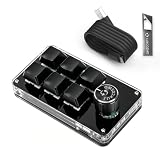
- 🖥 Software in USB Flash Drive, User-Friendly Interface and Floating Window --- With user-friendly interface and real-time floating window, you will never forget the function of the key being used at the moment. This wired one handed keyboard/macro mechanical gaming keypad can make your work faster and more efficient. The 6 non-conflict keys with macros on this macro pad allow you to press or hold multiple keys simultaneously, giving you an accurate, high-speed response, and a new level of gaming and typing experience.
- 🖥 Programmable Keyboard --- Type-C to USB interface, HID is driver-free. After setting on Windows, the macro keyboard can be plug and play on Linux, Mac OS, Windows, Pi, etc. With memory function, there is no need to set macropad again next time. After setting, the macro keypad can also be used by other computers. One computer can be plugged into multiple gaming keyboards, can be used normally. Besides, you can carry the micro keyboard anywhere due to the compact and elegant design.
- 🖥 Custom Configurations one handed gaming keyboard --- The mini keys keyboard macropad supports multiple function modes, each button can be set to a different function mode without affecting each other.
- 🖥 Macro Keys --- This macro pad keyboard can set a one-key macro operation (Multi-key mode). Pressing a key is equivalent to pressing multiple single keys continuously. Up to 15 keys are supported. You can also add an interval time, such as a one-key password. Powerful but easy to set up. Just set the function you want on the key, then drag the function key to the corresponding virtual key, and remember to click FLASH THE KEYBOARD, and it's done.
- 🖥 Work Partner and Game Booster --- The mechanical keyboard can save a lot of time wasted during working via one-click copy / paste / delete/ one click to open the system settings, which can greatly improve the efficiency of working. Besides, it's also a great game booster. You can do multiple combos or shovel slide with one click.
3. Decide how much feedback you need
If you can remember a small set of commands, physical keys and an encoder may be all you need. If you expect dozens of actions, share the device with colleagues, or change applications frequently, LCD labels, pages and profiles reduce the chance of pressing the wrong command.
4. Check the desk and connection constraints
Measure the space beside your keyboard, decide whether a cable can remain connected, and verify that your computer supports the desired wireless mode. The K0 Max and Q0 Max both document 2.4 GHz and Bluetooth options; the K0 Max specifies Bluetooth 5.3 and three Bluetooth device connections, while the Q0 Max specifies Bluetooth 5.1. A Stream Deck purchase also requires room for its stand or placement and permission to run its software.
Setting up a QMK/VIA-style mechanical macropad
The exact screen names depend on the board and configuration utility, but the planning sequence is consistent. Make changes gradually so a mistaken macro does not disrupt your normal typing layer.
- Connect the board in a supported wired mode for initial configuration. Wired setup avoids pairing problems while you assign keys and test layers.
- Record the factory layout. Save or photograph the original mapping before changing it so you can restore a known-good arrangement.
- Create a small base layer. Keep ordinary numpad functions and place only the highest-frequency commands on the macro column.
- Add a second layer for less frequent commands. Use a deliberate layer key and group related actions together, such as document editing, window management or spreadsheet commands.
- Assign macros conservatively. Test each key sequence in a harmless document before using it in production software. Include pauses only when the target application requires them, and avoid sequences that could submit or delete data unexpectedly.
- Configure the rotary encoder. Start with an easy-to-reverse action such as volume or scrolling. Test both rotation directions and the encoder press if you assign one.
- Label the physical layout. Use keycap legends, a printed map or a note beside the monitor. Firmware layers do not provide the visual status that an LCD key does.
- Test every connection mode you plan to use. Verify wired, 2.4 GHz and Bluetooth behavior, then confirm that switching among paired computers does not select the wrong device.
Keep a backup of the working keymap. If a later change causes unexpected output, restore the backup instead of trying to diagnose several changes at once.
Setting up a Stream Deck workflow
- Install the control application only on approved computers. Office policies may restrict device utilities or plugins.
- Start with one profile for your most repetitive application. Add only actions you use often enough to justify a dedicated key.
- Use clear labels and consistent icons. A label such as “Insert status reply” is safer than an ambiguous symbol when the action changes text or sends a message.
- Group secondary actions in folders or pages. Keep the first page focused on daily commands so you do not hunt through nested screens for common controls.
- Build multi-actions one operation at a time. Test the individual steps first, then chain them. A sequence that opens a file, changes a window and sends a command should be tested in the same application state your staff will use.
- Use profiles or Key Logic for application context. Confirm that the active profile changes when you switch applications and that the displayed label matches the command.
- Test plugins after updates. Application updates can change permissions or command names. Verify critical meeting and productivity actions before relying on them for an important call.
Can a macropad replace keyboard shortcuts?
It can replace many repeated shortcut sequences, but it does not eliminate the need for a keyboard. Text entry, navigation and unfamiliar applications still require ordinary keys. A macropad is best viewed as a shortcut layer: it puts a limited set of high-value commands under dedicated keys while leaving the keyboard available for everything else.
The Tool Desk
Outbyte PC Repair FREERepair Windows errors before they cause bigger problemsFix Now →Outbyte Driver Updater FREEFix the driver behind crashes, sound loss and screen glitchesFind Drivers →Firmware macros are most dependable when the target sequence is stable and application-independent. Stream Deck actions are more expressive when the task involves visible state, application-specific commands, plugins or several operations in a chain. For a mixed office, a mechanical board can provide universal shortcuts while a Stream Deck provides labeled controls for meetings and specialist software.
Common pitfalls and fixes
Accidental actions
A macro that pastes text, submits a form or deletes content can have consequences when focus is in the wrong window. Start with reversible commands, use descriptive labels, and test in a blank document. Keep destructive actions off the easiest-to-hit keys.
Also popular on Amazon

- Bluetooth 5.0: Compared to the previous version, the Huion Keydial Mini keyboard is upgraded to support Bluetooth connection bringing you cable-free convenience. Never worry about annoying drop-offs or lag up to a 10m range.
- Easy-to-use Dial Controller: Change Adobe Photoshop brush size and navigate timelines with a simple turn of the Dial. It can be set up to 3 different functions and easily switch between them.
- 18 Programmable Keys: The 18 buttons on Keydial Mini all can be customized to any shortcut in the way you want, making even the most complicated shortcuts available in one tap. Custom shortcuts need to be set in the Huion driver
- Anti-ghosting Performance: Featuring new anti-ghosting technology of up to 5 keys, the Keydial Mini keypad offers you more shortcut key customization and reliable multi-key input.
- Setting Preview Function: Set up one button to "Setting Preview", then press it, and a popup will display the current function setting of each button and dial. And you can customize the names of each button whatever you want. No need to memorize shortcuts anymore.
Layer confusion
Users often forget which layer is active. Limit the number of layers, give each one a clear purpose, and place the layer-switch key in a consistent location. If colleagues share the board, provide a visible map.
Software policy conflicts
A Stream Deck may be unsuitable on a managed computer if the control application or plugins cannot be installed. Ask your administrator before purchase. A QMK board still needs an approved method for initial configuration, but its programmed input can then be used without a continuously running desktop dashboard.
Do these 3 things before closing this tab:
1Scan for outdated or missing drivers - takes under a minute2Repair Windows errors before they cause bigger problems3Fix the driver behind crashes, sound loss and screen glitchesWireless switching problems
When a board supports several connection modes, confirm which mode is selected before troubleshooting. Test one computer at a time, remove stale pairings if the operating system keeps choosing the wrong device, and keep a wired fallback for configuration or urgent work.
Expecting automatic productivity gains
No neutral percentage improvement is established for these specific models. A macropad saves time only when its actions match tasks you perform repeatedly and the commands are reliable. Measure your own workflow by counting repeated operations before and after deployment rather than assuming a particular device will produce a fixed gain.
Which one should you buy?
Choose the Keychron K0 Max if…
- You want a wireless mechanical numpad with a macro column.
- You need QMK layers and firmware-stored remaps.
- You value low-profile hot-swappable switches and a rotary encoder.
- You may connect to several computers; its documented Bluetooth support covers three devices.
Choose the Keychron Q0 Max if…
- You want a full-metal, substantial board that stays on one desk.
- PBT keycaps and a 684 ± 10 g assembled weight fit your preferences.
- You want the same QMK-style customization with 2.4 GHz and Bluetooth 5.1 connectivity.
Choose the Elgato Stream Deck 15-Key if…
- You need labels, icons and live status instead of memorized layers.
- Your work benefits from profiles, folders, pages, plugins or multi-actions.
- You control meetings or application-specific workflows and can install the desktop software.
- The documented US listing of $149.99 fits your budget after checking the current regional price.
Bottom line
The K0 Max is the most balanced recommendation for a desk that needs both numeric entry and programmable mechanical controls. The Q0 Max is the premium choice when full-metal construction and stability matter more than portability. The Stream Deck 15-Key is the clearest choice for visible, software-driven workflows where labels, profiles and chained actions prevent guesswork. Decide first whether your repetitive work is mainly keyboard sequences or application-aware actions; that answer determines which control model will remain useful after the novelty wears off.
Frequently Asked Questions
Do QMK macropads require software to run every macro?
No. Once a compatible keymap is stored in the board’s firmware, the programmed remaps and macros are sent as keyboard input. Configuration still requires an approved setup method.
Recommended Free Tools
Is the Q0 Max portable?
It can be moved, but its documented assembled weight is 684 ± 10 g, so it is better suited to a permanent desk than frequent travel.
Does the Stream Deck 15-Key have mechanical switches?
No. Its 15 controls are customizable LCD keys designed for software labels, icons and status rather than mechanical key travel.
Can one macropad serve multiple computers?
The K0 Max documents Bluetooth connections to three devices, while both Keychron models also support 2.4 GHz and wired modes. A Stream Deck requires the control application and matching profiles on each computer.

