
Recommended Free Tools
iTechGuides is reader-supported. When you buy through links on our site, we may earn an affiliate commission. As an Amazon Associate I earn from qualifying purchases. Learn more
For most people, the Ledger Nano X is the best hardware wallet for protecting a broad mix of cryptocurrency while keeping phone connectivity. Choose the Trezor Safe 5 if open-source transparency and a touchscreen matter most, the BitBox02 Nova for an open-source dual-chip design with microSD backup, or the COLDCARD Mk5 for advanced, Bitcoin-only, air-gapped security.
No hardware wallet makes funds theft-proof. These devices keep private keys off computers and phones, but a user can still approve a malicious address, contract, or amount. The safest choice is therefore the wallet whose display, recovery system, supported assets, and operating model you will use correctly every time.
What a hardware wallet protects—and what it cannot
A hardware wallet generates and stores private keys inside a dedicated signing device. When you send cryptocurrency, the computer or phone prepares a transaction, but the hardware wallet performs the signing after you physically approve it. Malware on the host cannot simply copy the private key as it could with a software wallet whose keys are stored on that host.
The protection has an important limit: the device can sign a transaction that you approve. A phishing site, fake wallet interface, or wallet-drainer contract may present a transaction that sends assets to an attacker. Your defense is to read the trusted device display before confirming.
Popular on Amazon
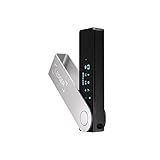
- Effortlessly build your crypto portfolio via the all in one Ledger Wallet app: buy, sell, send, receive, swap, stake and more across popular blockchains. 15,000+ coins & tokens in a single dashboard. Keep a close eye on the market. Compare service providers. Track performance. Get timely alerts. Build your portfolio with confidence.
- Enjoy Bluetooth connectivity, iOS access, and hours of battery use with this mobile-first, secure backup signer. Freedom you can depend on.
- Genuine Check: confirm your signer is authentic during setup with the Ledger Wallet app.
- Protect your signer: keep it in mint condition at all times with a bespoke Pod or Case to avoid scratches and everyday wear and tear.
- Check the recipient address, including the beginning and end of the address.
- Check the amount and the asset being transferred.
- For smart-contract transactions, check the contract action and any allowance or approval being requested.
- Reject anything that is unclear, unexpected, or different from the transaction you intended.
Ledger calls human-readable review of transaction details “Clear Signing.” “Blind signing” is the opposite: you approve data that is not clearly decoded on the device. Clear signing is useful only when you actually perform the review.
Best hardware wallets at a glance
| Wallet | Security and signing model | Recovery and advanced controls | Asset and connection focus | Best for |
|---|---|---|---|---|
| Ledger Nano X | Secure Element; secure-screen transaction review and Clear Signing | BIP-39 recovery; optional Recovery Key and Ledger Recover services; passphrase-created hidden accounts | Broad multi-asset ecosystem; Bluetooth connectivity begins with Nano X | People who want extensive asset coverage and phone use |
| Trezor Safe 5 | Open-source design with a color touchscreen; Safe models use Secure Elements, with certified EAL6+ listed for relevant models | 12-, 20-, or 24-word backups; SLIP-39 multi-share backup; PIN up to 50 digits; passphrase protection | Thousands of coins and tokens; desktop, mobile, and third-party-app compatibility | Users who prioritize open-source auditability and a touchscreen |
| BitBox02 Nova | Fully open-source BitBoxApp and firmware; dual-chip design with a secure chip; device-verified multisig registration | Instant microSD backup and restore plus written recovery words | In-app BTC, LTC, ETH, selected ADA integrations, and 1,500+ ERC-20 tokens through external integrations | Users wanting open source, Swiss manufacturing, and simple backups |
| COLDCARD Mk5 | Bitcoin-only device designed for air-gapped signing and policy-controlled approval | Duress PIN with decoy wallet, brick-me PIN, countdown login, anti-phishing words, SeedXOR, BIP-85 derived wallets, native air-gapped multisig, and a hardware spending-policy engine | Bitcoin only; advanced offline workflows | Experienced Bitcoin users who value maximum control over convenience |
Prices, warranty terms, firmware support, and authorized sellers change by region and over time. Verify those details on the manufacturer’s current store and support pages before purchasing. The comparison above describes the capabilities documented for these models, not a ranking of real-world theft rates; no standardized data establishes that one brand has the lowest theft rate.
1. Ledger Nano X: the mainstream multi-asset choice
Why it stands out
The Nano X combines a Secure Element with a device screen for reviewing transaction details. Ledger’s buyer guidance emphasizes Clear Signing, passphrase-created hidden accounts, and broad ecosystem support. Bluetooth connectivity, available beginning with Nano X in Ledger’s current comparison, allows a phone-based workflow without exposing the private key to the phone.
Ledger reported more than 8 million signers sold in 2026. That is a vendor-reported shipment figure, not an independent security or theft-rate measurement.
Also popular on Amazon

- Seedless by design, nothing to steal: Your private key is generated inside the EAL6+ chip and never leaves it. No seed phrase is shown or typed at setup, so a tampered device, keylogger, or phishing site has nothing to capture. 9+ years, millions of cards, no known remote hacks.
- Tap once to manage your entire crypto wallet across 90 blockchains - no USB cables or Bluetooth, no batteries, no setup. Access 16,100+ coins & tokens, DeFi, NFTs, and staking instantly from your phone
- Backup without a seed phrase: Your wallet is copied to 2 backup cards with end-to-end encryption, so there are no words on paper to lose or leak. Keep them in separate places; if one card is lost, the others restore full access. Optional seed phrase for advanced users.
- Engineered to last up to 25 years: Waterproof (IP69K), shockproof and tested for extreme temperatures from −25°C to 50°C. A durable cold wallet with long‑term protection and independently audited security.
- Trusted by 6 million users worldwide (4.9 App Store, 4.8 Google Play) - buy, sell, swap, stake, and spend cryptocurrency directly. The secure offline storage wallet designed for how people actually use crypto wallets
Recovery and privacy options
The standard recovery format is BIP-39. Ledger also documents an optional Recovery Key and Ledger Recover services. These are separate choices from the device’s ordinary recovery phrase; understand exactly which recovery method you are using and who can access each component before enabling an optional service. A passphrase can create hidden accounts, but losing or mistyping that passphrase makes those accounts inaccessible even when the main recovery phrase is correct.
Trade-offs
- Strengths: broad asset and wallet compatibility, mobile convenience, Secure Element architecture, and clear on-device review.
- Costs: Bluetooth and a large ecosystem add convenience but also create more opportunities to interact with a fraudulent app or contract; you must verify every approval on the device.
- Choose another model when: you want a fully open-source stack, a microSD-first backup, or an exclusively Bitcoin and air-gapped workflow.
2. Trezor Safe 5: the open-source touchscreen choice
Why it stands out
Trezor emphasizes open-source security and auditability. The Safe 5 adds a touchscreen so transaction details and approval prompts are displayed directly on the device rather than delegated to the host computer. Trezor documents PIN protection of up to 50 digits, passphrase protection, Tor support, coin control, and compatibility with third-party applications.
Trezor Safe models use Secure Elements; the official comparison lists certified EAL6+ for relevant models. Certification and open-source code answer different questions: the former concerns evaluated hardware security properties, while the latter lets researchers inspect and audit published software and firmware.
The Tool Desk
Outbyte PC Repair FREEClear out junk files and repair common Windows errorsFree Scan →Outbyte Driver Updater FREEFix the driver behind crashes, sound loss and screen glitchesFind Drivers →Recovery formats
Trezor documents 12-, 20-, and 24-word recovery backups. Safe 5 also supports advanced SLIP-39 multi-share backup. Instead of relying on one complete phrase, SLIP-39 can divide recovery into shares so a defined threshold is needed to restore the wallet. Store shares in separate secure locations and document the threshold; a pile of shares without that information can be difficult to use during an emergency.
Also popular on Amazon

- Seedless by design, nothing to steal: Your private key is generated inside the EAL6+ chip and never leaves it. No seed phrase is shown or typed at setup, so a tampered device, keylogger, or phishing site has nothing to capture. 9+ years, millions of card.
- Tap once to manage your entire crypto wallet across 90 blockchains - no USB cables or Bluetooth, no batteries, no setup. Access 16,100+ coins & tokens, DeFi, NFTs, and staking instantly from your phone
- Backup without a seed phrase: Your wallet is copied to 2 backup cards with end-to-end encryption, so there are no words on paper to lose or leak. Keep them in separate places; if one card is lost, the others restore full access. Optional seed phrase for advanced users.
- Engineered to last up to 25 years: Waterproof (IP69K), shockproof and tested for extreme temperatures from −25°C to 50°C. A durable cold wallet with long‑term protection and independently audited security.
- Trusted by 6 million users worldwide - buy, sell, swap, stake, and spend cryptocurrency directly. The secure offline storage wallet designed for how people actually use crypto wallets
Trade-offs
- Strengths: open-source transparency, touchscreen signing, long PINs, passphrases, multi-share backup, Tor, coin control, and thousands of supported coins and tokens.
- Costs: recovery compatibility differs from BIP-39-only workflows; confirm that your chosen wallet software supports the exact backup format before migrating funds.
- Choose another model when: you need Bluetooth phone connectivity, microSD backup, or Bitcoin-only air-gapped policy controls.
3. BitBox02 Nova: open-source dual-chip security with microSD backup
Why it stands out
BitBox states that both the BitBoxApp and firmware are fully open source. The device uses a dual-chip design that includes a secure chip, giving the wallet a hardware boundary while retaining an auditable software stack. The BitBoxApp supports device-verified multisig registration, which helps prevent registering a fraudulent cosigner during multisignature setup.
Backup workflow
A backup can be created or restored instantly on microSD, and BitBox also provides written recovery words. Keep the card and written words in separate secure locations: a microSD card is convenient, while a separate written backup remains available if the card is lost or damaged.
Supported assets
The app supports Bitcoin, Litecoin, Ethereum, and selected Cardano integrations. External integrations extend support to more than 1,500 ERC-20 tokens. Confirm support for the exact token and wallet application before sending funds; “ERC-20 support” does not mean every token is displayed natively in the app.
Do these 3 things before closing this tab:
1Clear out junk files and repair common Windows errors2Scan for outdated or missing drivers - takes under a minute3Repair Windows errors before they cause bigger problemsTrade-offs
- Strengths: open-source app and firmware, dual-chip architecture, microSD backup, Swiss manufacturing, and straightforward multisig verification.
- Costs: asset coverage relies partly on external integrations, so compatibility can be less uniform than a broad all-in-one ecosystem.
- Choose another model when: you need a touchscreen, extensive mobile Bluetooth use, or Bitcoin-only features such as SeedXOR and a hardware spending-policy engine.
4. COLDCARD Mk5: advanced Bitcoin-only and air-gapped security
Why it stands out
The COLDCARD Mk5 is designed only for Bitcoin and for users willing to accept a steeper learning curve. It supports native air-gapped multisig, allowing signing workflows that avoid a direct connection to an internet-connected computer. Its hardware spending-policy engine can enforce rules about how funds may be spent.
Also popular on Amazon

- EAL5+ CERTIFIED SECURE ELEMENT + FINGERPRINT PROTECTION — Your private keys stay encrypted offline on a certified EAL5+ chip, the same security tier used in EMV bank cards. Built by DCENT, securing crypto since 2018. Fingerprint authentication adds a second layer no PIN-only wallet can match.
- 10,000+ ASSETS NATIVE ON 100+ BLOCKCHAINS — Hold Bitcoin, Ethereum, XRP, Solana, Cardano, popular stablecoins (USDT, USDC), and NFTs in one wallet. No third-party apps, no fragmented setup — every supported asset works straight out of the box.
- TAP-TO-SIGN MOBILE EXPERIENCE — Pair your wallet with the DCENT mobile app over Bluetooth. Manage tokens, review transactions, and access in-app swap features directly from your phone — no cables, no desktop required.
- WEB3 & dAPP ACCESS VIA METAMASK — Connect to MetaMask and other browser extension wallets to manage NFTs, claim airdrops, and access dApps. A large screen and intuitive 4-button interface keep every transaction clearly visible before you sign.
- SEAMLESS FIRMWARE UPDATES & 30-DAY MONEY-BACK GUARANTEE — Apply security updates without resetting your wallet or migrating funds. Backed by Amazon's 30-day money-back guarantee — your purchase is risk-free.
Additional controls include a duress PIN that opens a decoy wallet, a brick-me PIN, countdown login, anti-phishing words, SeedXOR, and BIP-85 derived wallets. These features are powerful but add operational responsibility: document what each PIN and derived seed does, and test recovery before storing substantial value.
Vendor positioning and practical meaning
Coinkite’s comparison page, updated October 1, 2026, says: “If you want convenience, buy something else. If you want the hardest possible way to lose your Bitcoin, this is it.” That is a vendor statement, not an independent test. In practical terms, the Mk5 is suited to a Bitcoin holder who prefers deliberate offline procedures over fast, app-driven transactions.
Trade-offs
- Strengths: Bitcoin-only focus, air-gapped multisig, decoy and duress options, anti-phishing checks, SeedXOR, BIP-85, and policy-controlled signing.
- Costs: no altcoin support and a more demanding setup and operating process.
- Choose another model when: you need Ethereum, stablecoins, NFTs, many altcoins, or simple phone-based everyday use.
How to choose the right wallet
Choose by asset scope
- Several networks and tokens: start with Nano X or Safe 5, then verify support for every asset and wallet application you plan to use.
- Bitcoin, Litecoin, Ethereum, and selected Cardano integrations: BitBox02 Nova can fit if its external integrations cover your exact assets.
- Bitcoin only: COLDCARD Mk5 offers the deepest offline and policy controls; Nano X, Safe 5, and BitBox02 Nova are easier if you also value broader ecosystem access.
Choose by trust model
- Secure Element and an established app ecosystem: Nano X emphasizes this combination.
- Open-source auditability and touchscreen review: Safe 5 is the clearest fit.
- Open source plus dual-chip hardware: BitBox02 Nova combines both priorities.
- Air-gapped, policy-controlled Bitcoin signing: COLDCARD Mk5 is purpose-built for it.
Choose by backup tolerance
If you want a conventional word list, Nano X uses BIP-39 and Safe 5 supports 12-, 20-, and 24-word backups. If you want threshold recovery, Safe 5’s SLIP-39 multi-share option is distinctive. If you prefer a removable backup, BitBox02 Nova’s microSD workflow is convenient. If you need decoy and derived-wallet controls, COLDCARD’s SeedXOR, duress PIN, and BIP-85 features require more careful documentation.
Free tools Windows power users keep installed
One-click scans. No signup required.
Secure setup: a procedure that prevents common theft
- Buy through an official or verified seller. Check the seller, packaging, tamper evidence, and return policy. Never accept a device that arrives initialized or includes a recovery phrase.
- Install the manufacturer’s current app from its official source. Check the device model and firmware prompts. A counterfeit desktop or mobile app can request your recovery phrase.
- Initialize the device yourself. Let the hardware wallet generate the recovery words. Do not use words supplied on paper, in an email, or on a website.
- Write the recovery phrase or shares offline. Never photograph them, store them in cloud notes, paste them into a computer, or type them into a website. For BitBox02 Nova, protect both the microSD backup and written words; for Safe 5, record the SLIP-39 shares and threshold.
- Set a strong PIN. Keep it separate from the recovery material. If using a passphrase, record the exact spelling and capitalization offline; a passphrase creates a different wallet.
- Verify the backup with the device’s recovery check. Do this before transferring significant funds. A backup that has not been tested is only an assumption.
- Send a small test transaction. Confirm receipt, then verify the receiving address again on the hardware wallet before moving a larger balance.
- Review every future transaction on the device. Match the recipient, amount, asset, and contract action. Do not approve a transaction merely because the computer or phone says it is safe.
Protecting against specific theft scenarios
Malware or a hacked phone
Keep the signing device disconnected until you need it. A compromised phone may alter the address shown in its app, but the hardware-wallet screen should reveal the address you are about to approve. Stop if the device display and host screen disagree.
Also popular on Amazon
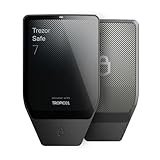
- Dual-chip architecture for maximum protection: The next-gen, fully auditable TROPIC01 chip works alongside a certified EAL6+ Secure Element—completely NDA-free—to deliver radically transparent, industry-leading defense against physical attacks.
- Quantum-ready security: Get protection against future threats with the first-ever hardware wallet designed with quantum-ready architecture.
- See every detail with confidence: Our largest high-resolution color touchscreen makes it easy to navigate your assets, review transactions and manage your coins with clarity.
- Wireless freedom with encrypted Bluetooth control: Manage, buy, swap and stake securely using Trezor Suite on desktop or mobile. Qi2-compatible wireless charging keeps your Trezor powered up. No cables required—security meets convenience.
- Works seamlessly with Android, iOS and desktop: Connect wirelessly or via USB-C to your phone or computer. Manage your crypto anywhere with our companion Trezor Suite app.
Phishing and fake wallet interfaces
Use bookmarks or manually verified official domains, avoid unsolicited support messages, and treat any request for a recovery phrase as theft. Hardware-wallet support will not need your phrase to troubleshoot a normal connection problem.
Malicious smart-contract approvals
Do not approve an unintelligible data blob. Prefer a wallet integration that decodes the action on the device. Revoke unnecessary token allowances through a trusted tool, and use a separate low-balance account for unfamiliar applications.
Physical theft of the device
A PIN, Secure Element or dual-chip protections, and an optional passphrase reduce the value of a stolen device. The recovery phrase remains the critical secret: an attacker who obtains it can restore the wallet elsewhere. Keep backups offline, separately secured, and inaccessible to casual visitors. A duress or decoy feature, available on COLDCARD Mk5 and hidden-account passphrases on Nano X, can help in coercion scenarios, but only if you have practiced the procedure.
Recovery planning and inheritance
Write down which wallet format you used, whether a passphrase is required, where each backup is stored, and which software can restore it. Do not put the actual phrase in the instructions. For multi-share backups, document the number of shares required without storing all shares together. Review the plan periodically after firmware, app, or estate changes, and perform a small recovery test on a separate device before relying on it for a large balance.
Buying checklist
- Confirm the exact model and supported assets before ordering.
- Use an official or verified seller; do not buy pre-initialized hardware.
- Check current price, warranty, return policy, firmware support, and regional availability at publication or purchase time.
- Inspect packaging and initialize the device yourself.
- Plan offline recovery storage before depositing funds.
- Decide whether you need a passphrase, multisig, air gap, duress feature, or spending policy.
- Budget for a durable metal recovery-phrase backup if paper is vulnerable to fire, water, or deterioration, but never engrave a phrase in a location accessible to unauthorized people.
Bottom line
Buy the Ledger Nano X for broad multi-asset and mobile use, the Trezor Safe 5 for open-source touchscreen signing, the BitBox02 Nova for open-source dual-chip security with microSD backup, or the COLDCARD Mk5 for advanced Bitcoin-only air-gapped control. Whichever you choose, the decisive theft defenses are an authentic self-initialized device, an offline recovery backup, and disciplined verification of every transaction on the hardware-wallet display.

