

Recommended Free Tools
iTechGuides is reader-supported. When you buy through links on our site, we may earn an affiliate commission. As an Amazon Associate I earn from qualifying purchases. Learn more
ASUS Chromebook C523: At First Glance
Due to its lightweight, the ASUS Chromebook C523 is an easy way to increase your productivity and have more fun while on the go. Moreover, many Chromebooks feature small displays and hefty bezels, but the ASUS Chromebook C523 is the direct opposite.
It features a large 15.6-inch display with thin bezels inside a sleek chassis. Additionally, the ASUS Chromebook C523 not only has a 15-inch display but also has a low price.
In September 2021, when this article was published, it had a starting price of $207.99. However, just like most Chromebooks, the ASUS Chromebook C523 is designed to carry out basic tasks such as web browsing, word processing.
Quick wins for a faster PC:
Fix the driver behind crashes, sound loss and screen glitchesFind Drivers →Clear out junk files and repair common Windows errorsFree Scan →Scan for outdated or missing drivers - takes under a minuteDriver Scan →This makes it more suitable for students and small business owners. Now let look into more details on what the ASUS Chromebook C523 has in store for us.
#1 Best Overall

- 15.6 inch Full HD 1920x1080 Anti-Glare NanoEdge display featuring an ultra-narrow bezel
- The Full HD display has a durable 180 degree hinge that can be laid flat to easily share content
- Powered by the Intel Celeron N3350 Processor (2M Cache, up to 2.4 GHz) for fast and snappy performance
- 4GB LPDDR4 RAM; 64GB eMMC storage
- Stay connected with Wi-Fi 5 (802.11ac), Bluetooth 4.0, 2x USB 3.2 Type-C (Gen 1), 2x USB 3.2 Type-A (Gen 1), and Micro SD card reader
ASUS Chromebook C523: Design, Dimension and Weight
As one might expect from a low-cost Chromebook, the ASUS Chromebook C523 is mostly built of plastic. Interestingly, its hinges and lid, on the other hand, composes of aluminum, which is quite impressive.
The lid of the laptop and the plastic keyboard deck both have a solid feel to them and comes in a plain silver finish. Surprisingly, ASUS skipped adding its distinctive swirl pattern to the lid.
It’s possible that it wasn’t added to visually distinguish the Chromebooks from the Zenbook line. However, I don’t believe that is the case because there is a Chrome logo on the upper left of the lid.
PC Slower Than It Used to Be?
A free scan shows the junk files, broken settings and background clutter dragging Windows down - then fixes them in one click.Free scan · Windows 10 & 11Outdated Drivers Are Slowing You Down
One free scan finds every outdated or missing driver and matches the right update for your exact hardware.Free scan · exact hardware matchBesides that, there is also an ASUS logo at the center of the lid. So, even with these few details on the lid, most people should be able to differentiate between the Chromebook and Zenbook.
Therefore, probably ASU didn’t include its signature swirl pattern on the lid to save cost since it’s a budget Chromebook. On the bright side, the lid has minimal flex.
As mentioned in the “my initial thoughts” section above, the ASUS Chromebook C523 features a 15.6-inch non-touchscreen display. Additionally, you can also purchase the ASUS Chromebook C523 with a touchscreen display, but it comes with an additional cost.
Moreover, the laptop offers multiple screen resolution options – HD (1366 x 768) or FHD (1920 x 1080). Specifically, the non-touchscreen display features an HD (1366 x 768) resolution.
The touchscreen display which is optional, on the other hand, comes with an FHD (1920 x 1080) screen resolution. My review unit came with a touchscreen display, and as expected, with an FHD (1920 x 1080) screen resolution.
This display isn’t the most colorful in terms of performance, but the amount of detail it displays puts it ahead of most budget laptops. However, its white balance was kind of poor, so whites were overexposed in general, making some website pages appear bleached.
On the plus side, images on the display are crisp, and the touchscreen is accurate and snappy. The glossy coating on the display, on the other hand, does a poor job of reducing reflation and glares.
Additionally, the ASUS Chromebook C523 also seems a little heavy due to the glossy touchscreen display, which contributes to the lid’s thickness. Furthermore, two large, robust hinges hold the display in place and allow it to rotate back 180 degrees.
Do these 3 things before closing this tab:
1Repair Windows errors before they cause bigger problems2Scan for outdated or missing drivers - takes under a minute3Clear out junk files and repair common Windows errorsUnfortunately, since the display can only rotate 180 degrees, you can’t use it as a tablet.
Recording a maximum brightness of 231 nits, the ASUS Chromebook C523’s display beats the category average of 221 nits. However, it is not as bright as the 258 nits recorded by the Dell Chromebook 5190’s 11-inch display.
If you are wondering what “nit” is, let me explain. Nit is a standard measurement of brightness used to define the source of light – a higher nit rating signifies a brighter display.
Moving on, the display screen is surrounded by ultra-thin 6mm bezels, which is uncommon for budget laptops. Despite featuring such thin bezels, ASUS managed to embed a 720p webcam in the center of the top bezel.
Unfortunately, this webcam takes grainy and less colorful images. However, it is adequate for video calls, making it perfect for online classes.
Moving on, the ASUS Chromebook C523 offers a full-sized keyboard with well-spaced keys and a spill-resistant feature. Additionally, this keyboard is an island-style keyboard, but without backlighting, which is quite understandable considering the laptop’s price range.
With a 1.5 millimeter travel and a pleasing click sound, the keyboard’s keys are comfortable to type on. However, because the keys require 62 g of actuation force, they have to be pressed all the way down to register input.
Rank #2

- Aspect Ratio:16:9
- 15.6 inch HD 1366x768 Anti-Glare NanoEdge display features an ultra-narrow bezel with anti-glare coating to reduce reflections
- The HD display has a durable 180 degree hinge that can be laid flat to share content easily
- Powered by the Intel Dual-Core Celeron N3350 Processor (2M Cache, up to 2.4 GHz) for fast and snappy performance
- 4GB DDR3 RAM; 32GB eMMC storage and USB Type-C (Gen 1) and Type-A ports
As for the touchpad, it measures 101.6 x 71.12 mm and it is very responsive, with integrated click buttons. Additionally, it is smooth and large enough to perform Chrome OS gestures, like three-finger swipe.
Free tools Windows power users keep installed
One-click scans. No signup required.
In terms of ports, the ASUS Chromebook C523 features a limited number of ports. However, this is also understandable considering the laptop’s price and thin design.
A USB 3.1 port, 1 USB Type-C port, a headphone jack, and a microSD slot are located on the left side. Meanwhile, on the right side, there’s another USB Type-C port and a USB 3.1 port.
As expected, the ASUS Chromebook C523 comes with a Chrome OS (operating system). With the taskbar at the bottom and shortcut icons in the lower-right corner, the Chrome OS layout is similar to the Windows OS.
Furthermore, Chrome OS is secure and simple to use, making it an excellent choice for low-cost laptops aimed at students. You also get the complete desktop experience of Google Chrome with the Chrome OS.
Other web browsers, on the other hand, will launch as an Android app with limited functionality and a mobile-first design. This is because Google included Android app support to Chrome OS.
Be aware, though, that once you enter the Chrome OS environment, you’ll be limited to applications on Google Play Store and Chrome Web store. As a result, you can’t get a full version of Microsoft Office, proprietary business apps, or any third-party application.
Moving on, the Chromebook C523 comes with a one-year warranty from ASUS. Therefore, if your laptop develops a hardware fault during the warranty period, you can get it repaired or replaced.
Moving on to the laptop’s size and weight, it measures 358 x 248 x 15.6 – 16.1 mm. However, its weight depends on whether you are using a touchscreen model or a non-touchscreen model.
Specifically, the ASUS Chromebook C523 non-touchscreen model weighs 1430 g. The touchscreen model, on the other hand, weighs 1690 g.
Comparatively, the Acer Chromebook 15 weighs a bit less than the touchscreen model but weighs more than the non-touchscreen model. The Acer Chromebook 15 weighs 1678 g.
In conclusion, the ASUS Chromebook C523’s design is pretty impressive for a low-cost laptop. Moreover, we should be grateful to Asus for featuring a little bit of metal on the Chromebook C523 despite its price.
For this reason, I will rate the ASUS Chromebook C523 a nine out of ten in this design review section for its impressive design and build.
The Tool Desk
Outbyte PC Repair FREERepair Windows errors before they cause bigger problemsFix Now →Outbyte Driver Updater FREEScan for outdated or missing drivers - takes under a minuteDriver Scan →ASUS Chromebook C523: Processor (CPU) Performance
The Asus Chromebook C523 is available with either a dual-core Intel Celeron N3350 or a quad-core Intel Pentium N4200 processor. Both processors feature a cache of 2 MB.
Additionally, both processors feature a 1.10 GHz base frequency but their maximum frequencies differ. Specifically, the Intel Celeron N3350 and Intel Pentium N4200 have a maximum frequency of 2.40 GHz and 2.50 GHz respectively.
Both processors are well-suited for simple tasks like word processing and web browsing, as well as light multitasking. However, the Intel Pentium N4200 should be a little faster due to the fact that it is a quad-core.
Fortunately, my review laptop came with the Intel Pentium N4200 processor. To determine the performance of my review laptop with this processor, I performed a Geekbench 4 test.
Geekbench 4 is an application-based benchmark test that measures how efficiently a device can process and execute information. Even with its Intel Pentium N4200 processor, the ASUS Chromebook C523 performed brilliantly on the Geekbench 4 test.
Rank #3

- 15 6 inch HD 1366x768 Anti-Glare NanoEdge display featuring an ultra-narrow bezel with anti-glare coating to reduce reflections
- The HD display has a durable 180 degree hinge that can be laid flat to share content easily
- Powered by the Intel Dual-Core Celeron N3350 Processor (2M Cache up to 2 4 GHz) for fast and snappy performance
- 4GB DDR3 RAM 32GB eMMC storage and USB Type-C (Gen 1) and Type-A ports
- Chromebook runs on Chrome OS - an operating system by Google that is built for the way we live today It comes with built-in virus protection updates automatically boots up in seconds and continues to stay fast over time
Based on this test, the laptop got a score of 4,698 points. This score is almost double the category average of 2,469 points.
Comparatively, the Dell Chromebook 5190 performed less, recording a score of 4,193 points on the Geekbench 4 test. Moreover, the Dell Chromebook 5190 uses an Intel Celeron N3450 processor.
In conclusion, the ASUS Chromebook C523’s processors may not be suitable for demanding tasks. However, they are much better than processors found on competing laptops.
What’s actually slowing this PC down?
Pick the symptom - the matching free tool is one click away.
Therefore, in this processor review, I will be rating the ASUS Chromebook C523 an eight out of ten.
Asus Chromebook C523: Memory (RAM) Performance
The ASUS Chromebook C523 comes with a standard memory of 4 GB LPDDR4 SDRAM, which isn’t upgradable or removable. This is because the laptop features a single RAM slot in which the RAM stick is soldered onto the motherboard.
You can, however, get the laptop with 8 GB RAM, which is the maximum memory capacity supported. Moreover, I don’t really think you may need to get a laptop with 8 GB RAM.
This is due to the fact that 4 GB RAM on this laptop is more than sufficient for your daily computing activities. To be more specific, I had no issues browsing the web, typing on MS Word, or streaming a video.
Windows Errors? Fix Them Before They Spread
Repair common Windows errors and clear accumulated junk for a smoother, more stable PC - no reinstall needed.Free scan · no reinstallOutdated Drivers Are Slowing You Down
One free scan finds every outdated or missing driver and matches the right update for your exact hardware.Free scan · exact hardware matchMoving on, I conducted a multitasking test to further determine how well the ASUS Chromebook C523 can perform with 4 GB RAM. For this test, I launched multiple applications including the Gmail app, Spotify, Netflix, Google Chrome, and YouTube.
Additionally, I had about 15 tabs opened on the Google Chrome app while streaming an episode of “Titans” on Netflix. At first, the laptop handled these applications smoothly.
However, the laptop slowed down a bit when I started switching in-between the applications.
Moving on, I conducted a benchmark test called CrXPRT 2015 on the ASUS Chromebook C523 to further determine its performance. CrXPRT 2015 is a tool that determines how quickly a Chromebook handles daily tasks such as, word processing, and web browsing.
The Tool Desk
Outbyte PC Repair FREERepair Windows errors before they cause bigger problemsFix Now →Outbyte Driver Updater FREEScan for outdated or missing drivers - takes under a minuteDriver Scan →Unfortunately, on this test, the ASUS Chromebook C523 performed less than all other laptops in its class, scoring only 123 points. Comparatively, the Acer Chromebook Spin 13 and HP Chromebook x2 performed better.
The Acer Chromebook Spin 13 scored 268 points while the HP Chromebook x2 scored 192 points.
In conclusion, the ASUS Chromebook C523 is only adequate for light multitasking. Moreover, it performed poorly on the CrXPRT 2015 benchmark test I performed.
As a result, I don’t think ASUS Chromebook C523 deserves more than a rating of seven in this memory review.
ASUS Chromebook C523: Storage Options & Performance
In terms of storage, the ASUS Chromebook C523 comes with an eMMC storage drive. This eMMC drive supports a maximum storage capacity of 128 GB.
Unfortunately, the eMMC storage isn’t removable/upgradable because they are usually soldered onto a computer’s motherboard. Therefore, if you want to purchase the ASUS Chromebook C523, think well about the amount of storage you need.
Furthermore, my review laptop came with 64 GB of eMMC storage, which I believe is adequate for students. Moreover, Chromebooks do not usually offer large storage drives.
Rank #4
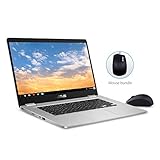
- 15.6 inch Full HD 1920x1080 NanoEdge display featuring an ultra-narrow bezel with a glossy screen.
- The FHD display has a durable 180 degree hinge that can be laid flat to share content easily.
- Powered by the Intel Quad-Core Pentium N4200 Processor for fast and snappy performance.
- 4GB DDR3 RAM; 64GB eMMC storage and USB Type-C (Gen 1) and Type-A ports.
- Includes ASUS Optical Mouse
This is because most Chromebooks come with 100 GB Google Drive cloud storage which is free for two years. So, users tend to save files on Google Drive rather than the typical eMMC storage drive.
What’s actually slowing this PC down?
Pick the symptom - the matching free tool is one click away.
Moreover, even though you do not get the 100 GB offered by some Chromebook manufacturers, you still get the free 5 GB Google Drive.
Additionally, the ASUS Chromebook C523 comes with a Micro SD card reader for storage expansion. Therefore, you have three storage options on the laptop.
You have the 64 GB eMMC storage, or 100 GB Google Drive storage. In addition to those, you also have a Micro SD card reader.
I strongly believe that these multiple storage options are impressive for a low-cost laptop.
Free tools Windows power users keep installed
One-click scans. No signup required.
Like I usually do in my reviews, I was meant to run a CrystalDiskMark test on the laptop to determine its eMMC storage speed. Unfortunately, CrystalDiskMark only supports SSDs and HDDs and not eMMC storage type.
So, I have to evaluate this Chromebook with its storage options.
Based on this, I will rate the ASUS Chromebook C523 an eight in this storage review section. My rating is based on its multiple storage options.
ASUS Chromebook C523: Graphics Card Performance
This graphics card has a 200 MHz base GPU frequency and 650 MHz boost GPU frequency.
As expected, this graphics card doesn’t come with a dedicated VRAM. The implication is that the graphics card shares memory with the CPU.
Therefore, the GPU is not great at graphics-intensive applications and gaming performance. Nevertheless, the Chromebook is capable of running low-end games and most games on the Google Play store.
Moving on, I conducted a WebGL Aquarium benchmark test on the ASUS Chromebook C523 to determine its graphics performance. WebGL Aquarium is a web-based benchmark test that tells you how well your computer can render 3D graphics.
On this test, the laptop displayed 500 fish at a smooth 66 fps (frame per second). This frame rate tops the category average of 49 fps.
Do these 3 things before closing this tab:
1Clear out junk files and repair common Windows errors2Scan for outdated or missing drivers - takes under a minute3Repair Windows errors before they cause bigger problemsASUS Chromebook C523′ 66 fps also beat that of Acer Chromebook 15’s 51 fps.
Furthermore, I also conducted a real-world gaming test on the ASUS Chromebook C523 to further determine how well it handles graphics. For this test, I played Asphalt 9: Legends, which I downloaded from Google Play Store.
While playing the game, the ASUS Chromebook C523 achieved a frame rate of 60 fps. This frame rate is quite impressive.
However, when I played high-end games such as Aztec Ruins, it only recorded a frame rate of 7.3 fps.
Quick wins for a faster PC:
Repair Windows errors before they cause bigger problemsFix Now →Scan for outdated or missing drivers - takes under a minuteDriver Scan →Therefore, in this graphics review section, I will rate the ASUS Chromebook C523 a seven out of ten.
Best Value

- FREE GOOGLE ONE AI PREMIUM PLAN — Get Gemini Advanced, 2TB of cloud storage, and more for 3 months at no cost*
- SMOOTH MULTITASKING — Powered by the Intel Celeron N4500 Processor, enabling decent multitasking experience
- TOUCHSCREEN VERSATILITY — 14-inch FHD 1920x1080 NanoEdge 360-degree flippable touchscreen display
- WORK AND PLAY FROM ANY ANGLE — Convertible 2-in-1 design with four different work modes: traditional clamshell, tent, stand, tablet mode
- LIGHTWEIGHT YET DURABLE — Durable and built to US Military Grade standard MIL- STD 810H weighing just 3.59 lbs
ASUS Chromebook C523: Battery Life & Performance
ASUS powers the Chromebook C523 with a 2-cell, 38 WHr Li-Ion battery. As advertised by ASUS, with this battery, the Chromebook C523 should last about 10 hours on a full charge.
However, to confirm ASUS’s claim, I conducted a web browsing test. This test involves continuously surfing the web using a WIFI connection.
For the test, I also set the laptop’s brightness is set to medium.
On this test, the Chromebook C523 lasted 6 hours and 30 minutes. This battery runtime is quite poor, considering the fact that an average Chromebook lasts about 9 hours.
Comparatively, the Acer Chromebook 15 lasted 9 hours and 7 minutes while the Dell Chromebook 5190 lasted 9 hours and 30 minutes. Meaning, both laptops have better battery runtimes than the ASUS Chromebook C523.
In conclusion, the ASUS Chromebook C523 really disappointed in terms of battery life. Additionally, most of its competitors have much better battery life.
For this reason, I will be rating the ASUS Chromebook C523 a seven out of ten in this battery review.
Recommended Free Tools
Frequently Asked Questions
Yes, it is. You can watch Netflix on your Chromebook by visiting the Netflix website or downloading the Netflix app from the Google Play Store.
Yes. You can purchase the ASUS Chromebook C523 with a touchscreen display. However, it is an optional feature and costs a bit more.
It is possible to install Windows on Chromebooks, but it is a difficult task. Chromebooks were not designed to run Windows. If you want to use Windows OS, I recommend purchasing a Windows PC.
A Chromebook is a less expensive option than a Windows laptop or MacBook. Chromebooks use Google’s Chrome Operating System. This means that Windows and Mac applications will not run on Chromebooks.
The ASUS Chromebook C523 starts at a price of $207.99 in September 2021, at the time this article was written.
Conclusion
ASUS Chromebook C523 offers a lot of features at a low price. For a $207.99 starting price, you get a sturdy chassis, a good 15.6-inch display, and adequate performance for basic computing tasks.
However, while I wish it features more ports, it’s far more difficult to overlook the laptop’s short battery life. Additionally, the keyboard on the laptop is also not backlit.
Overall, the ASUS Chromebook C523 is the way to go if you’re on a budget and need a laptop for basic computing tasks.
I hope you found this ASUS Chromebook C523 review helpful. If you found the review, kindly click Yes to “Was this page Helpful?” below.
You could also share your thoughts with the “Leave a Comment” form found at the end of this page.
Finally, for more laptop reviews, visit our Laptop Reviews or Chromebook Reviews page. You may also find our Laptop Specs page very helpful.
Quick Recap
Product prices and availability are accurate as of the date/time indicated and are subject to change. Any price and availability information displayed on Amazon at the time of purchase will apply.


