
iTechGuides is reader-supported. When you buy through links on our site, we may earn an affiliate commission. As an Amazon Associate I earn from qualifying purchases. Learn more
An AMD Wraith CPU Cooler review needs to identify the model first: the Wraith Stealth is adequate for many stock 65 W Ryzen CPUs, the legacy Spire offers more thermal capacity, and the Wraith Prism is the strongest mainstream version. Keep an included cooler when cost and size matter; buy a tower cooler for quieter sustained performance.
“Wraith” is a family name rather than one standardized cooler. The original Wraith, Stealth, Spire, Prism, and Wraith MAX differ in heatsink size, mounting hardware, noise, lighting, availability, and the processor workloads they can handle comfortably.
Key takeaways
- The Wraith Stealth is best treated as a stock-settings cooler for suitable 65 W Ryzen processors, especially in a well-ventilated case.
- The Wraith Prism is the most capable mainstream Wraith design, using a larger heatsink, direct-contact heat pipes, fan-speed control, and RGB lighting.
- Historical testing on a Ryzen 5 2600 recorded one-hour Blender temperatures of 57 °C for the Prism, 65 °C for the Spire, and 72 °C for the Stealth; those results show relative ranking, not modern universal temperatures.
- AMD’s Wraith Prism listing specified a maximum fan speed of 2,800 ±20% RPM, rated maximum noise of 42.0 dBA ±20%, and support for AM4 processors up to 105 W.
- A modern tower cooler is usually a better standalone purchase than a Wraith Prism at a similar price, but a free included Wraith can be perfectly sensible to keep.
Which AMD Wraith cooler do you have?
The exact model determines whether an AMD Wraith cooler is suitable. Check the cooler’s label, shape, fan shroud, mounting method, and lighting cables before applying test results or compatibility advice from another Wraith model.
Do these 3 things before closing this tab:
1Repair Windows errors before they cause bigger problems2Fix the driver behind crashes, sound loss and screen glitches3Clear out junk files and repair common Windows errors| Model | Design | Typical position | What distinguishes it |
|---|---|---|---|
| Original Wraith | Low-profile radial cooler with a 92 mm fan | Older AMD desktop processors | An older design; it is not equivalent to the later Wraith Prism. |
| Wraith Stealth | Small radial cooler | Entry-level and many 65 W Ryzen CPUs | Compact and inexpensive when included, but limited under sustained load. |
| Wraith Spire | Taller radial cooler | Mid-range and older Ryzen systems | More thermal mass than the Stealth; now mainly a legacy or used-market option. |
| Wraith Prism | Larger radial cooler with heat pipes and RGB | Higher-end boxed Ryzen CPUs and replacement buyers | The strongest well-known Wraith design, but often poor value when bought separately. |
| Wraith MAX | Larger premium legacy cooler | Selected older Ryzen systems | Relevant mostly to older builds and used purchases. |
AMD’s current processor-cooling solutions page still lists Wraith solutions with selected newer Ryzen processors, including the Ryzen 7 7700 and Ryzen 5 9600. Product inclusion indicates AMD’s intended bundled use; it does not guarantee a particular temperature or noise level in every case.
Popular on Amazon

- Supports Motherboard Socket: AM4
- Aluminum heatsink - Pre-applied thermal paste
- Direct screw mounting to socket AM4 motherboard
- 3.5-inch 90mm fan
- 4-pin PWM power connector (9-inch length, approximate)
How good is the Wraith Stealth?
The Wraith Stealth is adequate for many stock 65 W Ryzen processors, but it is the least capable mainstream Wraith option and commonly becomes the loudest model during long, demanding workloads.
The Stealth makes sense when the cooler came free with a suitable CPU, the case has reasonable intake and exhaust airflow, and the computer is used mainly for gaming, office work, browsing, or light productivity. Its low height also makes it useful in small-form-factor cases where a 155–159 mm tower cooler cannot fit.
The trade-off is limited thermal mass and a small fan. Short bursts may be acceptable, but a long render, compile, simulation, or stress test can keep the fan near high speed. High fan speed is not automatically a safety problem, but it can make the system unpleasantly loud and leave less room for sustained boost behavior.
Windows Errors? Fix Them Before They Spread
Repair common Windows errors and clear accumulated junk for a smoother, more stable PC - no reinstall needed.Free scan · no reinstallOutdated Drivers Are Slowing You Down
One free scan finds every outdated or missing driver and matches the right update for your exact hardware.Free scan · exact hardware matchHow does the Wraith Spire compare with the Stealth?
The Wraith Spire sits above the Stealth because its taller heatsink can absorb and dissipate more heat, but the Spire is now primarily a legacy or used-market cooler rather than a dependable new retail recommendation.
A Spire is worth reusing when it is already available, complete, clean, and paired with a processor within its practical power range. It is a more attractive option than the Stealth for sustained moderate workloads, but buyers should not pay a premium for an old Spire when a current tower cooler is similarly priced.
Used Spire listings require particular care. Confirm the exact model, mounting hardware, fan condition, thermal compound, and cooler height. A seller’s generic “AMD stock cooler” description is not enough to establish that the cooler is a Wraith Spire or that it will mount on the intended motherboard.
Is the Wraith Prism the best AMD Wraith cooler?
The Wraith Prism is the most capable mainstream Wraith design, but “best Wraith” does not mean “best CPU cooler for the money.” The Prism combines a larger radial heatsink, direct-contact heat pipes, fan-speed control, and RGB lighting in a relatively compact package.
Free tools Windows power users keep installed
One-click scans. No signup required.
AMD describes the Prism as using direct-contact heat pipes and a reduced profile intended to improve motherboard and memory compatibility. Individual motherboard heatsinks, tall memory modules, and case dimensions can still interfere, so physical clearance must be checked for the specific build.
AMD’s US retail listing reported these manufacturer specifications for the Wraith Prism:
| Specification | AMD-listed value |
|---|---|
| Dimensions | 119 × 105 × 93 mm |
| Heatsink and fan weight | 545 g |
| Maximum fan speed | 2,800 ±20% RPM |
| Rated maximum acoustic noise | 42.0 dBA ±20% |
| Rated processor range | AM4 processors up to 105 W |
| Lighting | RGB ring and transparent fan |
| Lighting connections | RGB header or USB header |
| LED cable length | 600 mm |
These are manufacturer ratings from AMD’s Wraith Prism product listing, not independent laboratory noise measurements. The same listing showed a $45.00 price and “Out of Stock” availability when crawled. Availability and pricing can change by country and over time, so a listing should not be treated as evidence of stable retail supply.
What do the Wraith Stealth, Spire, and Prism benchmarks show?
The clearest comparative results in the supplied research come from TechSpot’s test of the three coolers on a Ryzen 5 2600 in a 20 °C room. The results demonstrate the performance gap between Wraith models, but they do not predict exact temperatures for Ryzen 7000, 8000, 9000, or other processors.
Quick wins for a faster PC:
Fix the driver behind crashes, sound loss and screen glitchesFind Drivers →Repair Windows errors before they cause bigger problemsFix Now →Scan for outdated or missing drivers - takes under a minuteDriver Scan →Also popular on Amazon

- 12th Gen Intel Core i7-12700T 1.40GHz Processor (upto 4.7 GHz, 25MB Cache, 12-Cores, 20-Threads, 8 Performance-cores); Intel UHD 770 Shared Integrated Graphics
- 802.11ax Wifi, Bluetooth 5.3, Ethernet LAN (RJ-45), No Webcam, USB Keyboard, USB Mouse
- No Display ; 90W Power Supply; Black Color
- 1 x HDMI 2.1, 3 Display Port (DP), USB 3.2 Type-C, No Optical Drive, Headphone/Microphone Combo Jack,
- Includes USB-C DV4K 100W Universal Docking Station-6X3S6U3(USB 3.2 Type C wired host universal DV4K docking station with 100W power deliver;Thunderbolt 3 compatible / 4K support up to 3840 x 2160 resolution;01 USB 3.2 Gen 2 Type-C(10 GBPS) / 04 (1 fast charging) USB 3.2 Gen 1 Type-A;02 1.2A DisplayPort ports with 4K support/2 HDMI 2.0/ RJ45 GE/Headphone input)
| Workload and setting | Wraith Prism | Wraith Spire | Wraith Stealth |
|---|---|---|---|
| Gaming | Approximately 47 °C | Approximately 53 °C | Approximately 60 °C |
| One-hour Blender, stock | 57 °C | 65 °C | 72 °C |
| Blender, 4 GHz overclock | Approximately 63 °C | 70 °C | 87 °C |
TechSpot’s Wraith comparison measured lower Prism temperatures and fan speeds in the tested workloads, while the Stealth became noticeably loud during the overclocked sustained test. The Ryzen 5 2600 platform, room temperature, case, fan curve, thermal paste, and test procedure all affect those values.
The practical lesson is more useful than any single number: the Stealth, Spire, and Prism are not interchangeable. A Prism result should never be presented as evidence that every AMD Wraith cooler performs similarly.
How loud is an AMD Wraith cooler?
Noise is usually the Wraith family’s most important practical weakness. A Wraith cooler can be unobtrusive during light work and gaming, then become clearly audible when Ryzen temperature or package power causes the fan to ramp up.
The Stealth has the least thermal headroom, so its fan generally needs higher speed sooner than a Spire or Prism under sustained load. The Prism’s larger heatsink can maintain a given cooling level at lower fan speed in some workloads, although the Prism is not silent under every power level or fan curve.
Fan ramping can also make a stock cooler seem worse than its average noise suggests. Ryzen processors can change temperature quickly during short boost activity, and a motherboard’s default fan curve may respond with abrupt speed changes. A smoother curve with a short temperature delay can reduce repeated ramping without disabling the CPU fan’s high-temperature safety response. BIOS labels differ by motherboard manufacturer and firmware version.
Do not confuse AMD’s Prism acoustic specification with a controlled independent measurement. A useful noise comparison must identify the room noise floor, measurement distance, ambient temperature, CPU workload, case, fan curve, and fan RPM.
What CPU and workload can a Wraith cooler handle?
CPU model and real package power matter more than the Ryzen 3, Ryzen 5, Ryzen 7, or Ryzen 9 name alone. Before keeping or buying a Wraith cooler, identify the processor’s rated power behavior, whether Precision Boost is enabled, whether PBO or manual overclocking is active, and whether the workload is bursty or sustained.
| Use case | Wraith decision | Reason |
|---|---|---|
| Stock 65 W Ryzen, gaming and office work | Usually keep an included Stealth; Spire or Prism is more comfortable | Typical loads are intermittent, and included cost is zero. |
| Long rendering, compiling, or simulation | Prefer Prism or a modern tower cooler | Sustained all-core power exposes the Stealth’s thermal and acoustic limits. |
| Manual overclocking or aggressive PBO | Use a tower cooler unless the tuning is modest and noise is acceptable | Extra power increases temperature and fan speed. |
| Small-form-factor build | Consider Stealth or Prism after checking height and airflow | Radial coolers can fit where tower coolers cannot, but case airflow becomes more important. |
| High-power Ryzen 7 or Ryzen 9 sustained workload | Prefer a modern tower cooler | More thermal headroom improves noise and sustained performance. |
A Wraith cooler may keep a processor operating normally while allowing higher fan noise or lower sustained boost clocks than a larger cooler. Temperature alone is therefore an incomplete verdict; package power, average effective clock, fan RPM, and performance should be considered together.
Recommended Free Tools
What happens with Precision Boost Overdrive and overclocking?
Precision Boost Overdrive and manual overclocking can make a cooler that is acceptable at stock settings noisy or thermally constrained. Modern Ryzen processors dynamically manage clock speed, voltage, temperature, power, and current, so a processor may boost until it meets one of those limits.
A higher temperature is not automatically evidence of a defective Wraith cooler. Conversely, a CPU remaining within its model-specific operating limits does not mean the system is quiet or has ample boost headroom. There is no universal safe temperature that applies to every Ryzen generation and model.
The Stealth should be treated as a stock-settings cooler for appropriate CPUs. The Spire provides more headroom but is not a modern overclocking recommendation. The Prism can handle moderate stock workloads and some tuning, but fan noise may become the limiting factor before temperature becomes dangerous. Sustained rendering or aggressive PBO generally justifies a tower cooler.
Also popular on Amazon

- Wide Compatibility: Compatible with AMD Ryzen 5 9600/9500F, Ryzen 7 8700F, Ryzen 5 8600G/8500G/8400F, Ryzen 3 8300G, Ryzen 5 7600, Ryzen 7 5700G, Ryzen 5 5600X/5600GT/5600G, Ryzen 5 5500GT; supports AM4 & AM5 sockets.
- Efficient Heat Dissipation: Aluminum heatsink with optimized fins + quiet fan rapidly pulls heat from your CPU, keeping temps low during gaming or work.
- Whisper-Quiet Operation: Engineered fan blades ensure powerful airflow while reducing noise—stay focused without distractions.
- Easy Installation: Simple screw-mount design fits AM4/AM5 motherboards in minutes—hassle-free setup for your build.
- Reliable Performance: Built to match quality standards for daily use, light overclocking, and consistent cooling.
Is the Wraith Prism worth buying separately?
The Wraith Prism is worth buying separately only when its compact radial format, AMD branding, RGB, or replacement value matters more than maximum cooling and lowest noise per dollar.
- Buy a Prism: when the price is clearly below a suitable tower cooler, the complete mounting hardware and cables are included, and the buyer specifically wants RGB or a compact AMD-branded replacement.
- Keep a Prism: when it came with the CPU and the processor is within its practical power range.
- Skip a Prism: when the price approaches a current tower cooler, sustained workloads are common, or quiet operation is a priority.
- Be cautious with used units: inspect the fan, shroud, thermal compound, mounting hardware, RGB cable, and USB cable before purchase.
TechSpot’s historical conclusion was that the Prism was competent but not especially cost-effective as an aftermarket cooler because similarly priced or cheaper tower coolers could deliver comparable or better performance. The conclusion remains useful as a buying principle, but actual prices and availability must be checked at publication time.
Are AMD Wraith coolers compatible with AM4 and AM5?
AMD Wraith compatibility with AM4 or AM5 depends on the exact cooler revision and mounting hardware, so “all Wraith coolers fit all Ryzen sockets” is not a safe assumption.
Verify whether the cooler uses AMD retention clips or a screw-mounted backplate arrangement. Confirm that the motherboard’s original retention hardware is installed, that the cooler includes the correct brackets and screws, and that the cooler’s mounting spacing matches the socket.
AMD’s retail Prism listing describes the product in terms of AM4 processors, while AMD’s current processor-cooling page lists Wraith solutions alongside newer Ryzen processors. That difference makes exact revision and hardware verification especially important for used coolers and cross-generation installations.
The Tool Desk
Outbyte PC Repair FREEClear out junk files and repair common Windows errorsFree Scan →Outbyte Driver Updater FREEScan for outdated or missing drivers - takes under a minuteDriver Scan →Socket compatibility is only one part of fit. Check CPU-cooler height, RAM clearance, motherboard heatsinks, case side-panel clearance, and the direction in which the cooler exhausts air. A radial cooler can fit a compact case but may move warm air less directly toward the rear exhaust fan than a tower cooler.
How does Wraith Prism RGB connect?
The Wraith Prism fan can cool the CPU without the RGB cables being connected. Fan power, RGB control, and optional USB control are separate connections.
- Fan power: connects to the motherboard’s CPU_FAN header.
- RGB header: connects lighting to a compatible motherboard RGB system.
- USB connection: can provide an alternative lighting-control path when supported by the cooler and system.
- Software: motherboard lighting utilities may control supported ecosystems, including ASUS Aura Sync, ASRock RGB LED, Biostar VIVID LED DJ, Gigabyte RGB Fusion, and MSI Mystic Light.
Do not connect a lighting plug to a header with the wrong voltage or connector type. Addressable RGB and older 12 V RGB implementations are not interchangeable. Check the motherboard manual, the cooler revision, and the cable labels before powering the lighting.
How should you test a Wraith cooler fairly?
A meaningful Wraith cooler comparison must keep the CPU, case, paste, fan settings, ambient temperature, and workload consistent. Reporting only a peak temperature hides whether a cooler is noisy, reducing clock speed, or handling power efficiently.
What’s actually slowing this PC down?
Pick the symptom - the matching free tool is one click away.
Test platform checklist
- Exact CPU model and stepping
- Motherboard model and BIOS version
- Socket and mounting hardware
- Memory capacity, speed, and profile
- Case model and all case-fan positions
- GPU model and its effect on internal airflow
- Operating system and chipset-driver version
- Ambient temperature
- Thermal paste and application method
- Fan-control settings
Recommended procedure
- Install every cooler with the same thermal paste and equivalent mounting procedure.
- Allow the system to reach idle equilibrium, then record 10 minutes of idle temperature and fan speed.
- Run the same repeatable gaming workload for at least 30 minutes.
- Run a sustained all-core workload for 30–60 minutes.
- Record average and peak CPU temperature, package power, effective clock, and fan RPM.
- Measure noise from a fixed distance using the same room noise floor.
- Repeat each test at least twice when possible and keep ambient temperature within a narrow range.
Report CPU package temperature, the average temperature during the final 10 minutes, maximum temperature, average effective clock, package power, fan RPM, measured noise, and a performance result such as render time or average frame rate.
Independent reader supportYour contribution helps us test, update, and keep practical guides available for everyone.What are the best alternatives to a Wraith cooler?
A modern tower cooler is usually the better replacement when the cooler is purchased separately, sustained all-core work is common, or quiet operation matters.
Also popular on Amazon
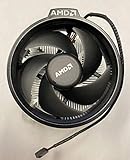
- Supports Motherboard Socket: AM4
- Aluminum heat sink - Pre-applied thermal paste
- 3.81-inch fan
- 4-pin power connector (9-inch length, approximate)
| Alternative | Relevant specifications or price signal | Best for | Main limitation |
|---|---|---|---|
| ARCTIC Freezer 36 | AM4/AM5; two 120 mm PWM fans; four 6 mm copper heat pipes; 159 mm height; six-year warranty; US MSRP listed as $47.99 before tax and shipping when crawled | Quiet sustained workloads and higher thermal headroom | Requires at least 159 mm of case cooler clearance. |
| Thermalright Peerless Assassin 120 SE | AM4/AM5; approximately 155 mm tall; dual-tower design; secondary coverage reported approximately $33 in the US at the time | High cooling performance per dollar | Large footprint, RAM-clearance concerns, and changing retailer prices. |
| Noctua NH-U12S redux | AM4/AM5; 120 mm fan; pre-applied NT-H1 paste; SecuFirm2 mounting; broad RAM compatibility; six-year warranty | Quiet operation, mounting quality, and long-term support | Usually not the maximum performance-per-dollar choice and has no RGB. |
| Cooler Master Hyper 212 | Current listings show AM4/AM5 support and a 120 mm fan | Widely available single-tower replacement | “Hyper 212” covers multiple revisions; compare the exact model before buying. |
See the ARCTIC Freezer 36 specifications, Noctua NH-U12S redux product details, and current cooler-category listings for the manufacturer specifications and market examples supplied in the research. The Peerless Assassin price is a time-sensitive secondary-market signal rather than a guaranteed current price.
How do you install and troubleshoot a Wraith cooler?
Do not force a Wraith cooler that does not mount cleanly. Correct mounting hardware, complete contact, fan power, and suitable thermal compound matter more than the model name printed on the shroud.
High temperatures at stock settings
- Confirm that the cooler is fully seated.
- Check that protective film, if present, was removed.
- Verify that thermal compound is present and not dried out.
- Confirm that the fan is connected to the CPU_FAN header and is spinning.
- Check that case intake and exhaust fans operate correctly.
- Check whether CPU package power is normal for the processor.
- Review BIOS fan control and confirm that the fan is not being limited.
- Confirm that the cooler model is appropriate for the CPU.
- Check whether BIOS settings apply unusually aggressive boost or voltage behavior.
Excessive noise
Excessive Wraith noise can result from a Stealth fan operating near maximum speed, poor case airflow, high ambient temperature, a reactive fan curve, dust, a worn bearing, PBO, manual overclocking, or poor mounting and thermal paste. Address the cause before simply setting a lower fan speed.
RGB does not work
Check the fan power cable, RGB cable, optional USB cable, header voltage and connector type, motherboard lighting settings, and control software. The CPU fan can operate normally while every lighting cable is disconnected.
The cooler will not mount
Confirm the Wraith model, socket hardware, AMD backplate, retention components, screw spacing, and included brackets. A used listing that says “AM4/AM5 compatible” does not prove that the necessary mounting hardware is included.
How do you remove an old Wraith cooler safely?
If an old cooler is stuck by dried thermal compound, briefly warming the CPU with a short workload before shutdown can make removal easier. Gently twist the cooler to break the thermal-compound seal instead of pulling vertically with force. This is a practical precaution, not a universal AMD removal procedure.
Which Wraith cooler should you choose?
| Reader priority | Best choice | Why |
|---|---|---|
| Zero additional cost | Included Wraith Stealth, Spire, or Prism appropriate to the CPU | Trying the included cooler costs nothing and may be sufficient at stock settings. |
| Smallest compatible cooler | Wraith Stealth, subject to CPU and case limits | Its low profile can solve clearance problems that exclude tower coolers. |
| Best Wraith performance | Wraith Prism | Larger heatsink, heat pipes, fan control, and lower fan speeds than smaller Wraith models in historical testing. |
| Used Wraith purchase | Complete, clean Prism or Spire at a clearly low price | Inspect mounting hardware, cables, fan condition, and model identity first. |
| Quiet sustained performance | ARCTIC Freezer 36 or Noctua NH-U12S redux | Modern tower designs provide more thermal headroom than radial Wraith coolers. |
| Maximum budget cooling | Thermalright Peerless Assassin 120 SE where it fits | Large dual-tower capacity and strong reported value, with variable pricing. |
| RGB | Wraith Prism if complete and reasonably priced | Integrated RGB ring and transparent fan avoid adding separate lighting hardware. |
The final AMD Wraith CPU Cooler Review verdict is model-specific. Keep an included Wraith Stealth for a suitable stock 65 W system if noise and temperatures are acceptable. Reuse a Wraith Spire when it is already available and complete. Choose the Wraith Prism when compact RGB cooling is the priority and the price is low. For a separately purchased cooler, a modern tower is normally the better performance, noise, and upgrade-headroom decision.
Frequently Asked Questions
Is the AMD Wraith cooler good enough for Ryzen processors?
An AMD Wraith cooler can be good enough for a suitable Ryzen processor at stock settings, especially when the cooler is included and the CPU is a 65 W model. The Wraith Stealth has less sustained-load headroom than the Wraith Spire or Prism, while high-power CPUs and long all-core workloads generally benefit from a tower cooler.
Is the Wraith Prism better than the Wraith Stealth?
The Wraith Prism is substantially more capable than the Wraith Stealth because it uses a larger heatsink, direct-contact heat pipes, fan-speed control, and RGB lighting. Historical Ryzen 5 2600 testing recorded lower temperatures for the Prism in gaming, Blender, and overclocked workloads, although those results do not predict temperatures on every modern Ryzen CPU.
Can a Wraith Prism be used on AM5?
AM5 compatibility must be verified for the exact Wraith Prism revision and mounting hardware rather than assumed from the Wraith name. AMD’s retail Prism listing describes AM4 processors, while AMD’s current cooling-solutions page lists Wraith coolers with newer Ryzen processors, so buyers should confirm the included brackets, screws, backplate arrangement, and motherboard fit.
Do these 3 things before closing this tab:
1Clear out junk files and repair common Windows errors2Scan for outdated or missing drivers - takes under a minute3Repair Windows errors before they cause bigger problemsIs it worth buying a Wraith Prism separately?
A Wraith Prism is usually not the best standalone purchase when a modern tower cooler costs a similar amount. A Prism can make sense when the buyer specifically wants AMD branding, integrated RGB, a compact radial design, or an inexpensive replacement with complete mounting hardware.
Why is my Wraith cooler so loud?
A Wraith cooler can become loud because its fan is responding to sustained CPU power, poor case airflow, high ambient temperature, dust, a worn bearing, PBO, overclocking, or an aggressive motherboard fan curve. A smoother fan curve may reduce short ramp-ups, but high sustained temperatures should be investigated before lowering fan speed.
The Bottom Line
Bottom line: There is no single AMD Wraith cooler verdict. The Stealth is a practical free cooler for many stock 65 W Ryzen systems, the Spire is a useful but aging middle option, and the Prism is the best-known Wraith for compact RGB builds. If buying new for quiet sustained performance, choose a modern tower cooler when the case and budget allow.

