

The Tool Desk
Outbyte Driver Updater FREEScan for outdated or missing drivers - takes under a minuteDriver Scan →Outbyte PC Repair FREERepair Windows errors before they cause bigger problemsFix Now →This Itechguide teaches you how to turn off chat on Facebook. The guide covers steps to turn off chat on Facebook from a PC, Android or iPhone.
Option 1: Turn off Chat Using a PC
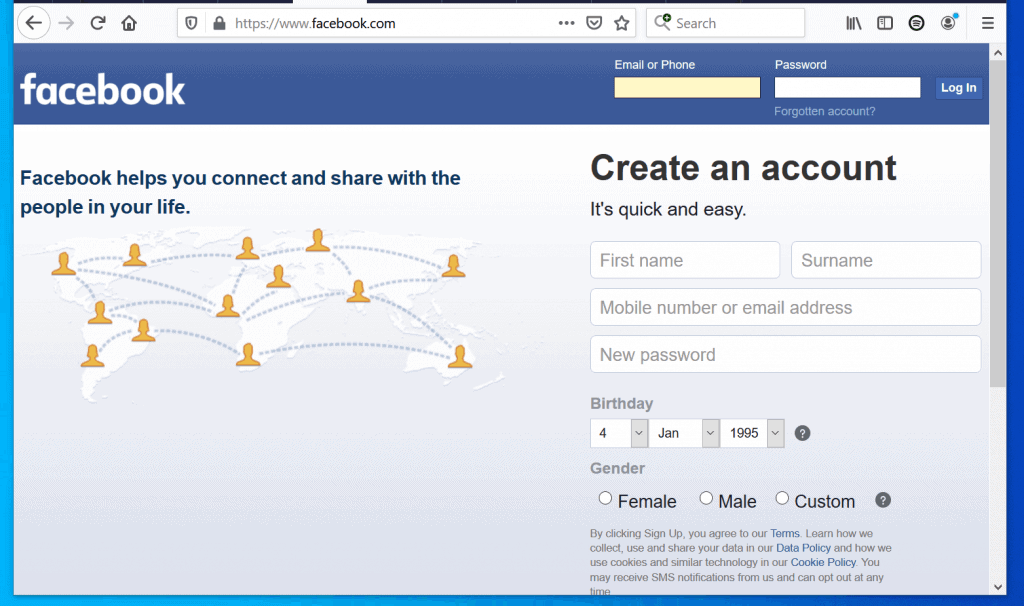
- Open Facebook.com from a browser in your PC. Then, login with your Email or Phone and Password.
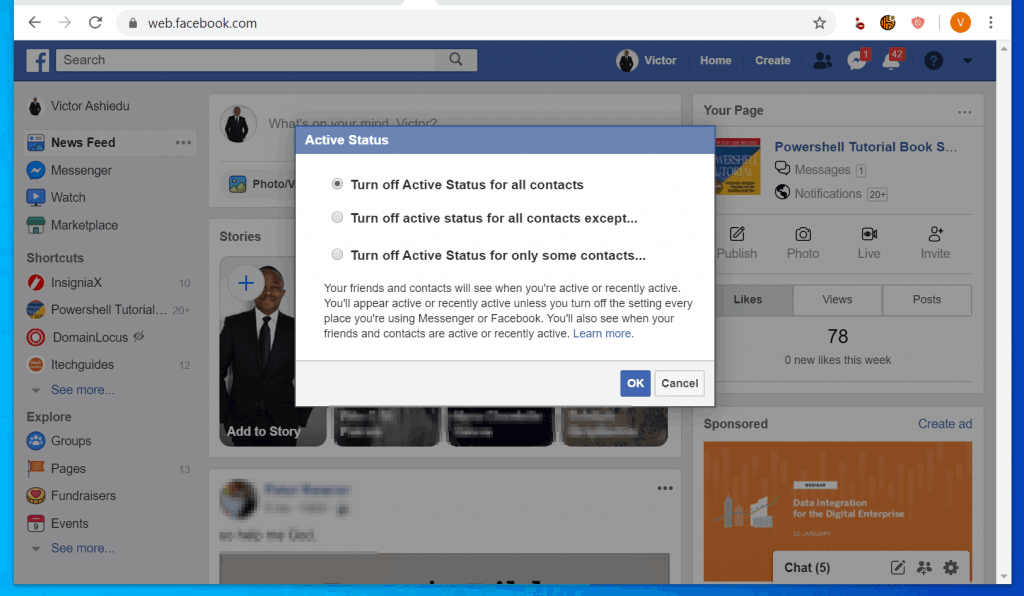
- At the bottom right of your Facebook News Feed, click the chat settings (gear icon). Then, from the list of displayed options, click Turn Off Active Status. The Active Status pop up will be displayed.

- Finally, to turn off chat on Facebook, on the Active Status pop up, select an option and click OK.
Turn off Active Status for all contacts will turn off chat for all your friends. None of your friends will be able to chat with you.
Turn off active status for all contacts except turns off chat for all your friends with option to stay on for specified friends. Chat will be On for the friends you specify but Off for everyone else.
Turn off Active Status for only some contacts offers option to specify specific friends you want to appear offline to. Chat will be turned Off for these friends but remain On for all other friends.
Quick wins for a faster PC:
Scan for outdated or missing drivers - takes under a minuteDriver Scan →Repair Windows errors before they cause bigger problemsFix Now →Fix the driver behind crashes, sound loss and screen glitchesFind Drivers →#1 Best Overall

- Keyed Deadbolt for Storm and Screen Doors: The GLK deadbolt lock adds a layer of secondary security to storm and screen doors. It’s ideal for exterior doors where a keyed lock and deadbolt are needed for peace of mind.
- Compatible with Other Lever Handles: Matches Ideal Security’s GL and AJ Series handles for a coordinated look, but also works as a standalone upgrade. Installs above or below most out-swinging storm door handles, with a keyed cylinder outside and thumb turn inside.
- Fits Most Storm Doors: Suitable for doors 1 to 2-1/8 inches thick. Includes a spindle that can be trimmed to fit your door thickness. Compatible with standard installation spacing.
- Straightforward Installation: Requires three 5/16-inch holes to be drilled through the door for the screws and spindle. Installation template is available to help guide the process.
- Set Includes: Includes exterior key cylinder escutcheon, interior deadbolt with thumb turn, screws and spindle for doors from 1 to 2-1/8 inches thick, surface-mount strike plate, two deadbolt shims, and two keys.
Option 2: Turn off Chat via Android App
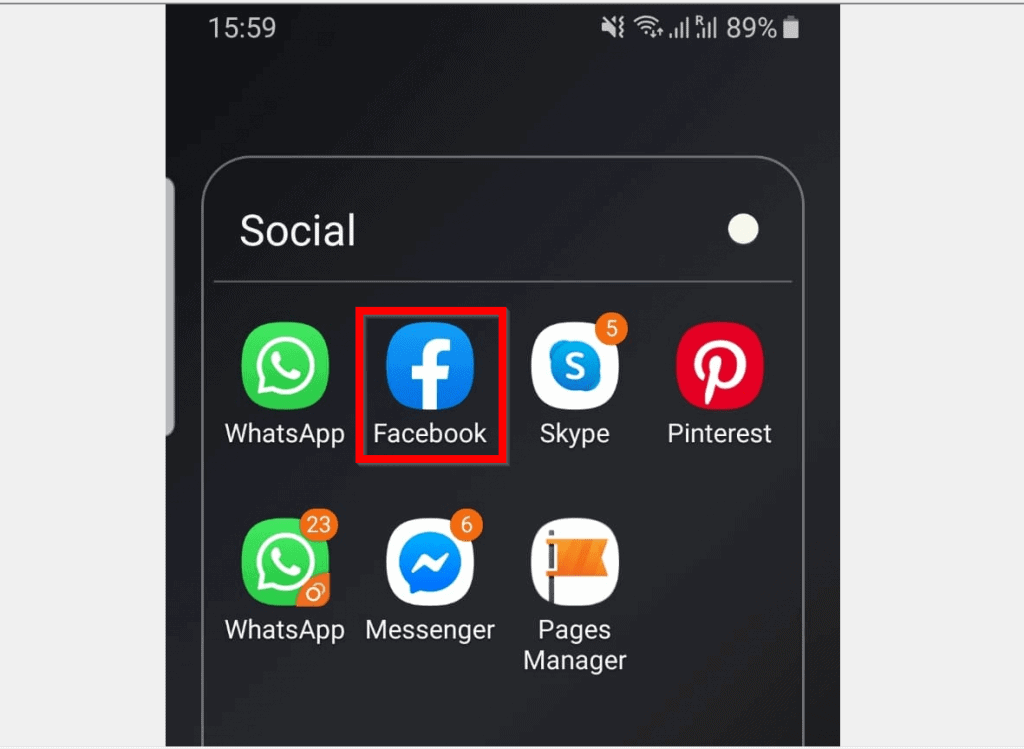
- Open the Facebook App on your Android phone. Then, if you have not signed in to the App before, sign in with your Facebook account.
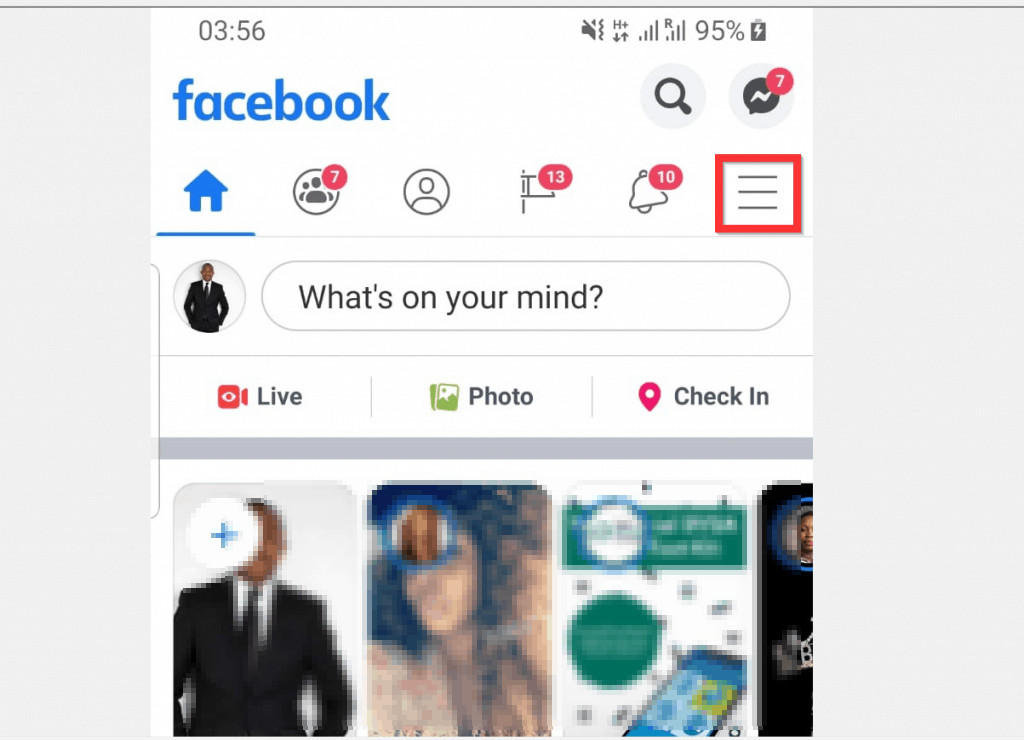
- Tap the 3 lines on the top right of the App. A set of options will be displayed.
- Scroll down the displayed options and tap Settings & Privacy.
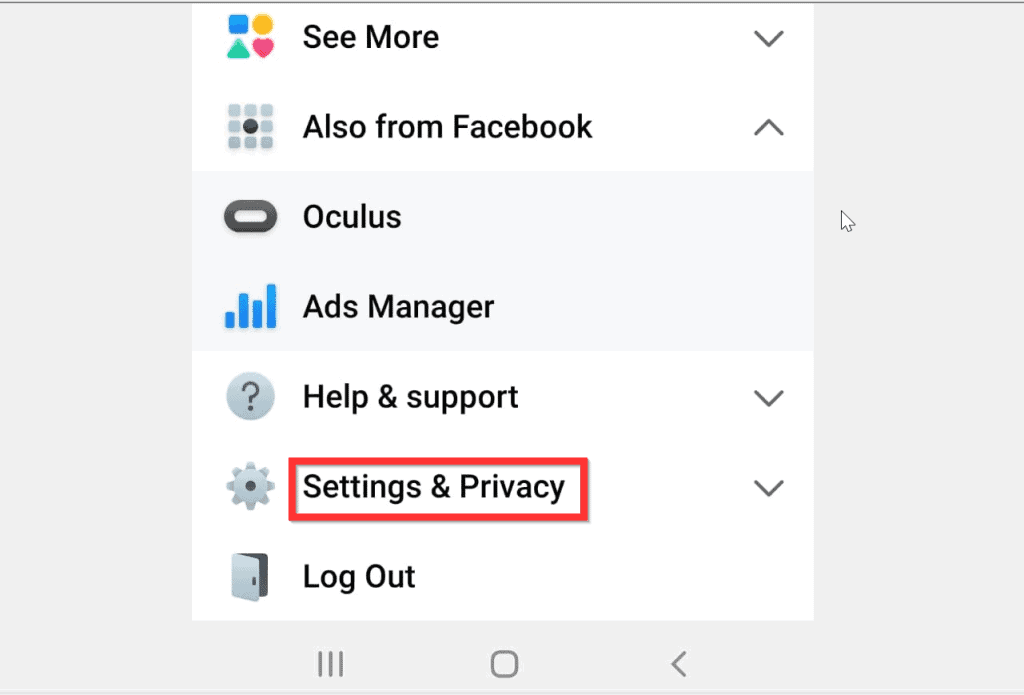
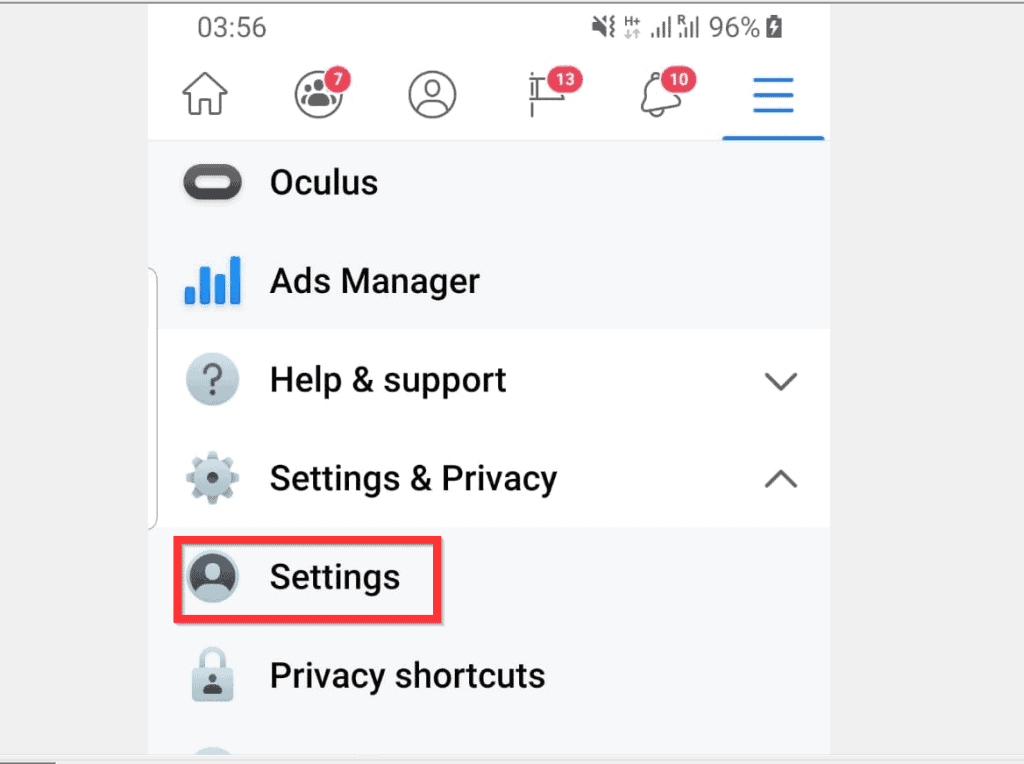
- Then, beneath Settings & Privacy, tap Settings.
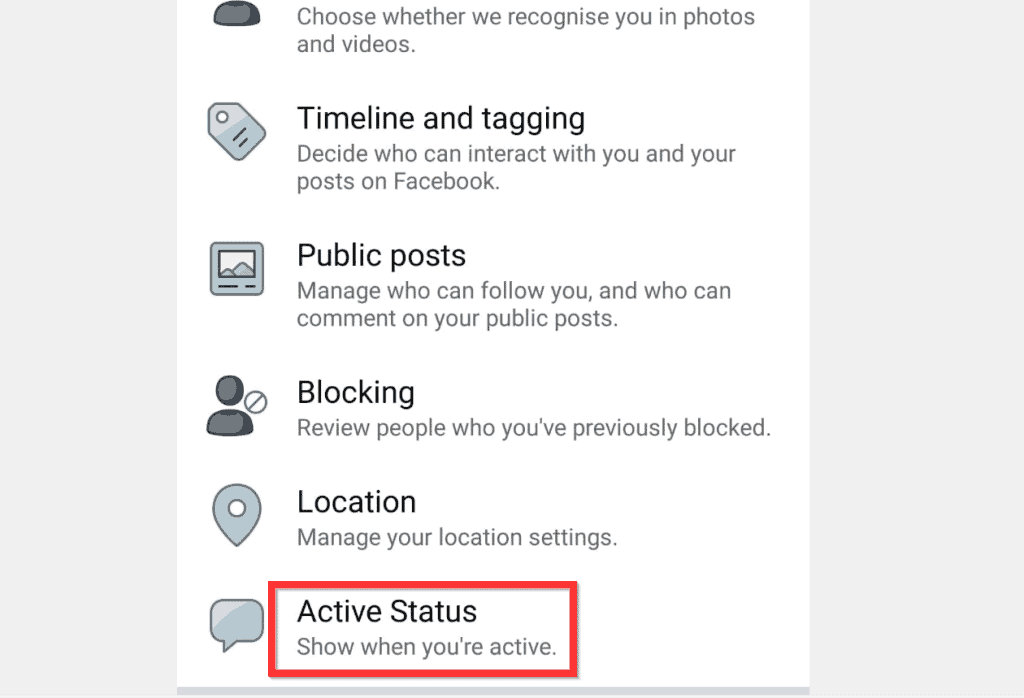
- When the Settings page opens, scroll down to Privacy and tap Active Status.
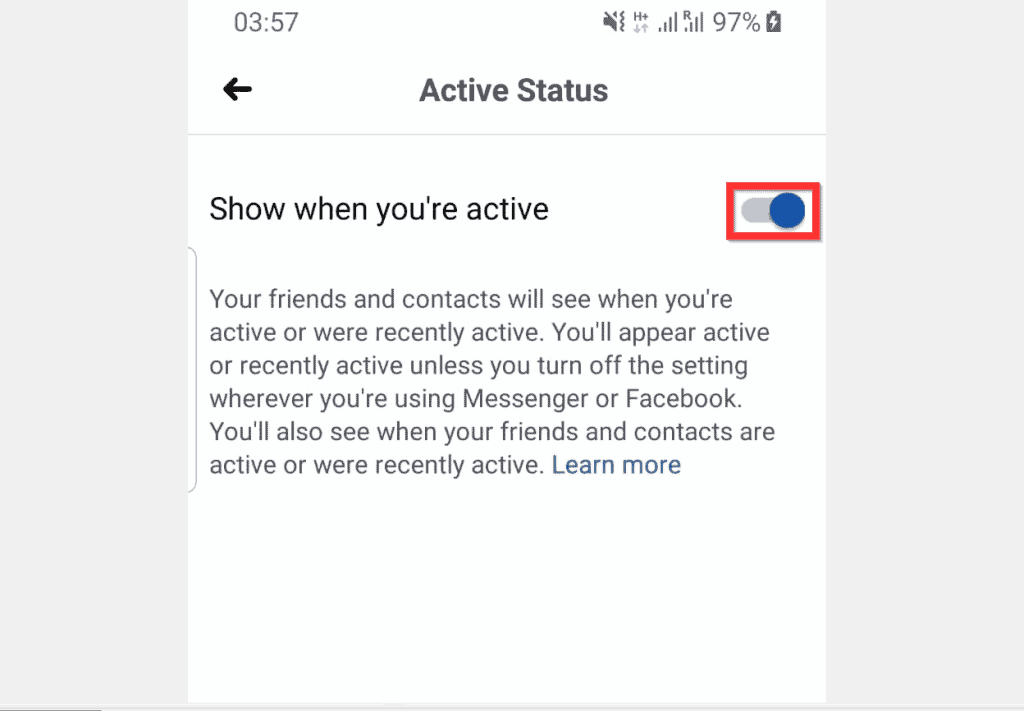
- Finally, to turn off chat on Facebook, on the Active Status page, flip the s switch from On (default) to Off.
- You will be required to confirm that you want to turn off active status. To confirm, at the bottom right of the Turn off Active Status? pop up, tap TURN OFF.

Option 3: Turn off Chat Through iPhone App
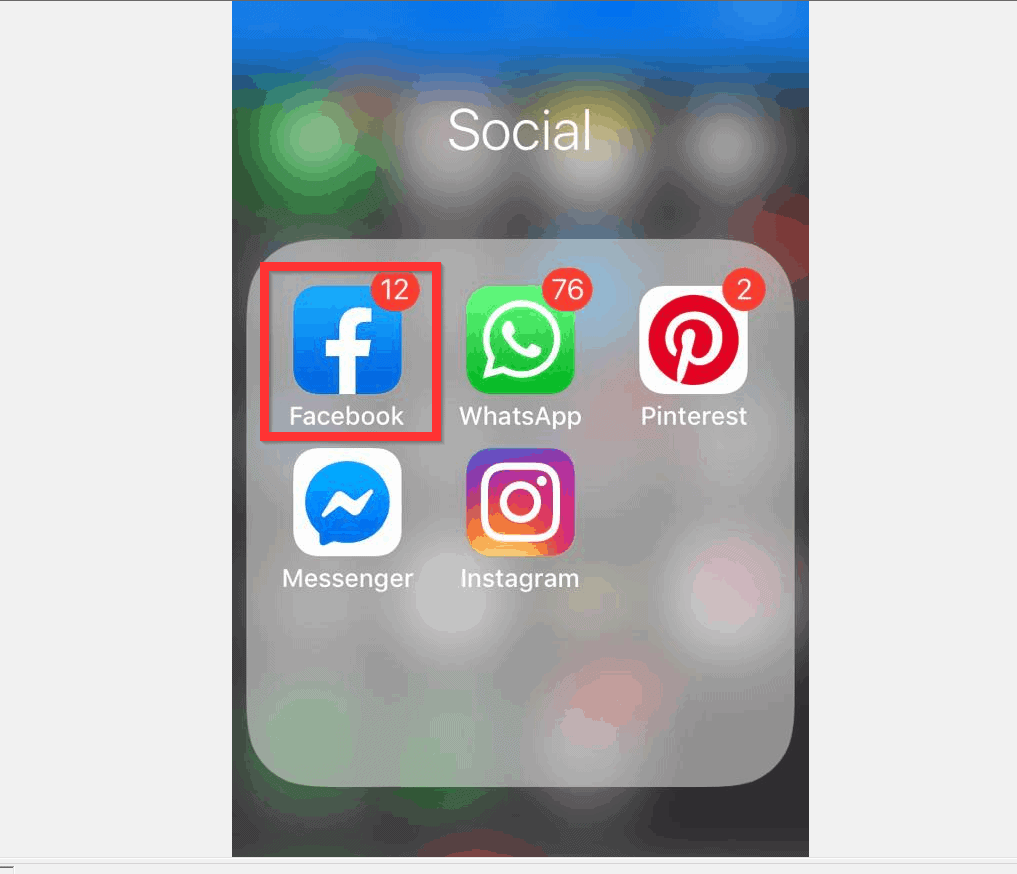
- Open the Facebook App on your iPhone. Then, if you have not yet signed in to the App, sign in with your Facebook account.
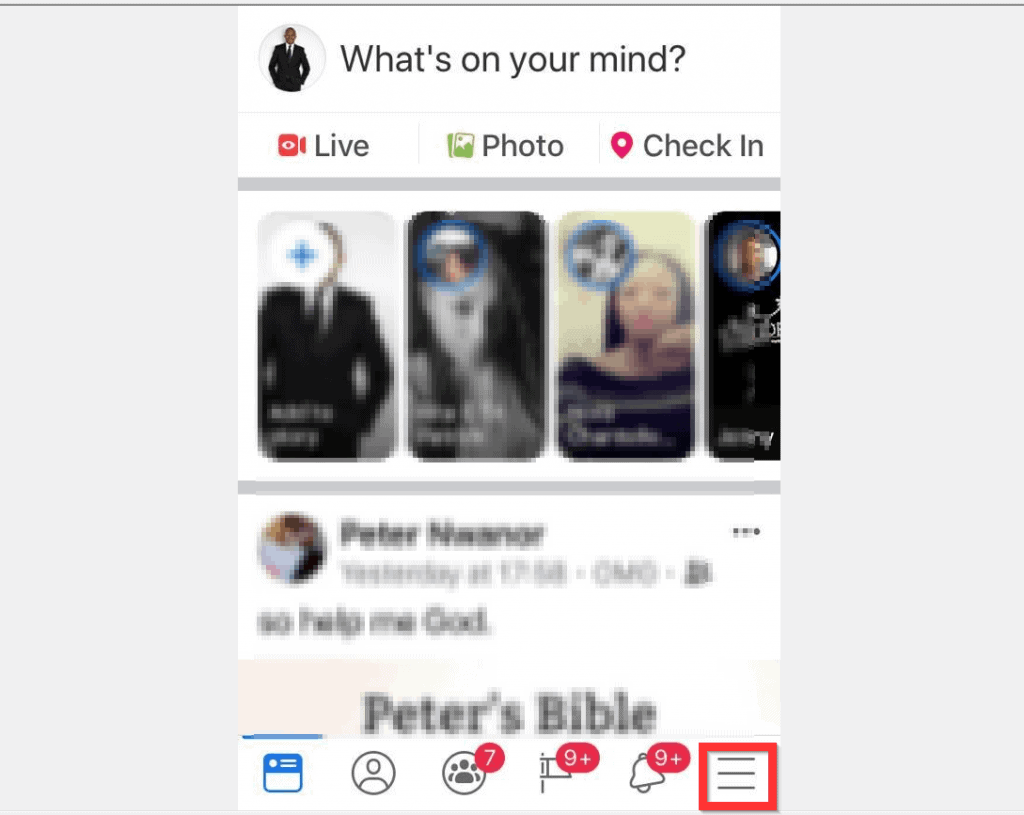
- Tap the 3 lines at the bottom right of the App. A set of options will be displayed.
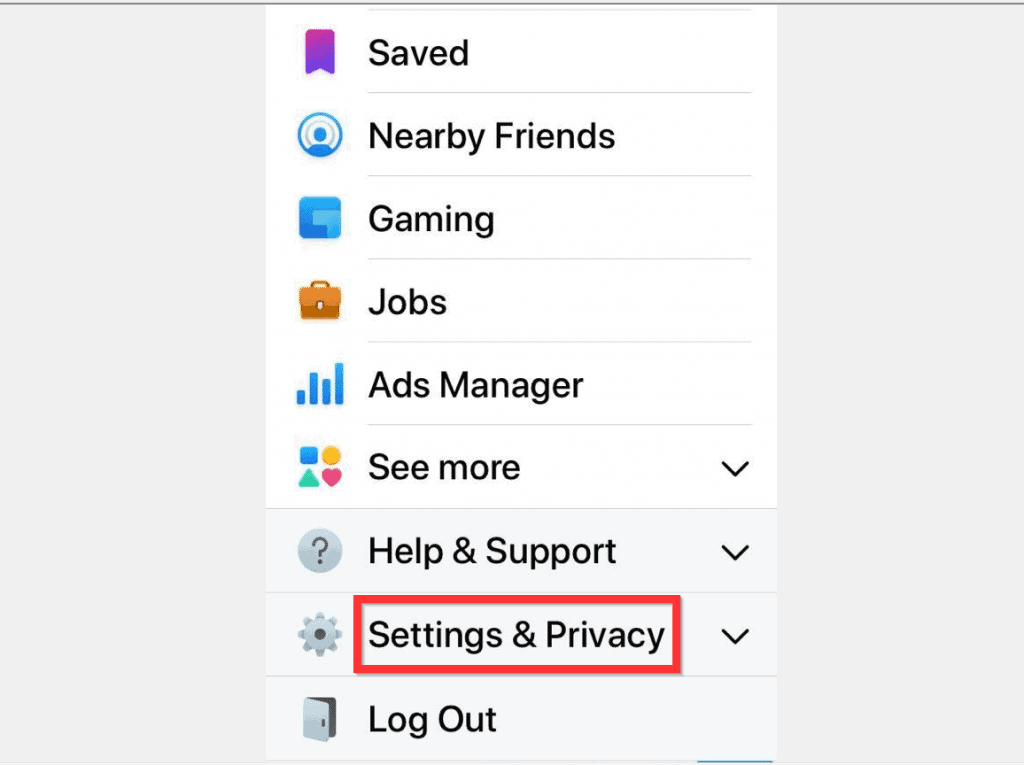
- Scroll down the displayed options and tap Settings & Privacy.
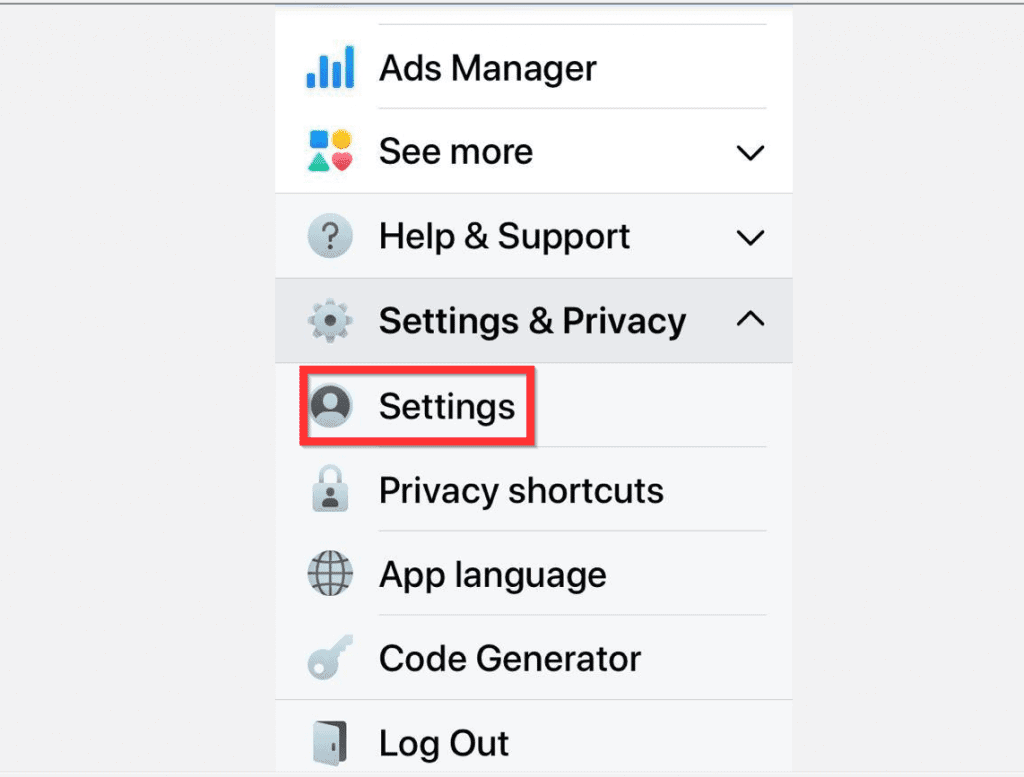
- When Settings & Privacy section opens, tap Settings.
- Then, on the Settings page, scroll down to the Privacy section and tap Active Status.
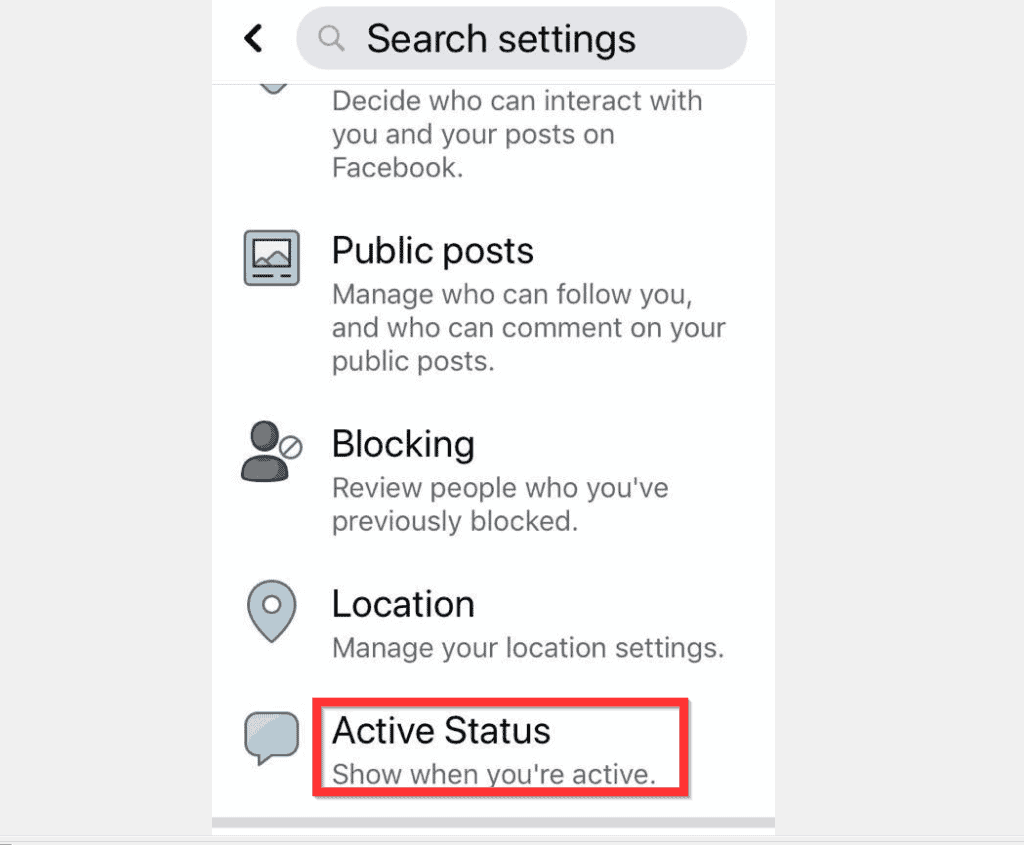
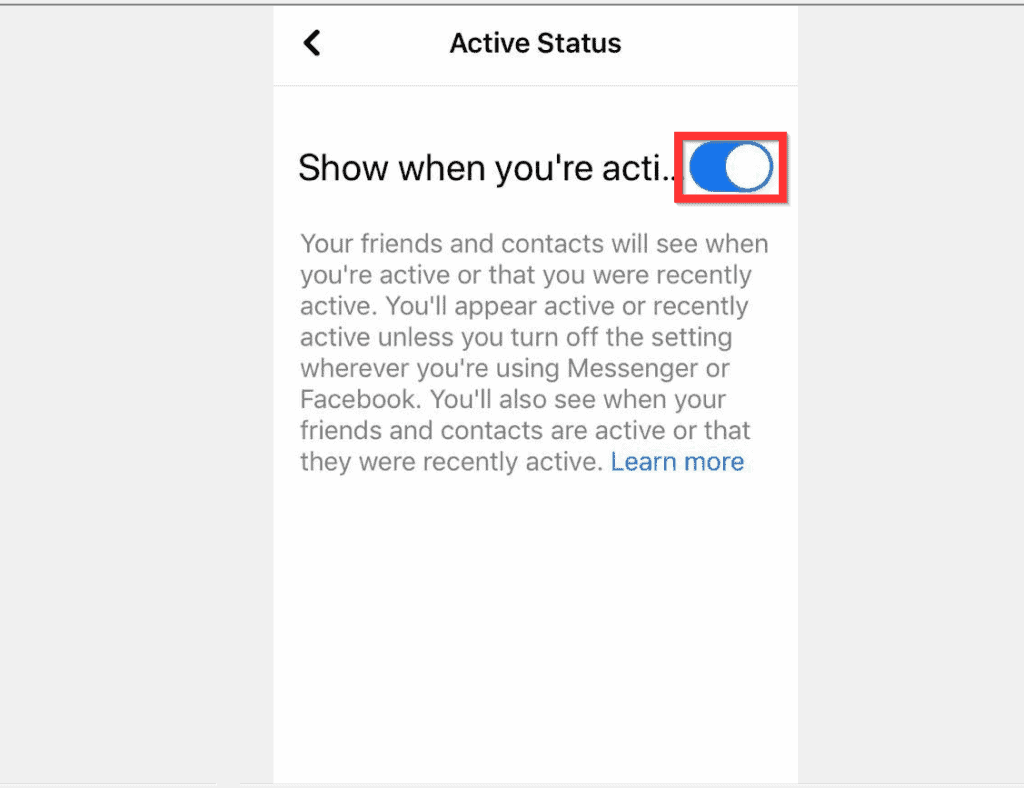
- When the Active Status screen opens, flip the Show when you’re active switch from On to Off. You will receive a confirmation pop up window.
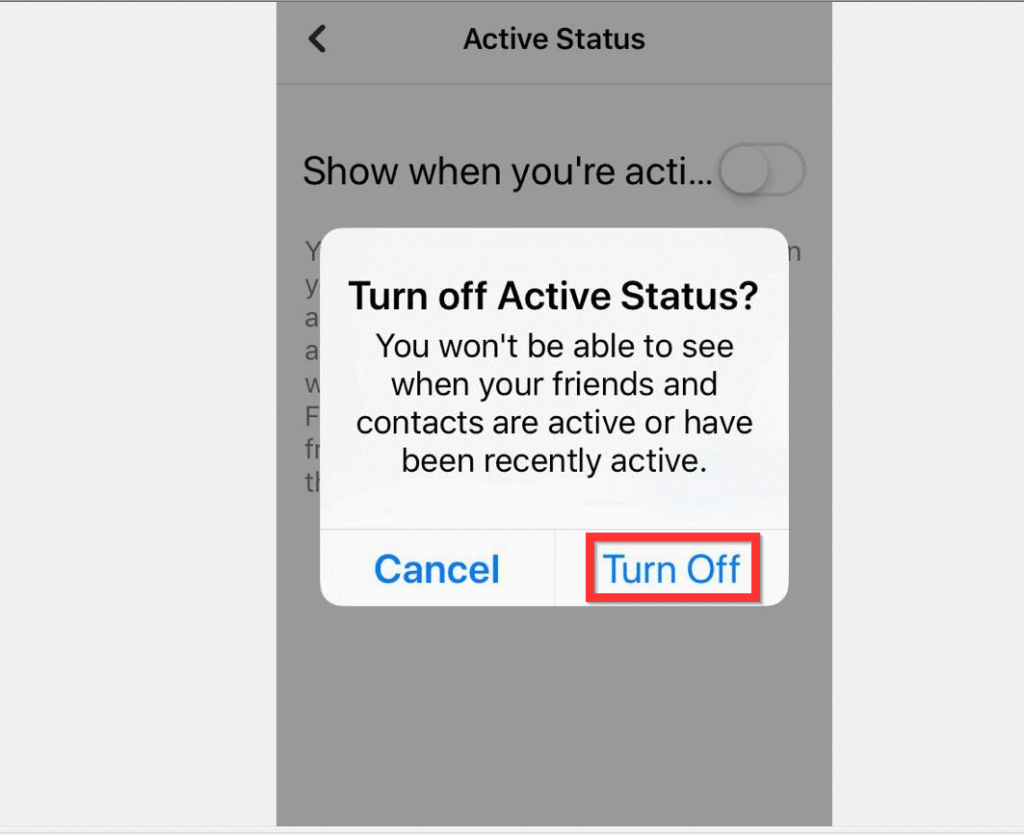
- Finally, to turn off chat on Facebook, at the Turn off Active Status? pop up window, tap Turn Off.
Option 4: Turn off Chat via the Messenger App
- Open the Facebook Messenger App on your Android phone. Then, if it is your first time opening the App, login with your Facebook account.
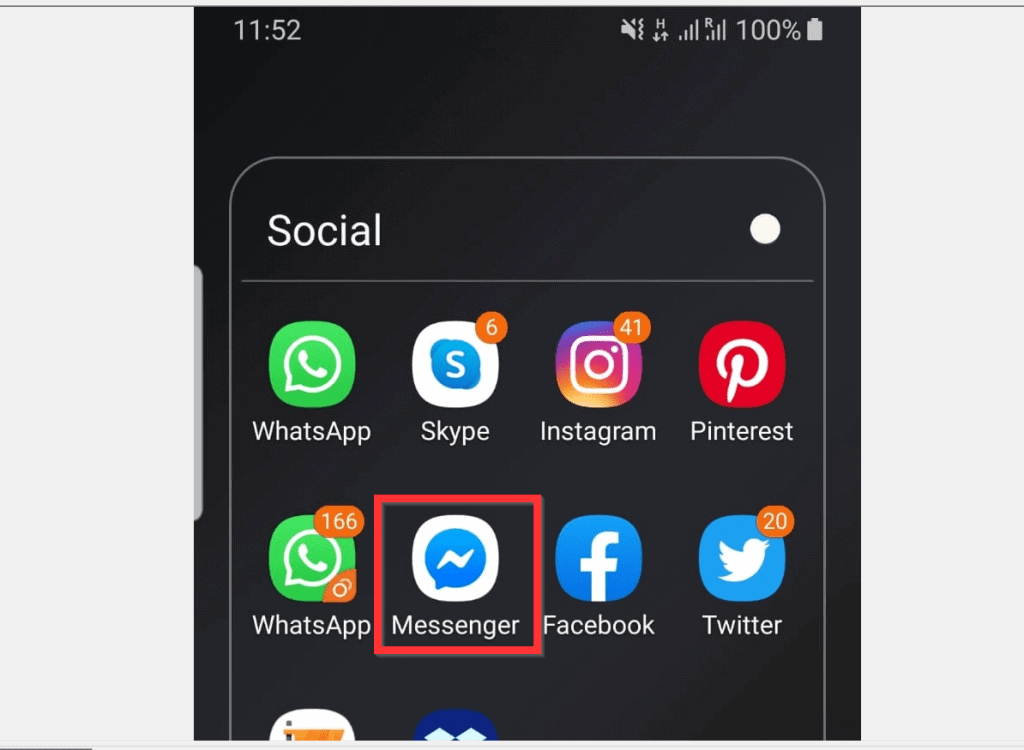
- On the top left of the Messenger App, tap your profile icon. If you have a profile picture, the icon will be a small version of your picture. Otherwise, it will display a generic icon.

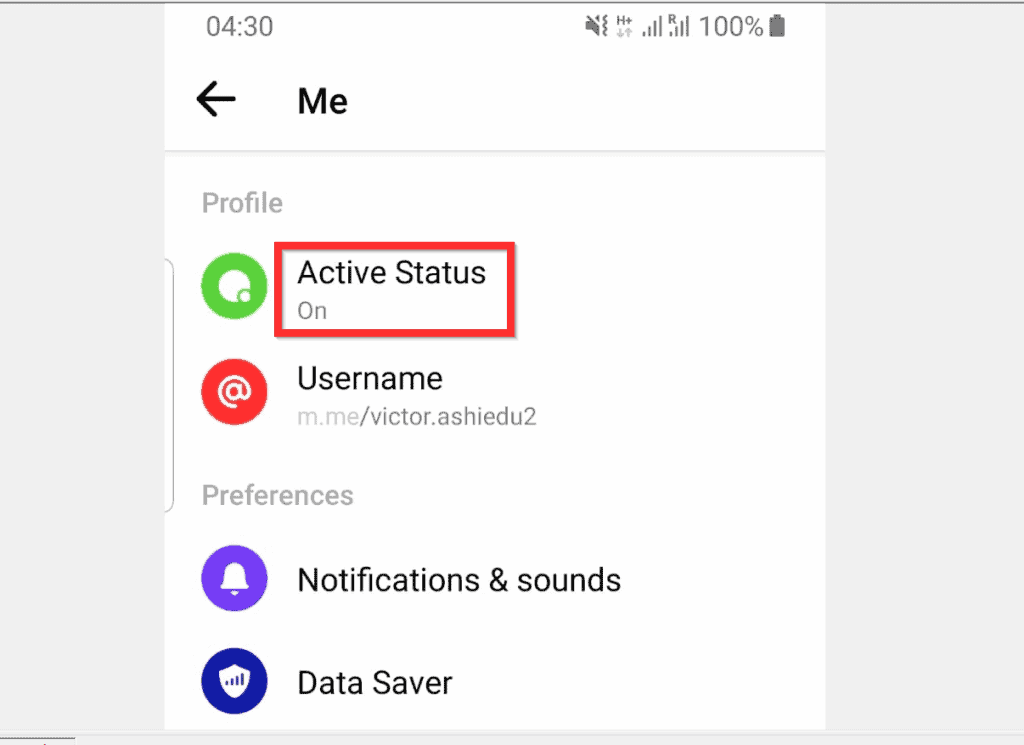
- When your Facebook messenger settings opens, scroll down to the Profile section and tap Active Status.
- Then, turn the Show when you’re active switch from On to Off. A confirmation pop up window will be displayed.
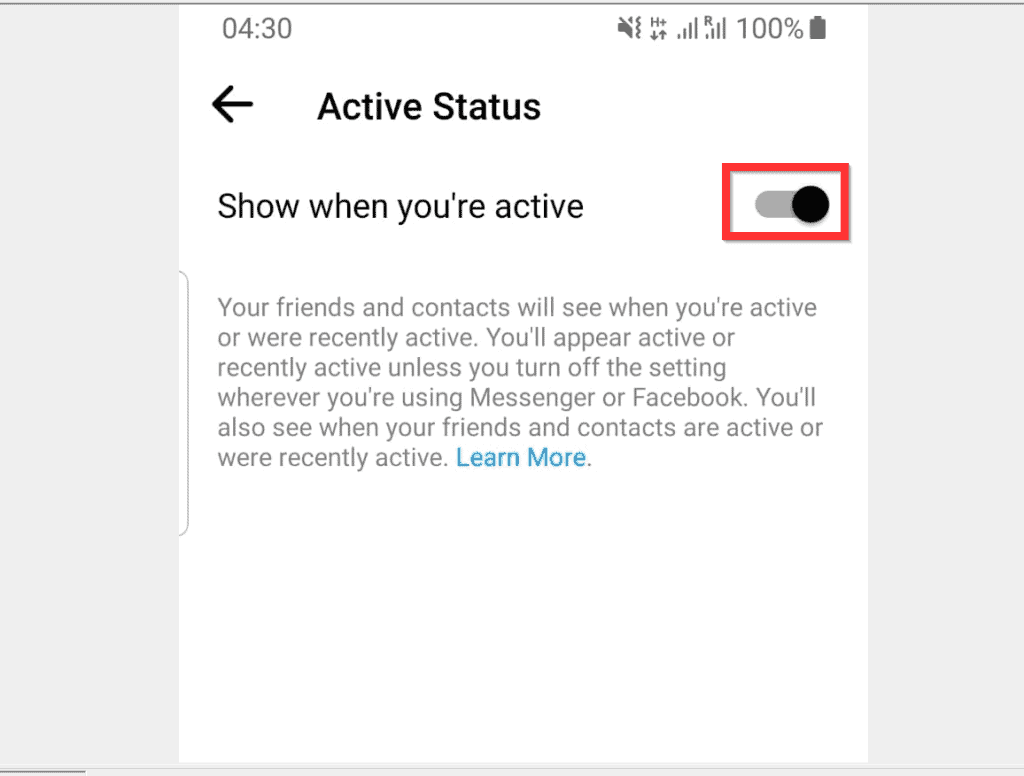
- Finally, to turn off chat on Facebook, at the confirmation pop up, tap TURN OFF.

I hope you found this article helpful. If you did, click on “Yes” beside the “Was this page helpful” question below.
You may also express your thoughts and opinions by using the “Leave a Comment” form at the bottom of this page.
Rank #2

- Instant, App-Free Monitoring: No smartphone or app required—just check the screen to see who's outside.
- Simple Replacement or Upgrade for S3/S3 Max: Only compatible with eufy FamiLock S3 Max and S3. Instantly upgrade your S3 to view the outside with a live video feed, or use as a replacement screen if your S3 Max display needs to be replaced.
- Effortless Installation and Smart Integration: As an official accessory, it easily and quickly integrates with your existing lock—no complicated setup, no hassle.
- Family-Friendly, Easy for All Ages: Easy to use for everyone in the home, including kids, seniors, and guests—no tech skills needed.
- Standalone Display—No App or Wi-Fi Needed: Get always-on visuals without relying on Wi-Fi or smartphone networks. Instant, stable video, every time you need it.
Finally, for more Social media Itechguides, visit our Social Media how to page.
Quick Recap
Best Value

- Complete Security Set: Super value with 2 sets of adhesive sticker & anchor plate for use on multiple mobile devices, provides much needed security against theft of your various gadgets in public places, a true laptop notebook ipad lock that gives you a peace of mind.
- Strong Adhesive Power: Industrial grade 3M adhesive provides strong adhesive power to most flat surfaces with intense power that effectively prevents tablets or cell phones being pulled away, it's also powerful enough to be inserted in to large notebook as laptop cable lock key.
- Premium Steel Design: Cut-resistant galvanized steel cable (6 feet) allows easy iPad or iPhone movement while secured. The high-quality stainless steel lock resists damage and ensures smooth operation, making it an ideal iPad locking stand when paired with our AboveTEK Tablet Stand.
- Easy Key Operation: The minimalist design ensures easy installation in seconds while being highly effective. It seamlessly integrates with your sleek Apple or Android mobile devices as a MacBook locking cable, iPad Air lock, or Samsung Galaxy Tab cable lock for added security.
- Universal Compatibility: Broad application with all tablets, smartphones, laptops, notebooks in various occasions for both commercial and private security including public library, cafe, restaurant, shop or retail store point of sale, showroom display and much more.
Rank #4

- Universal Compatibility: Broad application for laptop lock, iPad lock, tablet security cable, and monitor locking cable, ensuring secure protection across all your devices. Ideal for libraries, offices, retail stores, and other public spaces, keeping your valuable devices safe.
- Complete Security: Our laptop security cable includes 2 sets of adhesive stickers & anchor plates, providing a professional-grade anti-theft solution. Perfect for securing your MacBook, iPad Air, Samsung Galaxy Tab, and other gadgets in public environments.
- Steel Cable Protection: The computer locking cable is made of cut-resistant galvanized steel, offering durability, flexibility, and anti-theft security. With a 6-foot cable length, you can move your iPad or MacBook freely while keeping it securely locked in place.
- Industrial Strength: The AboveTEK laptop lock uses advanced 3M adhesive technology, ensuring a strong, reliable hold on flat surfaces without leaving residue. Designed for long-term use in high-traffic environments like retail stores, office spaces, and libraries.
- Keyless Convenience: The iPad cable lock features a user-friendly combination lock, removing key hassles. Its minimalist design seamlessly fits MacBook locking cable, tablet security solutions, and other modern devices, ensuring a sleek and secure setup.
Rank #3

- Suitable for Mac Book and all tablets, smart phones such as Apple iPad, Microsoft surface, Kindle, iPhone, Samsung, Android Tablet and mobile phones
- You can stick the box on one place, lock the products such as electronic remote control, calculator with the cable
- Attach the anchor plate with strong adhesive to the hard surface of the equipment, and use 3M adhesive or screw to fix part of the box on the table or wall
- The steel cable is stored in the packing box, the length can be adjusted, and the wire length is 1.2m
- Dimension: 44x44x16mm; Wire thickness: 0.9mm; Package includes: 1 x Retractable Anti-theft Cable Case
Product prices and availability are accurate as of the date/time indicated and are subject to change. Any price and availability information displayed on Amazon at the time of purchase will apply.


Great post! I found the steps really easy to follow. It was helpful to have the screenshots for each step. Thanks for making it so clear!
Great guide! I was struggling to find the option to turn off chat, and your step-by-step instructions made it so easy. Thank you for sharing!