
Free tools Windows power users keep installed
One-click scans. No signup required.
There are not four equally defensible current recommendations for 4 business card scanning apps for Android and iOS: Covve Scan, CamCard, and HubSpot are the verified shortlist, while ABBYY is no longer an Android option. Choose Covve for dedicated scanning and events, CamCard for a conventional card organizer, or HubSpot for direct CRM capture.
The important distinction is not simply whether an app can recognize text. A useful business-card scanner turns a paper card into structured fields—name, company, job title, telephone number, email address and notes—and sends those fields to the place where you actually work.
The shortlist deliberately contains three verified recommendations rather than padding the article with an outdated fourth app. A later editorial verification pass could add BizConnect, ScanBizCards or another product only after confirming a live Android listing, a live iOS listing, current pricing and documented business-card functionality.
Key takeaways
- Covve Scan is the strongest dedicated choice for individuals and event teams because its current product information covers offline scanning, QR codes, event badges, exports, CRM integrations and recognition in 60+ languages.
- CamCard is a conventional cross-platform business-card database with Android, iPhone and iPad downloads, plus separate business-management features for teams.
- HubSpot’s scanner is advertised as free, maps scanned details into HubSpot contact properties, and is most useful when HubSpot is already the reader’s CRM.
- ABBYY Business Card Reader should not be recommended as an Android-and-iOS app because ABBYY ended Android support on September 18, 2023.
- OCR can misread country codes, phone extensions, names, titles, email addresses and dark or glossy cards, so every valuable lead should be reviewed before the paper card is discarded.
Which business card scanning app should you choose?
Choose Covve Scan if you need a dedicated scanner with offline capture, event features, exports or several CRM destinations. Choose CamCard if you mainly want a familiar card organizer and digital-card service. Choose HubSpot if the scanned contact needs to become a HubSpot record immediately. For only a few cards, a phone’s built-in Contacts app may be simpler than adopting a separate cloud service.
#1 Best Overall

- IMPORT CONTACTS DIRECTLY TO OUTLOOK: Compatibility with Microsoft Outlook makes growing your contact list simple and easy. Scan your business card in just seconds, and the information will be imported directly into your Outlook address book.
- DELETING DUPLICATE CONTACTS: Automatic duplicate detection of Outlook contacts keeps your address book organized and up to date. Never worry about repeating information, and edit contact fields easily if needed.
- AI-POWERED CONTACT RECOGNITION: Enable optional AI processing in AmbirScan to significantly improve accuracy when extracting names, titles, phone numbers, and email addresses from scanned business cards — all processed locally on your PC.
- MULTI-LANGUAGE AI SUPPORT: When AI processing is enabled, AmbirScan's contact extraction supports business cards in English, French, Italian, German, and Spanish — so your global contacts are just a scan away.
- SCAN TO SHARED CONTACT FOLDER: For executive assistants and distributed office environments, scanning contacts to a shared folder allows for easy contact sharing across your organization. Simply set up your shared folder and start scanning.
| App | Android and iOS | Best for | Free or pricing position | Destinations and workflow | Offline position | Main drawback |
|---|---|---|---|---|---|---|
| Covve Scan | Advertised for Android and iOS | Dedicated scanning, networking and event teams | Essential listed at $12 per seat/month or $119 per seat/year on Covve’s pricing page checked in August 2026; marketplace prices can differ | Phone contacts, exports, Outlook, Google Contacts, Excel, CRM integrations and Zapier, depending on plan | Offline scanning is advertised; confirm whether recognition, sync or export requires later connectivity | More complex and potentially more expensive than needed for occasional scanning |
| CamCard | Official download pages list Android, iPhone and iPad versions | A conventional card database and digital business cards | Current universal consumer pricing was not reliably exposed; check the live store listing | In-app card management; consumer and business features should be evaluated separately | Not established by the supplied current evidence | Free limits, export rules and cloud requirements need checking for the specific edition and platform |
| HubSpot mobile app | Available on Android and iOS | Existing HubSpot CRM users and sales follow-up | HubSpot advertises the business-card scanner as free and says it has no arbitrary scan limit; broader CRM features may have separate plan rules | Creates HubSpot contacts, maps fields to HubSpot properties, associates companies and supports follow-up workflows | Not established by the supplied product evidence | Less suitable if you want a standalone address book, neutral CSV workflow or no CRM account |
Product availability, minimum operating-system versions, regional availability, feature parity and subscription prices can change independently on Android and iOS. Check both current store listings before deploying an app to a team.
What does Covve Scan do?
Covve Scan is the broadest dedicated option in this shortlist: Covve describes support for paper business cards, QR codes and event badges, alongside contact management, exports, notes, tags, groups, search, locations and CRM or automation connections. Covve also promotes digital business-card features, so Covve is better understood as a networking and lead-management platform rather than a bare OCR utility.
Covve’s pricing information advertises recognition in 60+ languages, offline scanning, exports, Outlook and Zapier. The language figure is a vendor claim, not an independent accuracy test; support for a language does not guarantee identical recognition quality for every script, typeface or card layout. See Covve’s current pricing and feature table for plan-dependent availability.
Covve’s listed CRM and export paths include HubSpot, Salesforce, Pipedrive, Zoho, Microsoft Dynamics 365, Outlook, Google Contacts, Excel and Zapier, with availability depending on the plan. That makes Covve a strong choice when the contact must move beyond a phone address book, particularly after conferences or trade shows.
How much does Covve Scan cost?
On the Covve pricing page checked during the August 2026 research pass, the Essential plan was listed at $12 per seat per month or $119 per seat per year. The same page listed Pro at $20 per seat per month or $199 per seat per year, and Business at $31 per seat per month or $299 per seat per year. Prices are stated in U.S. dollars on the supplied page and may change.
The iOS App Store listing displayed annual in-app purchase examples of $59.99 and $99.99. Those figures should not be treated as a universal Covve price: they may represent different tiers, promotions, regions or subscription configurations. Compare the checkout terms, billing interval, seat count and platform before subscribing. The Covve iOS listing is the relevant marketplace reference.
Who should avoid Covve?
Covve may be unnecessary for someone digitizing ten cards and saving them manually to a personal address book. Covve’s offline, team, badge, CRM and automation features are valuable only when the workflow uses them. A larger platform also means more account, cloud-storage and subscription decisions than a one-off manual entry.
What does Covve disclose about privacy?
Google Play says Covve may collect personal information, contacts and other data, states that data is encrypted in transit, and provides a way to request deletion. Apple’s listing reports data linked to the user, including identifiers, purchase history, usage data, diagnostics and device-related information. These are developer-provided store disclosures, not an independent privacy audit. Review the Covve Google Play data-safety disclosure and the Covve App Store privacy label against your organization’s requirements.
Is CamCard the best conventional business-card organizer?
CamCard is the most conventional choice here for readers who want a dedicated business-card reader, card manager and digital-business-card service rather than a CRM-first scanner. CamCard’s official download page lists versions for iPhone/iPad and Android/Android Tablet, making it a genuine cross-platform candidate based on the supplied official download evidence.
Rank #2

- Digitize business cards in seconds. Scan, recognize, and save contact information directly turn business cards into accurate digital format in a few seconds.
- Support multiple languages. Recognize business cards in 24 different languages as well.
- Data exchange. Export/ import contacts to/ from Address Book and then to iPhone/ iPod, Microsoft Entourage; and export to vCard, CSV. Text, HTML, image file format or import from vCard, CSV, WorldCard File.
- Manage business cards efficiently. Complete set of management functions provided for editing of information, assigning multiple categories and also adding of individual information and photos.Search by keyword.
- Quickly and efficiently find your contacts with "Text Search" and "Advanced Search" functions. Clicking on the address or website in card information fields will link to the map and contact's website directly.
CamCard’s business offering provides web and mobile access, separate private and company card holders, and administrative roles for company-level management. Those team controls belong to CamCard Business and should not automatically be assumed to exist in the consumer app. The CamCard Business administrator guide documents the company-management model.
What should you verify before choosing CamCard?
Current research did not expose a dependable universal consumer price or a complete current list of free limits, export formats and account requirements. Check the live CamCard download page and the relevant Google Play or App Store listing for the edition you intend to use.
Specifically verify whether the selected tier can save to phone contacts, export to CSV or vCard, retain notes and images, process both sides of a card, and merge duplicate records. Also check whether recognition happens offline or whether the app only lets you capture an image without a connection. Those details matter more than the label “OCR.”
The Tool Desk
Outbyte PC Repair FREEClear out junk files and repair common Windows errorsFree Scan →Outbyte Driver Updater FREEFix the driver behind crashes, sound loss and screen glitchesFind Drivers →CamCard is a reasonable fit for a person who wants a dedicated card collection with minimal CRM commitment, provided the current free tier and export terms meet the need. CamCard is a weaker choice for a compliance-sensitive organization seeking clearly documented local-only processing, because the supplied evidence does not establish that workflow.
Why is HubSpot best for existing HubSpot users?
HubSpot’s mobile business-card scanner is available on Android and iOS and sends scanned details directly into HubSpot contact records. HubSpot says the scanner maps extracted information into HubSpot properties and advertises the scanner as free, with no arbitrary scan limit. Those are first-party product claims; confirm current setup and account requirements before rollout.
The direct CRM destination is HubSpot’s main advantage. After scanning, a salesperson can associate the contact with a company, add follow-up tasks, call the contact and use tracked email workflows within the same ecosystem. The HubSpot business-card scanner page describes the current scanning and contact workflow.
When is HubSpot a poor fit?
HubSpot is less attractive when the reader wants a standalone local address book, a neutral CSV-first archive or a simple card database without maintaining a CRM. “Free scanner” does not mean every HubSpot CRM feature is free. Separate the scanner claim from the pricing and limits of the wider HubSpot platform.
Windows Errors? Fix Them Before They Spread
Repair common Windows errors and clear accumulated junk for a smoother, more stable PC - no reinstall needed.Free scan · no reinstallCrashes, No Sound, or Screen Glitches?
Random freezes, missing sound and display glitches usually trace back to one bad driver. Find and replace yours safely.Free scan · under a minuteHubSpot also creates a second risk: field mapping may not match the card perfectly. Review the contact’s name, company, title, phone labels, email address and associated company before allowing an automated follow-up sequence to run.
Why is there no fourth verified recommendation?
ABBYY Business Card Reader is the clearest example of why old comparison articles need checking. ABBYY officially discontinued its Business Card Reader for Android, with end of life on September 18, 2023. ABBYY’s current product page still describes an iOS version, including recognition in 25 languages and exports to Salesforce, Outlook, Google Contacts and CSV, but ABBYY also states that iOS synchronization for scanned cards was discontinued.
Rank #3
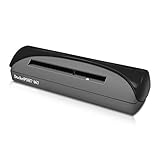
- ULTRA-COMPACT FOOTPRINT: At about the size of a stapler, the DP667 takes up far less space than flatbed scanners.
- USB POWERED CONVENIENCE: Because it's powered by your computer's USB port, you'll never search for an outlet or carry a bulky AC adapter again.
- STRAIGHT TO PDF SCANNING: With included DocketScan image acquisition software, users can scan directly to industry-standard PDF format.
- PORTABLE AND COMPACT: Light weight and small footprint make it the perfect travel companion.
- BROAD COMPATIBILITY: The included TWAIN driver ensures compatibility with thousands of software applications and hardware systems.
That combination makes ABBYY unsuitable for a current Android-and-iOS recommendation. The ABBYY mobile-app end-of-life announcement is the controlling source, not an older roundup that still lists the Android app. A fourth product should be added only after current Android, iOS, pricing and feature evidence is verified.
What should a business-card scanner handle?
A business-card scanner should do more than photograph a rectangle or run generic document OCR. Before choosing an app, check the complete path from card image to usable contact.
| Capability to check | Why it matters | What the current shortlist establishes |
|---|---|---|
| Structured name, company, title, phone and email fields | Structured fields can be searched, exported and mapped to CRM properties; an image alone cannot. | HubSpot explicitly maps scanned details to HubSpot properties. Covve and CamCard are positioned as dedicated card-management products. |
| Both sides of a card | Websites, addresses, QR codes and secondary contact details may be on the reverse. | Do not assume both sides become one contact record; verify the behavior in the current app. |
| QR codes and digital cards | Some cards use a QR code instead of printing every contact field. | Covve explicitly promotes QR-code scanning and digital business cards; CamCard also promotes digital-card features. |
| Event badges | Badge capture is useful at conferences but is not the same as ordinary card OCR. | Covve’s current product messaging includes event badges. |
| Handwritten notes | A note such as “met at the London conference” can be more valuable than the card image. | Covve supports notes as contact data, but do not assume handwritten notes are automatically recognized unless the vendor documents that capability. |
| Multiple cards in one session | Batch capture reduces repetitive work after an event. | Verify the current batch workflow and any scan limits in the chosen app. |
| Non-Latin scripts and bilingual layouts | Language support and layout accuracy can vary substantially. | Covve advertises 60+ recognition languages; that does not establish equal accuracy for every script. |
| Duplicate detection or merging | Repeated scans can create conflicting records and duplicate follow-ups. | Review the destination address book or CRM’s duplicate tools rather than assuming the scanner will merge records automatically. |
Where should scanned contacts go?
The destination should determine the app choice. A scan that remains trapped as an image is not equivalent to a contact that reaches Google Contacts, Outlook, a CSV archive or a CRM with the correct field mapping.
| Destination | Best use | Trade-off |
|---|---|---|
| Phone contacts | Personal networking and quick calling | Business leads can mix with personal contacts and be copied by device-level synchronization. |
| In-app address book | Keeping cards separate from the phone’s personal contacts | The data may become dependent on the app’s account, cloud service or export policy. |
| Google Contacts or Outlook | Existing personal or work contact systems | Labels, notes, images and multiple phone numbers may not transfer perfectly. |
| CSV or Excel | Archiving, review and migration to another system | CSV can lose photos, notes, custom fields and multiple-number labels. |
| vCard/VCF | Importing contacts into compatible address books | Field compatibility varies between contact applications. |
| CRM | Sales ownership, tasks, follow-up and reporting | Incorrect field mapping can create bad records or trigger the wrong automation. |
| Shared team database | Event lead capture and assignment | Team administrators may access card data, and governance or deletion rules need review. |
Covve’s listed integrations and export paths include Google Contacts, Outlook, Excel, HubSpot, Salesforce, Pipedrive, Zoho, Microsoft Dynamics 365 and Zapier, subject to plan. HubSpot sends its own scans directly into HubSpot records. CamCard’s team workflow is separate from its consumer experience, so confirm the exact edition before promising a shared database.
How accurate are business-card scanning apps?
Business-card OCR is useful but not infallible. Names with unusual capitalization, two surnames, telephone extensions, international prefixes, uncommon email domains, company names split across lines, vertical layouts, very small type, bilingual text and handwritten notes all deserve manual checking.
Dark backgrounds, glossy finishes, glare, bent cards and low light can reduce recognition quality. Do not repeat a vendor’s “most accurate” or “beats competitors” language as an independent test result. For example, Covve’s accuracy claims in its product marketing remain vendor claims unless supported by a controlled comparison.
Recommended Free Tools
Which fields should you check first?
- Name: confirm spelling, order and accents.
- Company: check whether a logo or line break caused the company name to split.
- Email: inspect every character, especially dots, hyphens and unusual domains.
- Telephone: verify the country code, area code, extension and whether the number is dialable.
- Job title and department: confirm that the app did not swap or combine the fields.
- Address and website: check line breaks, postal codes and URL punctuation.
- Notes and context: add where and when you met the person if the app did not capture that information.
For a high-value lead, call or message only after reviewing the contact record. Keep the paper card or original image until the corrected record has been exported, synchronized and backed up.
Independent reader supportYour contribution helps us test, update, and keep practical guides available for everyone.Does offline scanning mean the app is fully offline?
No. “Offline scanning” can mean offline photo capture, offline text recognition, local storage, or only the ability to queue a scan until cloud OCR and synchronization resume. Those are different capabilities.
Covve explicitly advertises offline scanning and later export or synchronization. At an event with poor reception, verify whether Covve can recognize the card without a connection, whether an account is needed before saving, and whether CRM delivery waits until the device reconnects. The same questions should be asked of CamCard and HubSpot because the supplied current evidence does not establish their complete offline behavior.
Rank #4

- EFFICIENT CARD AND ID SCANNING: The ImageScan Pro 667 is a rugged simplex card scanner. Because it’s USB-powered, you’ll never need to search for an outlet. Weighing just under one pound and about 8” long, it fits on any crowded desk, registration area or mobile cart.
- PROFESSIONAL-GRADE QUALITY: The ImageScan Pro 667 is designed to handle serious workloads. Inside, you’ll find high quality imaging hardware that captures quick, clear images of identification and insurance cards. Outside, you’ll find a durable shell that stands up to continuous use.
- YOUR WORKFLOW, UPGRADED: At just three seconds per scan, the ImageScan Pro 667 makes quick work of capturing any card. Identification and insurance cards are handled easily, along with credit cards with raised characters. Quit wasting time with flatbed scanners. Get the right tool for the job.
- CITRIX READY: Citrix Ready certification provides added assurance that our scanners have met the standards set by Citrix, confirming compatibility within the Citrix environment.
- COMPLETE SOLUTION: The included AmbirScan capture software makes your document scanning easy. Save documents as PDF, TIF or JPG to your local PC, or to one of these popular cloud services: Box, DropBox, Evernote and Google Drive.
Offline use matters in crowded trade-show halls, basements and international events where mobile data is unreliable. Offline capture is not a guarantee that card images never leave the device.
Do these 3 things before closing this tab:
1Clear out junk files and repair common Windows errors2Scan for outdated or missing drivers - takes under a minute3Repair Windows errors before they cause bigger problemsWhat privacy questions should you ask?
Before scanning customer or prospect information, determine whether the app uploads card images, stores contact data in the cloud, requires an account, creates CRM copies, permits deletion and gives team administrators access. Also review vendor terms and data-sharing disclosures for analytics or model-improvement use.
- Can you delete an individual card image and the extracted record?
- Does deletion remove CRM or export copies as well, or only the app’s copy?
- Is the scan processed locally, in the cloud, or through a mixture of both?
- Can an employer administrator view private cards?
- Will saving to phone contacts trigger Google, Apple or Microsoft synchronization?
- What happens to data after a subscription ends?
Covve’s store disclosures say data is encrypted in transit and that users can request deletion, while also indicating collection of personal information, contacts and other data. App-store privacy labels are developer declarations; Apple specifically notes that its privacy information is not verified by Apple. Treat those disclosures as evidence to investigate, not as independent certification that an app is fully private or local.
How should individuals, salespeople and event teams choose?
| Workflow | Recommended starting point | Reason | Check before deployment |
|---|---|---|---|
| Digitize a small personal pile | CamCard or direct phone entry | A dedicated card database may be useful, but a subscription-heavy platform may be excessive. | Free scan limits, export and phone-contact saving |
| Salesperson already using HubSpot | HubSpot | Scans become HubSpot contacts and can enter company, task and follow-up workflows. | Account requirements, field mapping and broader CRM plan limits |
| Conference or trade-show team | Covve | Offline scanning, QR or badge capture, tags, notes, exports and team-oriented plans fit event lead collection. | Seat pricing, admin access, ownership assignment and connectivity behavior |
| Multi-CRM organization | Covve | Covve lists several CRM and automation destinations, subject to plan. | Exact connector, field mapping, export format and cancellation terms |
| Privacy-sensitive organization | No automatic winner | The supplied evidence does not prove that any shortlisted app is fully local. | Processing location, retention, deletion, vendor terms and administrator access |
How do you scan a business card accurately?
- Use even, diffuse lighting and remove glare from glossy cards.
- Place the card flat on a contrasting background and straighten bent corners.
- Fill the camera frame without cutting off any edge or QR code.
- Capture the reverse side when the card contains additional details.
- Review the name, company, email address, country code, phone extension and title.
- Save the record to the intended destination rather than leaving it only in a temporary scan queue.
- Add a note identifying where and when you met the person.
- Export or synchronize the record and confirm that the destination contains the expected fields.
- Keep the card or original image until the corrected record is safely backed up.
- Delete the scan from the app when retention is no longer necessary.
When is a general document scanner better?
A general document OCR app is better for receipts, letters and multipage documents than for a pile of business cards. A document scanner may produce a good image or block of text while failing to identify which text is a name, phone number, company or job title. Use a business-card scanner when structured contact fields and a usable destination matter.
Manual entry is still the better option for a single complex card, a card with extensive handwritten information, a card whose OCR result is ambiguous, or a record that must be exact before entering a regulated or customer-facing system. A digital business card can reduce scanning work for future exchanges, but it does not digitize the paper cards already in the pile.
Quick wins for a faster PC:
Fix the driver behind crashes, sound loss and screen glitchesFind Drivers →Repair Windows errors before they cause bigger problemsFix Now →Frequently Asked Questions
What is the best business card scanning app for Android and iOS?
Covve Scan is the strongest dedicated choice in this verified shortlist for offline scanning, event workflows, exports and CRM integrations. HubSpot is the better choice for an existing HubSpot user, while CamCard is the more conventional card-organizer option.
Is HubSpot’s business-card scanner really free?
HubSpot advertises its business-card scanner as free and says it has no arbitrary scan limit. The wider HubSpot CRM can have separate feature and plan rules, so the free scanner claim should not be treated as a claim that every HubSpot service is free.
Can business-card scanning apps work without internet access?
Some apps support offline capture, but offline capture, offline OCR, local storage and later cloud synchronization are different features. Covve explicitly advertises offline scanning; verify whether recognition, account setup, export or CRM synchronization requires connectivity.
Should ABBYY Business Card Reader be included in an Android-and-iOS comparison?
No. ABBYY ended Business Card Reader for Android on September 18, 2023, and also states that iOS synchronization for scanned cards was discontinued. ABBYY should not be presented as a current cross-platform recommendation.
Are business-card scanner privacy labels independent audits?
No. App-store privacy labels and data-safety disclosures are supplied by developers and are not independent privacy audits. Review processing, retention, deletion, account, administrator-access and CRM-copy policies before scanning sensitive contact data.
The Bottom Line
Bottom line: choose the destination before choosing the scanner. HubSpot is the cleanest route into HubSpot CRM, Covve Scan is the most capable dedicated option for offline events and multi-CRM workflows, and CamCard is the conventional card-management choice. Do not use ABBYY to fill a fourth slot: its Android product was discontinued, so a genuine fourth recommendation needs fresh store and product verification.
Quick Recap
Product prices and availability are accurate as of the date/time indicated and are subject to change. Any price and availability information displayed on Amazon at the time of purchase will apply.

