
Recommended Free Tools
iTechGuides is reader-supported. When you buy through links on our site, we may earn an affiliate commission. As an Amazon Associate I earn from qualifying purchases. Learn more
The top 11 AI music generators to try in 2026 are not interchangeable: Suno is the strongest default for complete vocal songs, Udio offers detailed song shaping, Eleven Music targets commercially cleared and API workflows, and SOUNDRAW or Beatoven suit background music. AIVA, Mubert, Stable Audio, Loudly, Soundful, and Boomy serve more specialized needs.
The right choice depends on what you need to make: a finished song, an instrumental bed for a video, a cinematic score, adaptive app audio, or music for commercial distribution. Licensing is equally important. Commercial use may cover a video while excluding standalone streaming, Content ID, sublicensing, or copyright ownership.
Key takeaways
- Suno is the best general-purpose starting point for complete AI songs with vocals, lyrics, recognizable structure, remixing, stems, and iterative editing.
- Udio is a strong alternative for creators who prioritize detailed prompting and iterative arrangement control, but its current 2026 pricing and rights should be checked on the official plan page.
- Eleven Music is the strongest candidate for commercially oriented and API-based generation because ElevenLabs says Music v2 uses licensed data and is cleared for commercial use.
- SOUNDRAW, Beatoven.ai, Mubert, Loudly, and Soundful are generally better suited to instrumental background music, creator content, or scalable licensing than to finished vocal singles.
- “Commercial use” does not automatically mean copyright ownership, unrestricted Spotify distribution, Content ID eligibility, or permission to resell the raw track.
What are the Top 11 AI Music Generators to Try in 2026?
The top 11 AI music generators to try in 2026 are ranked by practical fit rather than by an unsupported claim that one system produces universally better audio. The ranking considers output type, creative control, licensing clarity, ease of use, value, and professional or API relevance.
The Tool Desk
Outbyte PC Repair FREEClear out junk files and repair common Windows errorsFree Scan →Outbyte Driver Updater FREEScan for outdated or missing drivers - takes under a minuteDriver Scan →| Rank | Tool | Best for | Vocals? | Primary output | Important limitation |
|---|---|---|---|---|---|
| 1 | Melody Genie | Artist-inspired songwriting control and multi-model song generation | Yes | Original lyrics, complete songs, sections, stems | Small free tier (14 credits per month); confirm commercial-use terms for your plan |
| 2 | Suno | Complete AI songs | Yes | Vocal songs, lyrics, arrangements | Free-plan songs are non-commercial by default |
| 3 | Udio | Iterative songwriting and arrangement | Yes | Full songs and song sections | Verify current plan and rights language |
| 4 | Eleven Music | Commercial and API generation | Yes | Full tracks, sections, stems | Some inputs, including artist names and song titles, are prohibited |
| 5 | SOUNDRAW | Creator background music | No | Instrumental tracks and beats | Artist and DSP distribution has extra conditions |
| 6 | Beatoven.ai | Scene-based video scoring | No | Instrumental soundtrack beds | Check the current license for each commercial project |
| 7 | AIVA | Cinematic and orchestral composition | Usually no | Compositions and scores | Monetization and ownership vary by plan |
| 8 | Stable Audio | Sound design and loops | Not the main use | Audio, effects, loops, and music | More technical than beginner song generators |
| 9 | Mubert | Apps, streams, and adaptive audio | Primarily no | Tracks, mixes, and API audio | Cited Render license prohibits Content ID and standalone streaming distribution |
| 10 | Loudly | Catalog and API licensing | Primarily no | AI tracks and catalog variations | API prices are not consumer subscription prices |
| 11 | Soundful | Template-based creator workflows | Primarily no | Instrumental tracks and stems | Full copyright may require a separate purchase |
| Also consider | Boomy | Simple beginner publishing | Limited or variable | Simple generated songs | Less editing and production depth |
Prices, plan names, model capabilities, and rights can change. The figures below reflect the research snapshot checked around August 16–18, 2026. Annual billing, regional pricing, taxes, promotions, and API agreements can produce different totals.
#1 Best Overall

- Next-Gen Music Production and Beat Maker Essential - USB-powered MIDI keyboard controller with 25 mini velocity-sensitive keys, optimized for studio or beat production, piano-style performance, synth leads, sample triggering
- Real-Time Control and Navigation - 8x assignable 360° knobs, a vibrant full-color screen and push/turn encoder for hands-on access to settings, presets, and DAW functions, without reaching for a computer
- Iconic MPC Pads with RGB Feedback - 8 velocity- and pressure-sensitive MPC pads deliver an iconic finger-drumming experience, plus dynamic visual feedback to match your performance in studio or on the go
- Studio Instrument Collection Included - A powerful VST/AU and standalone virtual suite packing 1000+ pro-grade drums, keys, synths, bass, FX from AIR, Akai Pro and Moog, plus MPK Mini IV integrated controls
- Pre-Mapped DAW Integration - Get producing in under 15 minutes with Ableton Live Lite 12, Logic Pro, FL Studio and more; comes with an expanded DAW-mapped transport section for uninterrupted workflow
How were these AI music generators evaluated?
The comparison separates products that are often incorrectly treated as one category. A text-to-song system creates vocals, lyrics, arrangement, and a mastered-style result. An instrumental music service creates soundtrack beds for videos. A composition assistant focuses on orchestration or scores. A sound-design tool produces loops and effects. An API platform generates or licenses music inside another product.
The editorial framework gives output fit 25%, creative control 20%, audio quality 15%, licensing clarity 20%, ease of use 10%, and value 10%. No undisclosed listening test is being presented as the source of the ranking. Terms such as “best vocals” or “highest quality” would require a documented, repeatable test and are intentionally avoided.
1. Is Melody Genie the best AI music generator for artist-inspired songwriting control?
Melody Genie is the best choice in this group for creators who want to control the writing before the sound: it pairs an artist-inspired lyric style with a separately chosen musical style, generates the song on the music model you pick, and keeps editing in the same workspace, which is more creative control than a single prompt-to-song generator offers.
Quick wins for a faster PC:
Repair Windows errors before they cause bigger problemsFix Now →Fix the driver behind crashes, sound loss and screen glitchesFind Drivers →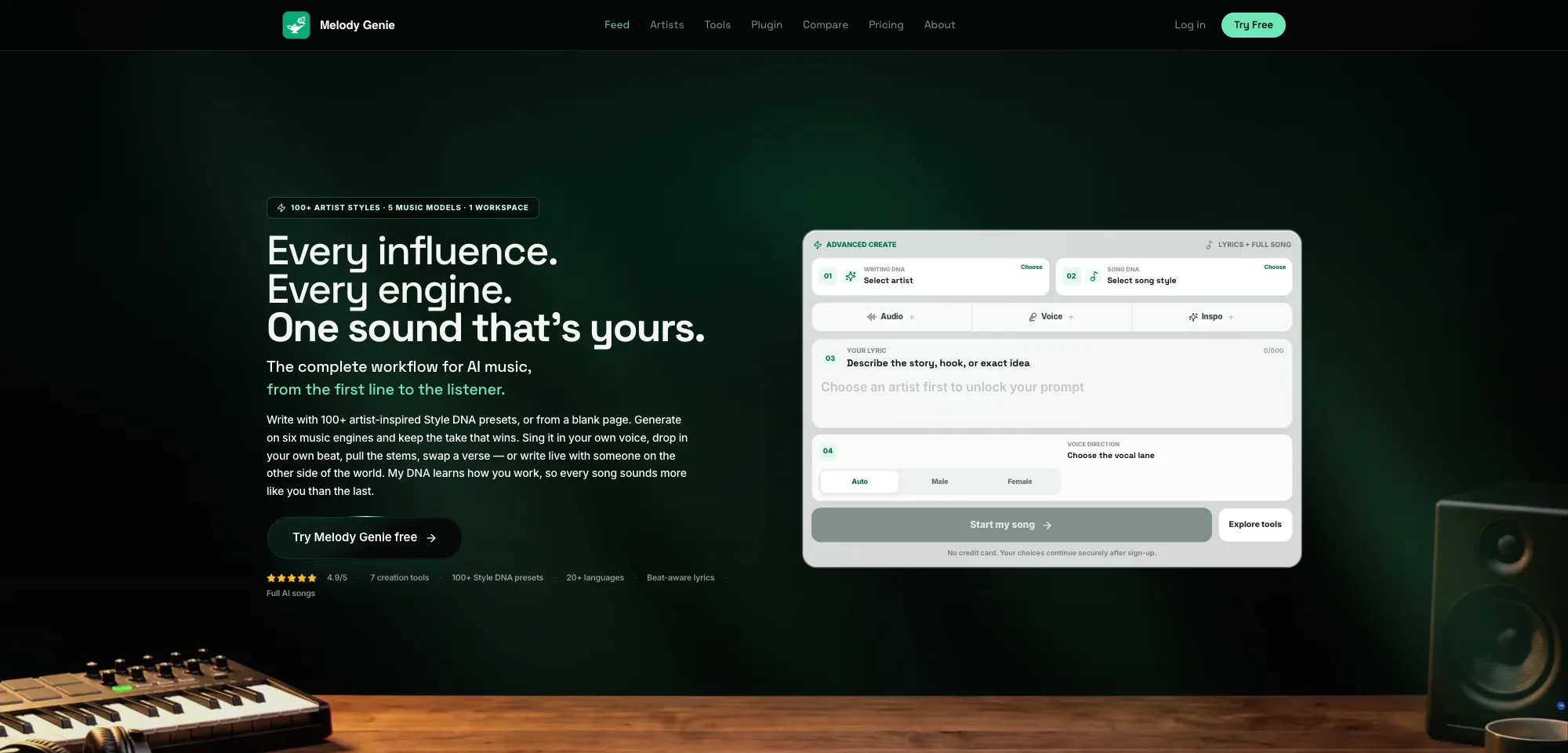
The workflow is built around Style DNA, with more than 100 artist-inspired profiles and 20+ songwriting languages. A Writing Style DNA guides vocabulary, rhyme patterns, flow, and hooks, while a Music Style DNA guides vocal and production direction. Creators can use one profile for both stages, write with one and generate with another, or blend two or three profiles in the DNA Mixer.
Song generation runs on multiple selectable music models behind one Generate button, with the official pages naming engines from Suno, Google Lyria, MiniMax, and ACE-Step. A finished track can be extended, restyled, or rewritten one section at a time, produced with an authorized personal voice or an uploaded beat, and split into vocal and instrumental stems. Virality Lab reviews hook, memorability, and short-form clip potential, and Melody Genie states that it does not predict commercial success.
The Melody Genie pricing section, checked in September 2026, lists a Free plan with 14 credits per month (up to 3 full AI songs, no card required), a $7.99-per-month Starter plan with 160 credits, a $16.99-per-month Pro plan with 400 credits, and a $39.99-per-month Elite plan with 1,000 credits. A full AI song costs 4 credits.
Artist-inspired profiles guide style only: Melody Genie says they do not represent or reproduce the named artist, voice cloning is limited to the user’s own authorized voice, and outputs are drafts to check for accidental similarity before release. The service is available on the web, iOS, and Android.
Do these 3 things before closing this tab:
1Repair Windows errors before they cause bigger problems2Fix the driver behind crashes, sound loss and screen glitches3Clear out junk files and repair common Windows errorsChoose Melody Genie if: you want artist-inspired lyric control, a separately chosen musical style, a choice of music models, and section-level editing in one workflow.
Think twice if: you only need a quick single-prompt track, or you need commercial-use terms confirmed for your plan before generating.
2. Is Suno the best AI music generator for complete songs?
Suno is the best default choice for most people who want a complete AI song quickly, especially a song with vocals, lyrics, a recognizable structure, and the ability to generate variations.
Suno is designed around the full-song workflow. Users can start with a prompt, supply lyrics, or develop an idea through repeated generations. The product is particularly relevant to songwriters creating demos, beginners experimenting with genres, and creators who want a finished-style track without building an arrangement manually.
What’s actually slowing this PC down?
Pick the symptom - the matching free tool is one click away.
The current Suno pricing page lists a $0 Free plan, an $8-per-month Pro plan, and a $24-per-month Premier plan. The Free plan shows 50 credits renewing daily and does not provide commercial use. Pro and Premier provide commercial-use rights for new songs made while those paid plans apply. Suno also lists newer models, uploads of up to 30 minutes, stem separation, and additional editing capabilities for paid subscribers.
Suno’s rights distinction matters. According to Suno’s support guidance on retroactive commercial rights, upgrading later does not automatically turn a song created on the Free plan into a commercially licensed song. Included subscription credits do not roll over, while purchased top-up credits do not expire but require an active subscription to use.
Choose Suno if: you want a fast full-song workflow, vocal ideas, songwriting demos, or many variations from a simple prompt.
Think twice if: you need guaranteed copyright ownership, unrestricted standalone distribution, or commercial rights for songs originally created on the free tier.
3. Is Udio better than Suno for song shaping?
Udio is a strong choice for creators who want to iterate on a full song and pay close attention to prompting, arrangement, vocals, and section development.
Udio belongs in the same full-song category as Suno, but the practical reason to test it is its emphasis on detailed song shaping rather than merely producing a quick first draft. It is suitable for writers who want to explore alternate sections, refine an arrangement, and develop a track over several generations.
Users should confirm current details on the official Udio pricing page before subscribing. Third-party 2026 coverage commonly places the entry paid tier around $8–$10 per month, but that figure may reflect a promotion, annualized billing, regional pricing, or an older plan. The available research does not establish a sufficiently reliable current first-party price or rights summary.
Udio is also not a shortcut around artist imitation or copyright concerns. Treat prompts involving a living artist, recognizable voice, or named song as legally and contractually sensitive, and read the current terms before releasing output.
Rank #2

- Full Creative Control - A dynamic 37-Key MPK Mini keybed for 3 full octaves of melodic and harmonic performance; Easily connect to your DAW or studio equipment with the USB-powered MIDI Controller
- Advanced Connectivity - Connect to different sound sources with CV/Gate and MIDI I/O; Control modular gear, sound modules, synthesizers, and more to bring new sound sources into your music production
- Native Kontrol Standard (NKS) Integration - Akai Professional and Native Instruments have partnered to bring NKS support to the MPK Controller series, get ready to Kontrol straight from your MPK
- Choose Your Exclusive Complimentary NKS Bundle - Browse and control Native Instruments presets and sound libraries; select one of three curated Komplete 15 Select bundles: Beats, Band, or Electronic
- Record and Compose Without a Computer - Connect to your production station and use the built-in 64-step sequencer featuring one track for drums and one for melodies or chords, with up to 8 notes each
Choose Udio if: iterative song development and detailed control matter more than the simplest one-click workflow.
Think twice if: you want a rights policy that can be summarized confidently without checking the current plan language.
4. Why is Eleven Music a major commercial and API contender?
Eleven Music is a leading candidate for brands, agencies, developers, and multilingual creators who need full tracks, section-level composition, stems, timestamps, editing, and an API workflow.
ElevenLabs announced Music v2 on May 26, 2026, and updated the announcement on July 28, 2026. According to the company’s Music v2 announcement, the system supports complete tracks, composition section by section, improved vocals and instrumentation, multilingual music, stems, timestamps, and editing.
ElevenLabs says Music v2 was trained only on licensed data and cleared for commercial use. That is an important stated company position, not an independent guarantee that every legal question is resolved in every country. Enterprise customers should rely on the agreement applicable to their account; the company says enterprise plans include broader rights for film, television, and games.
The Eleven Music API documentation says self-serve plans provide monthly generation limits ranging from 11 to 4,800 minutes, with exact prices handled through the current pricing page. API consumption should not be compared directly with a consumer subscription because the buyer may be paying for generation capacity, integration, commercial terms, and support.
Eleven Music also has prompt restrictions that matter to songwriters. The API information identifies artist names, song titles, and lyrics among prohibited inputs. Do not assume that every full-song generator permits a user to request a named artist’s style or upload arbitrary copyrighted material.
Choose Eleven Music if: commercial posture, multilingual output, section-level editing, stems, or API access is central to the project.
Think twice if: you want a casual, inexpensive tool with no input restrictions and no need to examine an API or enterprise agreement.
5. Is SOUNDRAW the best AI music generator for YouTube and client videos?
SOUNDRAW is one of the strongest fits for instrumental background music in YouTube videos, podcasts, livestreams, tutorials, product videos, client work, and games.
SOUNDRAW focuses on music that supports a larger piece of content rather than a vocal song intended to be the main product. Its workflow emphasizes genre, mood, energy, and customizable instrumental tracks or beats, making it useful to video editors and agencies that need a suitable bed at a particular point in an edit.
The SOUNDRAW license says its plans support personal and commercial use in projects including YouTube, user-generated content, product videos, tutorials, live streams, video games, client work, hold music, radio, and television. SOUNDRAW also says its music is trained using material from its in-house music team and catalog.
The license distinguishes creator use from artist release. The Creator plan is intended for background music where the music supports the content. Artist plans allow distribution to services such as Spotify only when the downloaded beat is modified, for example by adding vocals or a separately played instrumental part. Unmodified tracks cannot simply be distributed as standalone music under the stated artist terms, and Content ID and some stock-audio resale uses are restricted.
Choose SOUNDRAW if: you need fast instrumental music for a video, stream, podcast, game, or client deliverable.
Think twice if: your business model is to upload unmodified generated tracks as standalone releases, register them with Content ID, or resell them as stock music.
6. How does Beatoven.ai help score videos and scenes?
Beatoven.ai is best suited to mood- and scene-based instrumental scoring where the music must support a video, podcast, or specific emotional moment.
Free tools Windows power users keep installed
One-click scans. No signup required.
Beatoven belongs in the background-music group rather than the full vocal-song group. Its practical appeal is the connection between mood, scene, energy, and duration. A creator editing a documentary segment, podcast intro, explainer, or short video can evaluate Beatoven as a soundtrack tool rather than expecting it to function like a pop songwriter.
Review the current Beatoven pricing page and license before a commercial project. Third-party coverage has listed entry pricing around $10 per month, but the available research does not verify a current first-party 2026 price or every client-use condition.
Rank #3

- Music Production and Beat Maker Essential -USB powered MIDI controller with 25 mini MIDI keyboard velocity-sensitive keys for studio production, virtual synthesizer control and beat production
- Total Control of your Production - Innovative 4-way thumbstick for dynamic pitch and modulation control, plus a built-in arpeggiator with adjustable resolution, range and modes
- Native Kontrol Standard (NKS) Integration - Akai Professional and Native Instruments have partnered to bring NKS support to the MPK Controller series, get ready to Kontrol straight from your MPK
- Choose Your Exclusive Complimentary NKS Bundle - Browse and control Native Instruments presets and sound libraries; select one of three curated Komplete 15 Select bundles: Beats, Band, or Electronic
- The MPC Experience - 8 backlit velocity-sensitive MPC-style MIDI beat pads with Note Repeat and Full Level for programming drums, triggering samples and controlling virtual synthesizer / DAW controls
Confirm whether the intended use covers client work, advertising, podcasts, games, social platforms, and continued use after cancellation. A creator license can be broad for published content while still limiting standalone resale or distribution to music services.
Choose Beatoven.ai if: you want an instrumental score matched to a scene, mood, or timing requirement.
Windows Errors? Fix Them Before They Spread
Repair common Windows errors and clear accumulated junk for a smoother, more stable PC - no reinstall needed.Free scan · no reinstallCrashes, No Sound, or Screen Glitches?
Random freezes, missing sound and display glitches usually trace back to one bad driver. Find and replace yours safely.Free scan · under a minuteThink twice if: you need vocals, detailed lyric control, or a Spotify-first artist workflow.
7. Is AIVA still useful for cinematic and orchestral music?
AIVA remains especially relevant for cinematic, orchestral, ambient, and composer-oriented work, including film concepts, games, and dramatic scoring.
AIVA is composition-oriented rather than optimized for instant vocal pop songs. That makes it a better candidate for users who care about orchestral texture, cinematic development, ambient atmosphere, and a score-like arrangement.
Check the current AIVA pricing and licensing page before choosing a plan. AIVA’s monetization rules and the extent of copyright ownership vary substantially by plan, so a free or entry-level subscription should not be described as equivalent to full copyright ownership. Commercial permission, ownership, streaming distribution, and client rights must be checked separately.
Choose AIVA if: your project needs cinematic, orchestral, ambient, or composition-led music.
Think twice if: your priority is natural-sounding vocals, rapid social-media songs, or a lyric-first workflow.
8. When should producers use Stable Audio?
Stable Audio is more useful for producers, sound designers, experimental musicians, and developers who need controllable audio, loops, effects, or API-oriented generation than for beginners seeking a polished vocal song.
Stable Audio should not be judged as a direct Suno replacement. Its relevant use cases include sound-design experiments, loops, effects, samples, and technical audio workflows. A producer may value a short usable texture more than a complete verse-chorus song, while a developer may care about integration options and generation controls.
Consult the current Stable Audio product page and licensing terms for current plans, exports, and commercial conditions. The available research does not provide a reliable 2026 price, detailed plan matrix, or sufficiently precise rights summary, so this article does not hard-code one.
Choose Stable Audio if: you need loops, effects, sound design, or a technical production workflow.
Think twice if: you want the easiest route from a sentence to a complete vocal track.
9. Is Mubert better for apps than for standalone music releases?
Mubert is a strong candidate for app audio, streams, agencies, and scalable background-music workflows, but its cited Render license is a poor fit for standalone streaming releases or Content ID registration.
Do these 3 things before closing this tab:
1Fix the driver behind crashes, sound loss and screen glitches2Clear out junk files and repair common Windows errors3Scan for outdated or missing drivers - takes under a minuteMubert offers generated tracks, mixes, adaptive audio, and API workflows. The product is particularly relevant when music must be supplied repeatedly inside an app, stream, video service, or agency pipeline rather than released as an artist’s individual song.
The current Mubert Render license page lists Free at $0 with 25 tracks per month, limited duration, MP3 quality, five downloads per month, and non-commercial use. Creator is listed at $14 per month with 500 tracks, up to 25-minute duration, lossless quality, and unlimited downloads, although the cited page labels that plan non-commercial. Pro is listed at $39 per month with 500 tracks, up to 25-minute duration, lossless quality, unlimited downloads, and commercial use. Business is listed at $199 per month with 1,000 tracks and commercial app and agency use.
The same cited license prohibits Content ID registration and distribution through music-streaming services or music-stock platforms. Those restrictions make Mubert unsuitable for an artist who wants to upload a generated track to Spotify or claim it through Content ID.
Mubert’s separate API documentation lists API plans of $49 per month for Trial, $199 per month for Startup, and $499 per month for Startup+. The API overview also lists Enterprise at $36,000 per year. API features include text-to-music, image-to-music, monetized content, sublicensing, and distribution subject to the agreement.
Free tools Windows power users keep installed
One-click scans. No signup required.
Rank #4

- Compact yet powerful standalone mini keyboard with built-in speaker and USB MIDI Controller capabilities for beat makers, songwriters and musicians
- 25-Key Gen 2 MPK Mini dynamic keybed, OLED Display, 8 Velocity sensitive backlit MPC drum pads, arpeggiator and note repeat, plus 4 encoder knobs deliver a professional, versatile performance
- Native Kontrol Standard (NKS) Integration - Akai Professional and Native Instruments have partnered to bring NKS support to the MPK Controller series, get ready to Kontrol straight from your MPK
- Choose Your Exclusive Complimentary NKS Bundle - Browse and control Native Instruments presets and sound libraries; select one of three curated Komplete 15 Select bundles: Beats, Band, or Electronic
- Over 100 internal drum and instrument sounds including acoustic and electric pianos, synth leads, pads and more
Choose Mubert if: you need high-volume background audio, adaptive music, or app and streaming integration.
Think twice if: you need Content ID, standalone music-service distribution, or a conventional artist-release path.
10. Is Loudly a good choice for agencies and developers?
Loudly is most compelling for creators, agencies, and software companies that need AI tracks, catalog access, variations, sublicensing, or an API rather than a single personal song-generation subscription.
Loudly’s developer offering emphasizes text-to-music, a music generator, a music catalog, sublicensing, and corporate licensing. That makes the platform more relevant to a high-volume publishing operation or an app that needs to supply music repeatedly.
The Tool Desk
Outbyte Driver Updater FREEScan for outdated or missing drivers - takes under a minuteDriver Scan →Outbyte PC Repair FREEClear out junk files and repair common Windows errorsFree Scan →The Loudly developer pricing page lists pay-as-you-go API access at $150 for 1,000 track generations, or $0.15 per generation. Its subscription API option lists $125 per month for 1,000 generations, or $0.125 per generation. These are API prices, not consumer subscription prices, and the commercial terms may differ between API and individual plans.
Loudly should therefore be evaluated on integration, catalog licensing, volume, and business terms rather than on a simple monthly price comparison with Suno or Udio.
Choose Loudly if: an agency, creator platform, or SaaS product needs scalable music generation or catalog licensing.
Think twice if: you only need a handful of personal song ideas and do not need API access.
Quick wins for a faster PC:
Fix the driver behind crashes, sound loss and screen glitchesFind Drivers →Clear out junk files and repair common Windows errorsFree Scan →11. What does Soundful offer creators who prefer templates?
Soundful is a useful choice for creators and producers who prefer template-based instrumental generation, downloadable tracks, stems, and a clearly separated creator-license and copyright-purchase model.
The Soundful pricing and licensing page lists a Free plan with unlimited generation, more than 25 free styles, and one MP3 download per month under a personal license. Premium plans offer either 100 or 300 track downloads depending on the plan, along with unlimited template use and monetization.
Soundful’s Content Creator plan provides a non-exclusive, perpetual license for downloaded music used in content. Soundful says its Music Creator Plus plan provides an exclusive license while active, while full copyright for activities such as selling, sublicensing, commercial streaming, television, and advertising may be purchased separately.
That distinction is valuable because a creator can use music in content without necessarily receiving the rights needed to sell the raw track, sublicense it, or distribute it as a standalone commercial release.
What’s actually slowing this PC down?
Pick the symptom - the matching free tool is one click away.
Choose Soundful if: templates, instrumental tracks, creator downloads, and stems fit your production routine.
Think twice if: you assume a creator license automatically transfers full copyright.
Independent reader supportYour contribution helps us test, update, and keep practical guides available for everyone.Also consider: Is Boomy the simplest AI music generator for beginners?
Boomy is the simplest choice in this group for beginners who want to create basic songs quickly and explore a lightweight publishing workflow.
Boomy’s strength is accessibility rather than detailed arrangement, multitrack editing, stem manipulation, or fine-grained vocal control. That makes it appropriate for casual experimentation and first-time music publishers who value speed over production depth.
Use the current Boomy site to confirm available plans, publishing terms, and rights before release. Third-party 2026 coverage has cited paid pricing around $10 per month, but the available research does not establish a reliable current first-party price. Boomy should not be ranked alongside the most controllable full-song systems without that caveat.
Choose Boomy if: you want a low-friction first experience with generated songs.
Best Value

- The Creative Controller: Launchkey is an all-in-one DAW controller with premium keybeds and 16 responsive FSR pads for drumming, clip launching, and more
- Seamless DAW Integration: Launchkey works with all major DAWs, offering intuitive workflows for Ableton Live, Logic, Cubase, Reason, Reaper, FL Studio, and Ardour
- Go Beyond Finger Drumming: Launchkey’s FSR drum pads with polyphonic aftertouch also serve as step sequencers, clip launchers, chord triggers, and more
- Everything in the box: Ableton Live Lite, Cubase LE, Novation Play, sounds from GForce, Klevgrand, Orchestral Tools, Native Instruments, and free Melodics lessons
- Powerful Creative Tools: Never hit a wrong note with Scale Mode, trigger lush chords from a single key or drum pad, and create and mutate wild arpeggios
Think twice if: you need detailed arrangement control, professional stem editing, or a carefully documented commercial-release license.
Which AI music generator is best for each use case?
The best AI music generator depends on the output and rights you need, not only on how impressive a first preview sounds.
PC Slower Than It Used to Be?
A free scan shows the junk files, broken settings and background clutter dragging Windows down - then fixes them in one click.Free scan · Windows 10 & 11Outdated Drivers Are Slowing You Down
One free scan finds every outdated or missing driver and matches the right update for your exact hardware.Free scan · exact hardware match| Use case | Best starting choices | Why | Check before publishing |
|---|---|---|---|
| Complete vocal song | Suno, Udio, Eleven Music | They are designed for lyrics, vocals, sections, and full arrangements | Commercial rights, artist-name restrictions, distribution terms |
| Songwriting demo | Suno or Udio | Fast ideation and repeated full-song variations | Whether the plan covers songs created during the relevant subscription |
| YouTube background music | SOUNDRAW, Beatoven.ai, Soundful, or Mubert Pro | Instrumental tracks are designed to support larger content | Monetization, client work, post-cancellation use, Content ID |
| Podcast or short-form video score | Beatoven.ai, SOUNDRAW, Mubert | Mood, duration, and background-use workflows | License coverage for the platform and project owner |
| Cinematic or orchestral score | AIVA | Composition-oriented orchestral and ambient output | Plan-specific ownership and monetization |
| Game or app audio | Eleven Music API, Mubert API, or Loudly API | API access, scale, adaptive audio, or sublicensing possibilities | Enterprise agreement, redistribution, sublicensing, usage volume |
| Sound effects and loops | Stable Audio | More relevant to technical audio and sound-design workflows | Current export and commercial-use terms |
| Simple beginner workflow | Boomy | Low learning curve and lightweight creation | Current publishing and monetization rules |
| Standalone streaming release | Evaluate Suno, Udio, AIVA, or SOUNDRAW carefully | Artist release requires more than permission to use music in a video | Spotify/Apple Music eligibility, modification rules, ownership, Content ID |
What should you check before using AI-generated music commercially?
Check the exact plan and license for the specific output before publishing. “Commercial use permitted” is only one field in a rights review; it does not necessarily mean you own the copyright or may use the track in every commercial channel.
| Rights question | Why it matters |
|---|---|
| Is commercial use allowed? | A free plan may allow experimentation but prohibit monetized videos, client work, or advertising. |
| Is the license perpetual? | You may be able to keep an already published video online after cancellation, but the terms may restrict new downloads or new uses. |
| Do you own copyright? | A contractual license can permit use without transferring copyright or guaranteeing copyright protection. |
| Can you distribute the raw track? | Music for a video is different from uploading an unmodified track to Spotify or a stock-audio marketplace. |
| Is Content ID allowed? | Some licenses permit YouTube monetization but prohibit automated ownership claims. |
| Can you sublicense? | Client, agency, game, and app projects may require explicit sublicensing or enterprise rights. |
| Does the license cover client work? | Personal creator permission may not cover work delivered to a paying client. |
| What happens after cancellation? | Confirm whether published projects retain coverage and whether the account can access old files. |
Examples show why the details matter. Suno’s free-plan songs are not automatically covered for commercial use after a later upgrade. SOUNDRAW permits broad commercial use in projects but places additional conditions on artist and DSP distribution. Mubert’s cited Render license prohibits Content ID and music-streaming distribution. Soundful separates a perpetual creator license from purchasing full copyright for activities such as resale, sublicensing, commercial streaming, television, and advertising.
What are the copyright and legal risks of AI music?
AI-generated music creates several separate legal questions, and a platform’s commercial license cannot answer all of them.
Copyrightability
Copyright treatment varies by country and by the amount of human creative contribution. A platform may grant contractual permission to use an output without guaranteeing that the output itself receives copyright protection. Original lyrics, a human performance, substantial arrangement, editing, and creative selection can matter, but readers should obtain jurisdiction-specific legal advice for an important release.
Training-data provenance
“Royalty-free” usually describes the license granted to the user; it does not, by itself, prove how a model was trained. ElevenLabs says Music v2 was trained only on licensed data and cleared for commercial use. That claim should be attributed to ElevenLabs rather than treated as an independent finding about every possible output.
Voice, likeness, and style imitation
A prompt requesting a living artist, recognizable singer, or distinctive voice can create publicity, trademark, unfair-competition, or contractual concerns. Some platforms also prohibit those prompts. Eleven Music’s API information identifies artist names, song titles, and lyrics among prohibited inputs.
Similarity and accidental infringement
A commercially licensed output can still sound too similar to a known recording or contain an unwanted phrase, melody, pronunciation, or vocal artifact. Listen to the complete file, not only the preview, and avoid uploading copyrighted reference audio unless the service and rights holder permit that use.
What does “royalty-free” mean for AI music?
“Royalty-free” generally means the user does not pay a recurring royalty for permitted uses after meeting the plan requirement, but the phrase does not necessarily mean free of restrictions or exclusive.
Recommended Free Tools
- A royalty-free license may be non-exclusive.
- The license may allow use only inside a larger video, podcast, game, or stream.
- The license may prohibit selling the music as a standalone asset.
- The license may prohibit Content ID or music-service distribution.
- The license may apply only to downloads made during a paid subscription.
- The license may not transfer copyright ownership.
- Attribution, geographic, client, audience, or platform restrictions may apply.
Before choosing a plan, label the rights you actually need: commercial use, perpetual use, exclusive rights, copyright transfer, distribution, sublicensing, Content ID eligibility, and attribution requirements.
How can you get better results from an AI music generator?
- Describe the result, not just the genre. Include mood, tempo, instrumentation, energy, structure, intended duration, and whether the track is vocal or instrumental.
- Use original lyrics or a section outline. Supply verse, pre-chorus, chorus, bridge, and outro guidance when the tool supports structured input.
- Generate several variations. The first polished preview may have weaker lyrics, repetitive sections, poor pronunciation, or an arrangement that does not fit the edit.
- Develop weak sections separately. Section-level composition, extension, remix, and editing features can be more useful than repeatedly regenerating the entire track.
- Export stems when available. Stems can help with balance and replacement, but stem separation may contain bleed, timing artifacts, or imperfect isolation.
- Finish the production in a DAW. Web generators generally do not replace detailed mixing, automation, vocal comping, tuning, or mastering.
- Check the complete file. Listen for distortion, artifacts, repeated phrases, incorrect names, awkward foreign-language pronunciation, and identity loss after an extension.
- Verify rights before release. Confirm the plan, project type, distribution channel, Content ID policy, client permission, and post-cancellation terms.
- Keep provenance records. Save prompts, original lyrics, uploads, generation date, model or version, subscription receipts, downloaded terms, and evidence of human editing.
Which AI music generator should you choose?
Choose Suno for a complete vocal song now, Udio for more iterative song shaping, and Eleven Music when commercial posture, multilingual generation, section editing, or API access is central. Choose SOUNDRAW or Beatoven.ai for creator background music, AIVA for cinematic composition, Mubert for adaptive app audio, and Boomy for the simplest beginner workflow.
Do not choose a platform solely because its output sounds polished or because its plan says “commercial.” Match the tool to the delivery channel, then read the current license for standalone distribution, client work, Content ID, sublicensing, copyright, and cancellation. Save the evidence that applied when each track was generated.
Frequently Asked Questions
What is the best AI music generator in 2026?
Suno is the best general-purpose starting point for complete AI songs with vocals, lyrics, structure, remixing, stems, and editing. Udio is a strong alternative for iterative song shaping, while Eleven Music is better suited to commercially oriented and API workflows.
Which AI music generator is best for YouTube background music?
SOUNDRAW and Beatoven.ai are strong starting points for instrumental YouTube background music, while Soundful and Mubert Pro can also fit creator workflows. Verify monetization, client-use, Content ID, and post-cancellation terms before publishing.
Can AI-generated music be used commercially?
AI-generated music can be used commercially when the applicable plan and license permit the specific use, but commercial permission does not automatically grant copyright ownership, standalone streaming rights, Content ID eligibility, or sublicensing rights.
Does upgrading Suno give retroactive commercial rights to free songs?
No. Suno’s support guidance says songs created on the Free plan do not automatically receive retroactive commercial rights after a user upgrades. Commercial rights apply to new songs made on eligible paid plans under the stated terms.
What is the best AI music generator for games and apps?
Eleven Music API, Mubert API, and Loudly API are the strongest candidates for games and apps because they address API generation, scale, adaptive audio, catalog access, or sublicensing. The applicable API or enterprise agreement must be checked before distribution.
The Bottom Line
Bottom line: There is no single best AI music generator for every job. Suno leads for fast complete songs, Udio for iterative shaping, Eleven Music for commercially oriented and API work, SOUNDRAW or Beatoven for background music, AIVA for cinematic scoring, and Mubert for adaptive app audio. Treat licensing as a separate decision from audio quality.
Quick Recap
Product prices and availability are accurate as of the date/time indicated and are subject to change. Any price and availability information displayed on Amazon at the time of purchase will apply.

