
The Tool Desk
Outbyte Driver Updater FREEFix the driver behind crashes, sound loss and screen glitchesFind Drivers →Outbyte PC Repair FREERepair Windows errors before they cause bigger problemsFix Now →iTechGuides is reader-supported. When you buy through links on our site, we may earn an affiliate commission. As an Amazon Associate I earn from qualifying purchases. Learn more
The best free animation software in 2026 depends on the animation you want to make: Blender is the strongest all-round and 3D choice, Krita is best for hand-drawn 2D, OpenToonz or Tahoma2D suit production-oriented 2D, and Pencil2D is the easiest starting point. Browser, mobile, and freemium tools can be faster, but often limit exports, assets, resolution, or commercial use.
“Free” does not describe one business model. This guide separates permanently free open-source applications from proprietary free software, restricted free plans, and tools that are merely trials. Prices, versions, operating-system support, and online-plan restrictions can change, so verify volatile details on the linked official pages before downloading or buying.
Key takeaways
- Blender is the best overall free animation software for 3D, hybrid 2D/3D work, rigging, rendering, VFX, and motion graphics.
- Krita is the best free choice for artists who want to draw 2D animation frame by frame, while Pencil2D is usually easier for a first animation exercise.
- OpenToonz and Tahoma2D provide more production-oriented 2D workflows but require more patience than beginner-focused tools.
- Synfig Studio is the strongest specialist choice for free vector and cut-out animation; Natron and Glaxnimate are specialist compositing and motion-graphics companions.
- Free browser and mobile tools such as Canva, Animaker, Renderforest, and FlipaClip may add watermarks, ads, export limits, paid assets, or commercial-use restrictions.
- Software licensing and asset licensing are separate: a commercially usable application does not automatically make downloaded models, fonts, templates, textures, music, or stock media commercially usable.
Which free animation software should you choose?
The right free animation software is determined first by animation type, then by skill level, hardware, export needs, and licensing. Use this quick decision guide:
Outdated Drivers Are Slowing You Down
One free scan finds every outdated or missing driver and matches the right update for your exact hardware.Free scan · exact hardware matchPC Slower Than It Used to Be?
A free scan shows the junk files, broken settings and background clutter dragging Windows down - then fixes them in one click.Free scan · Windows 10 & 11| If you want to… | Start with… | Why |
|---|---|---|
| Make 3D animation | Blender | It combines modeling, rigging, animation, rendering, compositing, VFX, and video editing. |
| Draw every 2D frame | Krita or Pencil2D | Krita offers a richer drawing environment; Pencil2D is simpler and lighter. |
| Use a traditional 2D production workflow | OpenToonz or Tahoma2D | Both are more focused on production-style 2D work than general painting applications. |
| Animate reusable vector characters | Synfig Studio | Vector and bitmap artwork, interpolation, tweening, and reusable assets suit cut-out workflows. |
| Create motion graphics | Glaxnimate, Blender, or DaVinci Resolve Free | The best choice depends on whether the work is vector-based, 3D, or primarily post-production. |
| Composite VFX shots | Natron or Fusion in DaVinci Resolve Free | These are compositing tools rather than drawing-first animation programs. |
| Animate a game | Blender plus Godot | Blender can create assets and animation; Godot handles interactive game projects. |
| Animate on a phone or tablet | FlipaClip or Stop Motion Studio | These are accessible mobile-oriented options, subject to platform-specific limits. |
| Make a quick marketing explainer | Animaker, Canva, or Renderforest | Templates make production faster, but free plans commonly impose restrictions. |
How “free” animation software is classified
Permanent free and open-source applications are not equivalent to free trials or freemium web services. Before choosing a program, check whether the free version permits commercial work, whether output is watermarked, whether an account or cloud storage is required, and whether important codecs, export resolutions, durations, or assets are paid.
Popular on Amazon
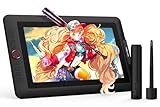
- PLEASE NOTE:XPPen Artist13.3 Pro drawing tablet Need to connect with computer,you need to use it with your computer or laptop, the 3 in 1 cable is included
- Drawing Tablet with Screen: Tilt Function- XPPen Artist 13.3 Pro supports up to 60 degrees of tilt function, so now you don't need to adjust the brush direction in the software again and again. Simply tilt to add shading to your creation and enjoy smoother and more natural transitions between lines and strokes
- Graphics Tablets: High Color Gamut- The 13.3 inch fully-laminated FHD Display pairs a superb color accuracy of 88% NTSC (Adobe RGB≧91%,sRGB≧123%) with a 178-degree viewing angle and delivers rich colors, vivid images, and dazzling details in a wider view. Your creative world is now as powerful as it is colorful
- Drawing Pad: One is enough- The sleek Red Dial on the display is expertly designed with creators in mind, its strategic placement allows for natural drawing postures. With just one wheel, you can effortlessly zoom in and out, adjust brush sizes, and flip the canvas—all tailored to suit the habits of everyday artists. The 8 customizable shortcut keys allow you to personalize your setup, streamlining your workflow and enhancing creative efficiency
- Universal Compatibility & Software Support:supports Windows 7 (or later), Mac OS X 10.10 (or later), Chrome OS 88 (or later), and Linux systems. Fully compatible with major creative software including Photoshop, Illustrator, SAI, and Blender 3D. Register your device to access additional programs like ArtRage 5 and openCanvas for expanded creative possibilities.
| Category | What it normally means | What to check |
|---|---|---|
| Free and open source | The application can generally be used without paying a subscription, and its source code is available under an open-source license. | License obligations, bundled assets, plug-ins, fonts, and downloaded content. |
| Free proprietary software | The developer provides a no-cost application, but the code and terms remain proprietary. | Commercial-use terms, account requirements, platform restrictions, ads, and feature limits. |
| Freemium or limited free plan | The core service is available at no cost, while exports, templates, resolution, storage, or branding removal may require payment. | Watermarks, duration and resolution caps, paid stock assets, and cloud dependence. |
| Free trial | A paid application can be tested temporarily or with restricted functionality. | Trial duration, export restrictions, recurring billing, and whether a permanent free version exists. |
What are the 20 best free animation software options?
1. Blender — best overall and best free 3D animation software
Blender is the broadest genuinely free animation application in this list. Blender is free and open source, and its official documentation lists modeling, rigging, animation, simulation, rendering, compositing, motion tracking, video editing, VFX, and Grease Pencil 2D workflows among its capabilities. See the official Blender site and Blender feature documentation.
Blender is the best starting point for 3D character animation, short films, product visualization, game assets, previs, and hybrid 2D/3D work. Grease Pencil lets users draw and animate inside a 3D environment, but Blender remains a 3D-first application. A beginner who only wants to draw simple frame-by-frame cartoons may find Krita or Pencil2D more approachable.
Blender is cross-platform. The official requirements page lists a Windows minimum of 64-bit Windows 8.1, a four-core CPU with SSE4.2, 8 GB RAM, 2 GB VRAM, and OpenGL 4.3; the recommended Windows configuration is Windows 10/11, an eight-core CPU, 32 GB RAM, and 8 GB VRAM. The same page lists macOS 11.2 with 8 GB RAM and a compatible Metal 2.2 GPU as a minimum, and Linux requires a 64-bit distribution with glibc 2.28 or newer and compatible OpenGL 4.3 graphics. These are Blender requirements, not universal requirements for all animation software. Check the current Blender hardware requirements before installation.
Free tools Windows power users keep installed
One-click scans. No signup required.
Best for: 3D animation, Grease Pencil, VFX, rendering, game assets, and creators willing to accept a steep learning curve. Main limitation: complex scenes can require substantial RAM, GPU power, storage, and render time.
2. Krita — best free hand-drawn 2D animation software
Krita is the best free animation software for digital artists who want a drawing-first, raster frame-by-frame workflow. Krita is free and open source, with painting and illustration tools at its center and animation tools integrated into the application. The project’s official site describes the application, while Krita’s license statement explicitly permits commercial work and use in schools or companies.
Krita is a strong fit for hand-drawn scenes, storyboards, animatics, rough animation, illustrated shorts, and YouTube projects. Krita is not a 3D suite, a full studio production-management system, or the most natural choice for sophisticated reusable character rigs. Large animated files can also become demanding in memory and file management.
The research pass identified Krita 5.3.2.1 as released on June 1, 2026. Because version information is volatile, verify the current stable build on the official Krita download page immediately before publication or installation.
Do these 3 things before closing this tab:
1Fix the driver behind crashes, sound loss and screen glitches2Repair Windows errors before they cause bigger problems3Scan for outdated or missing drivers - takes under a minuteBest for: illustrators, frame-by-frame animators, students, and commercial artists. Main limitation: Krita does not replace a full 3D package or a dedicated studio pipeline.
3. OpenToonz — best advanced traditional 2D option
OpenToonz is a strong free choice for serious traditional 2D animation, scanning, cleanup, coloring, compositing, and production-style workflows. The OpenToonz documentation covers traditional animation and production features, while the official project repository should be used for current downloads, release status, and license information.
OpenToonz is more appropriate than a simple drawing app when a project needs scenes, reusable assets, production organization, and a dedicated 2D pipeline. The trade-off is complexity. The interface and workflow can intimidate a complete beginner, and successful projects require disciplined file organization and troubleshooting.
The documentation result surfaced OpenToonz 1.7.1, but the exact current release should be checked before publication. Avoid treating the surfaced documentation version as a current 2026 release without confirming the project’s live release information.
Quick wins for a faster PC:
Repair Windows errors before they cause bigger problemsFix Now →Fix the driver behind crashes, sound loss and screen glitchesFind Drivers →Best for: ambitious 2D projects and users willing to learn a production-oriented application. Main limitation: the learning curve is substantially steeper than Pencil2D.
4. Tahoma2D — a more streamlined OpenToonz-style choice
Tahoma2D is an OpenToonz-derived option for users who want a focused 2D workflow and may prefer a more streamlined experience. Tahoma2D is relevant to traditional 2D and cut-out animation, but its smaller ecosystem and documentation footprint make it harder to evaluate purely from feature lists.
Also popular on Amazon

- Please note: Kamvas 13 (Gen 3) Pen Display is not a standalone product, this device must be connected to a computer/laptop to work.
- All-new Canvas Glass 2.0: HUION Kamvas 13 (Gen 3) drawing tablet for pc features a fully laminated 13.3-inch screen and brand new anti-sparkle canvas glass 2.0 for reduced glare and improved accuracy. It is perfect for designers, artists, and illustrators to unleash their creativity.
- Advanced PenTech 4.0 Technology: The 16384 levels of pressure sensitivity and 2g IAF ensure a fluid and natural drawing experience, while the 3 customized pen side buttons improve your workflow.
- Improved Color Accuracy: With enhanced color accuracy to Avg. ΔE<1.5, 16.7 million display colors, 99% sRGB coverage, and Rec.709 standard color gamuts, HUION Kamvas 13 (Gen 3) digital art tablet delivers stunning visuals.
- Rigorous Color Calibration: HUION Kamvas 13 (Gen 3) drawing monitor includes a factory calibration report for added assurance of color consistency.
Tahoma2D should not be declared universally better than OpenToonz without controlled hands-on comparison. Verify the current license, supported operating systems, release activity, downloads, and documentation before committing a production project.
Best for: users seeking an OpenToonz-style workflow with a potentially more approachable presentation. Main limitation: fewer tutorials, community resources, and established workflow references than Blender or Krita.
What’s actually slowing this PC down?
Pick the symptom - the matching free tool is one click away.
5. Pencil2D — best beginner hand-drawn tool
Pencil2D is usually the easiest free desktop application for learning basic hand-drawn animation. Pencil2D keeps the interface relatively simple, making it suitable for first exercises, classroom work, roughs, tests, and short hand-drawn pieces. Pencil2D is also a sensible option for a modest computer when the project does not require advanced compositing or rigging.
Pencil2D is not designed for large studio productions, sophisticated character rigs, or extensive compositing. Its export behavior also deserves attention: the official download page, updated March 13, 2026 in the research pass, warns that the default package is an FFmpeg-free build with limited codec support. The same page provides a separate legacy build for older macOS versions.
Best for: beginners, children, educators, rough animation, and low-spec computers. Main limitation: basic rigging, compositing, production management, and codec support.
6. Synfig Studio — best free vector animation tool
Synfig Studio is the strongest specialist choice for free vector and cut-out animation. Synfig supports vector and bitmap artwork, interpolation, tweening, and reusable assets, making it useful for characters and scenes that need scaling, recoloring, or repeated motion. The official Synfig site presents Synfig as a free and open-source 2D animation application.
Vector animation can reduce repetitive drawing because software interpolates changes between keyframes, but interpolation does not automatically produce a convincing hand-drawn look. Synfig’s interface and learning resources can feel dated compared with newer creative software.
Best for: vector characters, cut-out animation, reusable assets, and tweened motion. Main limitation: a less intuitive learning experience and smaller community than Blender or Krita.
7. DaVinci Resolve Free — best free post-production and Fusion companion
DaVinci Resolve Free is best used as a free editing, compositing, and motion-graphics companion rather than as a drawing-first animation application. Resolve is useful after animation is created: users can edit scenes, assemble an animatic, work in Fusion, add effects, and prepare final video. The official DaVinci Resolve page should be checked for current free-versus-Studio feature differences and pricing.
Resolve is a practical choice for YouTubers and filmmakers who need animation plus editing and post-production in one application. Some advanced features remain paid, and Resolve does not replace Krita, Pencil2D, or OpenToonz for drawing-based animation.
8. Natron — best free open-source compositor
Natron is a specialist node-based compositor for visual effects and compositing, not a complete character-animation package. Natron can complement Blender, Krita, OpenToonz, or another animation tool when a project requires layered effects, shot compositing, or a node-based VFX workflow. Natron should be chosen for the post-production stage rather than for drawing every frame.
Verify current maintenance, downloads, and operating-system support before adopting Natron for a long production, because specialist open-source ecosystems can be smaller than Blender’s.
9. Glaxnimate — best for vector motion graphics and Lottie-style work
Glaxnimate is best for vector animation, SVG workflows, and Lottie-style motion graphics. Glaxnimate is a useful companion when scalable artwork, web animation, or vector motion is more important than a traditional cel-animation timeline. Glaxnimate is not a full replacement for Blender, Krita, or OpenToonz.
Also popular on Amazon

- Universal Compatibility: It's compatible with Windows 7/8/10/11, Mac 10.10 or later, Linux. Compatible with Photoshop, Illustrator, SAI, Painter, MediBang, Clip Studio, and more. It's ideal for digital drawing, animation, sketching, photo editing, 3D sculpting, and more (XP-PEN Artist12 drawing tablet must be connected to a computer to work).
- 11.6 HD IPS display: Artist12 drawing tablet is the XP-PEN’s latest smallest 1920x1080 HD display paired with 72% NTSC(100%SRGB) Color Gamut, presenting vivid images, vibrant colors and extreme detail for a stunning display of your artwork. It's pre-installed anti-reflective screen protector already. The slim touch bar can be programmed to zoom in and out, scroll up and down. Its 6 shortcut keys are customizable, XP-PEN driver allows the shortcut keys to be attuned to other different software
- Battery-free stylus with a digital eraser at the end: XP-PEN advanced P06 passive pen was made for a traditional pencil-like feel! Featuring a unique hexagonal design, non-slip & tack-free flexible glue grip, partial transparent pen tip, and an eraser at the end! Delivering technical sense, high efficiency, with a fashionable and comfortable grip, and there are 8 replacement pen nibs included with the multi-function pen holder
- XP-PEN Artist12 drawing tablet with screen is ideal for online education and remote work. Set the Artist12 drawing screen as an extended display when working from home, visually present your handwritten notes on the screen directly. Teachers and students can write and edit complicated functional equations with ease. It's compatible with XSplit, Zoom, Twitch, Microsoft Teams, ezTalks Webinar, Idroo, Scribbiar, wiziQ, and more
- XP-PEN provides a one-year warranty and lifetime technical support for all our drawing pen tablets/displays. Register your XP-PEN Artist12 drawing tablet on xp-pen web to apply for an ArtRage 5, openCanvas, or Explain Everything. Your laptop/desktop needs to have HDMI and USB-A ports available for the connection, or you need an extra converter(such as Thunderbolt to HDMI, depends on what ports that your laptop/desktop has) for the connection
Choose Glaxnimate when the deliverable is primarily vector-based. Choose Krita or Pencil2D when the desired result depends on raster brushwork and hand-drawn frames.
Recommended Free Tools
10. Godot — best for game animation and interactive projects
Godot is best for animating assets inside a 2D or 3D game and building the interactive project around those assets. Godot is a game engine first, not a conventional animation editor. A game developer can create or import animation, connect it to gameplay, and test the result in an interactive environment.
Godot pairs naturally with Blender for 3D modeling and animation, but game-engine animation introduces requirements that do not apply to a rendered film, including runtime performance, animation state management, input, and asset compatibility.
11. Cascadeur Free — best assisted 3D character animation plan
Cascadeur’s free plan is relevant to 3D character posing, assisted animation, physics-informed motion, and cleanup, but Cascadeur must not be treated as unrestricted free software. Cascadeur offers Free, Indie, Pro, and Teams plan categories. The official plans page contains usage, earnings, export, and feature conditions that must be checked before claiming commercial eligibility.
Cascadeur is a specialist companion to Blender or another 3D workflow, not a drawing-first 2D application. Confirm the current free-plan export and commercial-use terms before using Cascadeur in paid client work.
12. Wick Editor — best browser-based 2D experimentation
Wick Editor is suited to beginner 2D animation, interactive content, and quick browser-based experiments when its current hosting and export workflow are available. A browser tool can reduce installation friction and work well for education or short web projects, but browser availability, account requirements, export formats, and performance depend on the current service.
Wick Editor is less suitable for large productions that need extensive local asset management, predictable offline access, or professional interchange. Confirm the current official hosting and export workflow before recommending it for a deliverable.
13. Enve — a lightweight vector-animation alternative
Enve is a free 2D animation, vector-art, and motion-graphics option for users seeking an alternative to larger packages. Enve can be relevant when vector artwork and motion graphics are central, but its smaller community and less mature ecosystem mean that documentation, maintenance, downloads, and supported operating systems should be verified before a major project.
14. Stop Motion Studio — best stop-motion entry point
Stop Motion Studio is best for stop-motion capture using physical objects, figures, clay, paper, or toys. Stop-motion software has a different workflow from digital 2D or 3D animation: the key requirements are camera capture, frame organization, onion-skin guidance, timing, and often audio or narration.
Free availability and feature limits vary by platform. Check whether the version for Windows, macOS, Android, or iOS includes the required capture, export, audio, and resolution features before starting a project.
15. FlipaClip — best mobile beginner animation app
FlipaClip is a convenient freemium option for beginner frame-by-frame animation on phones and tablets. Mobile drawing makes short exercises and social clips accessible, but the free tier may include advertisements, branding, export restrictions, or other limitations. Platform feature parity and commercial-use terms should be checked in the current app listing and license terms.
16. Animaker — best template-driven explainer workflow
Animaker is best for quickly assembling template-based explainer videos rather than for unrestricted hand-drawn or 3D animation. Browser templates can be efficient for presentations, marketing, and simple social content. The free plan may limit resolution, duration, asset access, storage, or watermark removal, so the free export must be tested against the intended publishing destination.
17. Canva — best for simple animated social posts and presentations
Canva is best for simple animated designs, presentations, social posts, and short template-based videos. Canva is not a dedicated 2D or 3D animation application and does not provide the same drawing, rigging, modeling, or production control as Blender, Krita, or OpenToonz. Free and paid templates, stock media, fonts, and export rights can differ, so inspect each asset’s license.
Also popular on Amazon
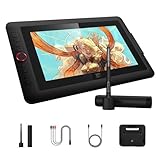
- Word-first 16K Pressure Levels: 1.5x* faster than ever. Initial response rate decreases to 90ms*. Accuracy increases by 20% to bring out every art project precisely what you want. Virtually no lag or broken lines. X3 pro smart chip stylus (PD21C) delivers much more precise and smooth lines than ever before - exceling athyper-nuanced creation and beyond
- Easy Control, One Scroll for All: Easy & efficiency Red Dial Quick Key simplifies the interface for beginners, like aspiring graphic designers and junior illustrators, allowing them to master essential controls such as brush size, navigation and zoom In/Out. This design ensures a natural hand position, reducing wrist strain during prolonged use. Additionally, with 8 customizable keys, users can easily assign frequently used functions, streamlining their workflow and minimizing interruptions
- User-friendly Setup: Understanding that many artists and designers, especially beginners, may not be tech-savvy,the new 13-inch drawing tablet features clear setup instructions for hassle-free installation. With an updated driver and intuitive interface, users can easily configure the drawing screen, and pens with a single installation. Quick access to settings allows adjustments to brightness, contrast, and color temperature (Windows only), enabling even newcomers to start creating right away
- Stunning Color Accuracy: Featuring 125% sRGB, 107% Adobe RGB, 95%display P3 color gamut, this tablet ensures every stroke has exceptional color fidelity. With 16.7 million colors at 8-bit depth, you can enjoy smooth gradients and rich transitions. The 250 cd/m² brightness and 1000:1 contrast ratio provide clearer, more vivid images, allowing artists to see their creations accurately. Ideal for both professionals and hobbyists
- Exceptional Visual Experience: Our 13.3-inch drawing tablet features a full-laminated screen with AG Film, reduces parallax and glare for a paper-like feel. With Full HD resolution and an IPS panel, enjoy vibrant colors and sharp details from a wide 178° viewing angle, ideal for drawing, animation, photography, fashion, architecture design, and much more
18. Renderforest — best template-based promotional animation
Renderforest is best for template-driven promotional videos and animated branding content when speed matters more than frame-level control. Renderforest’s free exports commonly involve branding or resolution restrictions, and the service is not a replacement for a dedicated animation package. Check current export terms, asset licensing, account requirements, and regional pricing before publishing client work.
19. K-3D — an open-source 3D alternative to Blender
K-3D is an option for exploring open-source 3D modeling and animation, but Blender remains the more broadly supported recommendation. K-3D may interest users specifically studying alternative open-source 3D workflows. Its smaller and less active ecosystem can affect documentation, compatibility, troubleshooting, and production confidence, so verify current maintenance and operating-system support before relying on it.
20. Pencil Project and other legacy tools — use only after current verification
Pencil Project and similar legacy animation tools should not be treated as automatic recommendations merely because older download lists describe them as free. Availability, maintenance, security, operating-system compatibility, and export support must be checked on an official project source before installation. Do not use an abandoned or unofficially repackaged application for sensitive files or commercial work.
This final category is included as a warning against outdated “20 best” lists, not as a claim that every legacy tool remains a current best choice. If a maintained free project such as TupiTube or another candidate is considered for publication, its current status must be separately verified first.
Recommended Free Tools
How do 2D, 3D, vector, motion-graphics, and stop-motion tools differ?
Animation software categories overlap, but the underlying workflows are different:
| Animation type | Core workflow | Good starting choices | Important trade-off |
|---|---|---|---|
| Frame-by-frame 2D | Draw or paint each pose and use keyframes, in-betweens, and onion skinning. | Krita, Pencil2D, OpenToonz | Offers expressive control but requires more drawings and time. |
| Vector or cut-out 2D | Build reusable shapes or character parts and animate transformations or interpolated changes. | Synfig Studio, Tahoma2D, Glaxnimate | Assets scale and reuse well, but interpolation may look less hand-drawn. |
| Rigged 2D character animation | Use bones, parenting, constraints, meshes, or reusable puppets. | Synfig Studio, OpenToonz, Tahoma2D | Faster repeated motion, but setup and deformation require learning. |
| 3D animation | Model or import objects, create rigs, animate in 3D space, light, render, and composite. | Blender, Cascadeur, K-3D | More camera and lighting freedom, but higher hardware and technical demands. |
| Motion graphics | Animate text, shapes, logos, transitions, and effects. | Glaxnimate, Blender, DaVinci Resolve Free | Dedicated tools differ greatly in vector export, compositing, and editing depth. |
| Stop motion | Capture physical objects one frame at a time and assemble the sequence. | Stop Motion Studio | Requires a camera setup, stable lighting, and physical production time. |
| VFX and compositing | Combine rendered layers or filmed plates and apply effects in a node or layer workflow. | Natron, DaVinci Resolve Fusion, Blender | These tools enhance shots but do not replace a drawing or modeling application. |
| Game animation | Animate assets and connect them to runtime states, input, physics, and gameplay. | Blender plus Godot | Real-time performance and engine compatibility matter more than final-render quality alone. |
What should you check before downloading free animation software?
- Confirm the license. Check whether the program is open source, proprietary freeware, freemium, or a trial. For commercial work, read the current software license rather than relying on a listicle.
- Check the output. Look for MP4/H.264, WebM, GIF, PNG or JPEG sequences, SVG, Lottie JSON, EXR, and 3D interchange formats such as FBX, OBJ, glTF, Alembic, or USD when those formats matter to your workflow.
- Check audio support. Audio import, timeline scrubbing, synchronization, lip-sync support, and audio-inclusive export are separate capabilities.
- Check rigs and tweening. Determine whether the software supports keyframes, in-betweens, bones, mesh deformation, parenting, constraints, onion skinning, and reusable characters.
- Check hardware and platform support. A Windows build may not match a Linux build, and a mobile app may not offer desktop features. Browser tools also require a reliable browser and internet connection.
- Check asset rights separately. Templates, stock media, fonts, models, textures, plug-ins, music, and downloaded artwork can have licenses different from the application.
- Download safely. Use the official project website, Microsoft Store, Steam, Apple App Store, Google Play, or a verified Linux package repository. Avoid cracked installers, unofficial repacks, and third-party “free download” sites.
Which free animation software works best on a low-end computer?
Pencil2D is generally the safest first choice for simple animation on modest hardware, followed by Krita for manageable 2D projects. Synfig Studio and OpenToonz or Tahoma2D can also work for 2D, although scene complexity, effects, and compositing can increase resource use. Browser tools work only when the browser and connection are reliable.
Blender’s requirements are substantially more demanding for complex 3D work. Even when Blender installs successfully, users may encounter slow viewport playback, out-of-memory errors, long renders, GPU-driver failures, unsupported render backends, incompatible add-ons, or laptop thermal throttling. Low-resolution previews, proxy assets, simplified lighting, and image-sequence rendering can reduce those problems.
Blender’s official requirements page recommends a 1920×1080 display and a three-button mouse for many workflows. Hardware requirements are specific to Blender and should not be presented as universal animation-software requirements.
The Tool Desk
Outbyte PC Repair FREEClear out junk files and repair common Windows errorsFree Scan →Outbyte Driver Updater FREEFix the driver behind crashes, sound loss and screen glitchesFind Drivers →Which free animation programs support commercial work?
Blender, Krita, OpenToonz, Tahoma2D, Pencil2D, Synfig Studio, Natron, and Glaxnimate are strong candidates for commercial workflows, subject to each project’s current license. Krita is the clearest documented example in the supplied research because Krita’s official license page expressly states that commercial work is permitted.
Commercial permission applies to the software, not automatically to every component used with the software. A project can use a commercially permitted application while still violating the license of a downloaded model, stock clip, font, texture, template, plug-in, sound effect, or music track. Keep records of third-party licenses and confirm client or distribution requirements separately.
Cascadeur requires special caution: the current official plan terms must be read for free-plan commercial use, earnings conditions, export restrictions, and asset limitations. Canva, Animaker, Renderforest, FlipaClip, and other freemium tools also require plan-specific checks before paid use.
Independent reader supportYour contribution helps us test, update, and keep practical guides available for everyone.What export formats matter for animation?
The best export format depends on the destination, and “exports video” is not enough information to choose a tool. YouTube may need a conventional video file; a game engine may need a 3D scene, sprite sheet, or animation asset; web motion graphics may need SVG or Lottie JSON; and a compositor may need numbered image sequences or EXR files.
| Destination or workflow | Formats to investigate | Potential issue |
|---|---|---|
| General online video | MP4/H.264, WebM | Codec availability, bitrate, frame rate, audio, and watermark restrictions vary. |
| GIF or short web loop | GIF, WebM, MP4 | GIF has limited color and may produce large files. |
| Compositing and professional finishing | PNG sequences, OpenEXR sequences | Alpha handling, color management, storage, and premultiplication require care. |
| Vector and web animation | SVG, Lottie JSON | Not every vector effect or expression is supported by every target runtime. |
| 3D pipeline | FBX, OBJ, glTF, Alembic, USD | Rigging, materials, animation curves, cameras, and modifiers may not transfer identically. |
For important work, render a PNG or EXR image sequence instead of writing directly to one fragile video file. A sequence makes it easier to resume after a failure, replace one damaged frame, and encode the final video in a dedicated editor or compositor. Confirm that the chosen application includes the required FFmpeg or codec support; Pencil2D’s official download warning is a concrete example of why codec assumptions can fail.
Also popular on Amazon
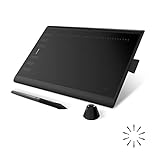
- Working Area Configuration - HUION art tablet equips with a 10 x 6.25 inches working area, providing the user with the most comfortable size to work; the 10mm slim structure and minimalist design of appearance make the drawing tablet more attractive.
- Tilt Function Battery-free Stylus: This computer graphics tablet come with a battery-free stylus PW100, no need to charge, allowing for constant uninterrupted drawing. ±60° tilt support enables imitation of lines input with diverse drawing gestures, with accuracy ensured.
- Press Keys:12 programmable press keys plus 16 programmable soft keys, you can set shortcut keys on drawing tablet's driver based on your preferences, such as erase, zoom in/out, scroll up and down, and so on.
- Compatibility: HUION graphics tablet supports Windows 7 or later/ macOS 10.12 or later/ Android 6.0 or later/ Linux (Ubuntu). A USB adapter is required to connect to a Mac computer. H1060P supports various mainstream design and drawing software, including PS, SAI, AI, CDR, etc. (Please note: The H1060P is compatible with Ubuntu, but it requires the use of the Xorg display server. Wayland is not supported.)
- NOTE: You can easily connect your phone to the art tablet via the OTG connector; while iPhone and iPad are NOT at the moment. The cursor will not show up in the SAMSUNG Galaxy S series at present. If you are not sure whether the product is compatible with your Phone or any help, please contact us.
How should beginners choose between Krita, Pencil2D, OpenToonz, and Blender?
Choose Pencil2D for the gentlest introduction, Krita for stronger drawing tools, OpenToonz or Tahoma2D for a dedicated production workflow, and Blender for a long-term 3D or hybrid skill path. “Easy” is an editorial judgment rather than a controlled benchmark, and personal experience with drawing, timelines, 3D software, or game engines changes the learning curve.
| Tool | Usually suits… | Why beginners may choose it | Why beginners may leave it |
|---|---|---|---|
| Pencil2D | Children, students, educators, and first-time animators | Simple interface and basic hand-drawn workflow. | Limited rigs, effects, compositing, and production tools. |
| Krita | Digital artists and illustrators | Drawing-first environment with capable raster tools. | Animation files and longer projects can become demanding. |
| OpenToonz/Tahoma2D | Users planning traditional or cut-out 2D projects | More dedicated production features. | Complex interfaces and smaller learning ecosystems. |
| Blender | Users planning 3D, VFX, games, or hybrid 2D/3D | Broad long-term capability and a large community. | 3D-first concepts, interface complexity, and hardware demands. |
What are the main failure modes in free animation software?
Export fails or the video has no audio
Missing FFmpeg support, unsupported codecs, incorrect frame rates, alpha-channel incompatibility, premultiplied-alpha problems, color-management differences, and audio sample-rate mismatches can all cause export problems. Test a short section before rendering an entire project.
The project plays slowly
Slow playback can result from large textures, high-resolution layers, complex 3D scenes, effects, insufficient RAM, or GPU-driver problems. Use low-resolution previews, proxy assets, simplified lighting, and lower-quality previews while animating.
Outdated Drivers Are Slowing You Down
One free scan finds every outdated or missing driver and matches the right update for your exact hardware.Free scan · exact hardware matchWindows Errors? Fix Them Before They Spread
Repair common Windows errors and clear accumulated junk for a smoother, more stable PC - no reinstall needed.Free scan · no reinstallAssets disappear after moving the project
External files, fonts, plug-ins, add-ons, and linked textures can break when a project is copied to another computer. Keep a managed project folder, use relative paths where supported, pack or collect assets before sharing, save incremental versions, and document dependencies.
A newer version breaks the file
Save backups before opening production files in a newer application version. Record the software version, plug-ins, fonts, add-ons, and external dependencies used to create the project.
A free download is unsafe
Do not use cracked installers, unofficial repacks, or generic third-party download sites. Obtain software from the official project website or an official distribution channel, and verify package signatures or repository provenance when the project provides that information.
What paid tools are realistic upgrades after free software?
Free software is often enough to learn, create independent work, and complete specialist tasks. Paid software may reduce pipeline, training, collaboration, export, or support costs when a project becomes larger.
Do these 3 things before closing this tab:
1Clear out junk files and repair common Windows errors2Scan for outdated or missing drivers - takes under a minute3Repair Windows errors before they cause bigger problems| Upgrade | Who may consider it | Research pricing or status | Important qualification |
|---|---|---|---|
| Toon Boom Harmony | Traditional 2D artists, studios, and teams needing a production-oriented pipeline | The official store showed Essentials at US$30/month or US$252/year during the research pass; Advanced and Premium cost more. | Commercial subscription software, not free; student eligibility and regional pricing apply. |
| Clip Studio Paint EX | Krita users wanting a drawing-centered 2D workflow with dedicated animation features | The official page showed EX perpetual licensing at US$277 and plans from US$2.49/month during the research pass. | Prices vary by region and platform; it is not a permanently free program and is not a 3D suite. |
| Moho | 2D character animators using reusable rigged or puppet-style workflows | The official purchase page listed Moho 14.4 as the installer shown on November 11, 2025. | Trial or paid license, not a permanent free product. |
| Cascadeur paid plans | 3D character animators needing assisted posing and motion cleanup | Free, Indie, Pro, and Teams categories are listed on the official plans page. | Read current commercial, export, earnings, and asset restrictions. |
| DaVinci Resolve Studio | Video creators who outgrow the free editing, Fusion, or post-production feature set | Current Studio pricing must be checked on the official Blackmagic Design page. | Resolve Free remains a companion rather than a drawing-first animation replacement. |
Hardware can also be the more useful upgrade. Blender and other 3D workflows may benefit from a discrete GPU, additional RAM, a faster SSD, external backups, a drawing tablet or pen display, or a render service. Specific hardware recommendations require current product research and should not be inferred from this software comparison.
How was this free animation software list judged?
The list prioritizes workflow fit instead of raw feature count. The editorial framework is animation capability at 25%, ease of learning at 15%, free-plan generosity and licensing at 15%, export and interoperability at 10%, performance and hardware accessibility at 10%, 2D/3D pipeline depth at 10%, documentation and community support at 10%, and maintenance and release activity at 5%. These are editorial assessments, not laboratory measurements or controlled hands-on benchmark results.
The research was checked August 18, 2026, but version numbers, prices, plan restrictions, supported platforms, and project maintenance remain volatile. Official pages should be rechecked immediately before publication, download, or purchase. The ranking includes dedicated animation applications, specialist companions, game tools, mobile applications, and freemium services because readers use the word “animation” for materially different workflows.
Which free animation software is best for your exact workflow?
- Beginner hand-drawn animator: Start with Pencil2D; move to Krita when drawing tools and project complexity become more important.
- Illustrator making a 2D short: Use Krita for raster frame-by-frame work.
- Traditional 2D production: Try OpenToonz or Tahoma2D, accepting the steeper workflow.
- Vector or cut-out animator: Use Synfig Studio, with Glaxnimate as a vector motion-graphics companion.
- 3D creator: Start with Blender; investigate Cascadeur when assisted character posing or cleanup becomes the bottleneck.
- Filmmaker or YouTuber: Combine Blender, Krita, or OpenToonz with DaVinci Resolve Free for editing and finishing.
- VFX artist: Use Natron or Fusion in DaVinci Resolve for compositing, alongside a separate animation application.
- Game developer: Create assets and animation in Blender, then integrate the interactive project in Godot.
- Mobile animator: Try FlipaClip for frame-by-frame work or Stop Motion Studio for physical capture, subject to platform limits.
- Marketing creator: Use Animaker, Canva, or Renderforest only after checking free-plan watermarks, resolution, assets, and commercial terms.
Frequently Asked Questions
What is the best free animation software overall?
Blender is the best overall free animation software for most broad workflows, especially 3D, rigging, rendering, VFX, and hybrid 2D/3D work. Krita or Pencil2D is a better starting point for simple hand-drawn 2D animation because Blender has a steeper 3D-oriented learning curve.
Is Blender good for 2D animation?
Blender is good for 2D animation through Grease Pencil, particularly when 2D drawings need to coexist with 3D cameras, lighting, models, or effects. Blender is not necessarily the easiest 2D drawing application, so Krita is often a better choice for raster frame-by-frame work.
Is Krita free for commercial use?
Krita is free and open source, and Krita’s official license statement permits commercial work. The license of every separate model, font, texture, template, plug-in, sound, or stock asset used in a Krita project must still be checked.
Is OpenToonz suitable for beginners?
OpenToonz can be used by beginners, but OpenToonz is generally harder to approach than Pencil2D or Krita because its production-oriented workflow and interface are more complex. Tahoma2D is another OpenToonz-derived option, although its ecosystem and documentation should be verified before choosing it.
Can free animation software export MP4?
Some free animation programs can export MP4, but MP4 support depends on the application build, operating system, codec support, resolution, and free-plan restrictions. Pencil2D’s official download page specifically warns that its default FFmpeg-free build has limited codec support, so test a short export before rendering a complete project.
The Bottom Line
Blender is the best overall free animation software, but Blender is not the best answer to every animation question. Choose Krita for drawn 2D, Pencil2D for the easiest first exercises, OpenToonz or Tahoma2D for production-minded 2D, Synfig for vector tweening, and specialist tools such as Natron, Glaxnimate, DaVinci Resolve Free, or Godot for particular pipeline stages. Treat freemium browser and mobile services as restricted tools until their current export and licensing terms are confirmed.

