
Windows Errors? Fix Them Before They Spread
Repair common Windows errors and clear accumulated junk for a smoother, more stable PC - no reinstall needed.Free scan · no reinstallCrashes, No Sound, or Screen Glitches?
Random freezes, missing sound and display glitches usually trace back to one bad driver. Find and replace yours safely.Free scan · under a minuteiTechGuides is reader-supported. When you buy through links on our site, we may earn an affiliate commission. As an Amazon Associate I earn from qualifying purchases. Learn more
The 16 best free and open source remote desktop clients depend on the access model: RustDesk is the broadest remote-support choice, Remmina is the strongest Linux multi-protocol client, Guacamole is a browser gateway, and FreeRDP, TigerVNC, Xpra, and virt-viewer serve protocol-specific workflows. This list separates clients, agents, gateways, and VM viewers.
Free, open source, and self-hosted are not interchangeable labels. Some entries are direct viewers, some require an agent or gateway, and some are complete management platforms or VM-console tools. The recommendations are based on documented scope and architecture rather than unsupported speed, security, or reliability benchmarks.
Key takeaways
- RustDesk is the strongest overall choice for remote support because it combines a full remote-control client with support for Windows, macOS, Linux, iOS, and Android and an open-source self-hosting path.
- Remmina is the best Linux multi-protocol client for reachable RDP, SSH, SPICE, VNC, X2Go, and HTTP/HTTPS endpoints.
- Apache Guacamole provides browser-based RDP, VNC, and SSH access, but it requires a gateway server between the browser and remote systems.
- MeshCentral is a self-hosted administration platform with remote desktop, terminal, file-management, and agent-deployment features rather than a simple one-off viewer.
- DWService has an open-source remote agent, but its hosted browser service is a separate component and its free service has a stated 6 Mbps bandwidth limit.
- FreeRDP, TigerVNC, Xpra, X2Go, TightVNC, virt-viewer, and the other specialist tools are better selected by protocol or workflow than by a universal performance ranking.
What counts as a free and open source remote desktop client?
A remote desktop client is software that lets one device view or control another device, but the software can sit in several different architectures. A native viewer connects directly to a protocol endpoint; an agent waits for remote-support connections; a browser gateway translates web sessions into RDP, VNC, or SSH; a management platform controls a fleet; and a VM console viewer connects to a virtual machine display.
Free tools Windows power users keep installed
One-click scans. No signup required.
Those categories are not interchangeable. Remmina cannot provide remote access by itself unless a reachable protocol endpoint already exists. Apache Guacamole needs a gateway server. DWService needs an agent on the remote machine and uses a hosted browser service. virt-viewer is designed for virtual-machine consoles, not general-purpose unattended support.
#1 Best Overall

- 【KVM Switch 1 Monitors 2 Computers】This HDMI KVM Switch with two HDMI ports allows control of two computers, enabling them to share a single monitor along with keyboard and mouse. It's complete USB switch and HDMI switch rolled into one. This KVM Switch also supports various input devices such as PCs, Laptops, PS4, etc. It is compatible with various operating systems including Windows 7/8/10/11/Vista/XP, Linux, Mac, and more.
- 【Four USB 3.0 Ports (3×USB-A + 1×USB-C)】 This KVM switch features 4 USB 3.0 ports with ultra-fast data transfer speeds up to 5Gbps, including 3 USB-A ports and 1 USB-C port for broader device compatibility. It allows you to seamlessly share peripherals between two computers, reducing cable clutter and improving workspace efficiency. Perfect for connecting and sharing USB devices such as keyboards, mice, scanners, printers, flash drives, headsets, and webcams. The switch automatically detects and recognizes connected devices for stable and reliable performance.
- 【4K Resolution & HDCP 2.2】HDMI KVM Switch supports stunning 4K resolution at 60Hz, ensuring crystal-clear and highly detailed visuals for your monitors. Additionally, it is HDCP 2.2 compliant, allowing you to seamlessly view HDCP-protected content on your monitors without any interruptions. It also supports 4K@30Hz, 2K, 3D, and 1080P, offering flexibility for various display needs. This guarantees both exceptional image quality and a smooth, secure multimedia experience.
- 【Two Ways of Switching】4K HDMI KVM Switch features two switching options: On-KVM Switch Button and Wired Remote Switch. The Wired Remote Switch allows you to place the HDMI KVM switch in hidden or distant location, keeping your desk tidy. Simply place the remote control within easy reach on your desk for quick access. With a press, you can switch between computers seamlessly, enhancing productivity and reducing clutter on your monitors.
- 【Adaptive EDID & Plug and Play】This USB 3.0 HDMI KVM Switch features Adaptive EDID, ensuring stable and smooth image transmission by automatically optimizing display settings on your monitors. Easy to install, this HDMI KVM switch requires no power supply or driver software—just plug it in and connect all cables for seamless operation between two computers and one monitor.
The recommendations below are use-case judgments based on each project’s documented architecture and scope, not hands-on benchmark results. Open source does not automatically mean secure, audited, anonymous, end-to-end encrypted, or easier to deploy. Security depends on the protocol, authentication, server configuration, network design, and trust model.
How do the 16 remote desktop clients compare?
| Client or project | Best for | Access model | Primary protocol or transport | Client platform | Remote-host requirement | Self-hosting | Notable limitation |
|---|---|---|---|---|---|---|---|
| RustDesk | General remote support | Installed client or unattended agent | RustDesk transport with peer-to-peer and relay options | Windows, macOS, Linux, iOS, Android | RustDesk on the remote device | Open-source server path; Professional Server is separate and paid | Deployment choices and trust boundaries vary between hosted and self-hosted modes |
| Remmina | Linux multi-protocol access | Native desktop viewer | RDP, SSH, SPICE, VNC, X2Go, HTTP/HTTPS | Linux distributions | A reachable service using one of its supported protocols | No central service; you operate the endpoint | It is a client, not a complete remote-support service |
| Apache Guacamole | Browser-based centralized access | HTML5 browser to gateway | RDP, VNC, SSH | Any device with a compatible web browser | Guacamole gateway plus a reachable target | Yes | Requires gateway deployment, authentication setup, and maintenance |
| MeshCentral | Self-hosted fleet management | Browser administration with remote agents | Agent-based remote desktop, terminal, and file management | Web browser for administration | MeshCentral agent on each managed computer | Yes | More platform-like and operationally involved than a simple viewer |
| FreeRDP / xfreerdp | Direct RDP tooling and scripts | Native command-line client, libraries, and applications | RDP | Linux and other supported platforms | A configured RDP server | No; it is primarily an RDP implementation and client toolkit | Powerful and scriptable, but less beginner-friendly |
| TigerVNC | Maintained VNC workflows | Native VNC viewer or server | VNC, with TLS and authentication features | Linux, Windows, macOS | A VNC server on the remote system | Yes, when you operate the VNC server | VNC configuration and network exposure remain your responsibility |
| Xpra | Persistent remote applications | Native client or HTML5 access | Xpra application or desktop forwarding | Native clients and a web browser | An Xpra server or persistent session | Yes | Its rootless application-forwarding model differs from full desktop mirroring |
| DWService | Browser-first remote support | Browser to hosted service to agent | DWService agent transport | Web browser for the controller | DWService agent on the remote computer | Open-source agent; hosted service is separate | The free hosted service has a stated 6 Mbps bandwidth limit |
| GNOME Connections | Simple GNOME desktop access | Native desktop viewer | VNC and RDP | GNOME desktop | A reachable VNC or RDP endpoint | No central service | Smaller scope and plugin surface than Remmina |
| X2Go Client | Linux session-oriented remote desktops | Native X2Go client or PyHoca-GUI | X2Go | Several supported desktop platforms | An X2Go server | Yes, through an X2Go server deployment | It is an X2Go ecosystem, not a universal RDP or TeamViewer replacement |
| TightVNC | Established lightweight VNC | Native viewer and server | RFB-compatible VNC | Check current project downloads for the required build | A VNC-compatible server | Yes | Commercial licenses also exist for proprietary integrations; GPL end-user software remains free |
| virt-viewer | Virtual-machine consoles | Native VM display viewer | VNC or SPICE through libvirt | Desktop viewer in a libvirt environment | A VM exposing a VNC or SPICE display and libvirt connection details | Yes, as part of a virtualization deployment | Not a general unattended remote-support tool |
| KRDC | KDE-integrated RDP and VNC | Native KDE desktop viewer | RDP and VNC | KDE desktop | A reachable RDP or VNC endpoint | No central service | Verify the current release and protocol matrix; KDE’s KRDP server is separate |
| rdesktop | Legacy RDP scripting and compatibility tests | Command-line native client | RDP | Command-line desktop platforms | A compatible RDP server | No; it is a client | Modern Windows authentication and feature requirements may favor FreeRDP |
| Moonlight | Game-streaming-style interactive access | Low-latency streaming client | Game-streaming transport | Verify current host and client platforms before deployment | A compatible streaming host | Depends on the compatible host stack | Specialized streaming option, not a general RDP or VNC administrator |
| KasmVNC | Browser-accessible hosted desktops | Browser to VNC server | VNC through a web interface | Any device with a compatible browser | KasmVNC deployment on the hosted or containerized desktop | Yes | Verify current licensing, release activity, and deployment requirements |
Which free and open source remote desktop client is best for each use case?
The best choice depends on whether you need remote support, a protocol viewer, browser access, persistent applications, fleet administration, or a VM console. The following recommendations explain what each project does and what it does not do.
1. RustDesk — best overall open-source remote-support alternative
RustDesk is the broadest recommendation for readers who want a TeamViewer-style remote-control experience without choosing a protocol such as RDP or VNC. RustDesk provides a full remote-control client for Windows, macOS, Linux, iOS, and Android, and the project documents peer-to-peer connections, encryption, unattended-access options, and codec support in its official documentation.
The Tool Desk
Outbyte PC Repair FREEClear out junk files and repair common Windows errorsFree Scan →Outbyte Driver Updater FREEScan for outdated or missing drivers - takes under a minuteDriver Scan →RustDesk is also useful when self-hosting matters: the project provides an open-source server path for rendezvous and relay functions. Do not describe every RustDesk deployment as free in the same way, because the open-source server and the separately offered paid Professional Server are different deployment choices. Choose RustDesk first for occasional support, unattended access, or mixed-device environments where installing the same client on both sides is acceptable.
2. Remmina — best multi-protocol Linux desktop client
Remmina is the best general-purpose Linux desktop client when the remote computer already exposes a supported endpoint. The official Remmina project site lists RDP, SSH, SPICE, VNC, X2Go, and HTTP/HTTPS support, along with plugins, kiosk mode, multi-monitor support, and broad distribution availability.
Remmina is a viewer, not a complete remote-support network. The remote system still needs an RDP server, VNC server, SSH service, SPICE display, X2Go server, or another compatible endpoint, and the endpoint must be reachable. Remmina is the practical first choice for Linux users who connect to several kinds of infrastructure from one desktop application.
3. Apache Guacamole — best browser-based, clientless gateway
Apache Guacamole is the strongest option when the controlling device should need only a web browser. Guacamole runs as a server-side gateway and exposes RDP, VNC, and SSH sessions through HTML5, so the administrator can reach remote systems without installing a conventional desktop client on the controlling device. The Apache Guacamole project site documents this gateway model.
What’s actually slowing this PC down?
Pick the symptom - the matching free tool is one click away.
Guacamole is especially suitable for a self-hosted lab, organization, or service desk that needs centralized authentication and access control. The trade-off is operational: you must deploy, secure, update, and monitor the gateway, and the gateway must be able to reach each target. Guacamole is not a peer-to-peer support app and does not remove the need for an RDP, VNC, or SSH service on the destination.
Rank #2
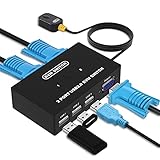
- Ideal Sharing Devices: USB VGA KVM Switch Box allows you to control 2 PCs via 1 Video Monitor and 3 USB2.0 Devices such as a printer, scanner, mouse, keyboard. It includes 2 KVM cables, VGA cables, and USB cables are 2 in 1 to keep your workspace tidy and efficient.
- Easy to install: plug and play with no driver required. With the switch button that you can easily switch 2 PCs without constantly swapping cables or setting up complicated software.
- High resolution: This KVM switch's resolution up to 1920 * 1440 and supports a super widescreen display. Support for DDC and high-quality auto-identification.
- Fast switching: you can easily and conveniently switch between 2 computers by pressing the buttons on the wired desktop controller.
- High compatibility: DGODRT KVM switch works with great compatibility, suit for DOS, Windows, Netware, Unix, Linux, Vista, Mac OS. For a business, office, multimedia classroom, meeting room, game room, home theater, research test, etc.
4. MeshCentral — best self-hosted fleet-management platform
MeshCentral is the best fit for administrators managing multiple computers rather than connecting to one desktop once. MeshCentral combines browser-based administration with remote desktop, terminal control, file management, and agent deployment; its official documentation covers the platform’s management model.
The remote computers need the MeshCentral agent, and the administrator uses the web interface to manage those computers. That makes MeshCentral more capable and more operationally involved than a simple viewer such as Remmina or GNOME Connections. Choose it when inventory, repeatable access, terminal operations, and centralized administration matter as much as seeing the remote screen.
5. FreeRDP and xfreerdp — best specialist RDP toolkit
FreeRDP is the strongest specialist choice for direct RDP work, especially when command-line control, scripting, libraries, or protocol-level flexibility matter. The FreeRDP project repository describes an Apache-licensed RDP implementation with libraries and clients, including command-line clients for Linux and other platforms.
FreeRDP is more powerful and scriptable than beginner-oriented graphical clients, but the command-line interface and authentication options require more technical knowledge. FreeRDP does not guarantee that every RDP server or authentication configuration will work automatically; compatibility depends on the target system and its settings. Use Remmina or GNOME Connections as a graphical front end when you want RDP without building commands manually.
6. TigerVNC — best modern VNC client and server stack
TigerVNC is the best VNC-focused recommendation when the remote endpoint speaks VNC and you want a maintained open implementation with native binaries for Linux, Windows, and macOS. The TigerVNC project site emphasizes performance, cross-platform support, TLS, and advanced authentication.
TigerVNC can supply both sides of a VNC deployment, but the remote machine still needs its VNC server configured and the network path must be controlled. VNC is a protocol, not a complete security policy: select strong authentication, restrict who can reach the service, and avoid treating a VNC port exposed directly to the public internet as a safe default.
7. Xpra — best for persistent remote applications
Xpra is the specialist choice for forwarding individual applications or persistent sessions rather than mirroring an entire desktop. Xpra can forward applications or full desktops, let sessions disconnect and reconnect without losing application state, and provide HTML5 access, as described on the Xpra project home page.
Xpra’s rootless application-forwarding model is its defining difference from VNC-style full-screen desktop sharing. Choose Xpra when a user needs a long-running remote application that should remain available after a network interruption or browser disconnect. Choose VNC, RDP, or RustDesk instead when the main requirement is ordinary whole-desktop control.
Rank #3

- Share Multiple USB Devices between 2 Computer : The BENFEI 2 in 4 out USB 3.0 kvm switch supports 2 computers share 4 USB devices like keyboards, mouses, U disk, printers, scanners, USB cameras, headphones, etc. It's convenient for you to switch freely between your work computer and personal computer, driver free and compatible with multiple OS, such as windows 7/10/8/8.1/7/Vista/XP and Mac OS, Linux, and Chrome OS.
- Transfer Files in Seconds: With the 4x USB 3.0 ports, BENFEI USB Switcher supports up to 5Gbps data transfer speed. You can easily transfer data from U disk, mobile hard disk to computer. It's backward compatible with USB 2.0, too.
- Switch Easily: With the USB switcher button and LED indicator design, you can freely switch multiple USB devices between two computers with one click and clearly know the working status. Please note: When connected, it could work only when using the BENFEI USB A to USB A cable.
- Multiple USB Devices Support: BENFEI USB Switch provides an extra USB C(5V 3A) power supply slot. If you use some high power consumption devices such as HDD, USB cameras, headphones, etc, please connect extra power for stable performance. (The USB A-USB Charging cable is included, but the power adapter is not)
- 18 MONTH WARRANTY : Exclusive BENFEI Unconditional 18-month Warranty ensures long-time satisfaction of your purchase; Friendly and easy-to-reach customer service to solve your problems timely
8. DWService — best browser-first hosted remote support
DWService is useful when the remote computer can run an agent but the controlling device should connect through a browser. The DWService download page states that the agent is open source; the hosted browser service is a separate architectural component and should not be conflated with the agent’s source availability.
The official DWService page states that the free service has a 6 Mbps bandwidth limit. Confirm the current service terms before a bandwidth-sensitive deployment because hosted limits can change. DWService is easier to approach than building a gateway, but it gives the hosted service a role in the trust and availability model, unlike a wholly self-hosted Guacamole or MeshCentral installation.
9. GNOME Connections — best simple GNOME client
GNOME Connections is the best straightforward choice for GNOME users who need VNC or RDP access without Remmina’s larger plugin surface. Connections uses the widely supported VNC and RDP protocols and is intended for access to Linux, Windows, and virtual-machine desktops.
Recommended Free Tools
The GNOME application page lists Connections version 50.0 as released on March 13, 2026; check the current GNOME application page for the version available to your distribution. Connections still requires a reachable RDP or VNC endpoint, so it is a client rather than a complete remote-support service.
10. X2Go Client — best for the X2Go ecosystem
X2Go Client is the right choice for Linux remote sessions built around the X2Go server ecosystem. The X2Go download and client documentation covers the native X2Go Client and PyHoca-GUI, with packages and source availability across several platforms.
X2Go is session-oriented rather than a universal replacement for RDP, VNC, or TeamViewer-style support. Select it when the remote host is already designed for X2Go sessions or when that ecosystem’s session model is the reason for the deployment. Do not choose it merely because you need a generic Windows RDP viewer.
11. TightVNC — best established lightweight VNC option
TightVNC remains a useful lightweight VNC choice because it supplies both viewer and server components and follows standard RFB compatibility. The TightVNC project site identifies the software as free and open source under the GPL.
TightVNC also offers commercial licenses for proprietary integrations. That commercial option does not change the fact that the end-user GPL software is free, but licensing matters if an organization plans to embed TightVNC into a proprietary product. TightVNC is a sensible interoperability-oriented VNC option, while TigerVNC is the stronger recommendation when the reader specifically wants the newer project emphasis on TLS and advanced authentication.
Rank #4

- 【USB KVM HDMI Switch】This HDMI KVM Switch allows you to control 2 computers with only one set of controls (Monitor, Mouse, Keyboard). You can easily switch between two displays. Makes your work and life much more simple and efficient. LED light color(Green or Blue) indicating the active computer.
- 【Ultra HD 4K@60Hz Visual Enjoyment】This HDMI USB KVM switch supporting resolution 4K@60Hz, makes the image display more exquisite and realistic, color is more bright and moving, really giving a feast for your eyes. Of course, Jancane KVM switches also supports 4K@30Hz, 3D and 1080P or lower resolution.
- 【Support Multi Devices & Widely applied】KVM switch supports many kinds of input devices or signal sources switch, such as PS4, PS4 Pro, PS3, Xbox One, TV Box, PC, laptop, Nintendo Switch, and most HDMI capable devices. It is widely applied for Enterprise, Office, Multimedia Teaching, Meeting Room Gaming Room, Home Theater, Research Tests, etc.
- 【Great Compatibility & One Button Switch】This KVM switch works with great compatibility, driver-free for Windows 10/8/8.1/7/Vista/XP and Mac OS, Linux, and Chrome OS, simply plug and play, No external power required. Easily switch between 2 displays by a single click on the button.
- 【What you will Get】Jancane provides lifetime technical support for this KVM switcher. Package includes 1*kvm switcher, 2*1.2m*USB 2.0 Cable, 2*1.2m*HDMI cables, 1*User Manual. Any problem, pls contact us to solve it.
12. virt-viewer — best for virtual-machine consoles
virt-viewer is the best choice when remote desktop means opening a virtual machine’s console rather than supporting an ordinary physical workstation. The viewer handles VNC or SPICE guest displays and uses libvirt to obtain connection details; the virt-manager project site provides the relevant virtualization project context.
virt-viewer belongs on this list because VM administrators often use the phrase remote desktop for guest-console access. It is not a general-purpose unattended support tool, fleet manager, or TeamViewer-style agent. Choose it when the target is a VM managed through a libvirt-oriented virtualization environment.
13. KRDC — best KDE-integrated client
KRDC is the natural KDE-integrated choice for RDP and VNC workflows. It is most appropriate for KDE users who want a desktop-environment-native viewer and already have a reachable RDP or VNC endpoint.
Verify KRDC’s exact current release and protocol matrix before deployment. KDE’s KRDP desktop-sharing server is a separate component, so features documented for KRDP must not automatically be attributed to the KRDC client. The supplied GNOME and KDE desktop-sharing documentation should not be treated as a substitute for checking the current KRDC project information.
14. rdesktop — best for legacy-oriented RDP work
rdesktop remains relevant for older environments, command-line use, scripting, and compatibility testing, but it should not be the default recommendation for current Windows deployments without entry-specific testing. Modern Windows authentication requirements and feature support may favor FreeRDP.
Use rdesktop when an older system specifically requires it or when reproducing a legacy connection is the goal. For a new RDP workflow, compare the target’s authentication requirements with FreeRDP before committing to rdesktop. A successful connection depends on the RDP server configuration, not just the name of the client.
15. Moonlight — best for game-streaming-style remote access
Moonlight is the specialist option for low-latency, interactive desktop or application streaming. Moonlight should be treated as a streaming client rather than a general RDP or VNC administration tool.
Do these 3 things before closing this tab:
1Clear out junk files and repair common Windows errors2Fix the driver behind crashes, sound loss and screen glitches3Repair Windows errors before they cause bigger problemsMoonlight belongs in a broad remote-desktop list only when interactive streaming is within the definition of remote desktop. Verify the current official project documentation, host compatibility, and client platforms before publication or deployment, because those details can change independently of conventional RDP and VNC support.
Best Value

- 2 PCs Share Multiple Devices: UGREEN 2-In 4-Out USB switcher supports 2 computers sharing 4 USB devices like keyboards, mouses, printers, headphones, and USB cameras. Switch freely between your work computer and personal computer and boost your work efficiency. (NOTE: This USB Switcher is NOT a KVM switch and does not support connecting a monitor or video transmission)
- Connect USB C & USB A Devices: The USB 3.0 switch provides 1 USB C port and 3 USB A ports to support connecting various USB devices, extending more ports for two computers. (*It is recommended to power supply when using multiple devices simultaneously to avoid disconnection due to insufficient power.*)
- 5Gbps Data Transfer / Plug & Play: With 4 USB 3.0 ports, the USB 3.0 switcher supports data transfer up to 5Gbps and is backward compatible with USB 2.0; Simple plug and play for any modern operating system: Windows, macOS, Chrome OS, and Linux computers. (*The USB ports are primarily for data transfer and are not recommended for charging devices.*)
- Note: 1. If your input device uses a USB-C port, please purchase a USB-C to USB adapter before use. 2. When using a camera through the switcher, if your computer has a built-in camera, please select the UGREEN camera in the camera settings to ensure proper use. 3.The USB-C port on the product does not support video output and cannot be used with a dock to connect a display
- USB-C Power Supply: The USB switch is designed with a optional power supply for high-power devices like Hard Disk Drives, headsets, and other USB devices to work more stably; The upgraded USB-C Power port avoids the trouble of not finding a micro cable.
16. KasmVNC — best browser-oriented VNC deployment
KasmVNC is designed for delivering graphical sessions through a browser, making it a specialized choice for containerized or hosted workspaces. KasmVNC is better suited to web-accessible desktops than to casual peer-to-peer support.
A KasmVNC deployment requires the KasmVNC server side on the hosted or containerized desktop and a browser on the controlling device. Verify current licensing, release activity, and deployment requirements before choosing it, because those details can change independently of the underlying VNC model.
Independent reader supportYour contribution helps us test, update, and keep practical guides available for everyone.What is the difference between free, open source, and self-hosted?
Free software, open-source software, and self-hosted software describe different properties. A project can publish source code while offering a separate hosted service; a client can be free while requiring a paid or separately operated server; and self-hosting can avoid a vendor relay while still creating infrastructure and maintenance costs.
Quick wins for a faster PC:
Scan for outdated or missing drivers - takes under a minuteDriver Scan →Repair Windows errors before they cause bigger problemsFix Now →Fix the driver behind crashes, sound loss and screen glitchesFind Drivers →| Example | What is open source or free | What you still need to operate | Important qualification |
|---|---|---|---|
| RustDesk | Client and an open-source server path | Remote clients and, for self-hosting, server infrastructure | The paid Professional Server is a separate deployment choice |
| Apache Guacamole | Gateway software | A gateway server, target services, authentication, and network access | Browser access does not eliminate server administration |
| MeshCentral | Self-hosted management platform and agents | A server and agents on managed computers | Its fleet-management scope is broader than a viewer |
| DWService | Remote agent | The hosted DWService browser service and an installed agent | The free hosted service has a stated 6 Mbps bandwidth limit |
| TightVNC | GPL end-user viewer and server | A VNC server, network controls, and suitable authentication | Commercial licenses are available for proprietary integrations |
For a self-hosted deployment, account for the server, updates, backups, authentication, logging, firewall rules, and recovery access. A self-hosted design can reduce dependence on a hosted relay, but it transfers responsibility to the operator.
How should you choose among RDP, VNC, browser gateways, and agents?
Choose the architecture that matches the remote host rather than trying to make every project perform the same job.
- Choose RustDesk when you want the closest broad remote-support experience, need unattended access, or connect across several desktop and mobile platforms.
- Choose Remmina, GNOME Connections, KRDC, or FreeRDP when the remote host already provides RDP, VNC, SSH, SPICE, or X2Go and you want a direct client. Remmina is the broadest graphical Linux option; FreeRDP is the strongest command-line RDP toolkit.
- Choose Apache Guacamole when browser-only access and centralized authentication are more important than avoiding gateway administration.
- Choose MeshCentral when you manage a fleet and need terminal, file, agent, and remote-desktop functions in one self-hosted platform.
- Choose DWService when a hosted browser workflow is acceptable and the remote computer can run its agent.
- Choose TigerVNC or TightVNC when VNC is already the required protocol. TigerVNC is the stronger modern VNC-stack recommendation; TightVNC is the established lightweight interoperability option.
- Choose Xpra or X2Go when persistent application or session behavior is central to the workflow rather than ordinary screen mirroring.
- Choose virt-viewer when the target is a virtual-machine console, not an unattended physical desktop.
- Choose Moonlight or KasmVNC only when low-latency streaming or browser-delivered hosted workspaces are the actual requirement.
How do you deploy remote desktop software safely?
Remote desktop software can expose screen viewing, keyboard and mouse control, file access, terminals, and sometimes privilege escalation. Treat every remote desktop agent, gateway, server, and browser portal as a high-impact administrative surface.
- Install only the required component. A direct RDP or VNC viewer does not need the same privileges or exposure as a fleet-management agent. Enable unattended access, file transfer, terminal access, and administrative control only when the workflow requires them.
- Use strong, unique credentials and appropriate access controls. Centralized systems such as Guacamole and MeshCentral need carefully configured authentication and authorization, while direct protocol clients depend heavily on the target service’s account and authentication settings.
- Keep clients, agents, gateways, and servers updated. Updating only the viewer leaves the remote agent or gateway exposed to the same risk the software was meant to manage.
- Restrict network reachability. Use firewalls and private networks where possible, and avoid exposing RDP or VNC directly to the public internet when a safer private-network design is available.
- Separate trust boundaries. A browser gateway, hosted relay, self-hosted rendezvous server, and direct LAN VNC connection place trust in different systems. Document which service can see connection metadata, authenticate users, relay traffic, or administer the target.
A private mesh VPN can provide an additional network layer for RDP, VNC, or RustDesk. Tailscale’s RDP guidance describes private encrypted connectivity without manual port forwarding or public IP exposure, and its documentation also covers connecting to devices and using RustDesk over a private tailnet. Tailscale is an optional networking service, not one of the open-source remote desktop clients in this list; verify current service terms and partner-program availability separately.
What should you check before installing one?
- Identify the remote-host service. RDP, VNC, SSH, SPICE, X2Go, an agent, a gateway, and a VM console are different connection requirements.
- Check both sides of the connection. A client platform list does not prove that the remote host, server, agent, or authentication method is supported.
- Decide where the trust boundary belongs. Hosted services are convenient; self-hosted gateways and servers provide more operational control but require more maintenance.
- Check licensing scope. Client, server, agent, hosted service, and commercial integration licenses may not be identical.
- Plan recovery access. If the remote desktop agent fails, keep a local, console, SSH, or virtualization-based recovery path where appropriate.
- Test authentication on the actual target. This is particularly important for legacy rdesktop deployments and current Windows RDP environments.
- Verify volatile details before production use. Confirm current releases, maintenance status, operating-system support, licensing, and deployment requirements for all sixteen projects.
Which one should you choose?
Choose RustDesk for broad remote support, Remmina for a Linux multi-protocol desktop, Apache Guacamole for browser-based self-hosting, MeshCentral for fleet management, FreeRDP for direct RDP tooling, TigerVNC for VNC, Xpra for persistent applications, and virt-viewer for VM consoles. Select DWService, X2Go, TightVNC, GNOME Connections, KRDC, rdesktop, Moonlight, or KasmVNC when their specific architecture matches the job.
The Bottom Line
Bottom line: There is no single best remote desktop client for every architecture. RustDesk is the best broad remote-support recommendation, Remmina is the best Linux multi-protocol viewer, Guacamole is the best browser gateway, MeshCentral is the best self-hosted fleet platform, and protocol-specific tools are better when the remote host already dictates RDP, VNC, X2Go, Xpra, SPICE, or a VM console.
Quick Recap
Product prices and availability are accurate as of the date/time indicated and are subject to change. Any price and availability information displayed on Amazon at the time of purchase will apply.

