
iTechGuides is reader-supported. When you buy through links on our site, we may earn an affiliate commission. As an Amazon Associate I earn from qualifying purchases. Learn more
Short answer: The Ryzen 7 9800X3D does not universally need a 360 mm liquid cooler. A capable dual-tower air cooler is the sensible starting point for most gaming PCs, while a 360 mm AIO makes sense when you want sustained-workload headroom, a specific radiator layout, or an RGB-focused build. This guide ranks 15 compatible designs, led by the Thermalright Phantom Spirit 120 SE for value, Noctua NH-D15 G2 for premium air cooling, and ARCTIC Liquid Freezer III 360 for performance-oriented AIO use.
The processor is an AM5 desktop X3D chip. The source guide lists a 120 W default TDP, but real temperatures depend on power limits, ambient temperature, case airflow, fan curves and workload. AMD explains that boost frequency is the maximum frequency achievable during a bursty workload and that boost frequency and sustainability vary with thermal conditions and applications. The shortlist below is based on compatibility, published design, specifications and installation trade-offs—not a single lab ranking of all 15 models.
At a glance
| Name | Best for | Key spec | Checked |
|---|---|---|---|
| Thermalright Phantom Spirit 120 SE | Value air cooling | 154 mm; seven 6 mm heatpipes; two 120 mm PWM fans | Nov 2026 |
| Noctua NH-D15 G2 | Premium air cooling | 168 mm; eight heatpipes; AM5 offset hardware | Nov 2026 |
| ARCTIC Liquid Freezer III 360 | Performance-focused AIO | 398 × 120 × 38 mm radiator; VRM fan | Nov 2026 |
| be quiet! Dark Rock Pro 5 | Quiet dual-tower builds | 145 × 136 × 168 mm | Nov 2026 |
| DeepCool AK620 | Balanced air cooling | 160 mm; six heatpipes; two 120 mm fans | Nov 2026 |
| Noctua NH-U12A | RAM-friendly premium tower | 158 mm; two 120 mm fans | Nov 2026 |
| Noctua NH-U14S | Slim single-tower layout | 165 mm; 52 mm slim heatsink depth | Nov 2026 |
| be quiet! Dark Rock Elite | Quiet tower with lighting | 168 mm tower; lighting connection | Nov 2026 |
| Cooler Master MasterAir MA824 Stealth | Large high-capacity tower | Eight heatpipes; 135 mm/120 mm fans | Nov 2026 |
| ARCTIC Liquid Freezer III Pro 360 | High-airflow AIO tuning | 398 × 120 × 38 mm radiator; P12 Pro fans | Nov 2026 |
| CORSAIR iCUE H150i ELITE CAPELLIX XT | iCUE and RGB ecosystems | 360 mm AIO; controller and cable planning required | Nov 2026 |
| Cooler Master MasterLiquid 360 Atmos | Compact 360 mm installation | 394 × 119 × 27.2 mm radiator | Nov 2026 |
| Lian Li Galahad II Trinity Performance 360 | High-airflow and L-Connect builds | 396 × 130 × 32 mm radiator | Nov 2026 |
| EK-Nucleus AIO CR360 Dark | Non-RGB 360 mm builds | 400 × 124 × 27 mm radiator; three 120 mm fans | Nov 2026 |
| EK-Nucleus AIO CR360 Lux D-RGB | AM5-compatible RGB AIO | 360 mm radiator; D-RGB lighting | Nov 2026 |
Which cooler should you buy for a Ryzen 7 9800X3D?
For most gaming systems, choose the Thermalright Phantom Spirit 120 SE. Its 154 mm height, seven 6 mm heatpipes and two 120 mm PWM fans provide a strong value-oriented fit profile, provided your case, memory and motherboard layout allow it. Choose the Noctua NH-D15 G2 if you want a premium air cooler with AM5 offset mounting and can accept a 168 mm tower. Choose the ARCTIC Liquid Freezer III 360 when sustained all-core workloads, a front or top 360 mm mount, or liquid-cooling aesthetics matter more than simplicity.
Crashes, No Sound, or Screen Glitches?
Random freezes, missing sound and display glitches usually trace back to one bad driver. Find and replace yours safely.Free scan · under a minuteWindows Errors? Fix Them Before They Spread
Repair common Windows errors and clear accumulated junk for a smoother, more stable PC - no reinstall needed.Free scan · no reinstallThose are starting points, not universal temperature promises. The guide’s categories are editorial matches based on design and compatibility. GamersNexus tested a 9800X3D cooler setup at a stated 157 W heat load with noise normalized to 25 dBA; its updated Tryx Panorama 360 result was 53.6°C above ambient average Tdie, with Liquid Freezer models slightly behind in that comparison. That controlled result should not be treated as the temperature every 9800X3D owner will see.
Popular on Amazon
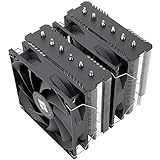
- [Brand Overview] Thermalright is a Taiwan brand with more than 20 years of development. It has a certain popularity in the domestic and foreign markets and has a pivotal influence in the player market. We have been focusing on the research and development of computer accessories. R & D product lines include: CPU air-cooled radiator, case fan, thermal silicone pad, thermal silicone grease, CPU fan controller, anti falling off mounting bracket, support mounting bracket and other commodities
- [Product specification] Thermalright PA120 SE; CPU Cooler dimensions: 125(L)x135(W)x155(H)mm (4.92x5.31x6.1 inch); heat sink material: aluminum, CPU cooler is equipped with metal fasteners of Intel & AMD platform to achieve better installation, double tower cooling is stronger((Note:Please check your case and motherboard for compatibility with this size cooler.)
- 【2 PWM Fans】TL-C12C; Standard size PWM fan:120x120x25mm (4.72x4.72x0.98 inches); fan speed (RPM):1550rpm±10%; power port: 4pin; Voltage:12V; Air flow:66.17CFM(MAX); Noise Level≤25.6dB(A), leave room for memory-chip(RAM), so that installation of ice cooler cpu is unrestricted
- 【AGHP technique】6×6mm heat pipes apply AGHP technique, Solve the Inverse gravity effect caused by vertical / horizontal orientation, 6 pure copper sintered heat pipes & PWM fan & Pure copper base&Full electroplating reflow welding process, When CPU cooler works, match with pwm fans, aim to extreme CPU cooling performance
- 【Compatibility】The CPU cooler Socket supports: Intel:115X/1200/1700/17XX AMD:AM4;AM5; For different CPU socket platforms, corresponding mounting plate or fastener parts are provided(Note: Toinstall the AMD platform, you need to use the original motherboard's built-in backplanefor installation, which is not included with this product)
What are the best air coolers?
1. Thermalright Phantom Spirit 120 SE — best value
Best reason to choose it: It offers a substantial dual-tower design without requiring a radiator, pump or liquid loop. The 154 mm height is shorter than several premium towers, while seven 6 mm heatpipes and two 120 mm PWM fans give it a sensible capacity for the 9800X3D’s listed 120 W default TDP. Confirm AM5 mounting hardware in the package and measure your case’s CPU-cooler limit before ordering.
2. Noctua NH-D15 G2 — best premium air cooler
Best reason to choose it: The NH-D15 G2 combines an eight-heatpipe dual-tower layout with AM5 offset mounting hardware intended to improve contact over the heat-spreader area. At 168 mm, it needs a roomy case, and its front fan can overlap tall memory modules. Check both the manufacturer’s RAM-clearance guidance and your motherboard’s socket and heatsink geometry.
3. be quiet! Dark Rock Pro 5 — best quiet-focused dual tower
Best reason to choose it: Its 145 × 136 × 168 mm format targets low-noise air builds with two large towers. The 168 mm height is the primary fit measurement; then check front-fan clearance over RAM and the distance to motherboard heatsinks. Use a conservative fan curve if your noise target matters more than minimum benchmark temperatures.
Free tools Windows power users keep installed
One-click scans. No signup required.
4. DeepCool AK620 — best balanced tower
Best reason to choose it: The AK620 is a straightforward 160 mm dual tower with six heatpipes and two 120 mm fans. It is a practical middle ground when the Phantom Spirit is unavailable or when you prefer this mounting and fan layout. Verify the case height limit and whether the front fan must be raised for your memory modules.
5. Noctua NH-U12A — best RAM-friendly premium tower
Best reason to choose it: This 158 mm tower uses two 120 mm fans while leaving the memory slots comparatively accessible. It suits boards where a very wide dual tower would crowd DIMMs or the primary M.2 heatsink. Check your case height and the exact AM5 mounting parts supplied with the cooler.
6. Noctua NH-U14S — best slim single tower
Best reason to choose it: The 165 mm NH-U14S has a 52 mm slim heatsink depth, useful when a second tower would interfere with memory or board components. It supports an optional second fan, but that adds width and may change RAM clearance. Measure case height and the available space around the socket before adding another fan.
7. be quiet! Dark Rock Elite — best quiet tower with lighting
Best reason to choose it: It pairs a large quiet-oriented tower with integrated lighting for a coordinated build. Treat it as a 168 mm-class cooler and check how the lighting connects to your motherboard or controller. A high noise target or a narrow case may make a smaller tower easier to configure.
8. Cooler Master MasterAir MA824 Stealth — best large tower alternative
Best reason to choose it: Eight heatpipes and 135 mm/120 mm fans provide a large heat-dissipation surface for users who prefer air cooling. The mixed fan sizes and overall tower volume make case width, height, motherboard heatsink clearance and memory position important. Confirm the complete fan and heatsink envelope, not just socket support.
Which 360 mm AIO coolers are worth considering?
9. ARCTIC Liquid Freezer III 360 — best performance-oriented AIO
Best reason to choose it: Its 398 × 120 × 38 mm radiator and dedicated VRM fan target sustained cooling and motherboard-area airflow. The 38 mm radiator is thicker than many 360 mm units, so calculate the complete radiator-plus-fan stack at the intended top or front mount. Check pump clearance around the socket, the primary M.2 heatsink, tubing bend radius and whether the radiator blocks tall memory or front fans.
10. ARCTIC Liquid Freezer III Pro 360 — best high-airflow AIO variant
Best reason to choose it: It keeps the 398 × 120 × 38 mm radiator format but uses P12 Pro fans for a performance-first setup. This is still a thick radiator assembly; confirm chassis width, fan clearance and your acceptable noise target. Set a pump and fan curve that avoids running every component at full speed when gaming loads are bursty.
Also popular on Amazon

- CONTACT FRAME FOR INTEL LGA1851 | LGA1700: Optimized contact pressure distribution for longer CPU life and better heat dissipation
- ARCTIC's P12 PRO FAN: More power at any speed - more powerful and quieter than the P12, especially at low speeds. Higher maximum speed for optimal cooling performance under high load
- NATIVE OFFSET MOUNTING FOR INTEL AND AMD: Shifting the cold plate center towards the CPU hotspot ensures more efficient heat transfer
- INTEGRATED VRM FAN: PWM-controlled fan that lowers the temperature of the voltage converters and thus ensures reliable performance
- INTEGRATED CABLE MANAGEMENT: The PWM cables of the radiator fans are integrated in the sheathing of the hoses so that only a single visible cable is connected to the motherboard
11. CORSAIR iCUE H150i ELITE CAPELLIX XT — best for iCUE/RGB builds
Best reason to choose it: It fits a 360 mm ecosystem build where iCUE control, lighting synchronization and a supplied controller are priorities. Verify the radiator length against your case, reserve mounting space for the controller, and plan USB and power cables before installing the motherboard. The 360 mm label alone does not confirm clearance for the fans, tubes or memory.
The Tool Desk
Outbyte Driver Updater FREEScan for outdated or missing drivers - takes under a minuteDriver Scan →Outbyte PC Repair FREEClear out junk files and repair common Windows errorsFree Scan →12. Cooler Master MasterLiquid 360 Atmos — best slimmer-radiator option
Best reason to choose it: Its listed 394 × 119 × 27.2 mm radiator can simplify installations where a 38 mm-class radiator would collide with a top heatsink or memory. You still need to measure the fan stack, radiator length and tube routing at the chosen mount. Confirm the AM5 bracket and the manufacturer’s case-compatibility information.
13. Lian Li Galahad II Trinity Performance 360 — best for L-Connect and airflow-focused layouts
Best reason to choose it: The 396 × 130 × 32 mm radiator and L-Connect-oriented ecosystem suit high-airflow, lighting-managed builds. Its 130 mm width and 32 mm thickness can be more demanding than a nominal 360 mm specification suggests. Check top-panel width, motherboard heatsinks, tube orientation and the available space beside the primary M.2 heatsink.
14. EK-Nucleus AIO CR360 Dark — best non-RGB 360 mm AIO
Best reason to choose it: The non-RGB design keeps the build visually restrained while providing a 400 × 124 × 27 mm radiator and three 120 mm fans. The 400 mm length and 124 mm width need a direct chassis check, especially in compact cases. Confirm mounting position and tubing reach before final cable management.
15. EK-Nucleus AIO CR360 Lux D-RGB — best RGB EK-Nucleus option
Best reason to choose it: It adds D-RGB lighting to an AM5-compatible 360 mm platform for users who want coordinated illumination. Check your case’s radiator support, the full fan-and-radiator stack and the lighting header or controller. Do not assume the Lux model has the same clearance in every mounting position as a slimmer air cooler.
How do I check whether a cooler will fit?
AM5 compatibility only confirms the socket interface. Fit also depends on the case, motherboard, memory, M.2 heatsink, GPU position and the cooler’s complete dimensions.
- Check air-cooler height. Find your case’s maximum CPU-cooler height and compare it with the heatsink’s published height: the shortlist spans 154 to 168 mm. Allow for a front fan that may be raised over tall RAM; that raises the effective height.
- Measure the socket neighborhood. Inspect VRM heatsinks, the top PCIe slot, DIMM latches and the primary M.2 heatsink. A tower can clear the socket yet collide with a heatsink or cover a memory slot.
- Check RAM clearance. Look for the cooler maker’s front-fan and DIMM-height limits. The NH-U12A and NH-U14S are easier starting points for memory-constrained boards; dual towers often require moving a fan upward.
- Check radiator dimensions, not just the 360 mm label. Listed radiators run from 394 to 400 mm long, 119 to 130 mm wide and 27 to 38 mm thick. Compare those numbers with the case’s supported length, width and thickness at the exact top or front position.
- Check the complete fan-and-radiator stack. Add radiator thickness and fan thickness, then compare the total with motherboard heatsinks and memory. A nominally supported radiator may still block a top EPS connector or tall VRM cover.
- Check pump and M.2-heatsink clearance. Confirm that the pump block can sit flat on AM5 without touching nearby heatsinks. For thick blocks or unusual socket surrounds, follow the manufacturer’s installation diagram.
- Check tubing and mounting positions. Ensure tubes can reach the pump without a sharp kink and that the chosen orientation does not press against the GPU or memory. Decide whether tubes exit toward the top, front or side before tightening the radiator.
- Check the manufacturer’s compatibility information. Use the current case, cooler and motherboard lists, and confirm the AM5 bracket is included. Socket support by itself is not a complete compatibility guarantee.
How should you plan noise and maintenance?
Set a noise target before choosing hardware. If you want a quiet gaming PC, compare independent results at equivalent sound levels rather than selecting a cooler from a full-speed temperature chart. Fan speed, pump tone, radiator turbulence and case airflow all affect what you hear. GamersNexus’ 25 dBA noise-normalized methodology illustrates why temperatures measured at different noise levels cannot be compared directly.
Air coolers have a simple maintenance profile: periodically remove dust from the heatsink and fans, check that the fan clips and screws remain secure, and replace a noisy fan if needed. There is no pump or liquid loop to monitor. An AIO adds a pump, tubing, radiator and more fans; keep the radiator fins clear, confirm the pump is powered, and watch for unusual pump noise or rising temperatures over time. Follow the manufacturer’s service and warranty guidance rather than opening a sealed loop.
For either type, configure a gradual fan curve. Let fans idle at low temperatures, ramp them as CPU temperature rises, and avoid abrupt speed changes. AIO owners can run the pump at the maker’s recommended baseline while controlling radiator fans from coolant or CPU temperature where the software supports it. Recheck the curve after changing case fans or power limits.
Do these 3 things before closing this tab:
1Clear out junk files and repair common Windows errors2Fix the driver behind crashes, sound loss and screen glitches3Repair Windows errors before they cause bigger problemsAre CPU cooler wattage ratings comparable between brands?
No. Vendor wattage, NSPR, PI and heat-dissipation figures use different test methods, so they are not a reliable cross-brand performance ranking. Use those figures as one design clue, then prioritize independent measurements, physical fit, noise conditions and your workload.
Also popular on Amazon

- CONTACT FRAME FOR INTEL LGA1851 | LGA1700: Optimized contact pressure distribution for longer CPU life and better heat dissipation
- ARCTIC's P12 PRO FAN: More power at any speed - more powerful and quieter than the P12, especially at low speeds. Higher maximum speed for optimal cooling performance under high load
- NATIVE OFFSET MOUNTING FOR INTEL AND AMD: Shifting the cold plate center towards the CPU hotspot ensures more efficient heat transfer
- INTEGRATED VRM FAN: PWM-controlled fan that lowers the temperature of the voltage converters and thus ensures reliable performance
- INTEGRATED CABLE MANAGEMENT: The PWM cables of the radiator fans are integrated in the sheathing of the hoses so that only a single visible cable is connected to the motherboard
The 9800X3D’s boost behavior also changes with temperature and application demand. AMD’s Ryzen 9000 Series Quick Reference Guide states that boost-clock achievability and sustainability depend on thermal conditions and workloads. Avoid treating a cooler’s marketing wattage as a promise of a particular clock speed or temperature.
Does the Ryzen 7 9800X3D need a 360 mm AIO?
Not for ordinary gaming. A competent tower cooler can be a better-value, lower-complexity choice, while a 360 mm AIO is useful for sustained rendering or compiling, a case designed around a large radiator, or a preference for liquid-cooling aesthetics. Consider the maintenance profile and pump noise as well as peak temperature.
A controlled reference helps set expectations: GamersNexus’ 2025 cooler testing used a 157 W heat load and 25 dBA normalization on a Ryzen 7 9800X3D; its updated Tryx Panorama 360 averaged 53.6°C above ambient Tdie in that setup. Your room, case, power settings and fan curve can produce a different result.
Can an AM5 offset accessory improve an existing Noctua cooler?
If you already own a compatible Noctua cooler, the NM-AMB12 datasheet describes AM4/AM5 offset bars that shift the heatsink 7 mm. Noctua reports typical improvements of 1–3°C on high-end AM5 CPUs, while noting that results vary and that buyers must verify exact cooler compatibility. It is an accessory for listed compatible models, not a universal mounting upgrade.
Do not substitute a low-profile cooler simply because it supports AM5. Noctua’s NH-L9a-AM5 datasheet positions that model for slim SFF/HTPC systems, says it is not suitable for overclocking and recommends it only for CPUs/APUs up to 95 W TDP. That profile is not a general recommendation for this 120 W-class processor.
How we picked
The ranking weighs AM5 support, cooler architecture, published dimensions, memory and motherboard clearance, installation complexity, likely noise considerations, radiator or tower fit and maintenance profile. Air and AIO models are not treated as directly interchangeable, and manufacturer wattage-style ratings are not compared as if they used one standard. The shortlist is a compatibility and design guide; the cited GamersNexus result applies only to its stated platform, load and acoustic setup.
Frequently Asked Questions
What case size is safest for a 168 mm CPU cooler?
Choose a case whose specification allows at least 168 mm CPU-cooler height, then leave practical room for a raised front fan and side-panel clearance. Measure the installed motherboard and memory area as well, because a case number alone does not account for unusually tall DIMMs or VRM heatsinks.
Quick wins for a faster PC:
Scan for outdated or missing drivers - takes under a minuteDriver Scan →Repair Windows errors before they cause bigger problemsFix Now →Will a 360 mm radiator fit in every case that advertises 360 mm support?
No. Check the supported radiator length, width and thickness at the exact mounting position, plus the fan thickness and tube path. A 398–400 mm radiator or a 38 mm-thick model can conflict with front brackets, top heatsinks, memory or the GPU even when the case label says “360 mm.”
Should I mount a 360 mm radiator at the front or top?
Use the position that leaves the pump below the highest point of the loop where the case layout permits, while preserving GPU and memory clearance. Compare the complete radiator-and-fan stack with motherboard heatsinks and confirm the manufacturer’s recommended orientation; the best position is case-specific.
How often should I clean a CPU cooler?
Inspect dust buildup every few months, with shorter intervals in dusty rooms or mesh-front cases. Power down, unplug the system and use the cooler maker’s safe cleaning guidance; keep fans from spinning freely while blowing compressed air and check that screws, clips and cables remain secure.

