
What’s actually slowing this PC down?
Pick the symptom - the matching free tool is one click away.
Zero Terminal 3 was a DIY modular Linux handheld built around a Raspberry Pi Zero, touchscreen and battery—not a finished product you could order. Reports from August 2020 said it was not for sale, and its current availability and build-file status remain unconfirmed.
What was the Zero Terminal 3?
Developed by hardware hacker NODE, Zero Terminal 3 was a compact, smartphone-sized computer concept designed to put a Raspberry Pi Zero, touchscreen and battery into one handheld enclosure. Coverage described it as a DIY build rather than a mass-market device. Its aim was to offer a portable Linux computer with conventional ports and room for modular add-ons.
The name can be misleading: this was not a Raspberry Pi product or a complete handheld sold by Raspberry Pi. The Pi board and display were separate components integrated into a custom project.
What hardware did the reported build include?
Reports described the following components and connections. These are project details reported in 2020, not specifications from an independent hands-on test.
Quick wins for a faster PC:
Fix the driver behind crashes, sound loss and screen glitchesFind Drivers →Clear out junk files and repair common Windows errorsFree Scan →Scan for outdated or missing drivers - takes under a minuteDriver Scan →#1 Best Overall

- 7 inches, 800x480 pixels, IPS type, wide viewing angle, capacitive touchscreen, enjoy smooth touch response and excellent clarity for all your Raspberry Pi projects.
- Specially designed, simply connect to your raspberry pi's MIPI DSI interface. (No additional connections required.)
- Fully Compatible with Raspberry Pi 5/ 4B / 3B+ / 3B / 3A+ / 2B. (No HDMI port, not compatible with any other device.)
- Supports for Raspbian OS 2 points to zoom the page(old version), for Ubuntu/Kali/Win10 IoT (single-touch only). Support backlight brightness adjustment.
- Easy to use, no configuration required, plug and play (for new and configuration unchanged raspberry pi systems). Instructions was provided.
| Part | Reported details |
|---|---|
| Computer board | Raspberry Pi Zero. Raspberry Pi lists a 1 GHz single-core CPU, 512 MB RAM, mini HDMI, micro USB OTG, micro USB power and a 40-pin header on its official Raspberry Pi Zero product page. |
| Display | 5.5-inch Waveshare capacitive AMOLED touchscreen, reported at 1,920 × 1,080 pixels. Notebookcheck cited US$119.99 as a display price reference in its August 9, 2020 report; that is a historical figure, not a current price or the price of the complete handheld. Notebookcheck’s 2020 report |
| Battery and audio | A 1,200 mAh LiPo battery, built-in speaker and audio amplifier, according to Liliputing’s August 7, 2020 report. No measured runtime is established. |
| Ports and controls | Reports list a full-size USB 2.0 Type-A port, micro USB charging, microSD card reader, headphone jack, three programmable GPIO-connected buttons and a power switch. Coverage also describes video and camera connections and two 40-pin sockets on the rear. Fossbytes’ August 8, 2020 report and Liliputing’s report |
Raspberry Pi says a Zero needs a microSD card with an operating system installed and a micro USB power supply to get started, and recommends Raspberry Pi OS for normal use. Those are setup requirements for the board; they do not establish the performance or runtime of the complete handheld.
Could you buy a Zero Terminal 3?
Not as a finished product according to the reports published at launch. Fossbytes and Liliputing both said in August 2020 that it was not available for sale. Fossbytes also reported that NODE wanted to revise the speaker, power circuitry and display board, while Liliputing said further build information was planned.
Rank #2

- 3.5 inch, 320×480 resolution, TFT LCD resistive touch screen, clear display effect and using easily with a touch pen.
- No external power supply required.Just plug it into the Raspberry Pi board correctly and install the driver to use it. (Driver installation tutorial is provided)
- This 3.5 inch touch screen is specially designed for Raspberry Pi, perfectly suitable for Pi5, Pi4B, Pi3B+, Pi3B, Pi2B, Pi1B (directly-pluggable).
- Compatible with a variety of systems, such as for Raspbian system, ubuntu system, kali Linux system and so on.
- You can get one 3.5 inch raspberry pi touch screen and one touch pen, what the important things is that the project introduction, code and tutorial is provided.We provide technical support, If you encounter any difficulties during use, please contact us first to help you solve it.
A Raspberry Pi Forums participant wrote on December 17, 2024 that “the project seems to be dead” while seeking a ready-to-buy handheld. That is one user’s impression, not an authoritative project update. Current availability of the finished device, official files and assembly instructions is not confirmed by the cited sources. Treat Zero Terminal 3 as a project concept, not a current retail product or a confirmed complete build guide.
What did “modular” mean?
The design was intended to accept rear-mounted add-ons, sometimes described as “backpacks.” Reports mentioned possible modules such as a keyboard, game controller, radio transceiver, extra network interface, solar panel and TV tuner. These examples describe the modular direction, not a verified catalog of released, compatible accessories; an early keyboard concept was described as a prototype.
Free tools Windows power users keep installed
One-click scans. No signup required.
Rank #3

- 320×480 resolution; Resistive touch control,Supports any revision of Raspberry Pi (directly-pluggable)
- 3.5 inch resistive touch screen designed compatible with Raspberry Pi A, B, A+, B+, 2B, 3B, 3B+,4B versions
- Size perfectly fits the Pi
- Supports Raspbian system, ubuntu system ,kali Linux system
- If you don't know how to do that,you can refer to the Raspberry Pi office tutorial or contact us.
The reports do not establish that currently available displays, adapters or modules will fit a new build without modification. Nor do they provide enough comparable cost, runtime or build-complexity data to rank this concept against other DIY handhelds.
Independent reader supportYour contribution helps us test, update, and keep practical guides available for everyone.What to take away if you want a handheld Pi computer
Zero Terminal 3 is useful as an example of a compact Raspberry Pi handheld design, but its reported specifications should not be mistaken for a ready-to-buy kit. Anyone considering a similar DIY project would need to confirm current parts, mechanical fit and assembly documentation independently; the cited reporting does not establish a maintained parts list or complete set of instructions.
Rank #4
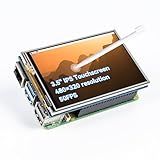
- Designed for Raspberry Pi – Compact, Clear, and Easy to Use. This 3.5-inch IPS full-view touch screen is tailor-made for Raspberry Pi, delivering 480×320 resolution, 65K vibrant colors, and up to 50FPS smooth performance. With its 40-pin GPIO direct connection, it plugs straight into your Raspberry Pi without extra cables, making installation effortless. Fully compatible with Raspberry Pi 5, 4B, it supports multiple systems including Raspberry Pi OS Trixie, Ubuntu, Kali Linux, and RetroPie. The display and touch orientation can be freely rotated at 0°, 90°, 180°, or 270° to fit your project needs
- High-Precision Resistive Touch Control with Included Stylus Pen. Equipped with a highly sensitive resistive touch screen and a matching stylus, this display ensures smooth and precise control. No additional external adapter needed, keeping your setup simple. Comes with a detailed manual, online tutorials, and software drivers, supporting the latest Raspberry Pi OS Trixie. Easy and quick to install, perfect for beginners and makers alike
- Wide OS Compatibility & Smooth Multimedia Experience. Supporting Raspberry Pi OS, Ubuntu, Kali Linux, and RetroPie, this IPS LCD delivers up to 50FPS performance, 65K vivid colors, and a wide 170° viewing angle for excellent video quality and fluid playback. The screen and touch orientation can be freely rotated at 0°, 90°, 180°, or 270°, making it adaptable to different setups. Ideal for gaming, multimedia, smart home dashboards, central control panels, and programming projects, it offers a versatile solution for beginners, engineers, and hobbyists alike
- Safer & More Reliable 40-Pin Connection. Unlike many 3.5-inch touch screens that use a 26-pin header, this display adopts a full 40-pin GPIO interface, making installation more secure and preventing misalignment that could damage the screen. The connection is easy, stable, and reliable, ensuring a worry-free setup experience
- Comprehensive Technical Support & Resources. Comes with a detailed user manual, online documentation, troubleshooting guides, and community forums, ensuring you have the help you need at every step. Whether you are a beginner or an experienced maker, reliable technical support makes your Raspberry Pi projects easier and more enjoyable
For board-level setup, Raspberry Pi’s official guidance says to prepare a microSD card with an operating system and use a micro USB power supply. The official product page lists the Zero’s 1 GHz single-core CPU and 512 MB RAM. Those figures describe the board, not measured handheld performance.
Quick Recap
Best Value

- 5-inch 800*480 resolution capacitive touch screen, IPS type, good viewing angle.
- The MIPI DSI interface directly outputs, plug and play, no driver installation required.
- As a touchscreen monitor, compatible with Raspberry Pi 5 / 4B / 3B+ / 3B / 3A+ / 2B / 1B+ / 1A+. (No HDMI. Not compatible with any other devices.)
- Supports for Raspbian OS 2 points to zoom the page(old version), for Ubuntu/Kali/Win10 IoT (single-touch only). Support PWM backlight brightness adjustment.
- Easy to use -> No configuration required (for new and configuration unchanged systems). Provide detailed usage documentation.
Product prices and availability are accurate as of the date/time indicated and are subject to change. Any price and availability information displayed on Amazon at the time of purchase will apply.
Recommended Free Tools

