
Free tools Windows power users keep installed
One-click scans. No signup required.
ParkEase is described by its author as a peer-to-peer parking marketplace for India: a space owner lists unused parking capacity, and a nearby driver can book it. The Android launch was described as forthcoming, not confirmed as live. The available article focuses on the owner-side app and leaves current availability, city coverage, earnings, and several practical requirements unanswered.
What ParkEase is—and what is confirmed
Onkar Deokate’s DEV Community article calls ParkEase “a peer-to-peer parking marketplace for India, launching soon on Android.” That is the author’s description and launch statement, not independent confirmation that the app or marketplace is now available. The article does not establish whether ParkEase has launched, is accepting listings, or operates in any particular city. Check its current availability before making plans to list a space.
The proposed model connects a person with unused parking capacity to a nearby driver looking for a place to park. The article supplies no measured figures for parking scarcity, users, bookings, or potential owner earnings.
How an owner listing is described
Provide the space details
An owner would enter the parking location, a name for the listing, capacity for cars and bikes, pricing, and availability. The article says a listing must be approved before it goes live, but does not explain who approves it, how long approval takes, or what criteria apply.
Recommended Free Tools
#1 Best Overall
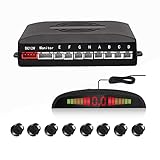
- 【High Quality Parking Radar】This Car Parking Radar System consists of 8 Ultrasonic sensors, digital control box, and LED display, making the job of parking any vehicle much easier.
- 【Intuitive Display】This parking radar not only makes beep sound warning, but aslo shows you distance data. Beep sound warning will be more frequent when distance is getting closer. Prevent future dangerous and costly collisions.
- 【Easy to Install】Easy to install, with full detailed English manual. Perfectly fit your car with universal hole saw. With a drill head, convenient to drill hole on the bumper of the car. The sensors cable length: Front sensors cable: 6m/20ft; Reversing sensors cable: 2.3m/7.5ft.
- 【Multi Color to Select】Multi Color to Select (Black/Red/Grey/White/Fiat Red/Champagne Gold/Blue/Silver). 8 Weather Proof Sensors + LED Distance Display.
- 【Warranty Period】High Quality and 3 Year Warranty
Set prices and availability
The described controls let owners choose hourly or per-slot pricing and set separate rates for cars and two-wheelers. These are features described in the article; it does not establish what rates owners can realistically charge or whether bookings are available in a specific area.
How arrival and the owner dashboard are described
QR check-in
At arrival, the driver presents a QR code for the owner to scan using a phone. The article says the scan confirms the driver’s identity, vehicle number, and booked time. It does not document independent testing of this flow or explain what happens if a phone, QR code, or network connection is unavailable.
Rank #2

- When the product is working, the sensor emits ultrasonic waves. When encountering an obstacle, the ultrasonic waves are reflected. The sensor receives the reflected signal and transmits it to the control box. Through calculation, the control box obtains the distance between the vehicle and the obstacle, and reminds the driver to pay attention through the display and sound, etc., to avoid danger. It is a good helper for us to drive the car!
- 1: When reversing, activate the rear 4 sensors and the front 2 sensors to detect and alarm. During normal driving, when braking, the 4 sensors in front of the car are activated to assist the driver to safely pass through narrow passages. When you release the brake, the parking sensor will work for about 15 seconds before stopping.
- 2: The product alerts the driver through sound, numbers, and light bars at the same time.
- 3: Probe behind the car to prevent collision, probe in front of the car to prevent rubbing.
- 4: On the display, there are 8 light bars representing each sensor, allowing the driver to distinguish the orientation of obstacles.
Booking and earnings views
The described booking view displays the booking price, ParkEase fee, and owner earnings. An owner view also summarizes daily and weekly earnings. No fee percentage, payout schedule, or actual booking results are provided, so the screens should not be read as evidence of a particular net income.
What the article does not establish
- Current launch and coverage: The article describes an upcoming Android launch, but does not confirm present availability or name operating cities.
- Driver-side map: The author says the driver map was still being worked on; during development it appeared blank. The walkthrough therefore does not establish a functioning driver search experience.
- Income and payments: No substantiated income estimate, fee amount, payout terms, or booking history is given.
- Permission and protection: The article does not address local permissions, lease or building rules, taxes, or insurance. Owners would need to check the rules and coverage that apply to their own space before offering it.
What to check before considering a listing
If ParkEase is available where you live, confirm the details directly before relying on the proposed workflow:
The Tool Desk
Outbyte PC Repair FREEClear out junk files and repair common Windows errorsFree Scan →Outbyte Driver Updater FREEFix the driver behind crashes, sound loss and screen glitchesFind Drivers →Rank #3

- Automatically detects obstacles behind the car when reversing, automatically turns on and on.
- Verify that the Android app or marketplace is currently live and accepts listings in your city.
- Ask what listing approval requires and whether the space type, access hours, and vehicle capacity are eligible.
- Confirm the platform fee, payout timing, cancellation and dispute rules, and how earnings are calculated.
- Check your lease, building or local requirements, and insurance terms before renting out the space.
- Test how check-in works if a QR scan cannot be completed, and how a driver finds the space if the map is unavailable.
Source
Onkar Deokate’s ParkEase walkthrough on DEV Community describes the owner-side app and its intended marketplace workflow. Its statements about features and launch timing are the author’s descriptions, not independently verified service status.
Quick Recap
Best Value

- [New Wider Angle Upgrade] This updated product from Fosmon is perfect for a one or two car garage. The angle of the two lasers is widened up to 75 degrees, which can safely and efficiently assist two cars.
- [Park Correctly and Easily Every Time] Do you have trouble about parking in a garage? Are you often too close to the side, too far forward, or too far back? Fosmon's dual laser parking assistant will allow you to park in the correct spot every time. With its simple installation and setup, the garage parking aid will be ready to use in minutes. No more busted bumpers and doors.
- [Motion Activated Laser] The motion activated lasers have a detection range of 33 feet/10 meters, and will shut off after 30 seconds without motion.
- [Provides Individual Laser Control] The garage parking aid allows for individual laser control for use with one parking stall or two. Simply toggle the button located on the side of the unit to switch between one or two lasers. The lasers have a 360-degree adjustment, ensuring that no matter the vehicle or parking spot size, the laser will be able to hit the mark each and every time.
- [Battery Backup and Motion Activated] Even if the power goes out, the dual laser garage parking aid can use a 9v powered battery backup. NOTE: Battery not included.
Rank #4

- Automatically detects obstacles behind the car when reversing, automatically turns on and on.
Product prices and availability are accurate as of the date/time indicated and are subject to change. Any price and availability information displayed on Amazon at the time of purchase will apply.

