
Do these 3 things before closing this tab:
1Clear out junk files and repair common Windows errors2Fix the driver behind crashes, sound loss and screen glitches3Repair Windows errors before they cause bigger problemsRepeated buffering means the radio is not receiving stream data steadily enough to keep playing; it does not, by itself, show that the radio is faulty. The cause could be weak Wi-Fi where the radio sits, competing use of your internet connection, a problem with one station’s stream, or the radio or its station service. Compare stations, devices, and locations before buying network equipment.
What buffering means—and what it does not tell you
A player stores some incoming audio data in a buffer so brief interruptions do not immediately stop playback. If data arrives too slowly, or the connection drops, the player may pause while it collects enough data to continue. That makes buffering a symptom, not a diagnosis. Infomaniak explains the role of buffer and latency; an internet-radio manual also lists connection problems among possible causes of a stream that will not play reliably. The manual’s troubleshooting guidance applies to its own product, so consult your radio’s manual for model-specific advice.
The radio’s small size does not establish why it buffers. The useful clues are whether other stations or devices are affected, whether playback improves closer to the router, and whether other people or devices are using the connection. Buffalo Toronto Public Media recommends checking another stream and the connection, while Teufel identifies placement and barriers as factors in wireless stability.
Diagnose the cause with a short comparison
- Try another station on the radio. If other stations play normally but one keeps stopping, the issue may be specific to that station or the radio’s service for accessing it. If all stations buffer, continue with the network checks.
- Try the affected station on another device, if available. If it buffers there too, that points away from a fault unique to the radio, although it does not prove the station is at fault: both devices still use the same home connection. If the station works elsewhere but not on the radio, consult the radio maker’s guidance and manual.
- Pause heavy network use for a comparison. Temporarily stop large downloads or other bandwidth-intensive activity, then listen again. A shared connection can struggle when available bandwidth is limited or varies with demand. Infomaniak notes that streaming needs sufficient bandwidth and some margin, and that connection use can affect streaming quality. Its guidance also recommends checking behavior at different times; a single speed test is only a snapshot, not a definitive diagnosis.
- Move the radio closer to the router temporarily. Leave it there long enough to compare playback. If interruptions ease near the router, weak Wi-Fi coverage or obstacles between the router and radio become more plausible. Where practical, reduce barriers or try a different position.
- Check whether other devices and services are affected. If multiple devices struggle with different online services, the problem is more likely to involve the home network or broadband connection than one station. If other devices work and the radio alone continues to buffer, the radio or its connection to the station service deserves closer attention.
These checks are comparisons, not proofs: a station issue and a weak shared connection can sometimes produce similar symptoms. Their value is in narrowing the next step without changing settings or buying equipment prematurely.
Free tools Windows power users keep installed
One-click scans. No signup required.
#1 Best Overall

- Listen to Thousands of Radio Stations from Around the World With Clear Reception - More than 25,000+ internet radio stations categorized by Location, Genre and Most Popular. Discover radio shows you love. Thousands of free rock, jazz, news and talk shows to choose from! All you need is a WiFi internet connection. Add your own favorite stations by submitting a valid URL to Skytune.
- Bluetooth receiving included so that you can send audio from a smartphone or tablet to the CC WiFi 3 Internet Radio. A 5dBi external antenna is included for best 2.4 Ghz Wi-Fi reception and distance within your home.
- Great Audio With Full Voice Clarity – Includes a line-out which can be used for remarkable results with an amplified speaker system or any AM, FM stereo receiver for superior audio. An adjustable equalizer (Line Out and Headphone) for advanced users centered at 105, 300, 850, 2400 and 6800 Hz plus an adjustable 3D setting for depth. Settings can be adjusted to your ear.
- Great Bedside Radio – It’s small and easy to use. Comes with a clock, dual alarm, sleep timer (15, 30, 45, 60, 120, 150, and 180 minutes) and stereo headphone jack. The included large sized remote control gives you quick access to preset stations. Presets: first 10 presets using the remote buttons, 100+ in sequence list.
- Additional Features – Adjustable Backlight, 5-volt AC adapter and USB to radio power cord included. Weight: 1 lbs. 2.6 oz. Size: 6.5” W x 3.9” H x 3.9” D. 2 Year limited warranty. U.S. based tech support.
Choose the fix that matches the evidence
| What you observe | Most useful next step | What the step can address |
|---|---|---|
| Only one station buffers, including on another device | Check the station or streaming service’s status or contact its support. | A station-specific stream or service problem; an extender will not repair an outage. |
| Several devices and services are slow or interrupted | Reduce competing use, restart the router if the connection is broadly slower than usual, and contact your internet provider if the problem continues. | Shared network use or a broadband/router problem. |
| The radio plays more reliably nearer the router | Improve coverage at the radio’s normal location, if possible. | Weak Wi-Fi at that location. |
| Other devices work, but this radio still buffers across stations | Consult the radio’s maker and model manual or support service. | A radio-specific connection, service, or device issue. |
Buffalo Toronto Public Media recommends restarting the device or router when a connection is slower than usual. Restart steps vary by model, so use the relevant manuals; do not assume a factory reset is necessary. If the broadband line has errors or disconnections, the internet-radio manual advises contacting the broadband supplier. Consult its troubleshooting guidance alongside your own model’s documentation.
When an extender or access point is worth considering
Consider a Wi-Fi range extender or access point only when the radio works better near the router, coverage at its usual location appears to be the problem, and moving the router or radio is impractical. Teufel describes repeaters as a way to extend signal coverage and discusses access points in a streaming setup. Its RADIO 3SIXTY guidance is specific to that product; before choosing any network equipment, check that your radio supports the proposed setup and consult its documented Wi-Fi requirements.
Rank #2

- All-in-One Internet Radio Component: Seamlessly access thousands of global stations via Wi-Fi or LAN, using Skytune, enjoy Podcasts, local FM radio, and stream music from your phone via Bluetooth (Requires external speakers or amplifier—no built-in speaker driver).
- HiFi Integration Ready: Easily connect to your home audio system with stereo line-out or optical output. No built-in speaker—designed as a pure tuner for audiophiles who want flexibility, or if you already have an amplifier or stereo systems to connect with.
- Smart Streaming & Playlist Control: Supports UPnP and DLNA for streaming music from networked PCs or NAS drives. Create and manage playlists or stream directly from your home server.
- Enhanced User Control: Comes with a full-function remote control and 3.2" color screen. Browse stations, set sleep timers, alarms, EQ sound modes, and manage your favorites. Option to display a clock while playing with adjustable dimmer settings.
- Multiple Playback Modes & Alarms: Supports alarm via favorite station, FM, or tone. Sleep timer, kitchen timer, podcast playback with resume function, and remote web control via Skytune website.
- An extender may help with poor coverage between the router and radio.
- It will not fix a station outage, congestion on the broadband line, a provider or router fault, or a defective radio.
- No particular extender or access-point model is established as compatible with every internet radio.
Buffer settings: a limited workaround
Some players provide a setting that waits longer before playback begins. TuneIn, for example, documents a “Buffer Before Play” option in its own settings. TuneIn’s instructions apply to TuneIn; other radios may not offer the setting. A longer initial buffer can help absorb short interruptions, but it cannot repair an unstable connection or a station problem.
Quick Recap
Best Value

- Internet wireless Wi-Fi radio: simply connect the radio to your internet network to access an extensive number of world’s radio channels, powerful and stereo output with rich sound.
- FM radio: Ordinary FM band without internet access. Can display radio texts if available.
- Bluetooth & UPnP/ DLNA Compatible: Play your preferred music or podcast using Bluetooth (such as Spotify or other audio streaming services) or UPnP/DLNA compatible device, also support Micro SD card.
- Personalize your favourite list up to 99 presets: Easy to manage favourites from FM and Internet radio in ONE list via 3 quick preset or remote control. Free to add new audio stream URL.
- Option to display the time when radio is playing, the backlight is adjustable, can be totally off / Multi-languages menu display / Remote control.
Rank #4
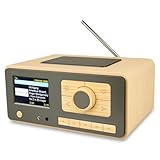
- UNLIMITED GLOBAL ENTERTAINMENT: Connect via WiFi (2.4GHz) to access thousands of radio stations and podcasts worldwide through Skytune. Easily search by region, genre, or talk show. Set you favorite region in Local Radio so that you can always access the internet radio station available in your local area with one click. Also supports standard FM reception with a telescopic antenna for offline listening.
- ADVANCED CONNECTIVITY & BLUETOOTH: Equipped with the latest Bluetooth V5.3 technology, this radio doubles as a high-quality wireless speaker, allowing you to stream music directly from your smartphone or tablet. It also supports UPnP/DLNA, letting you browse and stream audio files stored on your PC or network-connected devices. Features an external WiFi antenna socket for superior signal stability.
- STUNNING 3.5" COLOR DISPLAY & EASY CONTROL with BIG BUTTONS: Features a large, clear 3.5-inch color screen that displays station logos, song artist/title, and a big clock. Designed for ease of use with dual navigation knobs and 5 dedicated preset keys on the front panel for one-touch access to your favorite stations. Full-function remote control included.
- PERSONALIZED FAVORITES & WEB MANAGEMENT: Store up to 150 favorite stations in your "My Favorite" list. You can organize stations into custom categories (e.g., "Morning Mix," "My Jazz"). For power users, the radio supports web browser control via PC or smartphone to easily manage favorites, add custom URLs, and tune stations remotely.
- DUAL ALARM & SLEEP TIMER: Perfect for the bedroom or kitchen. Set two separate alarms with options to wake up to a Tone, My Favorite station, or FM Radio. Includes a Snooze function , a Sleep Timer (up to 180 mins) to fall asleep to music , and a dedicated Kitchen Timer for cooking countdowns.
Rank #3

- 𝗧𝗿𝘂𝗹𝘆 𝗔𝗺𝗮𝘇𝗶𝗻𝗴 𝗜𝗻𝘁𝗲𝗿𝗻𝗲𝘁 𝗥𝗮𝗱𝗶𝗼 𝘄𝗶𝘁𝗵 𝗙𝗠 & 𝗙𝘂𝗹𝗹𝘆 𝗣𝗼𝗿𝘁𝗮𝗯𝗹𝗲: Your access to the ultimate Global Radio experience, with WIFI enabled Internet Radio, access tens of thousands of global digital radio stations. Find your favourite national and local FM radio. Use Bluetooth mode to stream from your phone, ideal for your podcast and music apps. PLUS exclusive to Lemega for Internet Radio, the radio is fully portable to listen outside!
- 𝗣𝗼𝗿𝘁𝗮𝗯𝗹𝗲 𝟭𝟮𝗵𝗿 𝗣𝗹𝗮𝘆𝘁𝗶𝗺𝗲 & 𝗠𝗮𝗶𝗻𝘀 𝗣𝗼𝘄𝗲𝗿: Use the radio anywhere with 4 x AA batteries, long life 12hr playtime, fully portable as a garden radio. Use in your home as a kitchen radio, bedside radio in living room with the included mains power plug, extra long lead for any location.
- 𝗕𝗹𝘂𝗲𝘁𝗼𝗼𝘁𝗵, 𝗣𝗼𝗱𝗰𝗮𝘀𝘁 𝗣𝗹𝗮𝘆𝗲𝗿, 𝗢𝗞𝗧𝗜𝗩 𝗔𝗽𝗽 𝗖𝗼𝗻𝘁𝗿𝗼𝗹: Connect your phone and other devices via Bluetooth to stream and play your favourite playlists & music apps. Use the Podcast Player to catch up with your favourite shows, with clever bookmark and follow features so you never miss an episode. Play ALL features through the exclusive OKTIV App to wireless control all settings, change modes, access presets, music library & more!
- 𝗙𝘂𝗹𝗹 𝗖𝗼𝗹𝗼𝘂𝗿 𝗗𝗶𝘀𝗽𝗹𝗮𝘆, 𝟰𝟬 𝗣𝗿𝗲𝘀𝗲𝘁𝘀, 𝗛𝗲𝗮𝗱𝗽𝗵𝗼𝗻𝗲 𝗝𝗮𝗰𝗸: Advanced features to elevate your experience, full colour 2.4" display shows full radio station, artist artworks and music playback information. HUGE 40 preset modes available to save radio stations & podcast episodes for quick access. Headphone Jack to plug in your headphones for private listening.
- 【𝗔𝗱𝗱𝗮𝗯𝗹𝗲 𝗜𝗻𝘁𝗲𝗿𝗻𝗲𝘁 𝗥𝗮𝗱𝗶𝗼 𝗦𝘁𝗮𝘁𝗶𝗼𝗻𝘀】: 𝗬𝗼𝘂 𝗰𝗮𝗻 𝗮𝗱𝗱 𝘆𝗼𝘂𝗿 𝗳𝗮𝘃𝗼𝗿𝗶𝘁𝗲 𝗿𝗮𝗱𝗶𝗼 𝘀𝘁𝗮𝘁𝗶𝗼𝗻𝘀 𝗯𝘆 𝗲𝗻𝘁𝗲𝗿𝗶𝗻𝗴 𝗮 𝘃𝗮𝗹𝗶𝗱 𝗨𝗥𝗟 𝗱𝗶𝗿𝗲𝗰𝘁𝗹𝘆 𝘃𝗶𝗮 𝗿𝗮𝗱𝗶𝗼 𝗜𝗣 𝗮𝗱𝗱𝗿𝗲𝘀𝘀.
Product prices and availability are accurate as of the date/time indicated and are subject to change. Any price and availability information displayed on Amazon at the time of purchase will apply.
Quick wins for a faster PC:
Clear out junk files and repair common Windows errorsFree Scan →Scan for outdated or missing drivers - takes under a minuteDriver Scan →Repair Windows errors before they cause bigger problemsFix Now →
