
First identify what “won’t boot” means: does the PC show no response when you press its power button, do fans and lights come on but the monitor stays blank, or does the graphics card show a power-warning light? Those symptoms point to different checks. Shut the PC down and unplug it before touching internal components; then work through the relevant steps below.
Start with safe checks
Turn off the computer and disconnect its AC power before reseating a graphics card or its power cable. Do not connect or disconnect internal GPU power leads while the system is running. Check the card’s power sockets and cable ends for visible damage, debris, or anything blocking the connection. If you see damage, stop and contact the hardware maker or a qualified repair service rather than trying to power the system repeatedly.
Confirm the cable is the right type and fully seated
Check the labels and the manuals for both the graphics card and power supply (PSU). A typical 8-pin GPU socket accepts a PCIe 6+2-pin plug; it is not the same as the 8-pin EPS12V CPU power connector. CORSAIR explains the difference in its PCIe versus EPS12V cable guide. Never force a connector into a socket.
At the card end, press the correct connector in until it is fully seated and its latch engages. If the card uses a bundled adapter, connect every required input as directed in the graphics-card manual. With a modular PSU, use only a cable approved for that exact PSU model: a plug fitting physically does not establish that its wiring is compatible.
#1 Best Overall

- Compatibility Warning: This male-to-male 8-pin PSU to 6+2-pin PCIe/GPU cable is compatible with Corsair Type 3, Type 4, and select other PSUs with matching pinouts. It’s NOT compatible with EVGA PSU, Corsair RM850X Shift series, or other PSUs with different pinouts. Modular 8-pin layouts vary by brand/series—physical fit ≠ electrical match. Always verify your PSU’s 8-pin connector shape and pinout diagram before purchase. Using an incompatible cable may cause power failure or hardware damage
- Reliable Power Solution: Connect an 8-pin (EPS/ATX) male PSU connector directly to a 6-pin or 8-pin PCIe/GPU slot on your motherboard or graphics card. The cable effectively converts EPS power to PCIe power for secure and efficient delivery. Ideal for setups requiring additional power-routing flexibility while preventing power-related system issues. Note: Pin 4 on the PSU side is intentionally unused, and Pin 5 on the GPU side is double-wired to ensure stable 12V output.
- Graphics Card Compatibility: Perfect for powering high-performance graphics cards, this cable features a 6+2 pin PCIe connector that can be used with both 8 pin and 6 pin GPU interfaces, making it a versatile solution for varying power requirements.
- Easy Installation: With a 2ft length, this cable offers ample reach to accommodate different system configurations without creating excess clutter. Its plug-and-play design ensures a hassle-free setup, helping you get your system up and running in no time.
- Robust Construction: Crafted with a braided cable sleeve and heat-shrink tubing, this power extension/conversion cord offers superior durability and protection. The robust build ensures a secure and stable connection that withstands wear and thermal stress, making it ideal for high-performance computing environments.
Check whether the PSU and cable arrangement meet the card’s requirements
Look up the graphics card maker’s PSU recommendation and required power connectors, then compare them with your PSU’s capacity and available connections. ASUS includes verifying PSU capacity against the card’s recommendation in its graphics-card no-display troubleshooting steps.
If the card’s power-warning indicator remains lit after you reseat the cable, ASUS recommends trying a replacement cable and, if needed, a PSU that meets the card’s power requirements in its GPU power-indicator guidance. Any replacement modular cable must be approved for your exact PSU model. AMD’s stability guidance recommends seating a discrete graphics card in the primary PCIe slot and connecting it directly to the PSU with independent cables; follow your card and PSU makers’ instructions for the required cable arrangement rather than assuming that advice applies to every adapter or setup. See AMD’s system-stability troubleshooting guidance.
Rank #2
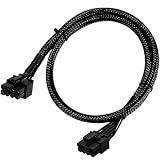
- Compatible with EVGA Modular PSU Only Designed for EVGA modular power supplies with PCIe/VGA ports. Not compatible with Corsair or other brands due to different pin configurations. Please verify your PSU model before purchase.
- 8 Pin to 6+2 Pin PCIe GPU Cable Connects an 8 pin PSU PCIe port to a 6+2 pin graphics card connector, supporting GPUs requiring 6-pin or 8-pin PCIe power connections.
- 18AWG Copper Wire for Stable Power Built with 18AWG tinned copper wire to provide reliable power delivery and stable performance for compatible graphics cards.
- 65cm Sleeved Cable for Better Cable Management The 65cm braided sleeved design provides flexible routing inside PC cases while improving appearance and durability.
- Important Safety Check Before Installation Use only with EVGA PCIe/VGA ports. Do not connect to CPU/EPS or motherboard ports. Incorrect cable use may damage your hardware.
If the PC turns on but there is no picture
Fans and lights with a blank monitor are different from a PC that does not power on. Check the display path first, then the card installation:
- Confirm the monitor is on, set to the correct input, and connected to an output on the graphics card you intend to use.
- Shut down and unplug the PC, then check that the graphics card is fully seated in its PCIe slot and that the slot has no visible dust or foreign objects.
- If your motherboard supports another PCIe slot, try it as a diagnostic check. If the system has integrated graphics, try connecting the monitor to the motherboard output to see whether the PC can display without the discrete card.
These checks can help isolate the problem, but no single result proves that the graphics card is defective. ASUS lists monitor connections, card seating, slot checks, and integrated graphics among its no-display troubleshooting steps.
Do these 3 things before closing this tab:
1Scan for outdated or missing drivers - takes under a minute2Clear out junk files and repair common Windows errors3Fix the driver behind crashes, sound loss and screen glitchesRank #3

- 『CPU 8P - Dual PCIe 8P』CPU 8 pin male end to plug into the NVIDIA graphics card, dual PCIe 8 pin female ends to plug into the 8 pin(6+2) connector of power supply;
- 『Compatibility』Compatible with Tesla K80/M40/M60/P40/P100, 170hx nvidia cmp other NVIDIA graphics card with CPU 8 pin port, etc.;
- 『Note』The 8 pin male end is CPU 8 pin, not pci-e 8 pin, which was only designed for NVIDIA graphics card with CPU 8 pin port. If you connect it with other incompatible devices, it will definitely burn or damage the motherboards, PSUs or graphics cards and we won’t take any responsibility for wrongly using or installing. Please carefully check the compatible types or contact us if you are not sure about it;
- 『Parameter』Length(including connectors): 4-inch(10cm), Gauge: 1007-16AWG(standard tin-coating copper wire), Maximum power: 600W, Quantity:2pcs, Self-adhesive tape*1pcs;
For cards with 12VHPWR or 12V-2×6 power
Use this check only if your card has one of these 16-pin connectors. ASUS advises confirming that the plug is fully inserted, with no visible gap between the plug and socket, and that the PSU has sufficient wattage for the GPU model. Follow the graphics-card and PSU manuals for any included adapter and cable routing; do not assume that instructions for a 6+2-pin PCIe plug apply to a 16-pin connection. See ASUS’s GPU power-indicator guidance.
Independent reader supportYour contribution helps us test, update, and keep practical guides available for everyone.When to stop and get help
Stop troubleshooting and contact the GPU or PSU manufacturer, or a qualified repair service, if the system shuts off immediately, a connector is visibly damaged, or a power warning persists after testing a compatible cable and a PSU that meets the GPU’s requirements. Do not open the PSU or probe energized connectors. If you have not established that the cable is compatible or the PSU meets the card’s requirements, resolve those uncertainties before further attempts to power on.
Quick Recap
Rank #4

- 『CPU 8P - Dual PCIe 8P』CPU 8 pin male end to plug into the NVIDIA graphics card, dual PCIe 8 pin female ends to plug into the 8 pin(6+2) connector of power supply;
- 『Compatibility』Compatible with Tesla K80/M40/M60/P40/P100, 170hx nvidia cmp other NVIDIA graphics card with CPU 8 pin port, etc.;
- 『Note』The 8 pin male end is CPU 8 pin, not pci-e 8 pin, which was only designed for NVIDIA graphics card with CPU 8 pin port. If you connect it with other incompatible devices, it will definitely burn or damage the motherboards, PSUs or graphics cards and we won’t take any responsibility for wrongly using or installing. Please carefully check the compatible types or contact us if you are not sure about it;
- 『Parameter』Length(including connectors): 4.8-inch(12.2cm), Gauge: 16AWG(standard tin-coating copper wire)with braided sleeves for easy cable management, Maximum power: 600W, Quantity:2pcs, Self-adhesive tape*1pcs;
Product prices and availability are accurate as of the date/time indicated and are subject to change. Any price and availability information displayed on Amazon at the time of purchase will apply.

