
Quick wins for a faster PC:
Scan for outdated or missing drivers - takes under a minuteDriver Scan →Repair Windows errors before they cause bigger problemsFix Now →iTechGuides is reader-supported. When you buy through links on our site, we may earn an affiliate commission. As an Amazon Associate I earn from qualifying purchases. Learn more
Boost Mobile now operates as a hybrid carrier. Its customer accounts, service controls and cloud-native 5G core are Boost-controlled, while the physical towers and radio access network come from partner carriers. Boost identifies AT&T as part of its Hybrid MNO service and also names T-Mobile as a partner, so a Boost phone may connect through either network depending on location, device compatibility, signal and available capacity. Boost moved away from operating its own physical network in late 2025 and says its native 5G network has been decommissioned.
What network does Boost Mobile run on?
Boost Mobile does not use one nationwide set of Boost-owned towers. As of October 18, 2026, it combines Boost-managed network functions with partner radio networks. In practical terms, the phone connects to a nearby AT&T or T-Mobile site, while Boost remains responsible for the account, core-network services, authentication and service policies.
Boost’s September 2026 explanation says the company transitioned away from operating its own physical network in late 2025. Its coverage-map information likewise says the native 5G network was decommissioned and that Boost now uses a major partner’s physical towers. The result is different from both a traditional facilities-based carrier and a simple reseller: Boost controls important parts of the service, but the antennas transmitting the signal generally belong to a partner.
AT&T and T-Mobile are both part of the answer
Boost’s Open Internet Transparency disclosure identifies AT&T as part of its Hybrid MNO service and states that partnerships with AT&T and T-Mobile mean a user’s experience could be powered by either partner. Therefore, asking whether Boost “uses AT&T or T-Mobile” has no single nationwide answer. The partner can vary with the address, available spectrum, the phone’s supported bands and current network conditions.
Popular on Amazon
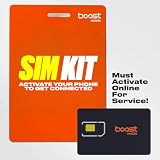
- COMPATIBILITY REMINDER: Check our User Guide for a list of compatible phones. The SIM Kit supports 4G and above phones (US versions only, manufactured after 2022) and is not compatible with other devices. For more details, call Boost Mobile Customer Support at 833-426-6782.
- HOW DOES IT WORK: The SIM Kit includes a 3-in-1 SIM card (standard, micro, and nano sizes) and supports eSIM activation on select devices. Activation is required to begin Boost Mobile service.
- THE BEST PART: You’re on a network with 99% nationwide coverage—stream, scroll, and surf with reliable service. To ensure the best experience, we may move you to a different Boost-supported network based on your location and device compatibility.
- EASY ACTIVATION: You bet. Bring your own unlocked phone, keep your current number (or get a new one) and activate online. Use the ICCID number on the SIM card delivered to you for both Physical SIM and eSIM activations. For more details, call Boost Mobile Customer Support at 833-426-6782.
- ANYTHING ELSE: Customize your plan after activation with all the extras that fit your lifestyle. From Data Hotspot to extra High-Speed Data — see our Amazon storefront for the full list of Add-Ons!
A Boost subscriber does not normally select a carrier manually for each trip. The device and network determine which permitted partner site and frequency band can serve it. A phone can therefore show different network behavior in different neighborhoods, on a road trip or inside and outside the same building.
What Boost controls versus what partners provide
| Network function | Who supplies or controls it | What that means for you |
|---|---|---|
| Customer account and billing relationship | Boost Mobile | Your plan, line, account support and service terms are handled as Boost services. |
| Cloud-native 5G core | Boost Mobile | Core functions such as authentication and routing are part of Boost’s controlled platform. |
| Radio access network (RAN) | Partner networks, including AT&T and T-Mobile | The partner’s towers, radios, spectrum and local engineering affect the signal available at your location. |
| Cell-site selection and handoff | RAN partners, coordinated with Boost service systems | Your phone can move between sites or partner technologies as you move or conditions change. |
| Plan-level traffic policies | Boost and its network partners | Congestion controls, quality-of-service rules and any plan threshold can affect speeds. |
This division explains why Boost coverage can be broad without Boost owning every tower, and why coverage maps, device bands and congestion rules matter as much as the brand name on the bill.
How a Boost phone connects and stays connected
The radio access network performs several decisions continuously. Boost’s disclosure says partner networks identify permitted devices and locations, assign a device to an available frequency band and cell site, and control handoffs between neighboring sites. As you move, the phone measures nearby signals and the network decides whether to keep the current connection, reseat it on another band or transfer it to another site.
Band and site selection
A compatible phone may support multiple low-, mid- and high-band frequencies. The network chooses among those bands based on coverage, signal quality, capacity and device permissions. A lower-frequency signal often travels farther and penetrates walls better; a higher-capacity band can deliver faster data when you are close enough to the site. The exact combination depends on the partner network serving that location and the bands enabled in your phone model.
Handoffs while you move
When you drive or walk between cells, the network can hand the session to a neighboring site without requiring you to restart an app. Boost’s technical requirements describe 5G standalone mobility, transitions involving 4G and 5G roaming partners, movement within the company’s own systems and N26-based handover with T-Mobile LTE. These technical paths allow a device to remain usable when the best radio technology changes, although a brief interruption can still occur in weak-signal areas or at coverage boundaries.
Why the network name can change
The partner shown in a phone’s settings or field-test screen is not guaranteed to be the same everywhere. Location, signal, spectrum, roaming permissions and local availability can change the serving network. Seeing an AT&T or T-Mobile identifier is therefore consistent with Boost’s hybrid model rather than proof that your entire service is permanently assigned to one carrier.
Does Boost have its own towers?
Boost no longer presents its former native 5G network as the physical coverage layer. Its current public descriptions say the native network was decommissioned and that service uses a major partner’s towers. Boost still operates network infrastructure in the form of its cloud-native core and service systems, but that is not the same as owning a nationwide set of radio sites.
The Tool Desk
Outbyte PC Repair FREEClear out junk files and repair common Windows errorsFree Scan →Outbyte Driver Updater FREEFix the driver behind crashes, sound loss and screen glitchesFind Drivers →Also popular on Amazon
- COMPATIBILITY REMINDER: Check our User Guide for a list of compatible phones. The SIM Kit supports 4G and above phones (US versions only, manufactured after 2022) and is not compatible with other devices. For more details, call Boost Mobile Customer Support at 833-426-6782.
- HOW DOES IT WORK: The SIM Kit includes a 3-in-1 SIM card (standard, micro, and nano sizes) and supports eSIM activation on select devices. Activation is required to begin Boost Mobile service.
- THE BEST PART: You’re on a network with 99% nationwide coverage—stream, scroll, and surf with reliable service. To ensure the best experience, we may move you to a different Boost-supported network based on your location and device compatibility.
- EASY ACTIVATION: You bet. Bring your own unlocked phone, keep your current number (or get a new one) and activate online. Use the ICCID number on the SIM card delivered to you for both Physical SIM and eSIM activations. For more details, call Boost Mobile Customer Support at 833-426-6782.
- ANYTHING ELSE: Customize your plan after activation with all the extras that fit your lifestyle. From Data Hotspot to extra High-Speed Data — see our Amazon storefront for the full list of Add-Ons!
This distinction matters when interpreting coverage claims. In a 2025 Auction 113 order, the Federal Communications Commission said EchoStar’s public 99% coverage claim was based in part on nationwide networks from wholesale providers such as AT&T and T-Mobile. The FCC did not classify EchoStar as a nationwide provider. The 99% figure should therefore not be read as 99% coverage from one Boost-owned tower network or as a guarantee that every Boost plan and device works in every location.
How to check whether Boost will work at your address
Use the exact service address rather than relying on a national percentage. The map is a starting point, not a promise of indoor performance.
- Open Boost’s coverage map. Enter your street address or ZIP code, not just a city name.
- Read the map layer and legend. Check whether the location is shown for 5G, LTE or another available service category.
- Check the places you actually use the phone. Search your home, workplace, school, regular commute, rural property and frequently visited travel routes.
- Confirm the phone model and bands. Boost requires a compatible device for 5G. Verify the exact model, supported 5G bands and whether it accepts the required SIM or eSIM configuration before activating.
- Ask about indoor and high-traffic conditions. A map prediction is generally for outdoor conditions under ideal assumptions. Concrete, metal, low-E windows, basements, hills and tree cover can make indoor service materially weaker.
- Test before moving every line. If possible, use a compatible line at the address during busy hours and in the rooms where calls and data matter most.
Boost’s map disclaimer says it shows approximate outdoor coverage under ideal conditions and does not guarantee service availability or quality. Terrain, weather, foliage, buildings, construction, signal strength, high-use periods and customer equipment can all change the result.
What speeds can Boost 5G deliver?
Boost’s current Open Internet Transparency disclosure estimates average 5G performance in these ranges:
| Metric | Boost’s estimated average range | How to interpret it |
|---|---|---|
| Download | 75–338 Mbps | A broad estimate, not a guaranteed speed at an individual address. |
| Upload | 4–27 Mbps | Upload performance can vary sharply with band, signal and local capacity. |
| Latency | 34–57 ms | Lower latency generally feels better for interactive tasks, but the range is still location-dependent. |
Boost says these figures are estimates drawn from its measurements, partner disclosures and third-party data. They are not a promise for every phone, plan, cell site or time of day. A compatible 5G handset is required to receive 5G speeds; an older LTE-only device will not produce the 5G estimates even where the map shows 5G.
Why your Boost speed may fall during busy periods
Coverage and capacity are separate questions. A location can have a strong signal yet slow data when many subscribers share the available radio resources. Boost says congestion-management software and partner radio scheduling allocate resources using signal quality, user count and other metrics.
Some unlimited plans may also apply plan-specific quality-of-service deprioritization or speed reductions after a defined threshold for the remainder of a billing cycle. The exact threshold and treatment depend on the plan terms in effect when you subscribe. Before comparing plans, look for the premium-data allowance, the point at which management begins and whether the terms describe reduced priority, a speed cap or another limitation.
Also popular on Amazon

- $50 Re-Boost Card
- Works with Boost Mobile phone
- Add money to your account
Is Boost coverage the same as AT&T or T-Mobile?
It can overlap substantially in places where a Boost line is being served by one of those partners, but “the same coverage” is too broad. Boost’s access is governed by its agreements, device permissions, supported bands, roaming design and plan rules. Two phones standing in the same place can also perform differently if one supports more of the partner’s bands or has a better antenna design.
Compare a Boost line with another carrier on the factors that determine the experience at your addresses:
- Exact-location coverage: Check home, work and travel routes rather than national maps alone.
- Indoor and rural reach: Low-band availability, terrain and building materials often matter more than the carrier logo.
- 5G versus LTE: Confirm which technologies your phone and plan can actually use in the area.
- Device compatibility: Verify model-specific bands, SIM or eSIM support and activation eligibility.
- Congestion and quality of service: Read the plan’s priority and threshold language.
- Price and premium data: Compare recurring cost alongside the amount of high-priority or unthrottled data.
Common problems and practical fixes
The map shows coverage, but service is weak indoors
Move near an exterior wall or window and test at different times. Thick walls, metal structures, low-E glass, basements and nearby obstructions can reduce indoor signal even when outdoor coverage is predicted. Wi-Fi calling, if supported by your phone and plan, can help with calls where indoor cellular penetration is the limiting factor.
The phone stays on LTE instead of 5G
Confirm that the exact phone model is 5G-compatible with Boost and that the required 5G bands are supported. Check that 5G is enabled in the phone’s mobile-network settings, install pending carrier or operating-system updates and reseat or re-provision the SIM or eSIM if activation was incomplete. LTE may still be the expected result when the local 5G signal is weak or the network assigns the device to a more reliable band.
Data is fast at night but slow at busy times
That pattern points to capacity or plan-level traffic management rather than a missing coverage footprint. Test several locations, record results at the same times and review your plan’s quality-of-service language. If only one room or one building is affected, the cause is more likely indoor attenuation.
Recommended Free Tools
Service drops while traveling
Check whether the route crosses a coverage boundary or a terrain obstruction. Handoffs between sites and between 4G, 5G and partner systems are designed to maintain service, but weak overlap can produce a short interruption. Download essential navigation or travel information before entering a known low-signal area.
What to verify before buying a Boost phone
- Buy an unlocked 5G smartphone explicitly listed as compatible with Boost, or confirm the exact model number before purchase.
- Check the supported 5G and LTE bands against Boost’s current technical requirements.
- Confirm physical SIM or eSIM support and whether the phone can be activated on the intended plan.
- Use the coverage map for every important address and route.
- Read the plan’s data-priority, congestion and threshold terms.
- Keep return or trial options in mind if indoor coverage has not been tested.
Compatibility is model-specific. Two phones sold under the same family name can have different regional radios, so verify the complete model identifier rather than relying on a retailer’s generic description.
The practical answer
Boost Mobile’s current service is a hybrid arrangement: Boost controls the customer relationship and core-network functions, while partner carriers provide the physical radio coverage. AT&T and T-Mobile are both named in Boost’s disclosures, and the serving partner, band and cell site can change as you move or network conditions change. Coverage maps are approximate outdoor predictions, not guarantees; the phone’s bands, indoor environment, congestion and plan rules determine the experience you actually receive.

