
For 2560×1440 (QHD), dual-link DVI-D reliably supports 60 Hz. Some monitor, GPU and cable combinations can reach about 75 Hz with reduced-blanking or custom timings, but that is not universal. Standard 120 Hz or 144 Hz at 1440p is generally beyond normal dual-link DVI-D capability; use DisplayPort or a suitably specified HDMI connection for those refresh rates.
The practical limit at 2560×1440
| Connection | What to expect at 2560×1440 |
|---|---|
| Single-link DVI-D | Usually not 60 Hz; some displays fall back to 30 Hz or show no image |
| Dual-link DVI-D | 60 Hz is the dependable, broadly compatible mode |
| Dual-link with custom timing | Approximately 75 Hz may work on some systems |
| Dual-link at 120 or 144 Hz | Generally outside normal capability |
| DisplayPort or capable HDMI | Preferred for 120 Hz, 144 Hz and higher |
Here, “1440p” means the PC monitor resolution 2560×1440 (QHD). It does not mean 1920×1440, 3440×1440 ultrawide, or a compressed video signal.
Dell lists dual-link DVI as a QHD-at-60-Hz connection, and Gigabyte’s guidance says 2560×1440 over DVI requires a dual-link connection from both the monitor and cable: Dell cable capabilities and Gigabyte support guidance.
Why 60 Hz is the normal answer
DVI-D transmits pixels using TMDS links. The relevant constraint is the pixel clock, which includes blanking intervals as well as the visible 2560×1440 image. A single-link connection has a practical TMDS clock of about 165 MHz. Dual-link uses two links and is commonly implemented with a limit near 330 MHz, although the DVI 1.0 specification leaves maximum dual-link formats implementation-specific: DVI 1.0 specification.
#1 Best Overall

- 【6 Feet DVI Cable】The DVI cable links dvi-equipped devices (desktop, laptop) to any display with 24+1 pin and 24+5 pin dvi female port. Easy to use.
- 【1080P Full HD】This dvi cable supports video resolutions up to 1920x1200, 1600x1200, and 1080P@60Hz . High-speed digital transmission rate up to 9.9 Gbits/sec. Please Note: DVI cable does not support audio output.
- 【Stable and Safe Transmission】This DVI-D Male to Male cable is combination of gold-plated connectors, bare copper conductors, foil & braid shielding, and integrated dual ferrite cores provides superior cable performance, static-free transmission, and noise suppression.
- 【Broad Compatible】Connects DVI equipped devices to flat panel displays, digital CRT displays, projectors, HDTV, and video projectors, including DFP and LCD types.
- 【24H Service Online】Originated from confidence in the DVI Cable, ensures long-time satisfaction of your purchase, If any problem plase tell us through Amazon.
One documented reduced-blanking 2560×1440-at-60-Hz timing uses about 241.5 MHz: Canon timing table. That fits below the conventional 330-MHz dual-link ceiling, leaving 60 Hz as the mode most manufacturers can support consistently. NVIDIA/PNY documentation also uses approximately 330 MHz as a common dual-link limit: PNY/NVIDIA resolution support.
Can 1440p run at 75 Hz over DVI-D?
Sometimes. If the same general blanking proportions were retained, 75 Hz would require roughly 302 MHz from a 241.5-MHz 60-Hz timing. That can fit under a 330-MHz output on some hardware, especially with reduced blanking.
Whether it works depends on the entire signal chain:
Rank #2
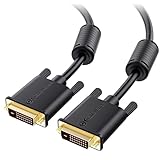
- DVI-D cable connects a DVI (Digital Video Interface) equipped computer to an HD monitor or projector with DVI-D Dual Link for video editing, gaming, or video projection
- Future-proof display configuration at home, in the office or conference room with more bandwidth than Single Link DVI cord. Premium Dual Link DVI cable 144hz capable and supports resolutions up to 2560x1600 including 2560x1440, 1920x1200, and 1080p (Full HD)
- DVI cables engineered with molded strain relief connectors for durability, grip treads for easy plugging and unplugging, and finger-tightened screws for a secure connection
- The combination of gold-plated connectors, bare copper conductors, foil & braid shielding, and integrated dual ferrite cores provides superior cable performance, static-free transmission, and noise suppression
- Supporting up to 2560x1440 (1440p), this highly rated DVI D cable is perfect for bandwidth-hungry gaming applications with Geforce GTX or AMD Radeon HD video cards
- The GPU’s DVI transmitter must allow the required pixel clock.
- The monitor’s DVI input and firmware must accept the timing.
- The cable must be a genuine, electrically sound dual-link DVI-D cable.
- The driver and operating system must expose or permit the mode.
The DVI specification does not promise one universal 75-Hz mode, so treat 75 Hz as a documented or carefully tested exception rather than a standard capability.
Why 120 or 144 Hz usually fails
Pixel-clock requirements rise approximately with refresh rate. Using the 241.5-MHz 1440p/60 reduced-blanking example as a reference:
| Refresh rate | Approximate pixel clock | Meaning |
|---|---|---|
| 60 Hz | 241.5 MHz | Fits conventional dual-link DVI |
| 75 Hz | About 302 MHz | Possible on some combinations |
| 120 Hz | About 483 MHz | Well above the common 330-MHz limit |
| 144 Hz | About 580 MHz | Well above the common 330-MHz limit |
Actual timings vary, so these are explanatory estimates, not universal mode specifications. A documented NVIDIA driver case rejected a 2560×1440/100-Hz mode requiring a 400-MHz pixel clock when the display path reported a 330-MHz maximum: NVIDIA developer forum example. Reports of 80, 85, 96 or 100 Hz generally involve monitor overclocking, custom reduced-blanking timings, modified driver checks, or confusion with 1080p, where DVI can operate at higher refresh rates.
Rank #3
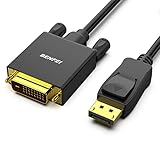
- EXCELLENT TRANSMISSION: Benfei DisplayPort to DVI 1.8 Meter Cable utilizes better chip solution and professional multiple shielding for instaneous and accurate data streaming.
- SUPERIOR STABILITY - Built-in advanced IC chip converts DisplayPort signal to DVI signal; It is NOT a bi-directional converter and cannot transmit signals from DVI to DisplayPort
- INCREDIBLE PERFORMANCE - The DisplayPort male to DVI Male converter supports resolutions up to 1920x1080@60Hz (1080p Full HD) including 720p, 1600x1200, 1280x1024 for high definition monitors or projectors; Gold plated DisplayPort connector resists corrosion and abrasion and improve the signal transmission performance; Molded strain relief increases cable durability
- LATCHES DESIGN: DisplayPort connector with latches provides a secure connection, the latches will improve the connection stability in usage. When plug out, please press the realse button, and easy to pull out.
- 18 MONTH WARRANTY - Exclusive Benfei Unconditional 18-month Warranty ensures long-time protection of your purchase; Friendly and easy-to-reach customer service to solve your problems timely
How to identify a true dual-link setup
Check the monitor specification
Look for an explicit entry such as “DVI-D dual-link” or “2560×1440 at 60 Hz via DVI.” A monitor’s headline refresh rate may apply only to DisplayPort or HDMI. HP’s QHD monitor specifications, for example, list higher refresh modes by interface rather than assuming every connector supports them: HP OMEN QHD specifications.
Inspect the GPU output
Confirm whether the port is dual-link DVI-D, a DVI-I port with digital dual-link capability, or a DVI-shaped connection routed through an adapter. Connector shape alone does not prove that both TMDS links are active.
Verify the cable
Use one explicitly marked dual-link DVI-D, commonly described as 24+1, with the full digital pin population. A 24+1 label is not a performance guarantee: damaged or poorly made cables, single-link ports and unsupported monitor inputs can still limit the result.
Rank #4

- IN THE BOX: (1) 6-foot HDMI to DVI cable adapts an HDMI (input) to a DVI (output)
- DEVICE COMPATIBLE: Works with all HDMI or DVI-D 24+1 equipped devices, also compatible with DVI-I 24+5 equipped devices It cannot support 4K/60 Hz(UHD)
- EASY CONNECTION: Bi-directional cable connects HDMI-equipped devices or connects DVI-equipped devices to HDMI-enabled devices
- DURABLE DESIGN: Gold-plated connectors deliver optimal conductivity; net jacket offers an extra layer of protection
Read the available PC modes
In Windows display settings or your GPU control panel, select 2560×1440 and inspect the refresh rates under the monitor’s PC modes. If 60 Hz is missing, suspect a single-link component, unsupported monitor input or incorrect EDID data before blaming the panel.
Independent reader supportYour contribution helps us test, update, and keep practical guides available for everyone.Adapters, audio and other limits
A passive DVI-to-HDMI cable does not create a second TMDS link. It may behave as a single-link DVI/HDMI connection and lose access to QHD at 60 Hz or higher modes. A DisplayPort-to-dual-link-DVI solution generally requires an active adapter containing conversion electronics. Check that adapter’s power requirement, operating-system compatibility and stated resolution/refresh limit; neither “active” nor “dual-link” alone guarantees 1440p at 144 Hz.
DVI-D is primarily a video interface. Plan on separate audio unless your particular hardware provides an unusual audio implementation; DisplayPort or HDMI is the normal choice for one-cable video and sound.
The Tool Desk
Outbyte Driver Updater FREEScan for outdated or missing drivers - takes under a minuteDriver Scan →Outbyte PC Repair FREEClear out junk files and repair common Windows errorsFree Scan →Best Value

- High performance DVI cable connects a DVI (Digital Video Interface) equipped computer to an HD monitor or projector with DVI-D Dual Link for video editing, gaming, or video projection
- Future-proof display configuration at home, in the office or conference room with more bandwidth than Single Link DVI cord. Supports resolutions up to 2560x1600 including 2560x1440, 1920x1200, and 1080p (Full HD)
- Engineered with molded strain relief connectors for durability, grip treads for easy plugging and unplugging, and finger-tightened screws for a secure connection
- The combination of gold-plated connectors, bare copper conductors, foil & braid shielding provides superior cable performance, static-free transmission, and noise suppression
- Supporting 120Hz refresh rate at up to 2560x1440 (1440p), this highly rated DVI wire is perfect for bandwidth-hungry gaming applications with Geforce GTX or AMD Radeon HD video cards
Troubleshooting common symptoms
Only 1920×1080 or 1920×1200 appears
Check for a single-link GPU port, single-link cable, passive adapter or a monitor whose DVI input is not dual-link. Replacing only the cable cannot upgrade a single-link port.
2560×1440 is available only at 30 Hz
This is consistent with a single-link path; EIZO documents 30-Hz fallback behavior for QHD over single-link DVI: EIZO FAQ. Verify every component and select the monitor’s PC mode rather than an HDTV mode.
60 Hz works but 75 Hz gives a black screen
Revert to 60 Hz, then check the monitor manual and GPU documentation. A custom reduced-blanking mode may exceed the monitor’s accepted timing even when its calculated pixel clock appears below 330 MHz. Test for flicker, sparkles, dropped frames and intermittent link loss; a briefly visible image is not proof of stable operation. If necessary, use a second display or Safe Mode to remove the custom mode.
The display is detected as a television
Incorrect EDID or an adapter can hide PC timings. Install the current GPU driver, select the monitor’s native PC resolution and, where available, choose the display’s PC timing list rather than an HDTV list.
Quick wins for a faster PC:
Clear out junk files and repair common Windows errorsFree Scan →Fix the driver behind crashes, sound loss and screen glitchesFind Drivers →What to use for 1440p high refresh
- DisplayPort: Choose the version specified by both the monitor and GPU for 120, 144, 165 Hz or higher, adaptive sync, HDR and audio.
- HDMI: Use it only when the exact monitor and graphics-card specifications explicitly list 2560×1440 at your desired refresh rate.
- Dual-link DVI-D: Keep it for legacy systems where 60 Hz, or a specifically documented lower high-refresh mode, is sufficient.
A computer rendering 144 frames per second does not make a DVI connection refresh a 1440p panel at 144 Hz; rendering rate and link refresh rate are separate.
The Bottom Line
Bottom line: At 2560×1440, dual-link DVI-D is normally a 60-Hz interface. About 75 Hz can work on selected hardware with suitable timing, but 120 or 144 Hz should be connected through DisplayPort or a verified high-bandwidth HDMI path.
Quick Recap
Product prices and availability are accurate as of the date/time indicated and are subject to change. Any price and availability information displayed on Amazon at the time of purchase will apply.

