
iTechGuides is reader-supported. When you buy through links on our site, we may earn an affiliate commission. As an Amazon Associate I earn from qualifying purchases. Learn more
The Valve Index is no longer the best all-purpose VR headset, but it still leads in a focused set of PC VR priorities: high-refresh wired video, Lighthouse tracking, expressive Index Controllers, broad field-of-view ergonomics, and off-ear audio. Newer headsets are clearly ahead for resolution, lens clarity, wireless use, standalone VR, passthrough, and eye- or camera-based features.
That makes the Index a specialist choice in 2026. It remains compelling for an existing SteamVR owner with base stations, or for a committed room-scale player who values tracking consistency and controller expressiveness more than convenience. It is difficult to justify as a first headset for someone who wants one device for travel, mixed reality, or sharp text.

The short answer
The Index’s advantage is not age-defying image quality. Its display is surpassed by newer panels and optics. Its strength is the way several mature PC VR choices work together: a direct DisplayPort connection, unusually high refresh modes, external Lighthouse tracking, hand-mounted controllers with individual finger sensing, and speakers that sit off the ears.
Crashes, No Sound, or Screen Glitches?
Random freezes, missing sound and display glitches usually trace back to one bad driver. Find and replace yours safely.Free scan · under a minutePC Slower Than It Used to Be?
A free scan shows the junk files, broken settings and background clutter dragging Windows down - then fixes them in one click.Free scan · Windows 10 & 11Those qualities matter most in fast room-scale games, social VR, simulations, and other applications where stable tracking, low-latency motion, and visible hand pose are more important than portability. They matter much less in a game that uses only two thumbsticks and triggers, or when the headset will be shared, carried between rooms, or used away from a gaming PC.
Popular on Amazon
Valve’s own description captures the design goal: “When we set out to create the Index HMD, one of our primary goals was to improve the overall fidelity of the VR experience, including visuals, audio, ergonomics, tracking quality, and more.” The important distinction in 2026 is that newer products improve several of those areas, while the Index still has a particularly coherent solution for dedicated wired PC VR.
1. High-refresh wired PC VR
The Index remains unusual because it combines high refresh with an uncompressed, wired DisplayPort connection. Valve lists 80Hz, 90Hz, 120Hz, and an experimental 144Hz mode. Valve describes 120Hz as the established high-refresh option and 144Hz as experimental; the 144Hz figure belongs to the 2019 product generation.
A high refresh mode can make head movement and fast turning appear smoother, but it is not an automatic improvement in every game. Your PC must render frames quickly enough to sustain the selected mode, and individual users differ in how strongly they notice the change. The defensible advantage is that the Index still offers a refresh-rate ceiling that remains unusually high among PC VR headsets while keeping the video path physically connected to the GPU.
Why the cable can be an advantage
Wireless PC VR has to encode, transmit, and decode the rendered image. That can be very convenient, but it introduces another link to configure and another possible source of interference or compression. The Index sends the PC signal over DisplayPort instead. For a fixed play space with a capable graphics card, that simplicity can be preferable to tuning wireless streaming.
Who benefits most
- Players of fast movement games who can maintain the required frame rate.
- Simulation users who prefer a direct PC connection over battery limits or wireless setup.
- Owners who already have a permanent VR area and do not need a standalone mode.
If your computer struggles to render the chosen refresh mode, lowering refresh or render resolution is more useful than treating the number as a guarantee of better motion.
2. Lighthouse tracking and room-scale consistency
The Index uses SteamVR tracking sensors and external base stations. The base stations establish a tracked volume that the headset and controllers use to determine position. This approach still appeals to people who want predictable controller tracking during rapid movement, hand overlap, or temporary visual occlusion.
The trade-off is physical infrastructure. You need compatible SteamVR base stations, a place to mount or position them, and a play area where their line of sight is not repeatedly blocked. Moving the system to another room is more involved than putting on an inside-out-tracked headset. Base stations also add hardware to maintain and eventually replace.
Do these 3 things before closing this tab:
1Clear out junk files and repair common Windows errors2Fix the driver behind crashes, sound loss and screen glitches3Repair Windows errors before they cause bigger problemsWhy Lighthouse remains relevant
Lighthouse is not merely a discontinued Index feature. Bigscreen’s official Beyond 2 documentation continues to describe SteamVR Base Stations as its tracking system and identifies compatibility with Valve Index Controllers. That shows that Lighthouse remains an active premium PC VR ecosystem, even as newer headsets use cameras for inside-out tracking.
Also popular on Amazon

- VR Experience: Immerse yourself in virtual reality with the Valve Index VR headset, designed specifically for PC and SteamVR platforms for seamless gaming and interactive experiences
- Display Quality: Experience crystal-clear visuals with high-resolution displays and optimized optics that deliver stunning graphics and reduced screen-door effect
- Comfort Design: Ergonomically engineered headset with adjustable head strap and face gasket ensures comfortable extended wear during long gaming sessions
- PC Integration: Seamlessly connects with your PC to access SteamVR's extensive library of virtual reality games, applications, and experiences
- Renewed with CPS 1-Year Warranty for added hardware protection.
The practical difference is installation philosophy. Lighthouse suits a committed room-scale space where repeatable tracking is the priority. Camera-based tracking suits quick setup, travel, shared rooms, and users who do not want external hardware.
3. Index Controllers still offer the most distinctive hand input
The Index Controllers remain the Index system’s clearest differentiator. Valve lists individual finger tracking, grip sensing, thumb input, triggers, buttons, and SteamVR sensors. A strap holds each controller to the hand, so you can open your palm without dropping it and make more natural finger poses in software that supports them.
That design changes the interaction model. A conventional controller is something you hold; an Index Controller can represent a hand that is gripping, releasing, pointing, or making a partial gesture. In social VR, the difference can be visible to other people. In physics-heavy games, it can make grabbing and releasing feel less like pressing a button. In simulations, it can provide more nuanced hand states than a simple binary input.
Recommended Free Tools
Why the advantage is narrower than it used to be
Newer systems have narrowed the gap with capacitive touch, hand tracking, and improved controller sensing. PlayStation VR2 lists capacitive finger-touch detection, and Valve’s Steam Frame listing describes capacitive sensing and finger tracking on its 6DoF controllers. The Index is therefore not the only headset with finger-aware input.
Its remaining advantage is the combination of a hand-mounted design, individual finger sensing, grip interaction, and deep SteamVR support. In a title that treats the controllers as ordinary sticks, triggers, and buttons, that advantage largely disappears. Before buying replacement controllers, check whether the games you actually play expose finger pose or grip states.
4. Off-ear audio is a real comfort choice
Valve built the Index with balanced-mode radiator speakers that sit beside the ears rather than sealed headphones pressed against them. The official specification lists built-in 37.5mm off-ear speakers and a 3.5mm auxiliary headphone output.
Leaving the ears open can reduce the hot, enclosed feeling that some users experience during long sessions. Positional sound remains close to the head without clamping an ear cup over it, and you can still connect conventional headphones when you prefer isolation. This is a comfort and presence advantage, not proof that the Index has universally superior sound; audio preference, room noise, and fit all matter.
The Tool Desk
Outbyte PC Repair FREEClear out junk files and repair common Windows errorsFree Scan →Outbyte Driver Updater FREEScan for outdated or missing drivers - takes under a minuteDriver Scan →5. Broad field of view and physical adjustment
The Index’s physical design gives it another advantage that specifications do not fully capture. Valve’s field-of-view explanation discusses eye relief, usable field of view, and fitting considerations for different users, including people who wear glasses. Bringing the lenses closer to the eyes can increase the visible scene for users whose facial shape and eye position allow it.
Also popular on Amazon
- HEADSET ONLY. (MAY NOT INCLUDE HEAD STRAP ADJUSTMENT PAD). Controllers and base station purchased seperately
- 5x IMPROVEMENT over first-generation PC VR HMDs.
A wider-feeling view can make room-scale movement feel less like looking through a narrow pair of binoculars. The effect depends on facial fit, eye relief, and how a particular user’s eyes align with the lenses. It is not the same as having a sharper image: newer pancake-lens headsets generally offer a larger clear area and make small text easier to read.
This is why an experienced PC VR user can prefer the Index after trying a newer, sharper headset. The judgment may be about spatial openness, balance, ventilation, glasses clearance, or how long the headset remains comfortable, rather than about panel resolution.
Where newer headsets are decisively better
Resolution, lens clarity, and readable detail
The Index uses older display hardware. Newer products such as Valve’s Steam Frame list 2160×2160 pixels per eye, alongside newer optics. More pixels and improved lens designs make cockpit instruments, menus, distant objects, and small text easier to read. A clearer center-to-edge image also reduces the need to move your head just to find a sharp spot.
Resolution alone does not determine image quality. Lens geometry, persistence, field of view, contrast, rendering resolution, and panel behavior all contribute. Even with those qualifications, newer headsets have a clear visual-fidelity advantage over the Index.
Wireless and standalone operation
The Index requires a gaming PC, a wired connection, and external base stations. Meta’s headset comparison describes Quest devices as supporting standalone Horizon OS features and PC VR through Quest Link or Air Link. Valve’s Steam Frame listing describes a standalone SteamOS headset with its own Snapdragon processor, battery, Wi-Fi 7, and camera-based tracking.
That changes what “ready to play” means. A standalone headset can be used for a short session without starting a desktop PC, moved between rooms, or packed for travel. Wireless PC streaming also removes the cable from the player’s body, although it introduces network configuration and compression considerations that a DisplayPort connection avoids.
Passthrough, room understanding, and eye tracking
Modern headsets put cameras and sensors at the center of setup and interaction. Meta documents passthrough, boundary features, and hand tracking across its headset family. Steam Frame lists outward-facing cameras, inward-facing eye-tracking cameras, and camera-based tracking.
The Index was not designed as a mixed-reality platform. It does not provide the modern camera-mediated workflow that lets you see a room, place virtual objects against it, or use eye tracking for interaction and rendering features. If those capabilities are central to your purchase, the Index cannot gain them through a software update.
Also popular on Amazon
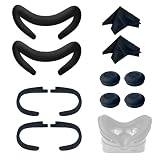
- Ice Silk & High Breathability: Designed specifically for Valve Index VR headset, the ice silk face gasket offers exceptional breathability, keeping your face cool and dry during long gaming sessions
- Machine Washable & Hygienic: The face gasket is machine washable for easy cleaning; together with the included cleaning cloths, you can quickly wipe down the headset and gasket, making shared use more hygienic and worry-free
- 2-Pack Face Gaskets + 4 Thumbstick Covers: Includes 2 replaceable ice silk face gaskets for easy swapping, plus 4 thumbstick covers that protect your Valve Index controllers from wear and tear, enhancing grip and control during intense gameplay
- 2 Cleaning Cloths + 2 Sets of Velcro Straps: The microfiber cleaning cloths safely clean lenses and face gaskets for a clear view; the 2 extra Velcro straps ensure a secure, non-slip fit even after extended use
- Lightweight & Comfortable Design: Thinner and lighter than standard foam padding, reducing pressure on your cheeks and forehead. Comfortable even with glasses, so you can stay fully immersed in VR
Compare the systems on the axes that actually affect use
| Decision axis | Valve Index | Newer headset pattern | What to ask yourself |
|---|---|---|---|
| Display and optics | Older display hardware; broad-field-of-view ergonomics | Higher resolution and newer lenses, often with a larger clear area | Do you read small text or prioritize spatial openness? |
| Motion | High-refresh wired PC signal | Refresh varies; wireless streaming or standalone rendering may be available | Can your PC sustain the mode you want, and do you notice the difference? |
| Tracking | External SteamVR sensors and base stations | Usually camera-based inside-out tracking | Do you want a permanent tracked room or quick setup? |
| Controllers | Hand-mounted controllers with individual finger sensing and grip input | Capacitive controls, improved sensing, or hand tracking depending on model | Do your applications expose detailed hand pose? |
| Connection | Gaming PC and DisplayPort cable | Standalone operation, wireless PC streaming, or both | Will you use the headset away from your desk? |
| Reality features | Conventional PC VR focus | Passthrough, boundary cameras, hand tracking, and sometimes eye tracking | Is mixed reality part of the plan? |
| Audio and fit | Off-ear speakers, adjustable eye relief, and broad-FOV design | Design varies; many use newer optics and integrated speakers | Which fit, glasses, ventilation, and audio compromises can you live with? |
Upgrade paths for different owners
If you already own an Index
Do not assume that replacing the whole ecosystem is the only upgrade. If your base stations and Index Controllers are working well, a Lighthouse-compatible headset can improve the display while preserving the tracking hardware and controller investment. Bigscreen Beyond 2 is a documented example: its official page identifies SteamVR Base Stations and Valve Index Controllers as compatible.
This is an inference from documented compatibility, not a universal recommendation. Compare the new headset’s comfort, display characteristics, controller condition, and total cost against the value of keeping hardware you already own. If your main complaint is unreadable text, a compatible newer headset may solve that without giving up Lighthouse. If your complaint is the cable or the need for base stations, it will not.
If you are buying your first headset
Most first-time buyers should start with a newer model unless they specifically want a wired SteamVR installation, already own a gaming PC, or have a strong reason to build around Lighthouse. The Index’s strengths are real but specialized, while its requirements are structural: a PC, DisplayPort, a cable, and external tracking hardware.
Quick wins for a faster PC:
Repair Windows errors before they cause bigger problemsFix Now →Fix the driver behind crashes, sound loss and screen glitchesFind Drivers →Clear out junk files and repair common Windows errorsFree Scan →Choose the Index first only when you can name the benefit you are buying. Examples include a permanent room-scale setup, a preference for its controllers in supported games, or a need for its high-refresh wired presentation. “It is a proven headset” is not, by itself, a reason to accept its older display and missing standalone features.
If you are invested in Valve’s ecosystem
Steam Frame is a useful current comparison, but it is not a direct Index replacement in tracking design. Its listing describes standalone SteamOS, 2160×2160-per-eye displays, camera tracking, eye tracking, Wi-Fi 7, 72–144Hz operation, and 6DoF controllers with capacitive finger sensing.
That makes Steam Frame a move toward modern convenience and sensors, whereas the Index remains the choice for external Lighthouse tracking and its particular controller system. Decide whether you want to retain the room-scale infrastructure or leave it behind; the answer determines whether the products are upgrades within one ecosystem or a change of approach.
Do you need base stations for the Valve Index?
Yes. A complete Index room-scale setup depends on compatible SteamVR base stations for positional tracking. The requirement is central to the system, not an optional accessory that can be replaced by a menu setting. Base stations need suitable placement and a play space with dependable line of sight, so include mounting, cable management, and eventual replacement in your planning.
What’s actually slowing this PC down?
Pick the symptom - the matching free tool is one click away.
This requirement is worthwhile when you want a dedicated installation with consistent tracking. It is a poor fit when the headset must move frequently, be stored after every session, or work in a room where external hardware cannot be mounted or positioned.
A practical 2026 buying decision
- Choose the Index or keep using it if high-refresh wired PC VR, Lighthouse consistency, Index Controller hand input, off-ear audio, and its physical fit are your priorities.
- Choose a newer standalone or wireless-capable headset if you want travel, quick startup, mixed reality, room scanning, hand tracking, or eye tracking.
- Consider a Lighthouse-compatible newer headset if your display is the problem but your base stations and controllers remain valuable.
- Do not buy on refresh rate alone. Confirm that your PC can sustain the mode and that the applications you use benefit from it.
- Do not buy on resolution alone. Weigh lens clarity, field of view, fit, audio, tracking behavior, and the type of connection you will actually use.
The Index is therefore neither the best universal headset nor an obsolete curiosity. It remains a specialist-friendly PC VR system whose surviving advantages are concentrated in motion, tracking, input, and ergonomics. Newer headsets win the broader convenience and visual-fidelity contest, but they do not erase the reasons a dedicated SteamVR owner may still prefer the Index.
Quick Recap
Product prices and availability are accurate as of the date/time indicated and are subject to change. Any price and availability information displayed on Amazon at the time of purchase will apply.

